Disable a resource hog: no more auto-play of Twitter videos (web settings, works for mobile too)
Posted by jpluimers on 2022/02/14
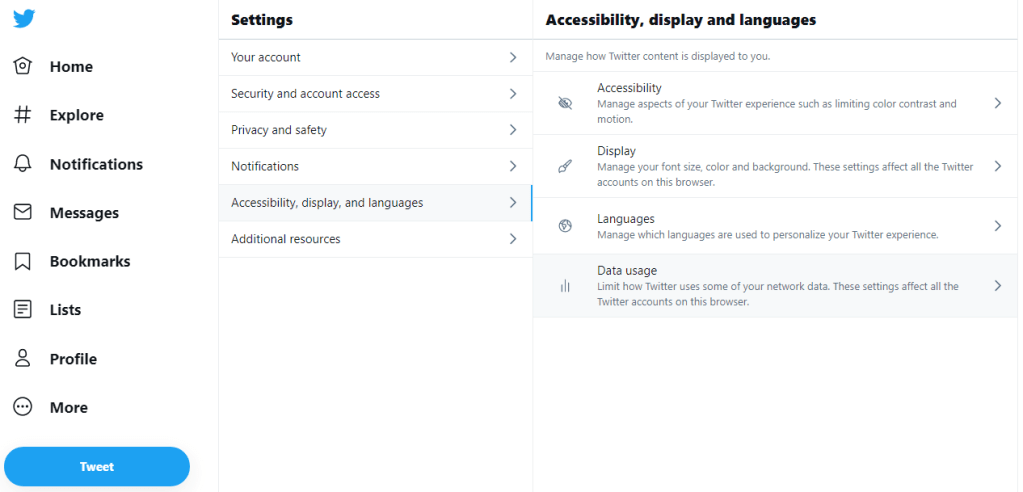
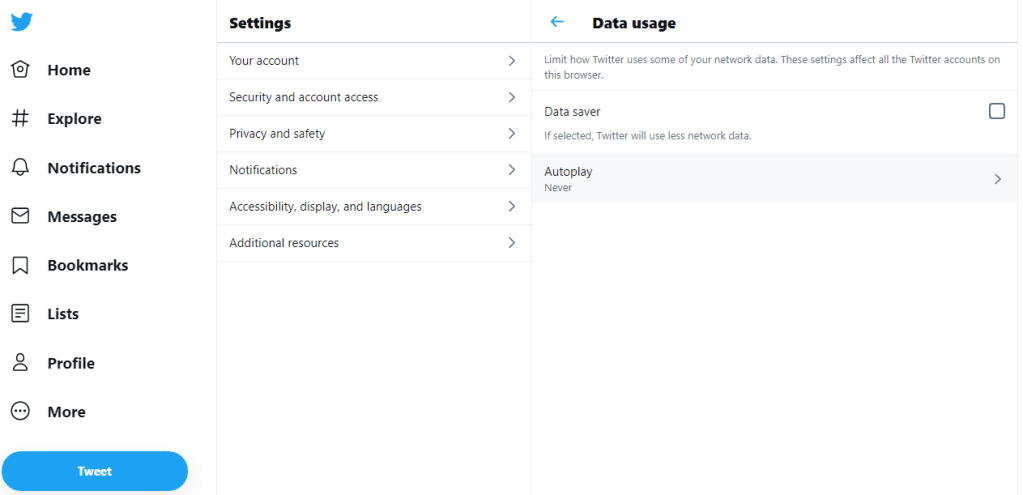
Steps: go directly to twitter.com/settings/autoplay, then ensure “Never” is checked, or
- Click on “More”,
- Click on “Settings and privacy”,
- Click on “Accessibility, display and languages”,
- Click on “Data usage”,
- Click on “Autoplay”,
- Ensure “Never” is checked.
Or in screenshots:




Enjoy!
–jeroen
Rate this:
Share this:
- Share on Mastodon (Opens in new window) Mastodon
- Share on Bluesky (Opens in new window) Bluesky
- Share on Tumblr
- Share on Reddit (Opens in new window) Reddit
- Share on Threads (Opens in new window) Threads
- Tweet
- Share on Telegram (Opens in new window) Telegram
- Share on Nextdoor (Opens in new window) Nextdoor
- Share on WhatsApp (Opens in new window) WhatsApp
- Print (Opens in new window) Print
- Email a link to a friend (Opens in new window) Email
Related
This entry was posted on 2022/02/14 at 06:00 and is filed under LifeHacker, Power User, SocialMedia, Twitter. You can follow any responses to this entry through the RSS 2.0 feed. You can leave a response, or trackback from your own site.
This site uses Akismet to reduce spam. Learn how your comment data is processed.


Leave a comment