The Wiert Corner – irregular stream of stuff

Jeroen W. Pluimers on .NET, C#, Delphi, databases, and personal interests

  • My badges

  • Twitter Updates

  • My Flickr Stream

  • Pages

  • All categories

  • Enter your email address to subscribe to this blog and receive notifications of new posts by email.

    Join 1,861 other subscribers

Archive for the ‘Agile’ Category

Some links on DUnit, JUnit and NUnit XSD specifications of their XML formats (JUnit is actually Ant XML)

Posted by jpluimers on 2019/04/02

For my link archive:

–jeroen

Posted in Agile, Development, Software Development, Unit Testing | Leave a Comment »

Some Delphi unit testing notes

Posted by jpluimers on 2019/03/21

A few notes I wrote down when coaching a team to write better unit tests and test tooling form themselves.

  • unit tests test a unit of code
  • integrating tests test multiple units of code, which can go as far as having external dependencies
  • mocks simulate depencencies
  • unit tests are being executed by a unit test runner
  • you can group tests into test suites, which can contain other suites, and determine order of tests (which can be important for integration tests).
  • unit tests and suites register them to be eligible for running (a test without an encompassing suite presents itself as a suit with one test)
  • the runner optionally has a mechanism to filter the eligible suites and tests down to the ones actually being run

References:

In the particular case for this team, testing was mostly done using DUnit for Delphi.

Here, these are worth mentioning:

  • The configuration is not limited to the GuiTestRunner: any DUnit based test runner can use it (though the default console TextTestRunner skips it, but https://github.com/graemeg/fptest/blob/master/src/TextTestRunner.pas and https://github.com/VSoftTechnologies/DUnit-XML/blob/master/Example/DUnitXMLTest.dpr shows how it can be used).
    • It comes down to either Suite.LoadConfiguration(IniFileName, UseRegistry, True) or RegisteredTests.LoadConfiguration(IniFileName, UseRegistry, True) where
      • IniFileName contains the INI filename, for instance from ExtractFilePath(ParamStr(0)) + 'dunit.ini' or from a ParamStr parameter on the command-line.
      • UseRegistry usually is False
  • If you want to disable all exceptions for easier debugging, but still want to catch failures, then you can enable Break on Failures (see screenshot below) so breaking tests will throw an EBreakingTestFailure.
  • Registration
    • Per test or per suite
    • You do not need a ITestSuite implementing class in order to register a suite (just pass a SuitePath when registering multiple tests)
    • Basically the only reasons for having a ITestSuite implementing class (like descending from TTestSuite) are
      • to have a specific SetUp or TearDown for that suite level
      • to allow \ backslash or / forward slash in test suite names (which is unwise because a lot of tooling sees those as suite hierarchy separators)
    • function TestSuite(AName: string; const Tests: array of ITest): ITestSuite;
    • procedure RegisterTest(SuitePath: string; test: ITest); overload;
    • procedure RegisterTest(test: ITest); overload;
    • procedure RegisterTests(SuitePath: string; const Tests: array of ITest); overload;
    • procedure RegisterTests(const Tests: array of ITest); overload;
    • function RegisteredTests: ITestSuite;
  • Configuration is exclusion based
    • procedure TTestSuite.LoadConfiguration(const iniFile: TCustomIniFile; const section: string);
    • procedure TTestSuite.SaveConfiguration(const iniFile: TCustomIniFile; const section: string);
    • The configuration file default name is DUnit.ini
    • The DUnit.ini file will be saved after the GUI tests are run (overwriting any changes) when the Auto Save Configuration is enabled (which is the default)
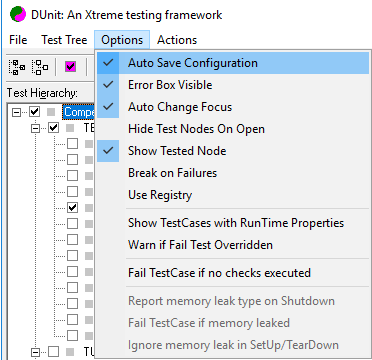
    • All tests are configured in
      • sections
        • named (of course inside [] brackets) as Tests.TestPath, where TestPath either
          • is the name of the test class
          • is a . period separated path of suites ending in an test class
        • values having keys named either
          • the test method with a value 0 to disable the test
          • a test method followed by .RunCount with an integer value indicating how often that test needs to be executed
        • note that with either TestName=1 or TestName.RunCount=1 will disappear from the ini file because those are default values
      • There are no values to indicate tests need to be run (so by default registered tests eligible to be run are being run)
    • An example file (without .RunCount ) is at [WayBack] delphidicontainer/dunit.ini at master · danieleteti/delphidicontainer · GitHub
    • You can add comments to INI files using a semi colon at the start of the line; see [WayBack] Do standard windows .ini files allow comments? – Stack Overflow

Registration and exclusion are two separate concerns.

To configure non-GUI tests, first run the GUI tester, configure it, then copy the resulting DUnit.ini file to the environment where the non-GUI tests are being run.

Be sure to check out test decorators, and maybe amend them with dependency injection. Example for apply database setup/teardown to a full suite of tests: [WayBack] How to organize testing of DB in dUnit — IT daily blog, news, magazine, technologies

Some resurrected documentation links because not all links from [WayBack] DUnit – Xtreme testing for Delphi and [WayBack] DUNIT: An Xtreme testing framework for Delphi programs succeed.

–jeroen

Posted in Agile, Conference Topics, Conferences, Development, Event, Software Development, Unit Testing | Leave a Comment »

Technical Leadership in Software Companies

Posted by jpluimers on 2019/01/01

When leading a tech team, the first thing you should do this year is read [WayBack] Technical Leadership in Software Companies.

It helps you learn about what developers want and how they want to be managed.

Quoting the author:

Software developers have to be managed differently than people in other industries because their work is intellectual in nature. I took the audience through ways in which technical leadership can inspire software developers to achieve the extraordinary.

Via:

Read the rest of this entry »

Posted in Agile, Development, Software Development | Leave a Comment »

programming practices – Unwritten rules of rewriting another team member’s code – Software Engineering Stack Exchange

Posted by jpluimers on 2018/12/31

[WayBackprogramming practices – Unwritten rules of rewriting another team member’s code – Software Engineering Stack Exchange

Especially the second answer has a nice set of follow-up questions to ask yourself when you are thinking about rewriting someone else’s code.

Some thoughts for the upcoming year (:

–jeroen

Posted in Agile, Development, Software Development | Leave a Comment »

A Case Study in Not Being A Jerk in Open Source – Kevlin Henney – Google+

Posted by jpluimers on 2018/09/28

Comments on [WayBack] A Case Study in Not Being A Jerk in Open Source – Kevlin Henney – Google+:

  • Ever notice that a lot of the people that can make big things happen can also be jerks sometimes? Torvalds, Gates, Ellison, Jobs, McNealy, Musk.
  • Jeroen Wiert Pluimers

    +Kevin Powick yup. Maybe we need to learn to live with it.

    At the current client I explained the teams that sometimes I do stupid things, both in code and in communications, and I expect them to tell me about them, just like I am telling them they do stupid things. Of course making compliments both ways work in a similar fashion.

    We Dutch are accustomed to make compliments, so I am trying to break them out of the “Doe maar gewoon, dat is al gek genoeg”, as they already create very good stuff, but both they and I are convinced together we can take that to a next level.

    Last week I did my first “Jeroen’s demo hour” showing stuff that happened in their development cycle over the last two weeks.

    Somewhere in the first third was “look here: you see artifacts of some re-use by copy actions; it can be dangerous, just look at this obscure unnoticed bug. I need to watch myself, because sometimes I do this too”, and in the final 10 minutes while demoing some C# code – which is new to them – “look at this variable: it has the wrong name because I copy-pasted it, so if you review my code, just let me know how had this is”.

Maybe time to include some code review examples in a conference session topic…

Some ideas at The 10 commandments of navigating code reviews | TechBeacon

–jeroen

Read the rest of this entry »

Posted in Agile, Conference Topics, Conferences, Development, Event, LifeHacker, Power User, Software Development | Leave a Comment »

The 10 commandments of navigating code reviews | TechBeacon

Posted by jpluimers on 2018/09/20

[WayBack] The 10 commandments of navigating code reviews | TechBeacon:

How to survive, and thrive, in the sometimes-caustic world of code reviews.

Summary:

  1. Thou shalt not take it personally
  2. Thou shalt not marry thy code
  3. Thou shalt consider all feedback
  4. Thou shalt articulate thy rationale
  5. Thou shalt be willing to compromise
  6. Thou shalt contribute to others’ code reviews
  7. Thou shalt treat submitters how thou would like to be treated
  8. Thou shalt not be intimidated by the number of comments
  9. Thou shalt not repeat the same mistakes
  10. Thou shalt embrace the nits

Via: [WayBack] Kevlin Henney – Google+: The 10 commandments of navigating code reviews

–jeroen

Posted in Agile, Conference Topics, Conferences, Development, Event, Software Development | Leave a Comment »

RaiMan’s SikuliX: Automate what you see on a computer monitor

Posted by jpluimers on 2018/09/05

On my research list:

Automate what you see on a computer monitor

Source: [WayBackRaiMan’s SikuliX

Repositories:

It is an evolution of [WayBackSikuli Script – Home that has an other fork that can be automated with PowerPoint slides:

I should play with it: [WayBackSikuliX – QUICKSTART

Via: [WayBack] Any recommendations of automation tools for GUI testing.We tried AutoIT but it had some problems and way too technical… – Tommi Prami – Google+

–jeroen

Read the rest of this entry »

Posted in Agile, Development, OCR, Power User, Software Development, Tesseract, Testing | Leave a Comment »

How To Make A Good Code Review — Geek&Poke

Posted by jpluimers on 2018/08/23

Source: [WayBackHow To Make A Good Code Review — Geek&Poke

At least we don’t ened to obfuscaste it before shipping.

Rule 1: try to find at least something postive.

–jeroen

via:

Read the rest of this entry »

Posted in Agile, Conference Topics, Conferences, Development, Event, Fun, Software Development | Leave a Comment »

THE OFFICIAL SCRUM HANDBOOK by JEFF SUTHERLAND : SSM : Free Download & Streaming : Internet Archive

Posted by jpluimers on 2018/08/15

The Internet Archive saves more than web sites:

A digital audio recording of the seminal Jeff Sutherland Scrum Handbook – with manual related figures in a distinct pdf Enjoy!

It comes with illustrations and book as PDF files in the downloads.

Source:

–jeroen

Posted in Agile, Development, Scrum, Software Development | 2 Comments »

Not just the Agile Manifesto – there is also one on Craftsmanship

Posted by jpluimers on 2018/08/13

Today it’s 17.5 years ago the gathering leading up to the Agile Manifesto ended.

It’s a great description on the way you want to develop software:

  • Individuals and interactions over processes and tools
  • Working software over comprehensive documentation
  • Customer collaboration over contract negotiation
  • Responding to change over following a plan

I found out that I’ve been trying to that for my whole career – even before I knew about the Agile Manifesto – despite my actual nature being a bit on the autistic side that makes the “human” thing a bit harder for me, but not impossible.

In my day to day work, I try to encourage people to develop in the same way and to also broaden their perspective.

So while writing this, I remembered that doing so (both developing and encouraging) isn’t always easy and requires a lot of craftsmanship. This then reminded me of another manifesto I had seen a while ago, but had forgotten about.

After some digging, I found it back: the “Manifesto for Software Craftsmanship” from 2009 which is subtitled “Raising the bar”

Later I even found back who referred me to it: [WayBack] Great companion to the Agile ManifestoManifesto for Software Craftsmanship – Marjan Venema – Google+

I like it because it defines Craftsmanship as an enhancement of Agile by going a level deeper on all the points of the Agile Manifesto:

  • Not only working software,
    but also well-crafted software
  • Not only responding to change,
    but also steadily adding value
  • Not only individuals and interactions,
    but also a community of professionals
  • Not only customer collaboration,
    but also productive partnerships

–jeroen

References:

Posted in Agile, Development, Software Development | Leave a Comment »