Archive for the ‘MacBook Retina’ Category
Posted by jpluimers on 2017/11/24
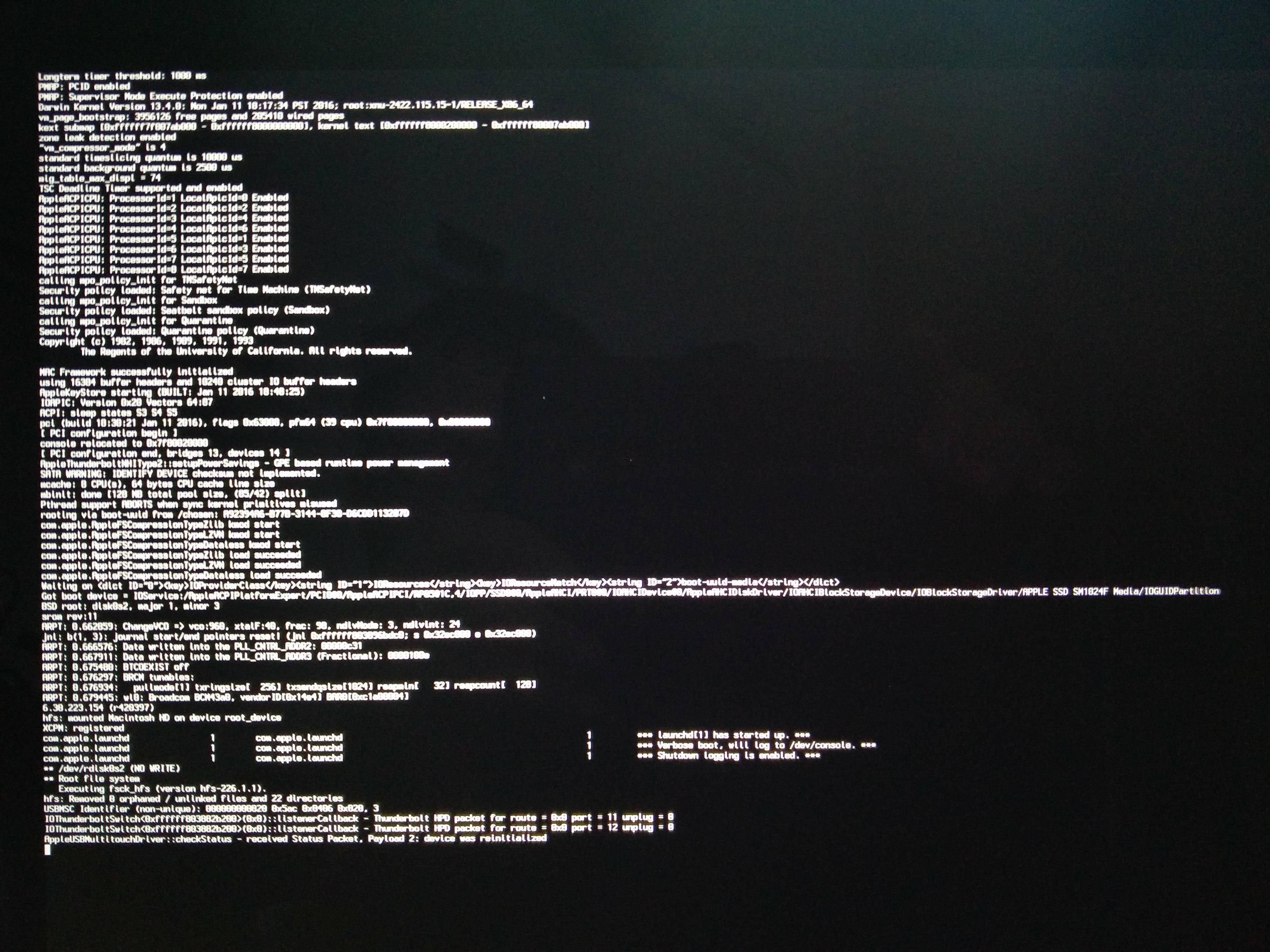
[WayBack] macbook – OS X 10.9.5 hangs with grey spinner; safe mode last message is “payload 2: device was reinitialized” – Ask Different
[WayBack] Recovery partition: “Restore From Time Machine Backup” stuck at 43.6% for more than 60 minutes – Ask Different
Steps since then:
- Restoring an image backup failed: same situation
- (it took an hour to verify the media, then an OK button appeared before continuing to restore in the middle of the night; actual restore took 4+ hours)
- Reinstalling OS X 10.9.5 failed: error -4403F
- Restoring a prior Time Machine backup hung at less than 50% (taking like 6 hours)
- Reinstalling OS X 10.9.5 over a different fiber connection worked
- Mounting the image backup succeeded, but took 3 hours to complete “verifying…”
- Migration Assistent on the image backup worked fine
In total it took 2.5 days to get the machine back in working condition.
Related links:
There was no transparent proxy inbetween the MacBook and Apple so these didn’t help:
What did help was ensuring there was only ONE NAT in between the MacBook and Apple.
–jeroen
Posted in Apple, Mac, Mac OS X / OS X / MacOS, MacBook, MacBook Retina, OS X 10.9 Mavericks, Power User | Leave a Comment »
Posted by jpluimers on 2017/11/17
The first trick works for WinBox 3.7 on Mac [download], the second doesn’t.
First trick:
To override your security settings and open the app anyway:
-
In the Finder, locate the app you want to open.
Don’t use Launchpad to do this. Launchpad doesn’t allow you to access the shortcut menu.
-
Press the Control key and click the app icon, then choose Open from the shortcut menu.
-
Click Open.
The app is saved as an exception to your security settings, and you can open it in the future by double-clicking it just as you can any registered app.
Second trick:
Note: Another way to grant an exception for a blocked app is to click the “Open Anyway” button on the Security pane of System Preferences. This button is available for about an hour after you try to open the app.
To open this pane, choose Apple menu > System Preferences, then click Security & Privacy.
Both from [WayBack] OS X El Capitan: Open an app from an unidentified developer
–jeroen
Posted in Apple, iMac, Mac, Mac OS X / OS X / MacOS, MacBook, MacBook Retina, MacBook-Air, MacBook-Pro, MacMini, OS X 10.11 El Capitan, Power User | Leave a Comment »
Posted by jpluimers on 2017/11/17
I have the Atom editor and was wondering how you can open a file or folder from the terminal in Atom. I am using a Mac. I am looking for a way to do this: atom . (opens folder) atom file.js (
The answer to it isn’t any good any more (since then, Atom has evolved), but this comment works splendid:
I solved the issue by choosing “Install Shell Commands” under the “Atom” menu.
It will add a script in /usr/local/bin/atom that starts Atom with the parameters you entered.
Thanks [WayBack] rxgx!
[WayBack] github – Open Atom editor from command line – Stack Overflow
–jeroen
PS: Reminder to self to add a screenshot.
Posted in Apple, atom editor, Mac, Mac OS X / OS X / MacOS, MacBook, MacBook Retina, MacBook-Air, MacBook-Pro, MacMini, macOS 10.12 Sierra, OS X 10.11 El Capitan, Power User, Text Editors | Leave a Comment »
Posted by jpluimers on 2017/10/27
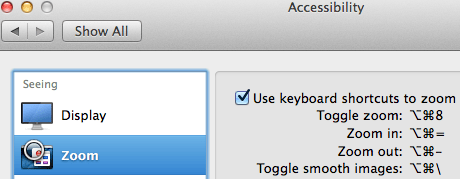
Accessibiity -> Zoom -> enable checkbox” class=”size-medium” /> Preferences -> Accessibiity -> Zoom -> enable checkbox
I didn’t know this was built-in since Mountain Lion and up, but it is, is startable from the keyboard and it’s tremendously convenient when presenting: [WayBack]: OS X Mountain Lion: Zoom content on the screen.
TL;DR:
- System Prefrecences
- Accesibility
- Zoom
- Checkbox
–jeroen
Posted in Apple, iMac, Keyboards and Keyboard Shortcuts, Mac, Mac OS X / OS X / MacOS, MacBook, MacBook Retina, MacBook-Air, MacBook-Pro, MacMini, macOS 10.12 Sierra, OS X 10.10 Yosemite, OS X 10.11 El Capitan, OS X 10.8 Mountain Lion, OS X 10.9 Mavericks, Power User | Leave a Comment »
Posted by jpluimers on 2017/10/13
Just in case you have this driver installed:
$ kextstat -kl | awk '!/com\.apple/{printf "%s %s\n", $6, $7}'

com.bresink.driver.BRESINKx86Monitoring (9.0)
[WayBack] Hardware Monitor Help shows how to remove it:
- Ensure you are logged in as user with administrative rights.
- Use the Finder to open the folder Library at the topmost level of your system volume, and inside it, the folder StartupItems. If the driver is still installed, you will see the folder BRESINKx86Monitoring at this location.
- Drag the folder BRESINKx86Monitoring to the Trash. OS X may ask for your administrator password.
–jeroen
Posted in Apple, Mac, Mac OS X / OS X / MacOS, MacBook, MacBook Retina, MacBook-Air, macOS 10.12 Sierra, OS X 10.10 Yosemite, OS X 10.11 El Capitan, OS X 10.9 Mavericks, Power User | Leave a Comment »
Posted by jpluimers on 2017/08/11
Posted in Apple, iMac, Mac, Mac OS X / OS X / MacOS, Mac OS X 10.5 Leopard, Mac OS X 10.6 Snow Leopard, Mac OS X 10.7 Lion, MacBook, MacBook Retina, MacBook-Air, MacBook-Pro, MacMini, OS X 10.10 Yosemite, OS X 10.11 El Capitan, OS X 10.8 Mountain Lion, OS X 10.9 Mavericks | Leave a Comment »
Posted by jpluimers on 2017/07/19
I’ve not tracked down the cause yet, but these seem to be related:
- The Mac OS X build of Atom IO
- WinBox v 3.4 WineBottle version from Winbox for Mac in an embedded Wine environment – Joshaven.com
- pbcopy / pbpaste that allow command-line copy/pasting
- none of these being able to copy/paste any more and return error level 1 like terminal – pbcopy exits code 1, no error message – Ask Different but not even running tmux or screen which means this solution does not apply: ChrisJohnsen/tmux-MacOSX-pasteboard: Notes and workarounds for accessing the Mac OS X pasteboard in tmux sessions.
- I didn’t have Mouse Keys turned on
- Other applications (Chrome, FireFox, TextEdit, Finder, etc) still being able to copy/paste between each other
I’ve “fixed” 4. by doing this as recommended at osx – Copy and Cut sometimes don’t work – Ask Different:
launchctl list | grep com.apple.pboard
If the pboard daemon is running, then stop and start it. If it’s not running, start it:
launchctl stop com.apple.pboard
launchctl start com.apple.pboard
Now 4. works again if I restart each application, 6. still works, but these applications still cannot copy/paste to 1. 2. and 3.
What does work is a full reboot, but that takes a while (especially Chrome re-loading lots of Windows: I need to get more organised here).
It might be that I need to restart each application in 6.
Grrr…..
–jeroen
Posted in *nix, *nix-tools, Apple, atom editor, Hardware, iMac, Internet, Mac, Mac OS X / OS X / MacOS, MacBook, MacBook Retina, MacBook-Air, MacBook-Pro, MikroTik, Network-and-equipment, OS X 10.10 Yosemite, OS X 10.11 El Capitan, OS X 10.9 Mavericks, Power User, routers, Text Editors, tmux | 4 Comments »
Posted by jpluimers on 2017/07/03
For a Iiyama Монитор PL3070WQ 30″ LCD on a Retina MacBook Pro 15-inch Late 2013:
Display Port – works every time
via: 2560×1600 on Dell U3011 with new MacBook Pro – Ask Different
–jeroen
Read the rest of this entry »
Posted in Apple, Mac, MacBook, MacBook Retina, Power User | 1 Comment »
Posted by jpluimers on 2017/06/12
You can use this package to install OS X on an empty partition, but perhaps more interestingly, you can also use it to upgrade existing OS X installations to a newer version of the OS X. There are many tools and workflows that support the installation of Apple packages; you can use these together with an OS X installation package to upgrade machines to the latest version of OS X.This is especially interesting when used with tools like Munki — you can automate the upgrade of a group of machines while still preserving user data, or offer an upgrade as a “Self-Service”-type option where a user can initiate an OS X upgrade themselves without needing to have administrative rights.
I will probably need this one day.
Source: munki/createOSXinstallPkg: Tools for packaging OS X installers
–jeroen
Posted in Apple, iMac, Mac, Mac OS X / OS X / MacOS, MacBook, MacBook Retina, MacBook-Air, MacBook-Pro, MacMini, OS X 10.10 Yosemite, OS X 10.11 El Capitan, OS X 10.9 Mavericks, Power User | Leave a Comment »
Posted by jpluimers on 2017/06/02
A while ago I had a “fzsftp could not be started” error using FileZilla on Mac OS X.
From the search results, it wasn’t exactly clear what I did wrong, as the “Show Package Contents” context menu showed “…/Contents/MacOS/fzsftp”
Then I remembered I got a bit confused with all the FileZilla updates coming out and renaming it to contain a version number (I do that with many applications so I can keep old versions allowing me to quickly revert to an older version if there are version compatibilities).
Renaming FileZilla.3.16.x.app back to FileZilla.app solved the issue: apparently FileZilla has a hardcoded dependency on exactly that name. I got there because of the hint about spaces in directories from this thread: fzsftp could not be started – FileZilla Forums
This was before Mac OS X El Capitan; with that version you have to set permissions correctly as well: fzsftp could not be started – Kruyswijk-ICT BV
–jeroen
Posted in Apple, Mac, Mac OS X / OS X / MacOS, MacBook, MacBook Retina, MacBook-Air, MacBook-Pro, OS X 10.10 Yosemite, OS X 10.11 El Capitan, OS X 10.8 Mountain Lion, Power User, Security | Leave a Comment »


 [WayBack] The apple story continues…. Jeroen Wiert Pluimers – Google+


 The Wiert Corner - irregular stream of stuff