Archive for the ‘Mac’ Category
Posted by jpluimers on 2017/11/17
The first trick works for WinBox 3.7 on Mac [download], the second doesn’t.
First trick:
To override your security settings and open the app anyway:
-
In the Finder, locate the app you want to open.
Don’t use Launchpad to do this. Launchpad doesn’t allow you to access the shortcut menu.
-
Press the Control key and click the app icon, then choose Open from the shortcut menu.
-
Click Open.
The app is saved as an exception to your security settings, and you can open it in the future by double-clicking it just as you can any registered app.
Second trick:
Note: Another way to grant an exception for a blocked app is to click the “Open Anyway” button on the Security pane of System Preferences. This button is available for about an hour after you try to open the app.
To open this pane, choose Apple menu > System Preferences, then click Security & Privacy.
Both from [WayBack] OS X El Capitan: Open an app from an unidentified developer
–jeroen
Posted in Apple, iMac, Mac, Mac OS X / OS X / MacOS, MacBook, MacBook Retina, MacBook-Air, MacBook-Pro, MacMini, OS X 10.11 El Capitan, Power User | Leave a Comment »
Posted by jpluimers on 2017/11/17
I have the Atom editor and was wondering how you can open a file or folder from the terminal in Atom. I am using a Mac. I am looking for a way to do this: atom . (opens folder) atom file.js (
The answer to it isn’t any good any more (since then, Atom has evolved), but this comment works splendid:
I solved the issue by choosing “Install Shell Commands” under the “Atom” menu.
It will add a script in /usr/local/bin/atom that starts Atom with the parameters you entered.
Thanks [WayBack] rxgx!
[WayBack] github – Open Atom editor from command line – Stack Overflow
–jeroen
PS: Reminder to self to add a screenshot.
Posted in Apple, atom editor, Mac, Mac OS X / OS X / MacOS, MacBook, MacBook Retina, MacBook-Air, MacBook-Pro, MacMini, macOS 10.12 Sierra, OS X 10.11 El Capitan, Power User, Text Editors | Leave a Comment »
Posted by jpluimers on 2017/10/27
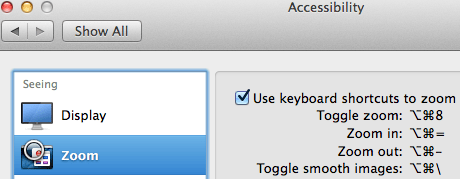
Accessibiity -> Zoom -> enable checkbox” class=”size-medium” /> Preferences -> Accessibiity -> Zoom -> enable checkbox
I didn’t know this was built-in since Mountain Lion and up, but it is, is startable from the keyboard and it’s tremendously convenient when presenting: [WayBack]: OS X Mountain Lion: Zoom content on the screen.
TL;DR:
- System Prefrecences
- Accesibility
- Zoom
- Checkbox
–jeroen
Posted in Apple, iMac, Keyboards and Keyboard Shortcuts, Mac, Mac OS X / OS X / MacOS, MacBook, MacBook Retina, MacBook-Air, MacBook-Pro, MacMini, macOS 10.12 Sierra, OS X 10.10 Yosemite, OS X 10.11 El Capitan, OS X 10.8 Mountain Lion, OS X 10.9 Mavericks, Power User | Leave a Comment »
Posted by jpluimers on 2017/10/16
We thought one of our Macs was compromised, but it wasn’t: it had too many web browsers open so it was crawling like a snake.
The below terminal commands and EtreCheck [Source: etresoft/EtreCheck: Source code for EtreCheck] helped to find out what was running:
kextstat -kl | awk '!/com\.apple/{printf "%s %s\n", $6, $7}'

sudo launchctl list | sed 1d | awk '!/0x|com\.(apple|openssh|vix)|edu\.mit|org\.(amavis|apache|cups|isc|ntp|postfix|x)/{print $3}'

launchctl list | sed 1d | awk '!/0x|com\.apple|edu\.mit|org\.(x|openbsd)/{print $3}'

ls -1A /e*/mach* {,/}L*/{Ad,Compon,Ex,Fram,In,Keyb,La,Mail/Bu,P*P,Priv,Qu,Scripti,Servi,Spo,Sta}* L*/Fonts 2> /dev/null

osascript -e 'tell application "System Events" to get name of every login item' 2> /dev/null
Source: [WayBack] I believe that I have a keylogger or some sort … | Official Apple Support Communities
–jeroen
Posted in Apple, Mac, MacBook, MacBook-Air, Power User | Leave a Comment »
Posted by jpluimers on 2017/10/13
Just in case you have this driver installed:
$ kextstat -kl | awk '!/com\.apple/{printf "%s %s\n", $6, $7}'

com.bresink.driver.BRESINKx86Monitoring (9.0)
[WayBack] Hardware Monitor Help shows how to remove it:
- Ensure you are logged in as user with administrative rights.
- Use the Finder to open the folder Library at the topmost level of your system volume, and inside it, the folder StartupItems. If the driver is still installed, you will see the folder BRESINKx86Monitoring at this location.
- Drag the folder BRESINKx86Monitoring to the Trash. OS X may ask for your administrator password.
–jeroen
Posted in Apple, Mac, Mac OS X / OS X / MacOS, MacBook, MacBook Retina, MacBook-Air, macOS 10.12 Sierra, OS X 10.10 Yosemite, OS X 10.11 El Capitan, OS X 10.9 Mavericks, Power User | Leave a Comment »
Posted by jpluimers on 2017/08/28

CompuLab 4K Display Emulator (fit-Headless 4K)
The MacMini is a bit dumb as it won’t enable the GPU when there is no display attached. Which means headless operation is cumbersome as display rendering is very slow.
There are a few tricks of which the off-the-shelve HDMI solutions work best.
You can buy them at Amazon:

CompuLab Display Emulator (fit-Headless)
Sources:
Basically the trick to simulate a monitor with a dummy load works for other display connectors as well (most of them work fine with 75 ohm resistors, usually a bit lower or higher works just as well):
Read the rest of this entry »
Posted in Apple, Mac, Mac OS X / OS X / MacOS, MacMini, OS X 10.10 Yosemite, OS X 10.11 El Capitan, OS X 10.9 Mavericks, Power User | Leave a Comment »
Posted by jpluimers on 2017/08/11
Posted in Apple, iMac, Mac, Mac OS X / OS X / MacOS, Mac OS X 10.5 Leopard, Mac OS X 10.6 Snow Leopard, Mac OS X 10.7 Lion, MacBook, MacBook Retina, MacBook-Air, MacBook-Pro, MacMini, OS X 10.10 Yosemite, OS X 10.11 El Capitan, OS X 10.8 Mountain Lion, OS X 10.9 Mavericks | Leave a Comment »
Posted by jpluimers on 2017/08/07
I had the same issue as in sleep wake – Macbook Air – battery drains while sleeping (but not when shut down) – Ask Different which suddenly introduced itself in April 2016 after I had been running El Capitan (OS X 10.11) for a while.
The Mac didn’t have PowerNap active as I verified using How Power Nap works on your Mac – Apple Support
At first it looked like an SMC reset worked as explained by Reset the System Management Controller (SMC) on your Mac – Apple Support and mentioned in Mac Air loses 90% of battery overnight when in … | Apple Support Communities.
The Mac is indeed running Chrome, but I don’t like to turn that off before sleeping.
Executing pmset -g would show hibernatemode 3.
So I opted for the hibernate option as mentioned in the first link:
sudo pmset -a hibernatemode 25
This will take a bit longer to restore the memory from hibernate state, but saves a lot of frustration.
–jeroen
Posted in Apple, Mac, MacBook, MacBook-Air, Power User | Leave a Comment »
Posted by jpluimers on 2017/07/19
I’ve not tracked down the cause yet, but these seem to be related:
- The Mac OS X build of Atom IO
- WinBox v 3.4 WineBottle version from Winbox for Mac in an embedded Wine environment – Joshaven.com
- pbcopy / pbpaste that allow command-line copy/pasting
- none of these being able to copy/paste any more and return error level 1 like terminal – pbcopy exits code 1, no error message – Ask Different but not even running tmux or screen which means this solution does not apply: ChrisJohnsen/tmux-MacOSX-pasteboard: Notes and workarounds for accessing the Mac OS X pasteboard in tmux sessions.
- I didn’t have Mouse Keys turned on
- Other applications (Chrome, FireFox, TextEdit, Finder, etc) still being able to copy/paste between each other
I’ve “fixed” 4. by doing this as recommended at osx – Copy and Cut sometimes don’t work – Ask Different:
launchctl list | grep com.apple.pboard
If the pboard daemon is running, then stop and start it. If it’s not running, start it:
launchctl stop com.apple.pboard
launchctl start com.apple.pboard
Now 4. works again if I restart each application, 6. still works, but these applications still cannot copy/paste to 1. 2. and 3.
What does work is a full reboot, but that takes a while (especially Chrome re-loading lots of Windows: I need to get more organised here).
It might be that I need to restart each application in 6.
Grrr…..
–jeroen
Posted in *nix, *nix-tools, Apple, atom editor, Hardware, iMac, Internet, Mac, Mac OS X / OS X / MacOS, MacBook, MacBook Retina, MacBook-Air, MacBook-Pro, MikroTik, Network-and-equipment, OS X 10.10 Yosemite, OS X 10.11 El Capitan, OS X 10.9 Mavericks, Power User, routers, Text Editors, tmux | 4 Comments »
Posted by jpluimers on 2017/07/03
For a Iiyama Монитор PL3070WQ 30″ LCD on a Retina MacBook Pro 15-inch Late 2013:
Display Port – works every time
via: 2560×1600 on Dell U3011 with new MacBook Pro – Ask Different
–jeroen
Read the rest of this entry »
Posted in Apple, Mac, MacBook, MacBook Retina, Power User | 1 Comment »


 The Wiert Corner - irregular stream of stuff