


HotSwap! – hot eject and hot insert SATA hard-drives – practical use with ICY BOX 266StUSD
Posted by jpluimers on 2009/08/30
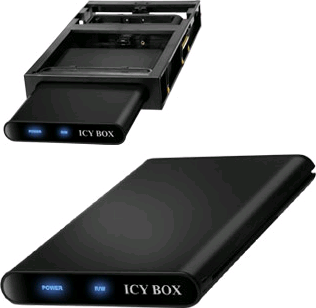 Over the last couple of years, I have upgraded a few SATA laptop hard-disk drives to larger ones.
The easiest way to reuse these drives, is to put them into an external USB enclosure.
But: USB does not deliver the speed of SATA.
So, a few years ago, I found the ICY BOX IB-266StUSD-B from RaidSonic – the picture at the top.
This box contains both the actual enclosure part IB-266StUS-B (note the missing D from the part number) – the picture on the bottom, and a docking station that fits in a regular 3.5″ external bay (now normally used for multi-card readers, in the past used for floppy drives or ZIP drives).
The cool thing is that the enclosure has both an USB and an eSATA connection:

Even cooler is that the docking station also has a SATA connection. Which means that as soon as you insert the HDD, you have full SATA speed.
Now the not so cool thing is that Windows does not allow you to hot eject or hot insert a SATA drive.
Or does it?
In fact it does allow inserts, and even ejects, but with a lot of fiddling with Device Manager, and only if your SATA driver allows it from within the Device Manager.
This is where HotSwap! kicks in…
It is a really nice tool that looks like “Safely Remove Hardware” icon, but with a red arrow in stead of a green one.
Here are some pictures to show you the possibilities:
- Left clicking on the icon allows you to select your SATA/eSATA drive that you want to remove safely.
- Right cliking on the icon allows you to rescan your hardware, which will detect new SATA drives after you have connected them.


In practice I do all my software development using virtual machines (mostly VMware).
Now since SATA is faster than my LAN (which is partially 100 megabit and partially gigabit ethernet), it allows me to prepare a VM one one physical computer, then transfer it very rapidly to another one.
So HotSwap! saves me a lot of time!
–jeroen

 The Wiert Corner - irregular stream of stuff
Formatting drives with FAT32 – works well with: HotSwap! – hot eject and hot insert SATA hard-drives – practical use with ICY BOX 266StUSD « The Wiert Corner – Jeroen Pluimers’ irregular stream of Wiert stuff « The Wiert Corner – said
[…] of unknown structure: use classes with published properties and the Delphi streaming mechanismHotSwap! – hot eject and hot insert SATA hard-drives – practical use with ICY BOX 266StUSDDelphi – indexed […]