


A while ago, I observed that when compiling, my Delphi IDE would not take into account unsaved changes any more.
This ws in a time when I was tracking down some hard to reproduce problems of code that sometimes would and sometimes would not compile at all.
The solution was this:
[HKEY_CURRENT_USER\Software\Embarcadero\BDS\18.0\Compiling]
"BackgroundCompilation"="False"
Somehow, the Delphi IDE had turned this flag to True without me telling it did, nor me changing an option (heck if you do a “Delphi” “BackgroundCompilation” – Google Search you hardly get any meaningful results).
Luckily, I did remember what happened around the bahaviour change: the compiler had encountered a strange error, and the IDE had become unstable.
With an unstable IDE, I did have seen damage in saved source files in the past, so I always use version control with Delphi as that allows easier to spot file differences.
What I did not anticipate was that it could corrupting my persisted IDE settings, though every now and then.
Detecting early signs of the IDE becoming unstable
- any internal compiler error (AV or not)
- refactoring not succeeding while it should
- insert mode suddenly becomes override or vice versa
- editor block selection is suddenly turned on
- any access violation or pointer error exception
Sometimes (but not always) these can be early signs too
- debugger blue dots not matching compiled code lines
- the debugger not being able to debug code despite blue dots being there
- properties in the object inspector having changed without manual action
Be prepared for an unstable IDE
- Save your work often
- At the earliest sign of an unstable IDE: kill (do not save work!) the affected bds.32 process using Process Explorer
BackgroundCompilation
A “Delphi” “BackgroundCompilation” – Google Search did not get much relevant results. Below are the most relevant ones I could find from it:
- [WayBack] kinode/delphi5_cu_nmd_09.reg at master · tm1/kinode · GitHub
- [WayBack] bcc32pch – commandline compiler replace for buildin compiler
- “Delphi\5.0” “BackgroundCompilation” – Google Search
- “Delphi\7.0” “BackgroundCompilation” – Google Search and “Delphi\6.0” “BackgroundCompilation” – Google Search
- [WayBack] Iterating IOTAEnvironmentOptions – Chee Wee’s blog: IT solutions for Singapore and companies worldwide
Too bad Google does not index the WayBack machine, as I think it contains relevant material that is now hard to find.
So it looks like the feature was introduced somewhere close to Delphi 5:
[HKEY_CURRENT_USER\Software\Borland\Delphi\5.0\Compiling]
"Show Compiler Progress"="True"
"Warn on Package Rebuild"="-1"
"Compile Beep"="0"
"Cache Headers"="0"
"BackgroundCompilation"="0"
“Delphi” “Background Compilation” – Google Search shows much more information, based on what it returned I found that the first actual documentation was for Background Compilation in Delphi 2010, some 10 years after it became available:
- [WayBack] Background Compilation in Delphi 2010 and C++Builder 2010 | Andreano Lanusse | Technology and Software Development
- [WayBack] Compiling, Building, and Running Applications Index – RAD Studio (RAD Studio 2010):
- [WayBack] Background Compilation – RAD Studio (RAD Studio 2010)
- [WayBack] Compiling, Building, and Running Applications (RAD Studio 2009): no mentioning of Background
- [WayBack] Compiling, Building, and Running Applications (RAD Studio 2007): no mentioning of Background
The image in the blog post of former product manager Andreano Lanusse shows why I did not see the behaviour: when background compiling is active, the progress dialog is transparent (and non-modal). I did not have the compiler progress enabled, so never saw that dialog change behaviour.

–jeroen






 If you use xs4all VoIP from any Fritz!Box device, then keep the “Telephone Number Format” for “Country code” on “No”, and “Area code” to “None”:






 The Wiert Corner - irregular stream of stuff
Yep, I can see this problem as well. I believe the problem (bug) has indeed always existed.

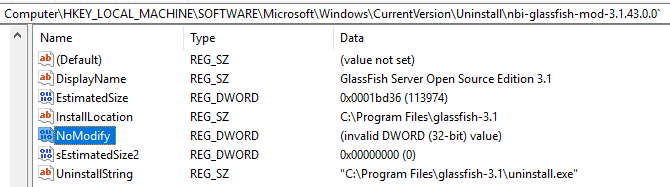
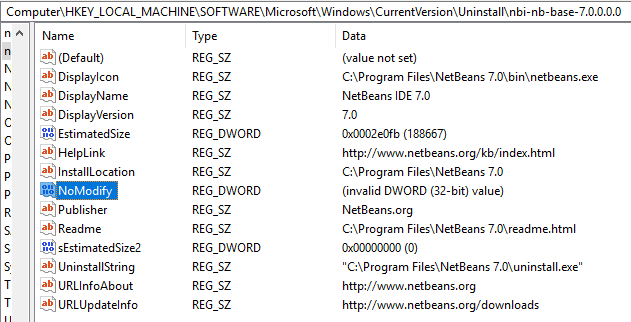
What happens is that someone (in this case NetBeans Installer) has put an 8-byte value into a Registry field that should only contain a 4-byte value. DWORDs are 4-byte.

If you use Registry Editor you can clearly see the problem if you look at something NBI has installed. You must look under either
HKEY_LOCAL_MACHINE\SOFTWARE\Microsoft\Windows\CurrentVersion\Uninstall (64-bit installers) or HKEY_LOCAL_MACHINE\SOFTWARE\Wow6432Node\Microsoft\Windows\CurrentVersion\Uninstall (32-bit installers). For some reason I don't see the problem for those NBI applications installed with a 32-bit installer, meaning the stuff in HKEY_LOCAL_MACHINE\SOFTWARE\Wow6432Node\Microsoft\Windows\CurrentVersion\Uninstall. This can probably be explained when you read the next bit.

NBI actually sets a number of Registry key values but all of them are strings, with the exception of NoModify value. As far as I know this value already defaults to true (=1) if not present so the fact that Windows cannot interpret what NBI has put into the Registry does not have much effect .... until all other kinds of tools will start to explain as you've encountered.

So, what's the problem?  As far as I can see this is really just a very simple bug. In the NBI project (NetBeans Platform source) you have a file called jni_WindowsRegistry.c which defines various JNI methods that can then be used from within Java. One of these is called 'set32BitValue0(....)'.

It looks like this:

JNIEXPORT void JNICALL Java_org_netbeans_installer_utils_system_windows_WindowsRegistry_set32BitValue0(JNIEnv *jEnv, jobject jObject, jint jMode, jint jSection, jstring jKey, jstring jName, jint jValue) {
    unsigned short*  key       = getWideChars(jEnv, jKey);
    unsigned short*  name      = getWideChars(jEnv, jName);
    DWORD  dword     = (DWORD) jValue;
    LPBYTE byteValue = (LPBYTE) &dword;

    if (!setValue(getMode(jMode),getHKEY(jSection), key, name, REG_DWORD, byteValue, sizeof(name), 0)) {
        throwException(jEnv, "Cannot set value");
    }

    FREE(key);
    FREE(name);
}

One of the parameters passed to the setValue() function is the size (bytes) of the value. Unfortunately whoever made this has made a blunder by using 'sizeof(name)' for that parameter. It should have been the size of the value, not the size of the name, meaning sizeof(dword) or just a hard-coded value of 4.  Just imagine what sizeof(name) will give you if name happens to be 'NoModify'. Yep, that's right: It will be 8.

As I said, I believe this blunder has been in the code from the very beginning. It just hasn't had much effect until now.