The Wiert Corner – irregular stream of stuff

Jeroen W. Pluimers on .NET, C#, Delphi, databases, and personal interests

  • My badges

  • Twitter Updates

  • My Flickr Stream

  • Pages

  • All categories

  • Enter your email address to subscribe to this blog and receive notifications of new posts by email.

    Join 1,860 other subscribers

Archive for the ‘Delphi 10.2 Tokyo (Godzilla)’ Category

System.TypInfo.SizeOfSet – RAD Studio API Documentation

Posted by jpluimers on 2021/08/11

This seems to have been introduced into Delphi Berlin: [WayBack] System.TypInfo.SizeOfSet – RAD Studio API Documentation. Maybe slightly earlier, but at least it was not documented in XE8 [WayBack] (via [WayBack] Delphi “SizeOfSet”.).

This is a useful function, for instance to get the Cardinality of a set in [WayBack] delphi – How can I get the number of elements of any variable of type set? – Stack Overflow.

From what I can see, the undocumented TLargestSet type also got introduced in Delphi Berlin.

Few hits by Google on [WayBack] Delphi “TLargestSet”, including [WayBack] Free Automated Malware Analysis Service – powered by Falcon Sandbox – Viewing online file analysis results for ‘Coperativa.exe’.

Not much more is documented than this in Tokyo [WayBack]:

System.TypInfo.SizeOfSet

Delphi

function SizeOfSet(TypeInfo: PTypeInfo): Integer;

C++

extern DELPHI_PACKAGE int __fastcall SizeOfSet(PTypeInfo TypeInfo);

Properties

Type Visibility Source Unit Parent
function public
System.TypInfo.pas
System.TypInfo.hpp
System.TypInfo System.TypInfo

Description

Embarcadero Technologies does not currently have any additional information. Please help us document this topic by using the Discussion page!

–jeroen

Posted in Delphi, Delphi 10.1 Berlin (BigBen), Delphi 10.2 Tokyo (Godzilla), Delphi 10.3 Rio (Carnival), Delphi XE8, Development, Software Development | Leave a Comment »

Delphi Tokyo binary BPLs not finding “@System@Net@Httpclient@Win@TCertificateStore@$bcctr$qqrv” means you likely have Delphi 10.2.2 installed

Posted by jpluimers on 2021/07/13

If you get errors loading BPLs that indicate this method cannot be found: “@System@Net@Httpclient@Win@TCertificateStore@$bcctr$qqrv” then it is likely you run Delphi 10.2.2.

Upgrade to Delphi 10.2.3 to resolve this problem.

This happens for instance with binary versions of these below libraries.

They cannot help, as Embarcadero removed the TCertificateStore class (present in Delphi 10.1.2) in 10.2.0, then re-added it in 10.2.3.


Libraries that I bumped into that were affected:

Note that some reports talk about “@System@Net@Httpclient@Win@TCertificateStore@$bcdtr$qqrv” in stead of “@System@Net@Httpclient@Win@TCertificateStore@$bcctr$qqrv“. I am not sure what causes this discrepancy yet.

–jeroen

Posted in Delphi, Delphi 10.2 Tokyo (Godzilla), Development, Software Development | Leave a Comment »

E2213 Bad packaged unit format: ..\xxxxx.dcp.yyyy – Expected version: 32.0, Windows Unicode(x86) Found version: 105.101, Unk(CIL)

Posted by jpluimers on 2021/07/08

On my research list I have seen this happen with various libraries, but only libraries that deliver a single set of .bpl/.dcp files that you require for both debug and release builds.

The error occurs both ways:

  • building a “debug” build is fine, but after it a “release” build fails
  • building a “release” build is fine, but after it a “debug” build fails

This is with all separate DCU output directories for any permutation in any project: .\$(Platform)\$(Config)\$(SanitizedProjectName)

Example (where xxxx.pas is the first unit depending on Qrctrls, but I have seen it with other libraries that provide .bpl/.dcp combinations as well):

[dcc32 Fatal Error] xxxx.pas(14): E2213 Bad packaged unit format: ..\3rdParty\Quickrep506\19.0\Lib\Win32\Release\QR506RunDXE10_2.dcp.Qrctrls - Expected version: 32.0, Windows Unicode(x86) Found version: 105.101, Unk(CIL)

My best guess is that something is being cached in between builds, but not marked for the correct build configuration well enough.

–jeroen

Posted in Delphi, Delphi 10.2 Tokyo (Godzilla), Development, Software Development | Leave a Comment »

Figure out access violation in Dsmtoolwindow.GetPreferences

Posted by jpluimers on 2021/05/26

Access violation when loading the Delphi IDE

Got the below error on Delphi 10.2 Tokyo with ODAC trial from DevArt at Delphi startup time (Error: Access violation at address 188F3528 in module 'DataSetManager250.bpl'. Read of address 00000000.).

My guess it is some configuration prerequisite which – when not existing – is handled very ungracefully.

This might have to do with my installation being a non-administrator Delphi user, but the ODAC installation requiring UAC elevation to administrative level.

In short this means the installing user is different from the user that runs Delphi.

Related (indicating it was fixed years ago, but apparently isn’t) via dsmtoolwindow.getpreferences – Google Search:

Workaround is to unregister the DataSetManager250.bpl package, though I have to figure out what functionality that disables.

[188F3528]{DataSetManager250.bpl} Dsmtoolwindow.GetPreferences + $18
[23CA524D]{Jcl240.bpl  } Jclhookexcept. + $0
[50060B13]{rtl250.bpl  } System.@HandleAnyException (Line 19991, "System.pas" + 13) + $0
[211B3A05]{designide250.bpl} DockForm.TDockableForm.FormCreate (Line 258, "DockForm.pas" + 11) + $1B
[188F2DEA]{DataSetManager250.bpl} Dsmtoolwindow.TDsmToolWindow.FormCreate + $4E
[50C06BC1]{vcl250.bpl  } Vcl.Forms.TCustomForm.DoCreate (Line 3788, "Vcl.Forms.pas" + 3) + $C
[50C067DD]{vcl250.bpl  } Vcl.Forms.TCustomForm.AfterConstruction (Line 3671, "Vcl.Forms.pas" + 1) + $D
[50060039]{rtl250.bpl  } System.@AfterConstruction (Line 18301, "System.pas" + 2) + $5
[188EBE9B]{DataSetManager250.bpl} Dsmtoolwindow.TDsmToolWindow + $43B
[188EA93D]{DataSetManager250.bpl} Dsmtoolwindow.TDsmToolWindow.CreateForm + $19
[188F7C81]{DataSetManager250.bpl} Dsmexpert.initialization + $31
[50061276]{rtl250.bpl  } System.InitUnits (Line 22833, "System.pas" + 21) + $0
[500612E6]{rtl250.bpl  } System.@PackageLoad (Line 22861, "System.pas" + 8) + $0
[188A1A09]{DataSetManager250.bpl} __dbk_fcall_wrapper + $195
[188F6DA1]{DataSetManager250.bpl} Initialize + $5
[500A0377]{rtl250.bpl  } System.SysUtils.InitializePackage (Line 25779, "System.SysUtils.pas" + 4) + $0
[500A04D1]{rtl250.bpl  } System.SysUtils.LoadPackage (Line 25830, "System.SysUtils.pas" + 18) + $5
[21E1AFAF]{delphicoreide250.bpl} PasCppPakMgr.TIDEDesignPackage.ClearModules (Line 2189, "PasCppPakMgr.pas" + 14) + $10
[204E9A94]{coreide250.bpl} PakLoad.TPackage.DoLoadPackage (Line 146, "PakLoad.pas" + 0) + $8
[204E9C09]{coreide250.bpl} PakLoad.TPackage.Load (Line 220, "PakLoad.pas" + 7) + $7
[204EC425]{coreide250.bpl} PakMgr.TDesignPackage.Load (Line 591, "PakMgr.pas" + 2) + $2
[21E1B2CB]{delphicoreide250.bpl} PasCppPakMgr.TIDEDesignPackage.Load (Line 2292, "PasCppPakMgr.pas" + 4) + $3
[50060039]{rtl250.bpl  } System.@AfterConstruction (Line 18301, "System.pas" + 2) + $5
[21E1B0DF]{delphicoreide250.bpl} PasCppPakMgr.TIDEDesignPackage.DelayLoad (Line 2217, "PasCppPakMgr.pas" + 11) + $4
[21E1572A]{delphicoreide250.bpl} PasCppPakMgr.LoadDesignPackage (Line 463, "PasCppPakMgr.pas" + 10) + $5
[0B6A0F84]{IDEFixPack.dll} SplashProgress2005p.HookedLoadDesignPackage (Line 277, "SplashProgress2005p.pas" + 3) + $3
[21E15A33]{delphicoreide250.bpl} PasCppPakMgr.LoadProjectPackages (Line 534, "PasCppPakMgr.pas" + 52) + $11
[21F20DBF]{delphicoreide250.bpl} BasePasProjOpts.TProjOptsManager.DoLoadPackages (Line 1604, "BasePasProjOpts.pas" + 22) + $6
[21F21BB4]{delphicoreide250.bpl} BasePasProjOpts.TProjOptsManager.LoadPackages (Line 1839, "BasePasProjOpts.pas" + 0) + $0
[21F22BD5]{delphicoreide250.bpl} BasePasProjOpts.TProjectOptions.LoadPackages (Line 2419, "BasePasProjOpts.pas" + 0) + $5
[22585BF3]{delphide250.bpl} DelphiProject.TDelphiProjectCreationTrait.LoadDefaultLibraries (Line 256, "DelphiProject.pas" + 1) + $1F
[2058A109]{coreide250.bpl} ProjectGroup.TDefaultProjectWrapper.LoadDefaultLibraries (Line 3544, "ProjectGroup.pas" + 5) + $31
[206DB2B9]{coreide250.bpl} Desktop.LoadDefaultDesktopState (Line 966, "Desktop.pas" + 3) + $9
[206DC0D5]{coreide250.bpl} Desktop.LoadDesktop (Line 1223, "Desktop.pas" + 73) + $0
[0049FBA8]{bds.exe     } AppMain.PostCreateInit (Line 2154, "AppMain.pas" + 57) + $0
[004A00B6]{bds.exe     } AppMain.TAppBuilder.CMPostCreateInit (Line 2257, "AppMain.pas" + 4) + $1
[50AC4C16]{vcl250.bpl  } Vcl.Controls.TControl.WndProc (Line 7326, "Vcl.Controls.pas" + 91) + $6
[50C110C3]{vcl250.bpl  } Vcl.Forms.TApplication.WndProc (Line 10270, "Vcl.Forms.pas" + 194) + $1
[50AC97FB]{vcl250.bpl  } Vcl.Controls.TWinControl.WndProc (Line 10197, "Vcl.Controls.pas" + 166) + $6
[50C080B5]{vcl250.bpl  } Vcl.Forms.TCustomForm.WndProc (Line 4546, "Vcl.Forms.pas" + 209) + $5
[50AC8DC8]{vcl250.bpl  } Vcl.Controls.TWinControl.MainWndProc (Line 9896, "Vcl.Controls.pas" + 3) + $6
[5016EBC4]{rtl250.bpl  } System.Classes.StdWndProc (Line 17406, "System.Classes.pas" + 9) + $2
[50C11A6F]{vcl250.bpl  } Vcl.Forms.TApplication.ProcessMessage (Line 10613, "Vcl.Forms.pas" + 23) + $1
[50C11AB2]{vcl250.bpl  } Vcl.Forms.TApplication.HandleMessage (Line 10643, "Vcl.Forms.pas" + 1) + $4
[50C11DE5]{vcl250.bpl  } Vcl.Forms.TApplication.Run (Line 10781, "Vcl.Forms.pas" + 26) + $3
[005088E2]{bds.exe     } bds.bds (Line 212, "" + 7) + $7

Solved the access violation

Notes:

  • %APPDATA% points to %USERPROFILE%\AppData\Roaming (where usually %USERPROFILE% is on the %HOMEDRIVE%)

Fix script (the double backslash \\ is needed, otherwise the final double quote " becomes part of the path name):

setlocal
:: 19.0 is the version for Delphi 10.2 Tokyo 
set ProductVersion=19.0
reg add "HKEY_CURRENT_USER\Software\Devart\DataSetManager\BDS\%ProductVersion%" /v "ConfigFilePath" /f /t REG_SZ /d "%APPDATA%\Embarcadero\BDS\%ProductVersion%\\"
endlocal

This allows for an XML file named DataSetManager.cfg to be created in the ConfigFilePath directory.

Even though Process Monitor will show access to the below keys, there is no need to add any values there:

  • KEY_CURRENT_USER\Software\Devart\DBMonitor
  • KEY_CURRENT_USER\SOFTWARE\Devart\ODAC
  • HKLM\Software\WOW6432Node\Devart\ODAC
  • HKLM\Software\WOW6432Node\Devart\Odac

Deploy enough BPLs

Another thing when running ODAC trial and licensed applications

---------------------------
ODAC
---------------------------
%1 is not a valid Win32 application
ODAC Trial version needs additional "bpl" files to be present on the user PC.
If you build your project without run-time packages you need:
  dac250.bpl
  odac250.bpl
---------------------------
OK   
---------------------------

This message is incomplete; what it should say is that any BPL dependencies must be deployed. One way to find out about those is to use I wanted to know the loaded DLLs in a process like Process Explorer shows, but from the console: Sysinternals ListDLLs to the rescue.

Another way is to use TDUMP (see [WayBack] TDUMP.EXE, the File Dumping Utility) and search for the import tables. I did just that for the 10.2 trial; below is the full list.

There is way better documentation at Devart ODAC Deployment: Deploying Windows applications built without run-time packages which fails to properly archive in the WayBack machine (it gets into a redirect loop) so I quote it in full:

Deploying Windows applications built without run-time packages

You do not need to deploy any files with ODAC-based applications built without run-time packages, provided you are using a registered version of ODAC.

You can check your application does not require run-time packages by making sure the “Build with runtime packages” check box is not selected in the Project Options dialog box.

Trial Limitation Warning

If you are evaluating deploying Windows applications with ODAC Trial Edition, you will need to deploy the following DAC BPL files:

dacXX.bpl always
odacXX.bpl always

and their dependencies (required IDE BPL files) with your application, even if it is built without run-time packages:

rtlXX.bpl always
dbrtlXX.bpl always
vcldbXXX.bpl always

Deploying Windows applications built with run-time packages

You can set your application to be built with run-time packages by selecting the “Build with runtime packages” check box in the Project Options dialog box before compiling your application.

In this case, you will also need to deploy the following BPL files with your Windows application:

dacXX.bpl always
odacXX.bpl always
dacvclXX.bpl if your application uses the OdacVcl unit
odacvclXX.bpl if your application uses the OdacVcl unit
crcontrolsXX.bpl if your application uses the CRDBGrid component

From those posts and the below full list, you also need to deploy the bold dependencies:

  • dac250.bpl
    • rtl250.bpl
    • dbrtl250.bpl
  • odac250.bpl
    • rtl250.bpl
    • dbrtl250.bpl
    • dac250.bpl

Enabling your projects to use ODAC packages

To get around errors like "E2202 Required package 'odac' not found", you need to ensure the correct .dcp files for ODAC are referenced.

Unlike Delphi, the ODAC .dcp files contain a version number, so in your required packages list, ensure you add them not like rtl;dbrtl, but like dac250;odac250.

List of various ODAC BPL dependencies

dac250.bpl
Imports from kernel32.dll
Imports from rtl250.bpl
Imports from wsock32.dll
Imports from dbrtl250.bpl
Imports from ole32.dll
Imports from user32.dll

dacfmx250.bpl
Imports from kernel32.dll
Imports from rtl250.bpl
Imports from dbrtl250.bpl
Imports from user32.dll
Imports from fmx250.bpl
Imports from dac250.bpl

dacvcl250.bpl
Imports from kernel32.dll
Imports from rtl250.bpl
Imports from dbrtl250.bpl
Imports from user32.dll
Imports from dac250.bpl
Imports from vcl250.bpl

dcldac250.bpl
Imports from vclactnband250.bpl
Imports from wininet.dll
Imports from shell32.dll
Imports from user32.dll
Imports from version.dll
Imports from oleaut32.dll
Imports from dac250.bpl
Imports from dacvcl250.bpl
Imports from vcldb250.bpl
Imports from dcldb250.bpl
Imports from xmlrtl250.bpl
Imports from kernel32.dll
Imports from rtl250.bpl
Imports from designide250.bpl
Imports from ole32.dll
Imports from dbrtl250.bpl
Imports from gdi32.dll
Imports from vcl250.bpl

odac250.bpl
Imports from kernel32.dll
Imports from rtl250.bpl
Imports from dbrtl250.bpl
Imports from version.dll
Imports from user32.dll
Imports from dac250.bpl
Imports from advapi32.dll

odacvcl250.bpl
Imports from kernel32.dll
Imports from odac250.bpl
Imports from rtl250.bpl
Imports from dbrtl250.bpl
Imports from dac250.bpl
Imports from dacvcl250.bpl
Imports from vcl250.bpl

dclodac250.bpl
Imports from vclactnband250.bpl
Imports from odac250.bpl
Imports from dcldac250.bpl
Imports from odacvcl250.bpl
Imports from shell32.dll
Imports from user32.dll
Imports from dac250.bpl
Imports from dcldb250.bpl
Imports from vcldb250.bpl
Imports from dacvcl250.bpl
Imports from vclimg250.bpl
Imports from kernel32.dll
Imports from xmlrtl250.bpl
Imports from rtl250.bpl
Imports from designide250.bpl
Imports from dbrtl250.bpl
Imports from vcl250.bpl

odacfmx250.bpl
Imports from kernel32.dll
Imports from odac250.bpl
Imports from rtl250.bpl
Imports from dacfmx250.bpl
Imports from dbrtl250.bpl
Imports from fmx250.bpl
Imports from dac250.bpl

dclodacfmx250.bpl
Imports from kernel32.dll
Imports from odac250.bpl
Imports from odacfmx250.bpl
Imports from rtl250.bpl
Imports from dacfmx250.bpl
Imports from dbrtl250.bpl
Imports from fmx250.bpl
Imports from dac250.bpl

oraprov250.bpl
Imports from kernel32.dll
Imports from odac250.bpl
Imports from dsnap250.bpl
Imports from rtl250.bpl
Imports from dbrtl250.bpl
Imports from dac250.bpl

dcloraprov250.bpl
Imports from kernel32.dll
Imports from odac250.bpl
Imports from dsnap250.bpl
Imports from rtl250.bpl
Imports from dbrtl250.bpl
Imports from oraprov250.bpl
Imports from dac250.bpl

datasetmanager250.bpl
Imports from vclactnband250.bpl
Imports from dcldac250.bpl
Imports from comctl32.dll
Imports from user32.dll
Imports from dac250.bpl
Imports from vclx250.bpl
Imports from dacvcl250.bpl
Imports from dcldb250.bpl
Imports from vcldb250.bpl
Imports from kernel32.dll
Imports from xmlrtl250.bpl
Imports from rtl250.bpl
Imports from designide250.bpl
Imports from dbrtl250.bpl
Imports from gdi32.dll
Imports from vcl250.bpl

crcontrols250.bpl
Imports from kernel32.dll
Imports from rtl250.bpl
Imports from dbrtl250.bpl
Imports from user32.dll
Imports from dac250.bpl
Imports from vcldb250.bpl
Imports from vcl250.bpl
Imports from gdi32.dll

dclcrcontrols250.bpl
Imports from kernel32.dll
Imports from rtl250.bpl
Imports from dbrtl250.bpl
Imports from crcontrols250.bpl
Imports from dac250.bpl
Imports from vcldb250.bpl
Imports from vcl250.bpl

oramigwizard250.dll
Imports from vclactnband250.bpl
Imports from odac250.bpl
Imports from odacvcl250.bpl
Imports from dcldac250.bpl
Imports from shell32.dll
Imports from user32.dll
Imports from dac250.bpl
Imports from vclx250.bpl
Imports from dcldb250.bpl
Imports from vcldb250.bpl
Imports from dacvcl250.bpl
Imports from vclimg250.bpl
Imports from kernel32.dll
Imports from xmlrtl250.bpl
Imports from dclodac250.bpl
Imports from rtl250.bpl
Imports from designide250.bpl
Imports from dbrtl250.bpl
Imports from vcl250.bpl

packagewizard250.dll
Imports from vclactnband250.bpl
Imports from odac250.bpl
Imports from odacvcl250.bpl
Imports from dcldac250.bpl
Imports from dac250.bpl
Imports from vclx250.bpl
Imports from dacvcl250.bpl
Imports from vcldb250.bpl
Imports from dcldb250.bpl
Imports from vclimg250.bpl
Imports from kernel32.dll
Imports from xmlrtl250.bpl
Imports from dclodac250.bpl
Imports from rtl250.bpl
Imports from designide250.bpl
Imports from dbrtl250.bpl
Imports from vcl250.bpl

–jeroen

Posted in Delphi, Delphi 10.2 Tokyo (Godzilla), Development, Software Development | Leave a Comment »

Delphi: creating copies of installed components to repositories for portability across use cases

Posted by jpluimers on 2021/05/25

Often it is useful to have 3rd party components part of a repository so it is easier to increase portability.

For instance when you want to include or exclude some of them in certain projects by installing/deinstalling them to/from the IDE.

This can be useful for cases where components bite each other, or you want to vary the components in use by version without spinning up new VMs (Delphi registration counts can be a pain for new VMs; you need to be very careful as you can never decrease your registration count).

I usually do this by having 3 batch files:

  1. copy from an installed 3rd party library to a repository in a relative way
  2. register any needed relative files into the IDE
  3. unregister any needed relative files in from the IDE

If successful, I can uninstall the library.

I especially take this approach with 3rd party libraries that stuff to global places (inside the Delphi installation directory, or worse, inside the Windows directories).

That way, I can try to ensure that compilation of running only uses files from the repository, making my options for portability larger.

Examples I did this for are for instance QuickReports and ODAC.

Some bits are tricky to get right, especially loading dependencies.

It helps to understand that for executable files Windows also searches for dependencies in the directory of the executable file.

For libraries, that does not happen. Which means that if a BPL has dependencies, they either have to be explicitly loaded before (for instance by being in the Known Packages registry entries), or on the search PATH.

Delphi has the %BDSCOMMONDIR% directory in the search PATH. It usually points to “%PUBLIC%\Documents\Embarcadero\Studio\%ProductVersion%\Bpl” (where ProductVersion=19.0 for Delphi 10.2 Tokyo).

There might be a away around this using manifests, but this means modifying the BPL files, which is beyond the point of having these copy scripts.

More on those environment variables in a later blog post.

Related:

–jeroen

Read the rest of this entry »

Posted in Conference Topics, Conferences, Delphi, Delphi 10.2 Tokyo (Godzilla), Development, Event, Software Development | Leave a Comment »

Delphi 10.2 Tokyo introduced a “with” warning: for most “with” statements, W1048 is raised ([RSP-17326] with statements generate W1048 unsafe typecast warning – Embarcadero Technologies)

Posted by jpluimers on 2021/05/05

A cool feature introduced in Delphi 10.2 Tokyo: often [RSP-17326] with statements generate W1048 unsafe typecast warning – Embarcadero Technologies.

Only 2 upvotes, so I assume the “anti with camp” people are finally winning (:

Notes:

Quoted from the bug-report (as they cannot be archived in the wayback machine)

  1. RAD Studio
  2. RSP-17326

with statements generate W1048 unsafe typecast warning

Details

  • Type:Bug Bug
  • Status:Reported Reported
  • Priority:Major Major
  • Resolution:Unresolved
  • Affects Version/s:10.2 Tokyo
  • Fix Version/s:None
  • Component/s:Delphi Compiler
  • Labels: None
  • Build No: 25.0.25948.9960
  • Platform: All
  • Language Version: English
  • Edition: Enterprise
  • InternalID: RS-82298
  • InternalStatus: Validation

Description

All with statements generate this warning. I am on board with the theory that all with statements are inherently somewhat unsafe, but with 1.5 million lines of legacy code (and over 500 new warnings), I would significantly prefer to have a separate warning for with statements.
As it happens I would like to go through and do this work, especially if we can have refactoring to restore non-with code – see RSP-13978. BUT, Godzilla is generating new extra warnings (including unsafe typecasts) in this legacy code and I would prefer to be able to attack these first and attend to with statements later.

Activity

Comments

Jira-Quality Sync Service added a comment – 

Jason Sprenger requested more info in order to validate the issue and commented: Not any code involving “with” statements produces an unsafe typecast warning.

For instance,

program RS82298;

{$APPTYPE CONSOLE}

uses
  System.SysUtils;

procedure Use(var X);
begin<
end;

type
  TMyClass = class
    FValue: Integer;
    property Value: Integer read FValue write FValue;
  end;

procedure RunRS82298;
var
  MyClass: TMyClass;
begin
  MyClass := TMyClass.Create;
  with MyClass do
    begin
      Value := 42;
    end;
  with MyClass do
    WriteLn('MyClass.Value=', MyClass.Value);

  Use(MyClass);
end;

begin
  try
    RunRS82298
  except
    on E: Exception do
      begin
        WriteLn('FAIL - Unexpected Exception');
        WriteLn('  ClassName=', E.ClassName);
        WriteLn('    Message=', E.Message);
      end;
  end;
end.

What sort of source involving “with” statements is generating these warnings for you?

With this information our development team can consider addressing your particular circumstance.

Stuart Seath [X] (Inactive) added a comment – 

Try this (obviously a simple made-up example), and you do need to enable W1048 first in the project options:

program Project18;

{$APPTYPE CONSOLE}

{$R *.res}

uses
  System.SysUtils;

type
  TAnother = class
  private
    FAmbiguous : Boolean;
  public
    property Ambiguous : Boolean read FAmbiguous write FAmbiguous;
  end;

  TFirst = class
  private
    FAnother : TAnother;
  public
    procedure Doit;
  end;

var
  First : TFirst;

{ TFirst }

procedure TFirst.Doit;
begin
  FAnother := TAnother.Create;
  with FAnother do // WARNING
  begin
    Ambiguous := true;
  end;
end;

var
  XAnother : TAnother;

begin
  try
    XAnother := TAnother.Create;
    with XAnother do // NO WARNING HERE
    begin
      Ambiguous := true;
    end;

  except
    on E: Exception do
  Writeln(E.ClassName, ': ', E.Message);
end;
end.

–jeroen

Posted in Delphi, Delphi 10.2 Tokyo (Godzilla), Development, Software Development | 1 Comment »

I’m using Delphi XE 10.2: empty documentation tab means you need to update to either the documentation Hotfix or 10.2.3

Posted by jpluimers on 2020/12/03

If you see the Documentation tab like below you need to either:

The problem is caused by Embarcadero using mixed technologies in the Delphi IDE combined with their lack of testing due to not eating their own dog-food.

Too bad, as the documentation over the last versions has finally increased after a 10+ year steady decline.

Doing one technology right is hard, but having to mix multiple technologies into one product is extremely hard.

Via: [WayBack] I’m using Delphi XE 10.2. Whenever I click on the Documentation tab, I see the following uselessly rendered page. I can’t seem to resize it either. Anyb… – Graeme Geldenhuys – Google+

–jeroen

Read the rest of this entry »

Posted in Delphi, Delphi 10.2 Tokyo (Godzilla), Development, Software Development | Leave a Comment »

Interface methods are not assignment compatible with method references or methods of object.

Posted by jpluimers on 2019/04/02

Boy I wish that QC was still up and QualityPortal was publicly indexable as that would have saved me quite a bit of time tracking this down. Luckily I got help from Stefan Glienke (who maintains the awesome Spring4D library based on modern Delphi compiler support) when I mentioned

How good are you with reference to function?
I’ve an odd compiler thing throwing errors when using interfaces but not with classes.

So, for posterity:

Unlike C#, in Delphi interface methods are not compatible with method references or methods of object.

This has many manifestations, which means you can get a variety of compiler errors. I’ve listed the ones I could find below, but presume there are more and if I find more will update this post.

These are the errors you can get:

  • E2010 Incompatible types: ‘T’ and ‘Procedure’
  • E2035 Not enough actual parameters
  • E2250 There is no overloaded version of ‘FirstOrDefault’ that can be called with these arguments

These are the (now defunct, but used to be publicly accessible) QC and QualityPortal (needs sign on) entries (thanks Stefan Glienke and Blaise Thorn for reporting these):

The really frustrating part is that the RSP is marked as “new feature” whereas clearly it isn’t, so it probably never will be fixed.

A workaround for now is to wrap the interface method references with:

  • either anonymous methods (when you have just a few classes to cover, but maybe more than a few methods on the interface)
  • or instance methods on a class (when there are many classes to cover and preferably few methods on the interface)

Examples are in the code below that also shows this works fine and dandy in C#.

–jeroen

Read the rest of this entry »

Posted in Delphi, Delphi 10 Seattle, Delphi 10.1 Berlin (BigBen), Delphi 10.2 Tokyo (Godzilla), Delphi XE3, Delphi XE4, Delphi XE5, Delphi XE6, Delphi XE7, Delphi XE8, Development, Software Development, Spring4D | Leave a Comment »

Berlin 10.1.2 Vcl.RibbonConsts removed, so now Vcl.ScreenTips compilation fails – Pascal Today

Posted by jpluimers on 2019/02/12

The Ribbon controls got removed since Delphi 10.1 Berlin, but the dependency in Vcl.ScreenTips remained, so:

After installing the official Delphi Berlin Update 2 I have faced nasty problem. One of my unit was using the Vcl.ScreenTips unit (for TScreenTipsWindow). And when you compile such a project you ge…

Source: Berlin 10.1.2 Vcl.ScreenTips compilation fail – Pascal Today

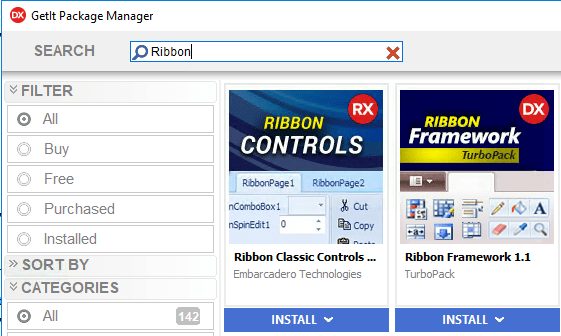
In the mean time however, it has been moved to GetIt: [WayBack] Ribbon Controls in RAD Studio 10.1 Berlin.

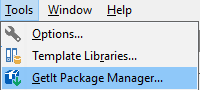
Note that the XE8 introduced [Archive.is] GetIt package manager is under the Tools menu, which is not covered by [Archive.is] IDE Insight – RAD Studio.

Anyway: here you can get it in Delphi 10.1 Berlin (now also in 10.2 Tokyo, where at first it was not available through GetIt):

jeroen

Posted in Delphi, Delphi 10.1 Berlin (BigBen), Delphi 10.2 Tokyo (Godzilla), Development, Software Development | Leave a Comment »

Don’t expect high floating point performance from the Delphi for Linux compiler

Posted by jpluimers on 2018/07/31

Don’t expect high floating point performance of the Delphi for Linux compiler as this thread proves it is not: [WayBack] Based on a recent post here, it looks like the new Linux compiler uses the x87 unit for floating point. Naturally this won’t perform well. If it is true… – David Heffernan – Google+

–jeroen

Posted in Delphi, Delphi 10.2 Tokyo (Godzilla), Development, Software Development | 5 Comments »