


Reminder to self: check the entries referenced in [WayBack] Judging from recent QP bug resolutions, current status of Delphi compiler is “Leaks all the way” or “Broken by design”. Take your pick… – Dalija Prasnikar – Google+
–jeroen
Posted by jpluimers on 2018/08/22
Reminder to self: check the entries referenced in [WayBack] Judging from recent QP bug resolutions, current status of Delphi compiler is “Leaks all the way” or “Broken by design”. Take your pick… – Dalija Prasnikar – Google+
–jeroen

Posted in Delphi, Development, Software Development | Leave a Comment »
Posted by jpluimers on 2018/08/21
If you want to restrict the WSDL publishing so it only is published in DEBUG mode, then add a [WayBack] TWSDLHTMLPublish to your [WayBack] TWebModule descendant, then add this in the [WayBack] OnCreate event handler of that TWebModule descendant:
// Enable/disable handling of "/wsdl*" requests during DEBUG/RELEASE mode. Enabling sends them via
//  Handled := WSDLHTMLPublish1.DispatchRequest(Sender, Request, Response);
{$ifdef DEBUG}
  WSDLHTMLPublish1.WebDispatch.Enabled := True;
{$endif DEBUG}
{$ifdef RELEASE}
  WSDLHTMLPublish1.WebDispatch.Enabled := False;
{$endif DEBUG}
end;
I have limited this because there are so many hard coded strings in the TWSDLHTMLPublish, see the thread by [WayBack] Marjan Venema at [WayBack] Hide WSDL document in SOAP app – delphi
–jeroen
Posted in Conference Topics, Conferences, Delphi, Development, Event, Software Development | Leave a Comment »
Posted by jpluimers on 2018/08/21
Last year, ZeroMQ – of late Pieter Hintjens ancestry – got a decent support library for Delphi https://github.com/grijjy/DelphiZeroMQ.
While writing, there is a reasonable chance I need to do message queue work and ZeroMQ is excellent. I’ve done MQ already in other environments with various projects involving Wintel/iSeries, WebSphere MQ (now IBM MQ, formerly MQSeries), Oracle AQ and Microsofts MSMQ stacks so I’m anxious to see if and how this works out.
via:
–jeroen
Posted in Delphi, Development, Software Development | 2 Comments »
Posted by jpluimers on 2018/08/16
Cool feature borrowed from Notepad, which can read files locked by other references (for instance a process having the handle open): [WayBack] c# – Notepad beats them all? – Stack Overflow.
The example from the answer is in .NET, but can be used in a native environment as well (Notepad is a native application).
Notepad reads files by first mapping them into memory, rather than using the “usual” file reading mechanisms presumably used by the other editors you tried. This method allows reading of files even if they have an exclusive range-based locks.
You can achieve the same in C# with something along the lines of:
using (var f = new FileStream(processIdPath, FileMode.Open, FileAccess.Read, FileShare.ReadWrite))
using (var m = MemoryMappedFile.CreateFromFile(f, null, 0, MemoryMappedFileAccess.Read, null, HandleInheritability.None, true))
using (var s = m.CreateViewStream(0, 0, MemoryMappedFileAccess.Read))
using (var r = new StreamReader(s))
{
    var l = r.ReadToEnd();
    Console.WriteLine(l);
}
Via: [WayBack] Maintaining Notepad is not a full-time job, but it’s not an empty job either – The Old New Thing
–jeroen
Posted in .NET, Delphi, Development, Software Development, The Old New Thing, Windows Development | Leave a Comment »
Posted by jpluimers on 2018/08/16
Reminder to self: [WayBack] Have NoMessageBoxes depend on a global boolean · Issue #58 · pleriche/FastMM4 · GitHub
–jeroen
Posted in Delphi, Development, FastMM, Software Development | Leave a Comment »
Posted by jpluimers on 2018/08/16
I found out this is a problem until at least Delphi 10.1 Berlin, but my original question was for XE8:
Is there any tool that clears the Delphi memory overhead when a “build all” switches to the next project in a project group?
XE8 constantly runs out of memory with large project groups as the memory usage keeps increasing for each project it builds in the group.
There are actually two answers:
Uwe Raabe: Have you tried with Use MSBuild checked for each project?
Jeroen Wiert Pluimers: +Uwe Raabe Much better. Much slower too (:
and:
Torbjörn Olsson: Have you tried DDevExtensions?There is a setting named “Release compiler unit cache before compiling”
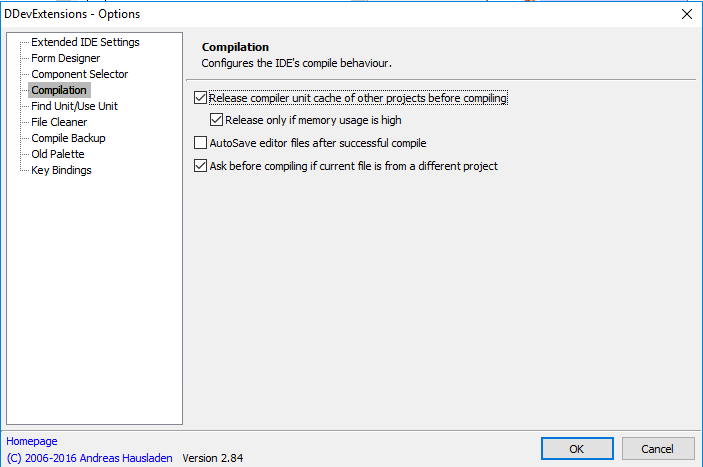 I’ve opted for the [Archive.is] DDevExtensions; I thought this VM had it installed, but apparently I forgot installing it as [Archive.is] IDE FixPack by the same author was installed.
This is how you configure DDevExtensions:
- Run Delphi
- Choose menu “Tools”, submenu “DDevExtensions Options…”
- In the dialog, select “Compilation” in the list on the left
- Ensure “Release compiler unit cache of other projects before compiling” is checked
- Confirm any changes
Source: [WayBack] Is there any tool that clears the Delphi memory overhead when a “build all” s…
In the comparison below:
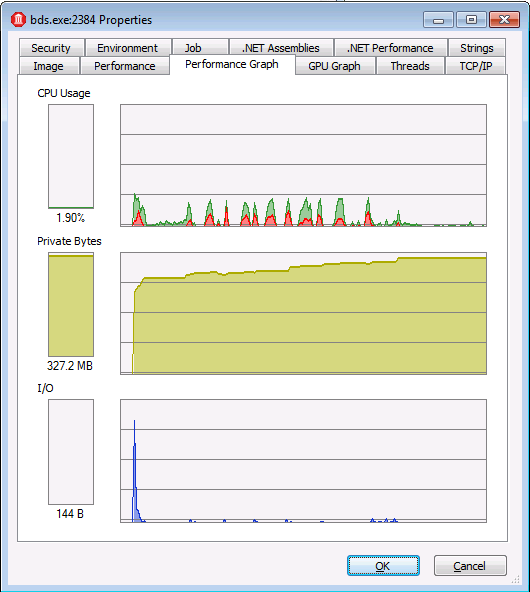
With “Use MSBuild externally to compile”
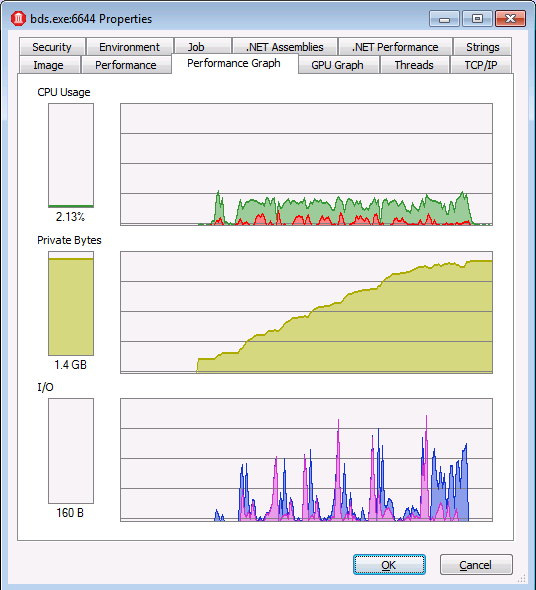
Regular “Build all”
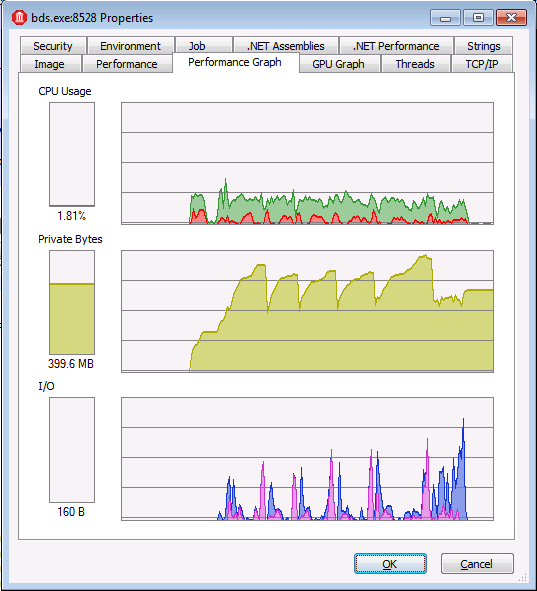
With DDevExtensions

Posted in Conference Topics, Conferences, Delphi, Development, Event, Software Development | Leave a Comment »
Posted by jpluimers on 2018/08/15
Though no maintenance for over 2 years, it ScaleMM seems among the fastest of Delphi memory managers: [WayBack] GitHub – andremussche/scalemm: Fast scaling memory manager for Delphi
Full story via [WayBack] A success story – kudos to ScaleMM, +André Mussche… – Ondrej Kelle – Google+ at [WayBack] just tried Scaled MM – cut the time for 100k down from 51 minutes to 40 minutes. That’s with 18 (9+9) cores allocated to the app and 2 to everything else. Wow, allocating 8 + 8 and the time drops even more… – Russell Weetch
Two lessons on multi-threading here:
Some history (as ScaleMM, TopMM and FastMM seem to be related):
There are also some IntelTBB memory manager references at https://plus.google.com/+RussellWeetch/posts/W4EQgLme5ud [WayBack]
–jeroen
Posted in Delphi, Development, FastMM, Software Development | Leave a Comment »
Posted by jpluimers on 2018/08/15
In the past, the DLL for zlib was called zlib.dll, but as of a few years back it is called zlib1.dll as it switched to static linking. There are may obscure download sites for zlib1.dll, but the master site is referenced from these documents:
What is ZLIB1.DLL, and how can I get it?

  - ZLIB1.DLL is the official build of zlib as a DLL.
    (Please remark the character '1' in the name.)

    Pointers to a precompiled ZLIB1.DLL can be found in the zlib
    web site at:
      http://www.zlib.net/
...
Why did you change the name of the DLL to ZLIB1.DLL?
    What happened to the old ZLIB.DLL?

  - The old ZLIB.DLL, built from zlib-1.1.4 or earlier, required
    compilation settings that were incompatible to those used by
    a static build.
zlibwapi.dll plus related utilities and static version)
zlib1.dlland static version)
–jeroen
Posted in Delphi, Development, Software Development | Leave a Comment »
Posted by jpluimers on 2018/08/14
An automated build system for your Delphi applications is gold, and straightforward to setup using the Delphi support for msbuild.
Sometimes however, it is convenient to build any or all Configuration/Target permutations of all your projects from inside the Delphi IDE.
This has been possible since Delphi XE introduced the [Archive.is] Build Groups – RAD Studio XE. It is a really nifty feature which you can activate by clicking on the “people” icon in the project manager:  .
.
Uwe Raabe has witten an excellent blog post on this a few years ago: [WayBack] Do you know Build Groups? | The Art of Delphi Programming
Since you can add multiple Build Groups, you can select which one contains what Configuration/Target permutations of any number of projects.
This for instance allows you to:
The Build Groups settings are saved as part of your groupproj settings and are a pretty stable feature.
Two extra tips:
–jeroen
Related:


Posted in Conference Topics, Conferences, Delphi, Development, Event, Software Development | Leave a Comment »
Posted by jpluimers on 2018/08/14
Long uses lists especially of units circularly referencing each other are killing for compiler performance both in CPU and memory consumption.
To solve it:
Ingredients
- ICARUS – a free tool from the maker of Pascal Analyzer. [WayBack] http://www.peganza.com/products.htm. Icarus parses Delphi or Borland Pascal source code and generates a Uses Report. This report will help you remove unneeded units from your uses lists. You will also know which units that can be moved from the interface uses list to the implementation uses list.
- Uses Cleanup Tool – by Oleg Zhukov [WayBack] http://cc.borland.com/Item.aspx?id=23199.
Step-by-step
- Run ICARUS on your delphi project to get a report of which units depends on each other.
- Input this report in the Uses Cleanup tool to automatically update all uses-clauses in your source code.
- Delete all DCU-files and recompile.
Source: [WayBack] Optimized Pascal compilation time | Fredrik Haglund’s blog
Bit-rot galore!: Since Fredrik published his article, some links have vanished, so they are invalid in the above quote as well:
Uwe Raabe was the first to notice on [WayBack] G+ Long uses lists especially of units circularly referencing each other are killing for compiler performance both in CPU and memory consumption… – Jeroen Wiert Pluimers – Google+ that the Uses Cleanup Tool by Oleg Zhukov can now be downloaded from [WayBack] Files as [WayBack] UsesCleanupceaf.zip.
Several people suggest using cnPack in the above G+ thread, but [WayBack] their Delphi parser is far behind [WayBack] Delphi AST.
Cleaning uses lists is a tough thing, it very much depends in getting the dependencies really right, then interpreting them correctly.
–jeroen
Posted in Delphi, Development, Software Development | 7 Comments »
 The Wiert Corner - irregular stream of stuff