The Wiert Corner – irregular stream of stuff

Jeroen W. Pluimers on .NET, C#, Delphi, databases, and personal interests

  • My badges

  • Twitter Updates

  • My Flickr Stream

  • Pages

  • All categories

  • Enter your email address to subscribe to this blog and receive notifications of new posts by email.

    Join 1,860 other subscribers

Archive for the ‘.NET ORM’ Category

Entity Framework 4 – security warning popup workaround: Do you trust all the T4 “text templates” on your system, even future ones?

Posted by jpluimers on 2011/04/13

When using Entity Framework 4, your transofmrations (model to classes, DB to model, etc) are performed by T4 Text Templates.

Those templates are executed all over the place (when saving your project, building your project, changing your model, etc).

Since anyone can insert a T4 Text Template into Visual Studio, and those are scripts, it is a potential vulnerability.

The default Visual Studio behaviour is to show you a dialog like this:
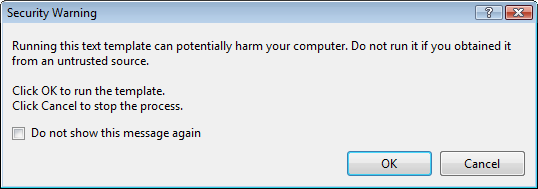
[Security Warning]

Running this text template can potentially harm your computer. Do not run it if you
obtain if rtom an untrusted source.

Click OK. to run the template.
Click Cancel top stop the process.

[X] Do not show this message again

[OK]  [Cancel]

Some blogs mention Just click OK and feel free to check “do not show this message again.”

I’m not sure I want that: it would indicate I always trust T4 Text Templates, even the ones added in the future (T4 Text Templates are executable content, malicious software could find it’s way into your development environment; anyone remember the virus that hooked itself into the run-time library sources of a development system so it would spread through anything compiled on that system?).

But I also don’t want to click OK on that dialog.

It would be so nice if the dialog:

  1. Showed which template is about to be executed
  2. Allowed me to skip only for that particular template

Anyone better thoughts on this?

–jeroen

via Customizing EDM Code Gen in EF4 : Don’t Be Iffy.

Posted in .NET, C#, Delphi, Development, EF Entity Framework, Prism, Software Development | 4 Comments »

Entity Framework 4 “Error 3004: Problem in mapping fragments starting at line” means you must generate your DB from your model first (Stack Overflow)

Posted by jpluimers on 2011/04/05

Entity Framework 4 is nice, but has very confusing  error messages.

Maybe it is just me, but getting a feel for what each error message means, and how to cure the underlying mistake(s) is time consuming.

For instance, it took me quite a while to find out why this error occurred during a project build:

Error 3004: Problem in mapping fragments starting at line 569: No mapping specified for properties MyEntity.MyValue in Set MyEntities. An Entity with Key (PK) will not round-trip when: Entity is type [MyEntities.MyEntity]

The solution was simple, I had forgotten to manually perform the “Generate Database from Model…” step before building my solution and was glad I found it in this Stack Overflow answer:

Have since discovered that after I add/change/delete properties on my entities I must “Generate Database from Model” before I compile otherwise I get 3004 mapping errors.

Note that this generation is always a manual step; I haven’t found a way to automate that (if you have found a way: please add a comment below).

–jeroen

via: .net – Entity Framework 4 mapping fragment error when adding new entity scalar – Stack Overflow.

Posted in .NET, Development, EF Entity Framework, Software Development | 5 Comments »

Weird Errors With EF4 CTP5 Code First? Close All Database Connections » Danny Thorpe

Posted by jpluimers on 2011/03/01

Often solutions are simple, but the steps finding that simple solution can take a while.

This time, good friend Danny Thorpe found out the hard way using the joungest Community Technology Preview version of Entity Framework 4, he writes:

I don’t claim to know why, but after a day of permutations and combinations, this is what I found cleared the problem for me.

The solution for his problems – all sorts of stranges errors when using DropCreateDatabaseAlways in the Entity Framework – is simple: make sure you don’t have any other connection to your underlying database open.

–jeroen

via: Weird Errors With EF4 CTP5 Code First? Close All Database Connections » Danny Thorpe.

Posted in .NET, Development, EF Entity Framework, Software Development | Leave a Comment »