Archive for the ‘Visual Studio 2005’ Category
Posted by jpluimers on 2012/07/17
There are features you rarely use. I once screwed up my Visual Studio desktop. Resetting to the default is easy, if you remember it is in the import/export settings dialog, which I didn’t (:
This is how I got back to the default:
To reset your settings
- On the Tools menu, click Import and Export Settings.
- On the Welcome to the Import and Export Settings Wizard page, click Reset all settings and then click Next.
- If you want to save your current settings combination, click Yes, save my current settings, specify a file name, and then click Next.
—or—
If you want to delete your current settings combination, choose No, just reset settings, overwriting my current settings, and then click Next. This option does not delete default settings, which will still be available the next time you use the wizard.
- In Which collection of settings do you want to reset to, select a settings collection from the list.
- Click Finish.
The Reset Complete page alerts you to any problems encountered during the reset.
–jeroen
via: How to: Reset Your Settings.
Posted in .NET, Development, Software Development, Visual Studio 11, Visual Studio 2005, Visual Studio 2008, Visual Studio 2010, Visual Studio and tools | Leave a Comment »
Posted by jpluimers on 2012/07/04
I’m a keyboard fan, so recently I have put up a new Keyboards and Keyboard Shortcuts category and tried to add all old relevant posts to it (staying organized is time consuming, but in the end it pays back by being able to find back stuff faster).
At conferences, presentations, and clients people often wonder “how do you get to such-and-such IDE feature so quickly” and the answer usually is: be sure you know your keyboard shortcuts. Which isn’t easy, as documentation for them is often spread out, and to find the information: you have to know how the underlying actions are called.
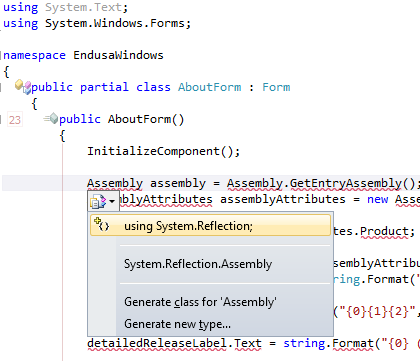
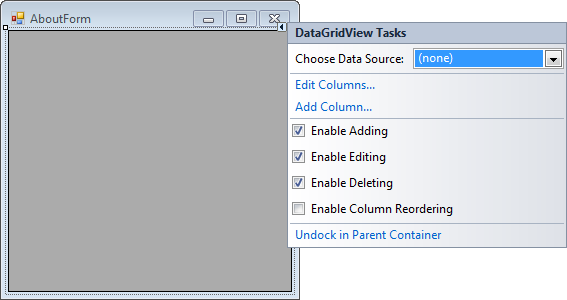
A long time ago (I think it was in version 2005) Visual Studio introduced Smart Tags. Most posts talk only about one kind of Smart Tags, but the Visual Studio IDE has two kinds:
- A tiny triangle in the designer
- A combobox drop-down button like control in the code editor
Both listen to these keyboard shortcuts (most cheat sheets miss at least one of these, but you can find them at Pre-defined keyboard shortcuts and at the VS2008 C# keyboard cheatsheet):
- Shift-Alt-F10
The shortcut is called View.ShowSmartTag, View.ObjectBrowserGoToSearchCombo
- Ctrl-. (yes, the . is a period)
The shortcut seems to be called Edit.Generate
The pictures below show the Smart Tag in action.


Oh BTW: the red squiggly lines and some of the other adornments in the screenshot are from CodeRush, one of the most keyboard-centric additions to Visual Studio I know.
–jeroen
Posted in Keyboards and Keyboard Shortcuts, Visual Studio 11, Visual Studio 2005, Visual Studio 2008, Visual Studio 2010, Visual Studio and tools | Leave a Comment »
Posted by jpluimers on 2012/06/21
I’m in the midst of converting a suite of WinForms C# projects from a range of .NET versions (1.x till 3.x) to 4 totalling some million lines of code.
One of the problems is that some people hacked together some splash screen stuff using multi-threading, doing all sorts of things that was forbidden in .NET 1 (and broke in .NET 2+).
On my research list for getting this to work:
- Mahin Gupta | Winforms splash screen – Great work by Tom. which is an update of
- A Pretty Good Splash Screen in C# – CodeProject.
–jeroen
Posted in .NET, C#, C# 1.0, C# 2.0, C# 3.0, C# 4.0, Development, Software Development, Visual Studio 2002, Visual Studio 2003, Visual Studio 2005, Visual Studio 2008, Visual Studio 2010, Visual Studio and tools, WinForms | Leave a Comment »
Posted by jpluimers on 2012/05/16
As a Delphi user, I’m missing the “Reverse Assignment” feature in the Visual Studio version of CodeRush.
Since CodeRush is very extendable (Mark is still explaining to people how the idea for that came from Delphi Packages back in the mid 90s), you can add this one yourself, as the a answer to this DevExpress support issue shows:
Q:
Is there a quick way to reverse the assignment in CodeRush? For example:
FROM:
Field[“test1”] = edTest1.Value;

Field[“test2”] = edTest2.Value;
TO:
edTest1.Value = Field[“test1”];

edTest2.Value = Field[“test2”];
I know Delphi had this capability in its refactoring, does CodeRush for Visual Studio?
Thanks
Daniel Schipper
Read the rest of this entry »
Posted in .NET, C#, C# 2.0, C# 3.0, C# 4.0, Development, Software Development, Visual Studio 2005, Visual Studio 2008, Visual Studio 2010, Visual Studio and tools | Leave a Comment »
Posted by jpluimers on 2012/03/29
August 2011, Microsoft re-issued KB2251481. They should not have done that, because if you have the original KB2251481 installed (also known as KB2251481.T369_32ToU865_32) you need to go through the hoopla below to uninstall it.
In stead, they should have released a new version that automatically uninstalls a previously installed one, then installs itself.
It is not the first patch that Microsoft did wrong, but this one is the “Microsoft Visual Studio 2005 Service Pack 1 XML Editor Security Update”. Every now and then I come across it when doing work on some archived virtual machines that contain Visual Studio 2005 (which I used a lot in the past, and occasionally still use for doing some maintenance work for clients that long ago ditched stuff they thought they’d never need to use again).
The really stupid thing is the error message you get when it cannot get installed: John Doe user will never find out why it failed, let alone figure out how to get it install properly.
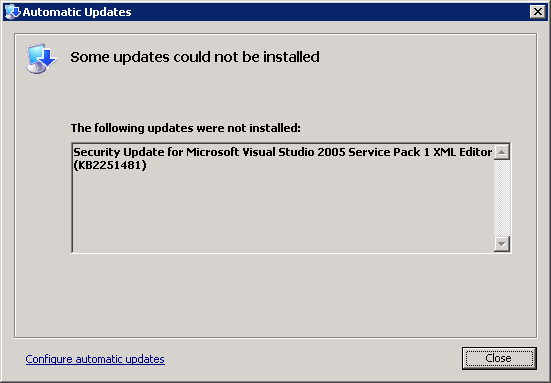
This is the message you will see:
[Automatic Updates]

Some updates could not be installed

The following updates were note installed:

Security Update for Microsoft Visual Studio 2005 Service Pack 1 XML Editor (KB2251481)

[Close]
The message doesn’t even include that it is trying to install the August 2011 version (hinting that there might be an earlier version you need to uninstall). Read the rest of this entry »
Posted in .NET, C#, C# 2.0, Development, Software Development, Visual Studio 2005, Visual Studio and tools | Leave a Comment »
Posted by jpluimers on 2012/03/13
Sometimes when creating new Team work items in Visual Studio 2010 connected to Team Foundation System 2010, you get a sub menu like this:

“New Work Item menu still loading… (try again in a moment)”
There are not many results in the new work item menu still loading “try again in a moment” site:microsoft.com query, but luckily the first one shows a similar issue in Visual Studio 2005 with Team Foundation System 2005: the “Add Work Item menu still loading… (try again in a moment)”.
The solution is also very simple:
- Quit Visual Studio 2010
- Delete this registry key
HKEY_CURRENT_USER\Software\Microsoft\VisualStudio\10.0\WorkItemTracking\TeamMenu\AddWorkItemMru
- Start Visual Studio 2010
- Retry (can take more than a minute, but it usually works)
The only difference between the Visual Studio 2010 (version 10.0) and Visual Studio 2005 (version 8.0) is the version number:
- HKEY_CURRENT_USER\Software\Microsoft\VisualStudio\8.0\WorkItemTracking\TeamMenu\AddWorkItemMru
Not sure if this can fail in Visual Studio 2008 too, but if it does, just apply this fix with version number to 9.0, and if it happens with the Visual Studio 11 developer preview, change the version number to 11.0.
–jeroen
via: Add Work Item menu still loading….
Posted in .NET, Development, Software Development, Visual Studio 2005, Visual Studio 2010, Visual Studio and tools | Leave a Comment »
Posted by jpluimers on 2012/01/26
This is WinForms code from a long time ago, but the concept of using an IDisposable interface to do resource cleanup and restore a temporary setting is very valid.
You use the code below like this:
        private void myMethod()
        {
            // set busy cursor
            using (IDisposable waitCursor = new TemporaryCursor(this, System.Windows.Forms.Cursors.WaitCursor))
            {
                // logic that takes a long while
            }
        }
The code below implements the TemporaryCursor class; you can assign any System.Windows.Forms.Cursors item you want.
It restores the cursor upon these three “events”:
Most often the IDispose pattern is being used to make sure that resources get cleaned up. If you think of a wait cursor as a temporary resource, this example becomes much easier to remember.
Of course this is not limited to the System.Windows.Forms realm, you can just as well use this for non-visual temporaries, and other kinds of UIs like ASP.NET, WPF or SilverLight.
using System.Windows.Forms;

namespace bo.Windows.Forms
{
    public class TemporaryCursor : IDisposable
    {
        private Control targetControl;
        private Cursor savedCursor;
        private Cursor temporaryCursor;
        private bool disposed = false;

        public TemporaryCursor(Control targetControl, Cursor temporaryCursor)
        {
            if (null == targetControl)
                throw new ArgumentNullException("targetControl");
            if (null == temporaryCursor)
                throw new ArgumentNullException("temporaryCursor");
            this.targetControl = targetControl;
            this.temporaryCursor = temporaryCursor;
            savedCursor = targetControl.Cursor;
            targetControl.Cursor = temporaryCursor;
            targetControl.HandleDestroyed += new EventHandler(targetControl_HandleDestroyed);
        }

        void targetControl_HandleDestroyed(object sender, EventArgs e)
        {
            if (null != targetControl)
                if (!targetControl.RecreatingHandle)
                    targetControl = null;
        }

        // public so you can call it on the class instance as well as through IDisposable
        public void Dispose()
        {
            Dispose(true);
            GC.SuppressFinalize(this);
        }

        protected virtual void Dispose(bool disposing)
        {
            if (!disposed)
            {
                if (null != targetControl)
                {
                    targetControl.HandleDestroyed -= new EventHandler(targetControl_HandleDestroyed);
                    if (temporaryCursor == targetControl.Cursor)
                        targetControl.Cursor = savedCursor;
                    targetControl = null;
                }
                disposed = true;
            }
        }

        // Finalizer
        ~TemporaryCursor()
        {
            Dispose(false);
        }
    }
}
–jeroen
Posted in .NET, C#, C# 2.0, C# 3.0, C# 4.0, Development, Software Development, Visual Studio 2005, Visual Studio 2008, Visual Studio 2010, Visual Studio and tools, WinForms | 4 Comments »
Posted by jpluimers on 2012/01/24
Every once in a while you need to maintain really old stuff, and start update an old VM.
In case of Visual Studio 2005, the Windows Update and Microsoft Update will get you into a condition where it cannot install “Security Update for Microsoft Visual Studio 2005 Service Pack 1 XML Editor (KB2251481)“. Not even the direct download will install.
The search for “some updates were not installed” “Security Update for Microsoft Visual Studio 2005 Service Pack 1 XML Editor (KB2251481)” pointed me to the solution:
There are two versions of KB2251481 June and August. When the June version is installed, the August version refuses to install.
Uninstall the original KB2251481 from the Control Panel. Then reinstall the August version.
The KB2251481 article mentions this only for the “Microsoft Visual Studio 2005 Premier Partner Edition SP1”, but it happens with other Visual Studio 2005 editions as well.
–jeroen
via: KB2251481 Security Update for Microsoft Visual Studio 2005 Service – Microsoft Answers.
Posted in .NET, Development, Software Development, Visual Studio 2005, Visual Studio and tools | 1 Comment »
Posted by jpluimers on 2011/05/26
When you are using Team Foundation System (TFS) for version control, the project manager sometimes shows a file as being checked out by someone else, but it doesn’t show who that someone else is.
The reason is that the Project Manager only has generic knowledge about version control systems. However, the Source Control Explorer has specific knowledge about TFS.
So when you look in the Properties Window for the path of the file you are interested in, then you can use the Source Control Explorer to locate the file, and find out who has checked out that file.
There are other tools that can even give your more information than the Source Control Explorer:
- the TF command-line application (on your PATH when you start the Visual Studio Command Prompt shortcut) to obtain extra information.
- the Team Foundation Sidekicks (free; version 3.0 is for Team Foundation Server 2010; 2.4 is for Team Foundation Server 2008/2005) even produce most of that info from a GUI.
These two Stack Overflow questions were relevant in answering the above:
Posted in .NET, Development, Software Development, Source Code Management, TFS (Team Foundation System), Visual Studio 2005, Visual Studio 2008, Visual Studio 2010, Visual Studio and tools | Leave a Comment »
Posted by jpluimers on 2011/03/17
I maintain some .NET code that still uses the MDX 1.1 (since MDX 2.0 got cancelled, and this project cannot be brought to XNA).
Every now and then, you get a Loader Lock error.
ZBfufer provides the solution (I always use choice #3): Read the rest of this entry »
Posted in .NET, C#, C# 2.0, C# 3.0, Development, Software Development, Visual Studio 2005, Visual Studio 2008, Visual Studio and tools | Leave a Comment »





 The Wiert Corner - irregular stream of stuff