The Wiert Corner – irregular stream of stuff

Jeroen W. Pluimers on .NET, C#, Delphi, databases, and personal interests

  • My badges

  • Twitter Updates

  • My Flickr Stream

  • Pages

  • All categories

  • Enter your email address to subscribe to this blog and receive notifications of new posts by email.

    Join 1,860 other subscribers

Archive for the ‘Python’ Category

shell – Should I put #! (shebang) in Python scripts, and what form should it take? – Stack Overflow

Posted by jpluimers on 2019/12/17

It is very important to get the shebang correct. In case of Python, you both need env and the correct Python main version.

Answer

Correct usage for Python 3 scripts is:

#!/usr/bin/env python3

This defaults to version 3.latest. For Python 2.7.latest use python2 in place of python3.

Comment

env will always be found in /usr/bin/, and its job is to locate bins (like python) using PATH. No matter how python is installed, its path will be added to this variable, and env will find it (if not, python is not installed). That’s the job of env, that’s the whole reasonwhy it exists. It’s the thing that alerts the environment (set up env variables, including the install paths, and include paths).

Source: [WayBack] shell – Should I put #! (shebang) in Python scripts, and what form should it take? – Stack Overflow

Thanks GlassGhost and especially flornquake for the answer and Elias Van Ootegem for the comment!

The answer is based on [WayBack] PEP 394 — The “python” Command on Unix-Like Systems | Python.org.

The env is always in the same place, see env – Wikipedia and Shebang (Unix) – Wikipedia.

–jeroen

Posted in Development, Python, Scripting, Software Development | Leave a Comment »

How to Send Emails with Gmail using Python

Posted by jpluimers on 2019/11/27

The cool thing about [WayBack] How to Send Emails with Gmail using Python is that it covers a broad range of email sending topics:

  • regular connections
  • secure connections
  • authenticating
  • rate limits
  • Google disallowing SMTP by default

Well wordt reading it, and the references:

–jeroen

Posted in Development, Python, Scripting, Software Development | Leave a Comment »

PyGotham keynote: The Other Async (Threads + Async = ❤️)

Posted by jpluimers on 2019/09/18

Interesting talk:

Published on Oct 8, 2017

Screencast of my keynote presentation at PyGotham 2017, New York City. October 7, 2017. In this live-coded talk, I build a queue object that spans the world of threads and asyncio with a single unified API.

Via [WayBack] The Other Async (Threads + Async = ❤️) – screencast of David Beazley’s keynote at PyGotham 2017 – ThisIsWhyICode – Google+

–jeroen

Read the rest of this entry »

Posted in Development, Python, Scripting, Software Development | Leave a Comment »

What do the three arrow (“>>>”) signs mean in python?

Posted by jpluimers on 2019/09/10

When starting to work with Python, a lot of examples contain the >>> characters on the first line often followed by ... characters on continuing lines.

They are about two things:

  1. interactive Python sessions
  2. doctest

The answers in [WayBackWhat do the three arrow (“>>>”) signs mean in python? give insight in the various Python versions and how they prompt.

References from them:

–jeroen

Posted in Development, Python, Scripting, Software Development | Leave a Comment »

Python “NameError: name ‘socket’ is not defined”

Posted by jpluimers on 2019/09/05

I bumped into this a while ago, but could not find back the code example showing it, so below is the SO question to solve it:

NameError: name 'socket' is not defined

[WayBackHow to refer to a standard library in a logging configuration file?

Related: [WayBack[Tutor] Socket error in class

–jeroen

Posted in Development, Python, Scripting, Software Development | Leave a Comment »

python multithreading wait till all threads finished

Posted by jpluimers on 2019/09/04

A great tip from [WayBack] python multithreading wait till all threads finished:

ou need to use join method of Thread object in the end of the script.

t1 = Thread(target=call_script, args=(scriptA + argumentsA))
t2 = Thread(target=call_script, args=(scriptA + argumentsB))
t3 = Thread(target=call_script, args=(scriptA + argumentsC))

t1.start()
t2.start()
t3.start()

t1.join()
t2.join()
t3.join()

Thus the main thread will wait till t1t2 and t3 finish execution.

I’ve used a similar construct that’s used by the multi-threading code I posted a few ways ago (on Passing multiple parameters to a Python method: the * tag) in the ThreadManager class below.

But first some of the other links that helped me getting that code as it is now:

Example:

class ThreadManager:
    def __init__(self):
        self.threads = []

    def append(self, *threads):
        for thread in threads:
            self.threads.append(thread)

    def runAllToCompletion(self):
        ## The loops are the easiest way to run one methods on all entries in a list; see https://stackoverflow.com/questions/2682012/how-to-call-same-method-for-a-list-of-objects
        # First ensure everything runs in parallel:
        for thread in self.threads:
            thread.start()
        # Then wait until all monitoring work has finished:
        for thread in self.threads:
            thread.join()
        # here all threads have finished

def main():
    ## ...
    threadManager.append(
        UrlMonitorThread(monitor, "http://%s" % targetHost),
        SmtpMonitorThread(monitor, targetHost, 25),
        SmtpMonitorThread(monitor, targetHost, 587),
        SshMonitorThread(monitor, targetHost, 22),
        SshMonitorThread(monitor, targetHost, 10022),
        SshMonitorThread(monitor, targetHost, 20022))

    threadManager.runAllToCompletion()

–jeroen

Posted in Development, Python, Scripting, Software Development | Leave a Comment »

Python: variables in the class scope are class, not instance

Posted by jpluimers on 2019/09/03

A very subtle thing that keeps biting me as my background is from languages where by default, identifiers on the class scope are instance level, not class level:

In Python, variables on class level are class variables.

If you need instance variables, initialise them in your constructor with a self.variable = value.

The example in the Python 3 docs [WayBackClasses – A First Look at Classes – Class and Instance Variables is the same as in the Python 2 docs [WayBackClasses – A First Look at Classes – Class and Instance Variables:

Generally speaking, instance variables are for data unique to each instance and class variables are for attributes and methods shared by all instances of the class:

class Dog:

    kind = 'canine'         # class variable shared by all instances

    def __init__(self, name):
        self.name = name    # instance variable unique to each instance

>>> d = Dog('Fido')
>>> e = Dog('Buddy')
>>> d.kind                  # shared by all dogs
'canine'
>>> e.kind                  # shared by all dogs
'canine'
>>> d.name                  # unique to d
'Fido'
>>> e.name                  # unique to e
'Buddy'

For people new at Python: the __init__ is a constructor; see these links for more explanation:

Of course, the __init__() method may have arguments for greater flexibility. In that case, arguments given to the class instantiation operator are passed on to __init__(). For example,

>>> class Complex:
...     def __init__(self, realpart, imagpart):
...         self.r = realpart
...         self.i = imagpart
...
>>> x = Complex(3.0, -4.5)
>>> x.r, x.i
(3.0, -4.5)

–jeroen

Posted in Development, Python, Scripting, Software Development | Leave a Comment »

Exploring Line Lengths in Python Packages

Posted by jpluimers on 2019/09/02

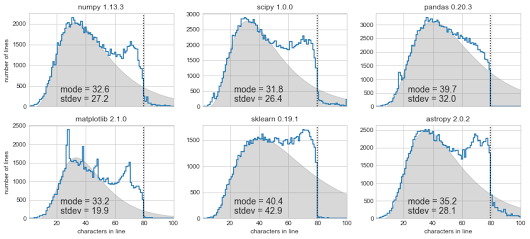
[Archive.is] Exploring Line Lengths in Python Packages is an interesting read.

It explores the relation between actual and “maximum” line lengths in Python in related to the prior 140 Twitter character limit.

via [Archive.is] Exploring Line Lengths in Python Packages – ThisIsWhyICode – Google+

–jeroen

Read the rest of this entry »

Posted in Development, Python, Scripting, Software Development, Static Code Analysis | Leave a Comment »

Passing multiple parameters to a Python method: the * tag

Posted by jpluimers on 2019/08/28

I had to pass parameters to a method so they became a list:

    threadManager.append(
        UrlMonitorThread(monitor, "http://%s" % targetHost),
        SmtpMonitorThread(monitor, targetHost, 25),
        SmtpMonitorThread(monitor, targetHost, 587),
        SshMonitorThread(monitor, targetHost, 22))

This appeared much easier than I anticipated:

    def append(self, *threads):
        for thread in threads:
            self.threads.append(thread)

It uses the * tag which is explained here:

–jeroen

Posted in Development, Python, Scripting, Software Development | Leave a Comment »

Python line continuation: only use backslash if it gives cleaner code

Posted by jpluimers on 2019/08/20

Since Python is a [WayBack] line-oriented programming language, sometimes you want to wrap longer lines into more readable shorter ones.

Many people struggle with this, see for instance these questions (and excellent answers!):

This struggle is likely why it made it to the [WayBack] style guide. Relevant sections are below.

I had this struggle wile passing multiple parameters to a method creating a very long line, but found I did not need a line continuation as the Python language understands this construct perfectly fine:

    threadManager.append(
        UrlMonitorThread(monitor, "http://%s" % targetHost),
        SmtpMonitorThread(monitor, targetHost, 25),
        SmtpMonitorThread(monitor, targetHost, 587),
        SshMonitorThread(monitor, targetHost, 22))

You could use the line continuation backslash to do this, but often that is not needed or a better way exists (for instance wrapping an expression in parentheses), so here are are the relevant style guide sections:

Code lay-out

Indentation

Use 4 spaces per indentation level.

Continuation lines should align wrapped elements either vertically using Python’s implicit line joining inside parentheses, brackets and braces, or using a hanging indent[7]. When using a hanging indent the following should be considered; there should be no arguments on the first line and further indentation should be used to clearly distinguish itself as a continuation line.

Maximum Line Length

Limit all lines to a maximum of 79 characters.

For flowing long blocks of text with fewer structural restrictions (docstrings or comments), the line length should be limited to 72 characters.

Limiting the required editor window width makes it possible to have several files open side-by-side, and works well when using code review tools that present the two versions in adjacent columns.

The preferred way of wrapping long lines is by using Python’s implied line continuation inside parentheses, brackets and braces. Long lines can be broken over multiple lines by wrapping expressions in parentheses. These should be used in preference to using a backslash for line continuation.

Backslashes may still be appropriate at times. For example, long, multiple with-statements cannot use implicit continuation, so backslashes are acceptable:

with open('/path/to/some/file/you/want/to/read') as file_1, \
     open('/path/to/some/file/being/written', 'w') as file_2:
    file_2.write(file_1.read())

Make sure to indent the continued line appropriately.

Should a line break before or after a binary operator?

For decades the recommended style was to break after binary operators. But this can hurt readability in two ways: the operators tend to get scattered across different columns on the screen, and each operator is moved away from its operand and onto the previous line. Here, the eye has to do extra work to tell which items are added and which are subtracted:


To solve this readability problem, mathematicians and their publishers follow the opposite convention. Donald Knuth explains the traditional rule in his Computers and Typesetting series: “Although formulas within a paragraph always break after binary operations and relations, displayed formulas always break before binary operations” [3].

Following the tradition from mathematics usually results in more readable code:

# Yes: easy to match operators with operands
income = (gross_wages
          + taxable_interest
          + (dividends - qualified_dividends)
          - ira_deduction
          - student_loan_interest)

In Python code, it is permissible to break before or after a binary operator, as long as the convention is consistent locally. For new code Knuth’s style is suggested.

–jeroen

Posted in Development, Python, Scripting, Software Development | Leave a Comment »