


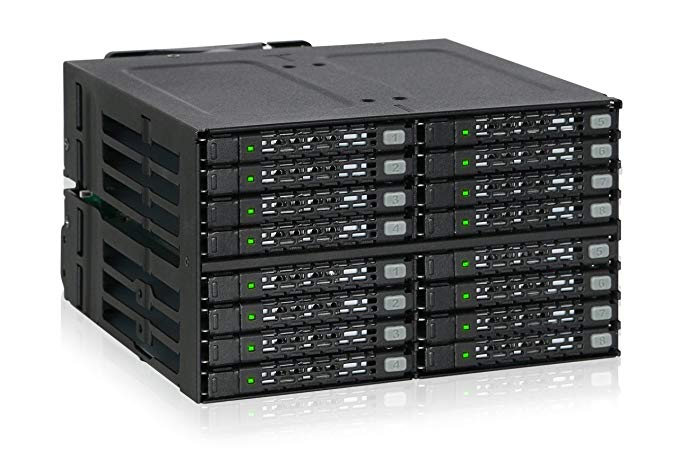
Want: [Archive.is] ICY DOCK SATA/SAS Hot Swap Wechselrahmen für 16x: AmazonSmile: Computer & Zubehör.
Reasons:
- 80 mm fan
- 16 slots for SSD
- 4x SFF-8643 MiniSAS connector to minimise cabling
Posted by jpluimers on 2020/02/07
Want: [Archive.is] ICY DOCK SATA/SAS Hot Swap Wechselrahmen für 16x: AmazonSmile: Computer & Zubehör.
Reasons:

Posted in Power User, SSD | Leave a Comment »
Posted by jpluimers on 2018/04/30
A short while ago, I installed a pair of 1TB Intel 600p NVMe SSD devices.
Performing a straight rsync backup of some 100 gigabyte of data managed to shutdown both of them: the throttling was so much that VMware ESXi lost the volumes on it and showed “Permanently inaccessible device”.
I was quite surprised as the initial reviews did not mention any temperature problems, but apparently there are.
Since then I’ve put a 120mm fan near to it which made the problems go away, but it still every now and then jumped to over 60 degrees Celsius.
Later I “fixed” it in a better way for cooling getting the idle temperature around 30 degrees Celsius and heavy duty temperatures around 40 degrees Celsius:
- Put the NVME drives each on a fan supported PCIe 4x adapter which has different names in the USA and Europe:
- USA: search for
B01NAQPE6J; [WayBack] Amazon.com: Sintech M.2(NGFF) M-Key PCIe 3.0 X4 Card For Samsung SM951 PM951 950 960 PRO SSD: Computers & Accessories- Europe: search for
B06WGLK4CC; [Archive.is] KALEA-INFORMATIQUE © Controller Card PCIe x4 PCIe: AmazonSmile: Electronics- A [WayBack] NF S12A FLX: Noctua 120mm case fan over all the PCIe slots to cool even further
- Added more fans to the [WayBack] Fractal Design: R5 case to ensure better inlet/outlet air flow, especially over the PCI slots and drives using fans of these types:
- Stock 140mm [WayBack] Fractal Design: Dynamic GP-14
- Extra [WayBack] NF-A14 FLX: Noctua 140mm case fan
- Extra [WayBack] NF A6x25 FLX: Noctua 60mm case fan
- Later I will likely replace the fans on the PCIe adapters with a pair of [WayBack] NF A4x10 FLX: Noctua 40mm fans, 10mm height
I did not have to mount any M.2 heatsinks on them yet; they probably won’t fit under the fan anyway
Related links and products:
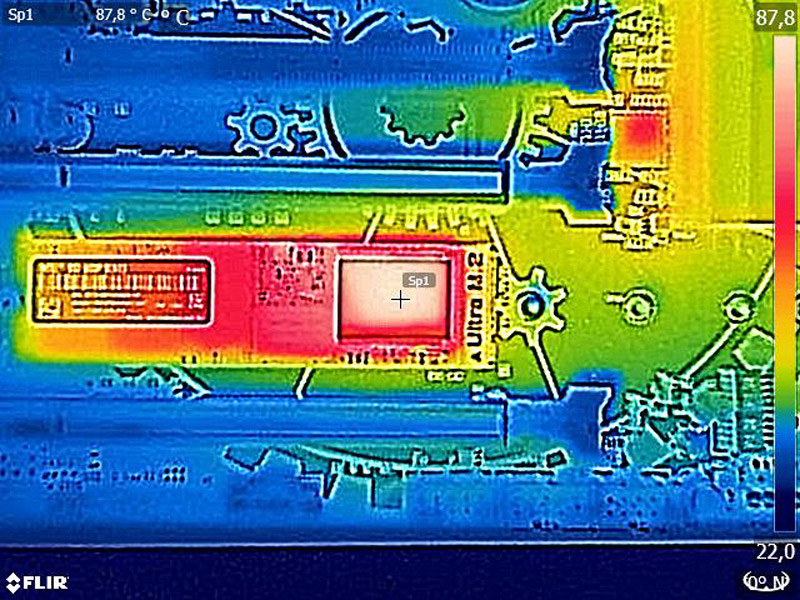
Before we will come to the benchmark results, we want to show something very special on OCinside.de and that is the heat distribution and temperature of the M.2 SSD with an infrared thermal imaging camera, which also supports image overlay and results in an interesting mixture of the infrared image and real image.
According to the internal temperature diode, there was a temperature of approx. 41°C in idle and up to 70°C under load. With an external temperature sensor and the thermal imaging camera, we’ve measures approx. 18 degrees Celsius more than the internal temperature diode outputs and achieve a maximum M.2 SSD temperature of approx. 87.8°C.
Tip:
Who like to reduce the SSD temperature, for example could:
a) adjust the power saving mode.
b) perform an active SSD cooling by direct ventilation.
c) apply commercially available silicone heat transfer pads to the top and bottom of the PCB.
d) purchase a special heatsink for M.2 SSDs.
e) buy a M.2 PCIe card with heatsink.
Related:
–jeroen

Posted in Hardware, NVMe, Power User, SSD | 1 Comment »
Posted by jpluimers on 2018/04/23
Somehow I missed this:
- August 2011: [WayBack] Status: Intel has posted a firmware update for the Intel® SSD 320 Series (firmware 4PC10362) which addresses the Bad Context 13x Error being discussed on the Communities site and elsewhere. You can download the new firmware here: www.intel.com/go/ssdfirmware
- December 2012: [WayBack] Download Intel® SSD Firmware Update Tool
- [WayBack] Solid State Drives/Memory cell clearing – ArchWiki
- [WayBack] Intel SSD back to life success story (using Lin… |Intel Communities
So I made a file and an image backup, then updated the firmware.
–jeroen

Posted in Hardware, Power User, SSD | Leave a Comment »
Posted by jpluimers on 2018/04/06
When using SSD drives on Linux, mind the discard option in mnt and the fstrim command: [WayBack] Solid state drives in Linux: Enabling TRIM for SSDs | Opensource.com
–jeroen
Posted in *nix, *nix-tools, Hardware, Power User, SSD, Trim | Leave a Comment »
Posted by jpluimers on 2018/01/15
Not just a great overview for the season, but also a good overview on what the state of the art in various SSD products is: [WayBack] Best SSDs: Holiday 2017.
Recommended reading when you are looking for SSDs
–jeroen
Posted in Hardware, Power User, SSD | Leave a Comment »
Posted by jpluimers on 2017/08/17
SSD TRIM check tool | CyberShadow’s blog [WayBack] has source code on github:
trimcheck – SSD TRIM check tool for Windows
Source: CyberShadow/trimcheck: SSD TRIM check tool for Windows
It’s written in D using rdmd as compiler.
–jeroen
via via.
Posted in D, Development, Hardware, Power User, Software Development, SSD, Trim, Windows | 1 Comment »
Posted by jpluimers on 2016/03/29
In the future, I need to add my own experience as well. For now some links:
–jeroen
Posted in Hardware, LSI/3ware, Power User, RAID, SSD | Leave a Comment »
Posted by jpluimers on 2015/12/14
Close to X-mas, so doing some dreaming of unaffordable things (:
In august, this 2.5 device was sort of announced: PM1633a: a Samsumg 16TB (nah: 15.36TB) SSD.
No news ever since, so I wonder when will they get to the market and how much they would cost.
Just like I’m wondering about a Retina MacBook Pro with 2TB of SSD storage and more than 32 GB RAM (:
–jeroen
Posted in Hardware, Power User, SSD | Leave a Comment »
Posted by jpluimers on 2015/06/26
Interesting machine: TinkerTry’s Xeon D-1540 fueled ESXi 6.0 home lab build begins LIVE! | TinkerTry IT @ Home.
It does ECC and IPMI, fits mSATA, 2.5 drives, and 3.5 hot-swap bays. For more specs see Supermicro SuperServer mini-tower ordered with 64GB of memory for $1900 starts the ultimate 24×7 home virtualization lab | TinkerTry IT @ Home.
The drive trays used are these:
Besides the official ways of converting the 3.5″ tray for 2.5″ drives that only allows for 4 drives to be converted, I think there is an unofficial way that allows for more hot-swappable 2.5″ drives.
The case is an CSE-721TQ-250B. Looking at a picture of the dimensions of the space where the drive trays fit in (thanks Anandtech), removing the CSE-SAS-733TQ backplane and fitting these into the MCP-220-00075-0B should allow for 8 2.5″ drives to be connected:
(all found via Sata Rack Enclosure – on Aliexpress.com)
Modify an existing 3.5″ tray to fit a 2.5″ drive: please note the drive is mounted up side down!
Note there is another (dual!) 2.5″ tray for a different kind servers: many 2U and some 4U rack mounted SuperMicro servers and chassises optionally have this in the back for boot drives:
These are for instance used in the below chassises and SAS extenders based on them (the extenders all use SFF-8644 HD mini-SAS3 cable connectors):
Note to self: if ever getting these, ensure to get them with PWS-920P-SQ or better power supplies as these are super quiet although the chassis fans can be loud which can be resolved with a PWM controller or carefully selecting the SuperMicro parts from Supermicro | Support | System Fan Matrix as described in Supermicro noise levels | ServeTheHome and ServeThe.Biz Forums.
–jeroen
Posted in ECC memory, Hardware, Memory, Power User, RAID, SSD | 1 Comment »
Posted by jpluimers on 2015/04/17
Though the Dell Inspiron 17R 5737 Owner’s Manual contains instructions on pages 24-26, it was easier to see how to access it on the photos at
Review Dell Inspiron 17R-5737 Notebook – NotebookCheck.net Reviews.
Steps (see also the pictures below):
– remove the battery
– remove the wide bottom plate
– remove the three screws of the hard drive (there are 4 holes, but only 3 screws, saves half a cent per laptop)
– pull the tab gets the metal bracket with the hard drive out of the laptop.
Now you can unscrew the hard drive from the bracket, and replace it with a new one or an SSD drive.
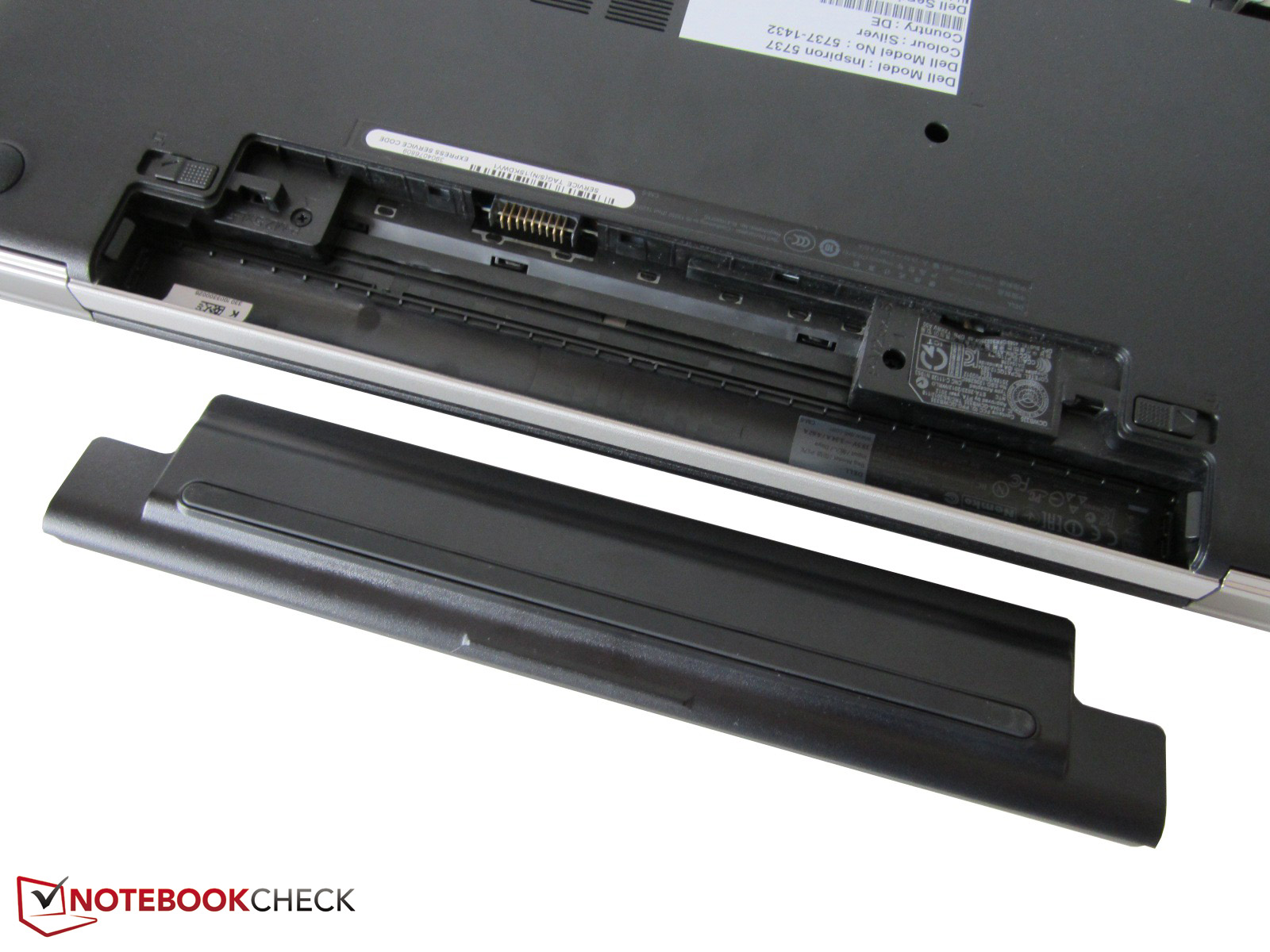
Removing the battery
Removing the wide bottom plate.
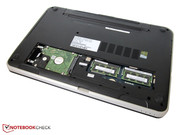
Remove the three screws of the hard-drive.
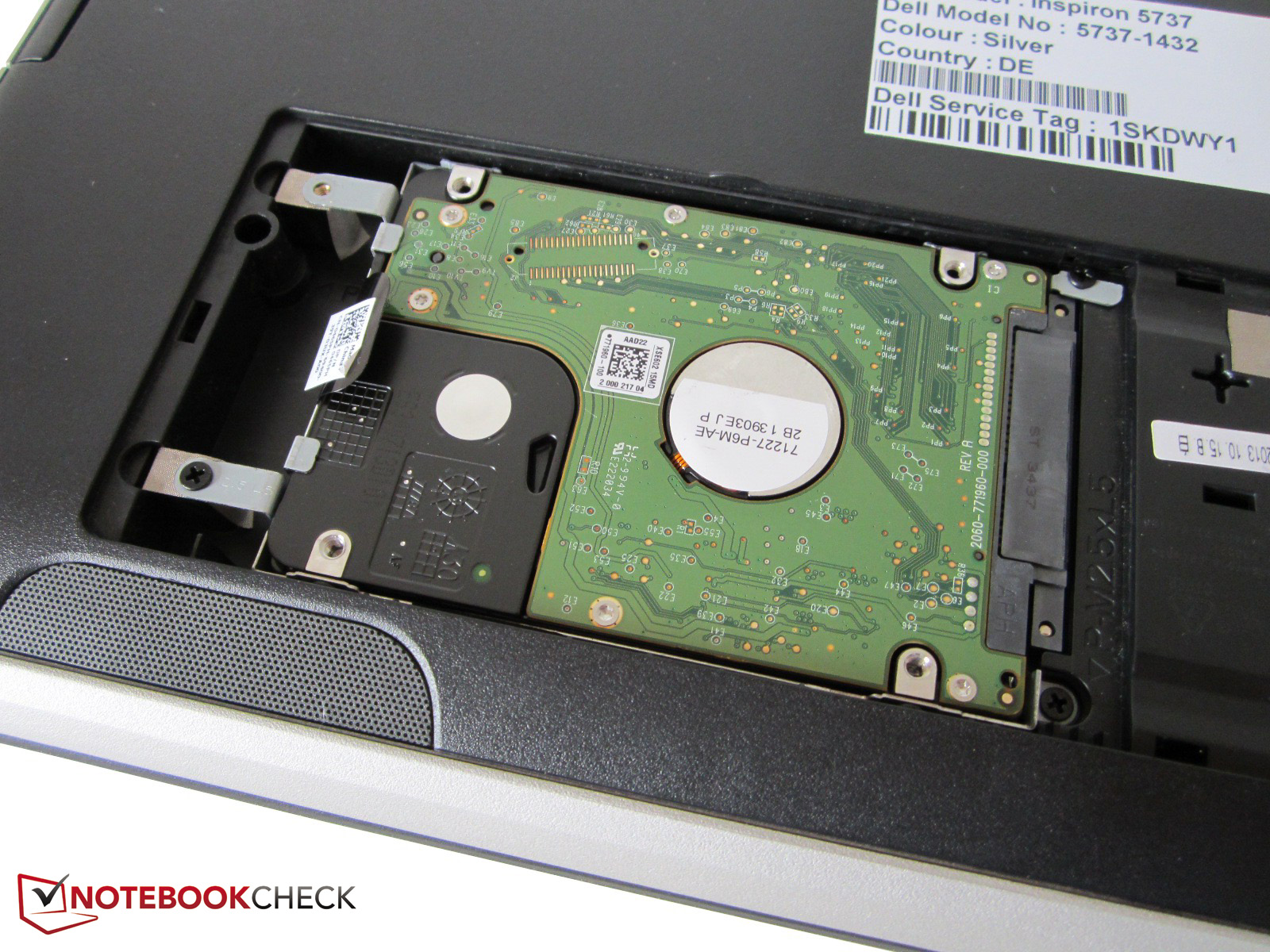
Pull the tab to remove the hard drive.

Posted in Hardware, Power User, SSD | Leave a Comment »
 The Wiert Corner - irregular stream of stuff