The Wiert Corner – irregular stream of stuff

Jeroen W. Pluimers on .NET, C#, Delphi, databases, and personal interests

  • My badges

  • Twitter Updates

  • My Flickr Stream

  • Pages

  • All categories

  • Enter your email address to subscribe to this blog and receive notifications of new posts by email.

    Join 1,860 other subscribers

Archive for the ‘Office 2011 for Mac’ Category

Excel formula: SUMIFS with multiple criteria and OR logic | Exceljet

Posted by jpluimers on 2020/03/31

As I need this one day:

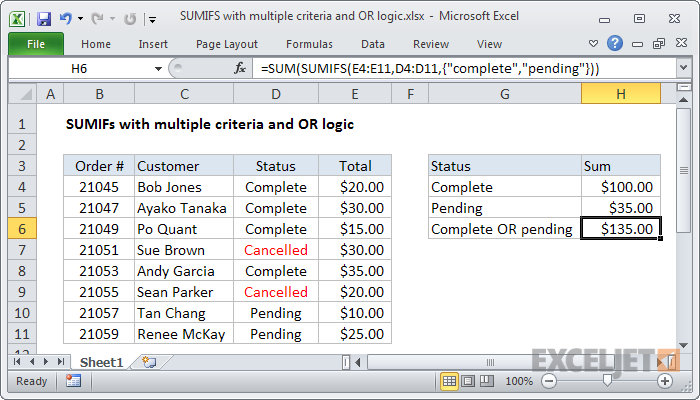
To sum based on multiple criteria using OR logic, you can use the SUMIFS function with an array constant. In the example shown, the formula in H6 is:

=SUM(SUMIFS(E4:E11,D4:D11,{"complete","pending"}))

Source: [WayBackExcel formula: SUMIFS with multiple criteria and OR logic | Exceljet

–jeroen

Posted in Development, Excel, Office, Office 2011 for Mac, Office 2013, Office 2016, Power User, Software Development | Leave a Comment »

Removing “Workbook Contains Macros” Prompt – Free Excel\VBA Help Forum

Posted by jpluimers on 2019/11/22

This indeed was an Excel 2011 for Mac thing.

Even without macros or VBA modules, Excel 2011 for Mac shows this dialog when opening a .xls file.

The solution was simple: save as .xlsx.

–jeroen

via [WayBack] Removing “Workbook Contains Macros” Prompt – Free Excel\VBA Help Forum

Posted in Excel, Office, Office 2011 for Mac, Power User | Leave a Comment »

How to Extract a Number or Text from Excel with this Function

Posted by jpluimers on 2019/11/11

Lots of fuzz, but the formula towards the end worked:

=SUMPRODUCT(MID(0&A1,LARGE(INDEX(ISNUMBER(--MID(A1,ROW($1:$25),1))*
ROW($1:$25),0),ROW($1:$25))+1,1)*10^ROW($1:$25)/10)

Source: [Archive.isHow to Extract a Number or Text from Excel with this Function

More of those at [WayBack] Extract Only Numbers From Text String

–jeroen

Posted in Excel, Office, Office 2011 for Mac, Power User | Leave a Comment »

Resize a table in Word or PowerPoint for Mac – Office Support

Posted by jpluimers on 2019/11/08

Why does it take forever for Microsoft Office suite programs to function the same across their various components and over operating systems. It has been like 2 decades and still sizing columns/rows in tables is a nightmare.

[WayBack] Resize a table in Word or PowerPoint for Mac – Office Support.

In my case PowerPoint: it is so different from Excel, and even different from Word, that it gives me headaches.

This is what PowerPoint 2011 could do; more recent versions are only marginally better:

PowerPoint

You can resize a whole table to improve readability or to improve the visual effect of your document. You can also resize one or more rows, columns, or individual cells in a table.

Do any of the following:

Resize a table

  1. Click the table.
  2. Rest the pointer on any corner of the table until Table Resize Cursor appears, and then drag the table boundary until the table is the size that you want.

Change the row height in a table

  1. Rest the pointer on the row boundary that you want to move until Horizontal split arrow appears, and then drag the boundary until the row is the height that you want.

    If you have text in a table cell, the row must be the same height or taller than the text.

Change the column width in a table

  1. Rest the pointer on the column boundary that you want to move until Vertical split arrow appears, and then drag the boundary until the column is as wide as you want.

    If you have text in a table cell, the column must be as wide as or wider than the text.

Change the row or column to fit the text

  • Rest the pointer on the column boundary until Vertical split arrow appears or the row boundary until Horizontal split arrow appears, and then double-click it.

Make multiple rows or columns the same size

  1. Select the columns or rows that you want to make the same size, and then click the Table Layout tab.
  2. Under Cells, click Distribute Rows or Distribute Columns.

    Tables Layout tab, Cells group

–jeroen

Posted in Office, Office 2011 for Mac, Power Point, Power User, Word | Leave a Comment »

Excel on Mac OS X: Insert, move, or delete page breaks in a sheet

Posted by jpluimers on 2019/08/16

Since I always get confused by the differences in Excel versions (not just between Mac OS X  and Windows):

In Excel for Mac, you can adjust where automatic page breaks occur, add your own page breaks manually, and remove manual page breaks.

Source: [WayBackInsert, move, or delete page breaks in a sheet.

–jeroen

Read the rest of this entry »

Posted in Excel, Office, Office 2011 for Mac, Power User | Leave a Comment »

Excel: printing top row on every page, and including grid

Posted by jpluimers on 2019/06/28

I hardly print with Excel, so I always forget these two:

–jeroen

Posted in Excel, Office, Office 2011 for Mac, Office 2013, Power User | Leave a Comment »

ms office – Keyboard shortcut to select all text in a cell in Excel – Ask Different

Posted by jpluimers on 2019/06/10

Via [WayBack] ms office – Keyboard shortcut to select all text in a cell in Excel – Ask Different a few keyboard tips.

Lets start with the shortest one:

  1. Put the focus on the cell (click, use arrow keys, etc)
  2. Press space
  3. Press CommandZ or ControlZ to undo the change

This probably is unintended, but works great: all text is now selected, so you can copy/cut with Command-C/CommandX.

Now the “official” way:

  1. Put the focus on the cell (click, use arrow keys, etc)
  2. Press ControlU or F2 to edit the cell (the cursor is now at the end)
  3. Press ShiftAltHome or ShiftControlHome (to select all text)
    note: Home can also be FnLeft.

Other selections you can make while the cell is in edit mode:

  • Press ShiftAltEnd or ShiftControlEnd (to select to the end of the cell)
    note: End can also be FnRight.
  • Press ShiftAltRight or ShiftControlRight (to select one word to the right)
  • Press ShiftAltLeft or ShiftControlLeft (to select one word to the left)
  • Press ShiftAltDown or ShiftControlDown (to select to the same position on the line below)
  • Press ShiftAltUp or ShiftControlUp (to select to the same position on the line up)

Keyboard symbols (more at [WayBackCommand, Option, & Shift Symbols in Unicode):

  • Shift
  • ^Control
  •  – Alt which is the same as Option
  •  – Command
  • Fn – Function

–jeroen

Posted in Apple, Excel, Mac, Mac OS X / OS X / MacOS, MacBook, MacBook Retina, MacBook-Air, MacBook-Pro, MacMini, macOS 10.12 Sierra, Office, Office 2011 for Mac, Power User | Leave a Comment »

keyboard – How to add a line break in a cell in Excel for Mac – Ask Different

Posted by jpluimers on 2019/06/03

What key combination do I have to press to create a line break in a cell in Excel for Mac 2011? The Windows combination of Alt+Enter does not work on the Mac.

Source: [WayBackkeyboard – How to add a line break in a cell in Excel for Mac – Ask Different

The answer depends on the Excel for Mac OS X version you are using.

Excel 2015 is simple (thanks esham): use Option+Enter.

In older Excel <= 2011 (thanks nwinkler), use Command+Option+Enter or Control+Option+Enter.

Some users report the also need the Fn key in addition to the above modifiers.

–jeroen

PS: Later I found out that [WayBack] Beckism.com: Use a linebreak in Excel on Mac also shows the Excel <= 2011 solution Control+Option+Return (note that Return is the same key as Enter).

Posted in Apple, Excel, Mac, Mac OS X / OS X / MacOS, MacBook, MacBook Retina, MacBook-Air, MacBook-Pro, macOS 10.12 Sierra, Office, Office 2011 for Mac, Power User | Leave a Comment »

MS Excel 2011 for Mac: How to Change Data Source for a Pivot Table

Posted by jpluimers on 2018/08/24

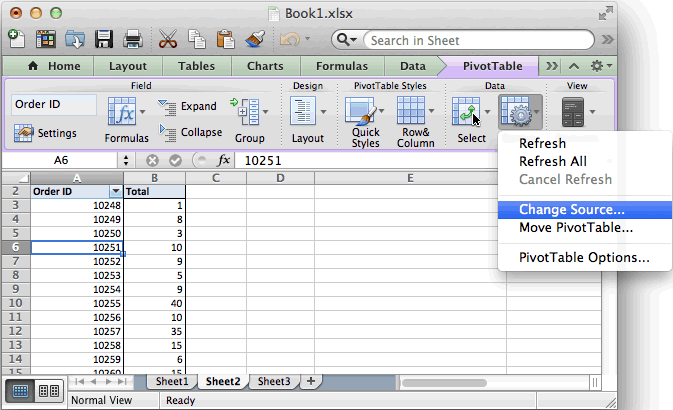
Based on [WayBackMS Excel 2011 for Mac: How to Change Data Source for a Pivot Table:

  • Refreshing the data is in the “PivotTable” toolbar under “Data”: either
    • “Refresh” for the current PivotTable or
    • “Refresh All” for all PivotTables in the spreadsheet
  • Setting the range of source data is “Change Source” in the “PivotTable” toolbar under “Data”
    • If your data is on a sheet by itself, it’s better to select the range using column only notation than using column:row notation, compare these:
      • ‘FRITZ!Box_CallList.csv’!$A:$S
      • ‘FRITZ!Box_CallList.csv’!$A$1:$S$401

The last trick makes it way easier to add newer data from an external CSV file into an existing workbook with various PivotTable analysis worksheets:

  1. Append the CSV data to the source
  2. Copy over any formulas needed to make pivot life easier
  3. “Refresh All”

On a 1920×1200 screen, the PivotTable toolbar looks like this:

Excel 2011 for Mac PivotTable toolbar

Excel 2011 for Mac PivotTable toolbar

–jeroen

Posted in Office, Office 2011 for Mac, Power User | Leave a Comment »

Office 2011 for Mac update pesky Window pops up every 10 seconds

Posted by jpluimers on 2018/03/27

From the “I hate my users” department:

  • This dialog pops up every 10 seconds
  • The Office 2011 for Mac update requires non-Office apps to quit as well

–jeroen

Posted in Apple, Development, iMac, Mac, Mac OS X / OS X / MacOS, MacBook, MacBook Retina, MacBook-Air, MacBook-Pro, MacMini, Office, Office 2011 for Mac, Power User, Software Development, Usability, User Experience (ux) | Leave a Comment »