Wow, I just came across a really old conference paper I wrote back in the Delphi 1 and 2 days.
It was about a component wrapper for the CARDS.DLL (that shipped in Windows 1995 and Windows NT).
I presented the talk in 1996 during the USA and UK Borland Conferences, the Dutch Conference to the Max and the Danish DAPUG (Delphi and Paradox User Group).
Lets see if such an old Word document still pastes OK :-)
It pasted horrible; so I reformatted most by hand.
Oh: I even found the sourcecode download, so I put it online.
Have fun with it!
CARDS
Everybody plays them. Card games in Windows are a favourite way of letting time go by. Everything started with Solitaire in Windows 3.0. Then Windows for Workgroups came along bringing Hearts which, along with the Chat applet, was designed to show off Network DDE. Finally Win32s and Windows/NT brought FreeCell. In between, Microsoft’s various Windows Entertainment Packs (WEPs) brought even more.
How do they do it?
That is a little history; in the early days of Windows 3.0 there was solitaire. It was a result from the very early days there were the games, like Taipei, that were developed internally at Microsoft and “released” under the name BogusWare. Solitaire had its cards stored as a bunch of bitmap resources and did its own card drawing. Later on, Microsoft introduced Windows for Workgroups and the Microsoft Entertainment Pack. Both had CARDS.DLL, an undocumented 16-bit DLL that did all of the drawing.
Then, Windows NT and Win32s introduced FreeCell, a 32-bit game with a 32-bit version of the DLL. Finally, Windows 95 came out which had (not surprisingly, since it’s really a 16-bit operating system) the 16-bit CARDS.DLL and only 16-bit versions of Solitaire, Hearts and FreeCell. Solitaire however, still does its own drawing and makes no use of CARDS.DLL whatsoever.
What it does
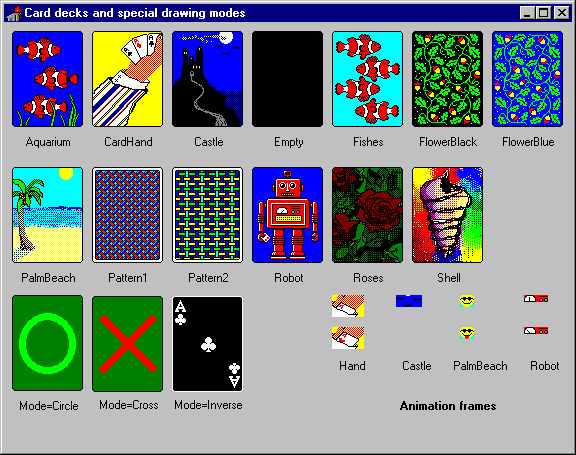
All in all, CARDS.DLL consists mostly of the bitmap resources. These contain the 52 playing cards (no jokers or wild cards are included), the backs of several card decks, and a few tiny bitmaps used for animation. These are the same bitmaps coming from Solitaire.
CARDS.DLL (with the internal name of Cards Display Technology) contains a whopping 5 routines for its API and one routine (the WEP) for housekeeping.
The API routines are:
- cdtInit
- cdtTerm
- cdtDraw
- cdtDrawExt
- cdtAnimate
The initialisation returns the default width and height for a playing card. In addition, it caches some of the card decks (the cross and circle and empty decks). Default width and height are obtained from the empty card deck.
The two drawing routines differ in only one way: cdtDrawExt has extra parameters for card width and height. Actually, internally cdtDraw calls cdtDrawExt filling those two parameters with the default values.
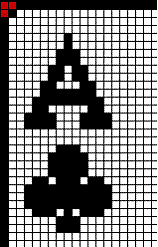
The cdtDrawExt does the grunt work. It has different drawing modes (which are explained below) and possesses some additional intelligence by optionally saving the tree corner pixels on all four corners of the card and restoring them after the card has been drawn. It ONLY does this when drawing cards of the default width and height; cards with different width or height have a different amount of pixels to be saved and cdtDrawExt is not smart enough for that.

Figure: Three corner pixels to be saved and replaced in each corner.
Another pitfall cdtDrawExt solves has an historic reason. When looking at the bitmap resources, we see all the bitmaps have a black border, except for the Ace through 10 of Hearts and the Ace through 10 of Diamonds. This was a design-fault made in Solitaire. This border needs to be black, so cdtDrawExt repaints the border using a black pen for these cards.
The drawing modes supported by cdtDraw and cdtDrawExt are worth experimenting with. Especially bleed through combined with background, deck and face can give fancy results.


Some of the decks contain an animation sequence consisting of 2 or 4 animation frames. The cdtAnimate function draws these frames. There are two points to be aware of though:
- you have to perform your own animation timing
- cdtAnimate draws to the canvas regardless if it is on top Z-order or not.
The first is really strange: it means that all Microsoft applications that need to do animation on the card back need to implement it themselves. In the end, this is not strange at all: the only application that does animation is Solitaire. Hearts has a fixed card deck without animation and FreeCell does not use a card deck at all.
The second is not so strange: the application itself always is responsible for maintaining the Z-order of its objects. In short it means that it should call cdtAnimate only in its paint handler.
For animation, there are at most two (possibly semi-random) timing intervals needed. The first interval determines the time between two sequences of events. This can be used for the Palm Beach deck where once every while, the sun gets sunglasses and sticks out its tongue.
The second interval determines the amount of time between each animation frame in succession. This can be used for the robot with the blinking lights and moving gauge.
A Delphi wrapper
Although Delphi can do procedural stuff, its heart and soul is based on components. Playing cards are visual, have properties (card and deck) and events (animation) so are very well suited for a component wrapper.
The component wrapper must be able to perform all the functionality that is found in the Microsoft applications. So it must be able to draw the card faces, decks and animation just like the Microsoft applications do.
Of course you can restrict yourself, but the above goal makes a lot of sense, not?
Getting the CARDS.DLL API
In order to implement the Delphi wrapper, we have to know the exact parameters of the CARDS.DLL API. This is not an easy task as CARDS.DLL is undocumented. Finding out is a matter of reverse engineering. For an experienced programmer, completely reverse engineering a small DLL like CARDS.DLL takes about 1 or 2 days. I will not go into deep detail, but in short the process is as follows:
- use an inspection tool (like Borland’s TDUMP or Microsoft’s EXEHDR) to find out the imported and exported routines in CARDS.DLL
- use a disassembly tool (like DUMPPROG) to dump CARDS.DLL
- check for RETF instructions: they indicate the number of parameters
- check for calls to the Windows API: they shed light on what the other parameters mean
TDUMP ships with Delphi, so you already have it. It gives all kinds of fancy information about files related to software development. EXEHDR ships with various Microsoft programming products. DUMPPROG is a tool for disassembling Win16 .EXE and .DLL files written by Duncan Murdoch, William Peavy and Jeroen Pluimers.
The net result is the below function list (with parameters):
type
    TCardId = Cardinal;
    TCoordinate = Integer;

function  cdtInit(var CardWidth, CardHeight: TCoordinate): Bool;
procedure cdtTerm;
function  cdtDraw(aDC: HDC; X,Y: TCoordinate; Card: TCardId; Mode: TCoordinate; Color: TColorRef): Bool;
function  cdtDrawExt(aDC: HDC; X,Y,Width,Height: TCoordinate; Card: TCardId; Mode: TCoordinate; Color: TColorRef): Bool;
function  cdtAnimate(aDC: HDC; Card: TCardId; X, Y: TCoordinate; AnimateIndex: Word): Bool;
Translating to properties
From that, a property hierarchy can be assembled. The absence of joker cards makes it easier to set up such an hierarchy; it is one less thing to take care of. One of the possible hierarchies is like this:
- TCard
- Animation timer 1
- randomness
- minimum interval
- maximum interval
- Animation timer 2
- randomness
- minimum interval
- maximum interval
- Suit
- Rank (within suit)
- Deck
- Visible side (Deck or Face)
- Drawing mode
- Background colour
- Left,Top,Width,Height (standard Delphi properties)
The deck, suit and rank of the card, together with the visible side determine the CardId value passed to cdtDraw or cdtDrawExt.
The animation timers can be written fully in Delphi itself. They use a Timer component each and a back-link to the Card component or Card property to pass on the timer event.
Timing the animations
The source file CARDTMR.PAS contains the source to the animation timer which has four properties:
TCardTimer
   MinInterval: Integer
   MaxInterval: Integer
   Mode: TTimerMode (tmOff, tmFixed, tmRandom)
   OnTimer: TNotifyEvent
The OnTimer event is fired never (TimerMode = tmOff), once every MinInterval (TimerMode = tmFixed) or once every MinInterval..MaxInterval (TimerMode = tmRandom). It is an excellent example of how to use Get/Set property methods, how to encapsulate another component (TTimer) and how to form a part-of relationship with another property.
Actually, the TCardTimer component does not contain much code. The most important piece is the Assign method which is used by its owner to assign a new value.
procedure TCardTimer.Assign(Source: TPersistent);
begin
  if Source is TCardTimer then begin
    if TCardTimer(Source).FTimer.Enabled then
      Start
    else
      Stop;
    MinInterval := TCardTimer(Source).MinInterval;
    MaxInterval := TCardTimer(Source).MaxInterval;
    Mode := TCardTimer(Source).Mode;
  end;
end;
What you see here is also a procedural encapsulation of the Enabled property by using Start and Stop methods. Many times, a property can also be expressed as two actions. The TDataSet component with the Active property – that can be changed by calling Open or Close.
Another interesting method is Adjust. It changes the value of the embedded TTimer component according to the interval rules specified earlier:
procedure TCardTimer.Adjust;
begin
  if FMode = tmRandom then
    FTimer.Interval := MinInt([MinInterval, MaxInterval]) +
      Random(Abs(MaxInterval-MinInterval))
   else
    FTimer.Interval := MaxInt([MinInterval,MaxInterval]);
end;
Storing the properties
The source file CARDPRP.PAS contains the TCard class, which has a few more properties:
TCard
   ResourceId: TCardId
   BackgroundColor: TColor
   AnimationFrame: TCardAnimationFrame
   AnimationFrameTimer: TCardTimer
   DrawMode: TCardDrawMode (cdmFace, cdmDeck, ... cdmCross, cdmCircle)
   Deck: TCardDeck
   Rank: TCardRank
   Suit: TCardSuit
   OnAnimate: TNotifyEvent
   OnChange: TNotifyEvent
The ResourceId property is calculated depending on the values of DrawMode, Deck, Rank and Suit:
  if DrawMode = cdmDeck then
    NewResourceId := idDeckFirst + Word(Deck)
  else
    NewResourceId := Word(Rank)*SuitCount + Word(Suit);
The OnTimer event of the TCardTimer property is bound to the TCard methods DoAnimation and DoAnimation frame methods. These contain a bit of tricky code to start and stop the timers so only one timer handle is used at any moment (Win16 has a limit on timer handles) and handle the randomness of the timers.
The Animation frame property depends on the state of the timers and determines how the Card component draws itself. OnAnimate is called whenever the Animation property changes.
OnChange is called whenever the contents of the properties ResourceId or BackGround changes. OnAnimate and OnChange are links to the Card component itself which is in VCLCARD.PAS.
TCard also contains an Assign method that copies the property values from another TCard component:
procedure TCard.Assign(Source: TPersistent);
begin
  if Source is TCard then
  begin
    FAnimationFrame := TCard(Source).AnimationFrame;
    AnimationTimer := TCard(Source).AnimationTimer;
    AnimationFrameTimer := TCard(Source).AnimationFrameTimer;
    FBackgroundColor := TCard(Source).BackgroundColor;
    FDrawMode        := TCard(Source).DrawMode;
    FDeck            := TCard(Source).Deck;
    FRank            := TCard(Source).Rank;
    FSuit            := TCard(Source).Suit;
    CalcResourceId;
  end;
end;
Bringing it all together
Finally there is the source file VCLCARD.PAS. It is the actual component used by a Delphi application. It is also the only source file that actually calls into CARDS.DLL. So, interface to both the upper layer (Delphi application) and lower layer (CARDS.DLL) are kept into one file.
The events OnAnimate and OnChange from TCard are routed to its own OnChange and OnAnimate events. Also, repainting is performed upon an OnChange event and animation frame painting upon an OnAnimate event.
One tricky bit is in the Create method. It calls cdtInit to initialise the CARDS.DLL and obtain the default width and height of a card. Because the width and height properties of a component can not be passed as var-parameters, a few temporary variables are used. The reason for this impossibility is that a property can have a write and read method. The compiler would have to make assumptions (like C++ with its automatic constructors/destructors) that violate the idea behind the Pascal language. Assigning the values is therefore left to the programmer.
Going 32-bit
All flavours of CARDS.DLL share the same file name. This imposes a problem, as it is not easy to distinguish between the 16-bit and 32-bit easily. We have to find a way of distinguishing the DLLs, or only use one DLL.
Calling one DLL would involve thunking. Also thunking is out of the question. For one reason, the thunking mechanisms in Windows 95 and Windows/NT differ sufficiently to require different solutions. One of the reasons is that you have to do thunking with the Microsoft Thunking Compiler, which assumes both assembly and C knowledge.
In the end, it seems easiest to ship 16 and 32-bit versions with the correct DLL in different directories.
The next few sections discuss the problems faced when porting the Cards component to Win32.
Static importing peculiarities
There is a difference in importing for 16-bit and 32-bit static references.
Before talking about the problem, lets give the solution:
{$ifdef Win32}
  const mmsyst = 'WINMM.DLL'
{$else}
  const mmsyst = 'MMSYSTEM'
{$endif Win32}

function mmsystemGetVersion; external mmsyst name 'mmsystemGetVersion';
The problem is that the extension ‘.DLL’ is actually used in the Win32 world. If you ommit it, the Win32 program loader can’t find the particular module and refuses to load.
The Win16 loader however, appends ‘.DLL’ to all static external references. This means that if you are trying to link to ‘THREED.VBX’, the loader actually tries to load ‘THREED.VBX.DLL’ – which of course does not work.
Windows 95 had the Win16 loader fixed, but for compatibility with Windows 3.x and Windows/NT 3.x, you still need to ommit the extension. Which also means that you are limited to .DLL files for static linking in Win16.
The thing you learn from this is that IF you write code with static external references and the code is to be run on multiple platforms, be sure to test it on all of them. This holds for both 16-bit and 32-bit code on Windows 3.x, Windows 95 and Windows NT (both 3.x and 4.x).
Note that this peculiarity only shows up with static linking. With dynamic linking (using LoadLibrary), both methods can be used on all platforms. So, if you ommit ‘.DLL’, LoadLibrary will add ‘.DLL’. If you add a different extension (for instance ‘.OCX’), then LoadLibrary won’t touch it.
Importing by name versus by (ordinal) index
In Win32, you don’t import functions by ordinal, you can only import functions by name. The “ordinal” value associated with an exported function is not the function’s index in the export table, it is a hash value derived from the exported function name, and is entirely optional.
This is a real problem for many third party Win16 libraries. Most of them only partially export references by ordinal because this loads faster. In Win32, they HAVE to export by name.
That is exactly the reason why the Delphi RTL has been almost completely replaced in stead of IFDEFed. Otherwise, you would see a lot of IFDEFs like below.
{$ifdef Win32}
  const mmsyst = 'WINMM.DLL'
  function mmsystemGetVersion; external mmsyst name 'mmsystemGetVersion';
{$else}
  const mmsyst = 'MMSYSTEM'
  function mmsystemGetVersion; external mmsyst index 5;
{$endif Win32}
The lesson you learn from this is that if you are a third party library vendor, you should put your efforts into exporting everything by name as well as by ordinal.
Note that the performance penalty of importing by name is not that bad anyway – it is only performed once for each program instance at load time (or at run time if your app uses GetProcAddress to do truly dynamic linking)
Calling conventions
During the shift from Win16 to Win32 the calling convention for most procedures have changed.
In Win16, the calling convention for external references was Pascal-style. This was the default calling convention in Delphi 1.0. During Pascal-style call, the parameters are pushed onto the stack in a left to right order. The called procedure is responsible for cleaning up the stack.
In Win32, the calling convention has changed to STDCALL. This is NOT the default in Delphi 2.0 (the default is REGISTER which is more efficient), so it has to be explicitly specified. The STDCALL is a mix between C-style and Pascal-style convention; parameters are pushed on the stack from right to left (like C-style), but the called procedures is responsible for cleaning up the stack (like Pascal-style).
A very simple program shows the differences between the calling conventions.
For the calling conventions, the order of parameters pushed onto the stack differs and the responsibility of cleaning up the stack changes from caller to function. Also, with the default REGISTER calling convention, the first three parameters are passed in registers and less stack needs to be cleaned up.
This means it is VERY important to get the calling convention with external references right, otherwise processor exceptions will take place that are non-recoverable.
Of course, the calling convention most often used with external references in Win32 mode is STDCALL. In Win16 mode, this used to be PASCAL (which is the default in Win16 mode).
    program Project1;

    procedure rc (a,b,c,d: Integer); Register; { default }
    begin
    end;

    procedure sc (a,b,c,d: Integer); StdCall;
    begin
    end;

    procedure pc (a,b,c,d: Integer); Pascal;
    begin
    end;

    procedure cc (a,b,c,d: Integer); CDecl;
    begin
    end;

    begin
      rc(1,2,3,4);
      pc(1,2,3,4);
      cc(1,2,3,4);
      sc(1,2,3,4);
    end.

    Turbo Debugger Log
    CPU 80486
    Project1.rc: begin                          ; REGISTER calling convention
    :00401BB4 55             push   ebp
    :00401BB5 8BEC           mov    ebp,esp
    Project1.5: end;
    :00401BB7 5D             pop    ebp
    :00401BB8 C20400         ret    0004        ; function cleans up stack
    :00401BBB 90             nop
    Project1.sc: begin                          ; STANDARD calling convention
    :00401BBC 55             push   ebp
    :00401BBD 8BEC           mov    ebp,esp
    Project1.9: end;
    :00401BBF 5D             pop    ebp
    :00401BC0 C21000         ret    0010        ; function clears up stack
    :00401BC3 90             nop
    Project1.pc: begin                          ; PASCAL calling convention
    :00401BC4 55             push   ebp
    :00401BC5 8BEC           mov    ebp,esp
    Project1.13: end;
    :00401BC7 5D             pop    ebp
    :00401BC8 C21000         ret    0010        ; caller cleans up stack
    :00401BCB 90             nop
    Project1.cc: begin                          ; C calling convention
    :00401BCC 55             push   ebp
    :00401BCD 8BEC           mov    ebp,esp
    Project1.17: end;
    :00401BCF 5D             pop    ebp
    :00401BD0 C3             ret                ; caller cleans up stack
    :00401BD1 8D4000         lea    eax,[eax]

    Project1.Project1: begin
    [...]                                       ; program initialization
    Project1.20:  rc(1,2,3,4);                  ; REGISTER calling convention
    :00401BEB 6A04           push   00000004    ; parameters from right to left
    :00401BED B903000000     mov    ecx,00000003; three parameters in registers
    :00401BF2 BA02000000     mov    edx,00000002
    :00401BF7 B801000000     mov    eax,00000001
    :00401BFC E8B3FFFFFF     call   Project1.rc
    Project1.21:  pc(1,2,3,4);                  ; PASCAL calling convention
    :00401C01 6A01           push   00000001    ; parameters from left to right
    :00401C03 6A02           push   00000002    ; all parameters on the stack
    :00401C05 6A03           push   00000003
    :00401C07 6A04           push   00000004
    :00401C09 E8B6FFFFFF     call   Project1.pc
    Project1.22:  cc(1,2,3,4);                  ; C calling convention
    :00401C0E 6A04           push   00000004    ; parameters from right to left
    :00401C10 6A03           push   00000003    ; all parameters on the stack
    :00401C12 6A02           push   00000002
    :00401C14 6A01           push   00000001
    :00401C16 E8B1FFFFFF     call   Project1.cc
    :00401C1B 83C410         add    esp,00000010; caller cleans up stack
    Project1.23:  sc(1,2,3,4);                  ; STANDARD calling convention
    :00401C1E 6A04           push   00000004    ; parameters from right to left
    :00401C20 6A03           push   00000003    ; all parameters on the stack
    :00401C22 6A02           push   00000002
    :00401C24 6A01           push   00000001
    :00401C26 E891FFFFFF     call   Project1.sc
    Project1.24: end.
    [...]                                       ; program termination
Using compiler directives
Delphi 2.0 (or Delphi32) adds two new conditional defines: WIN32 and VER90. It is important to use the right one while writing code.
- WIN32 – use only to distinguish between WIN16 and WIN32 API issues
- VER90 – use only to distinguish between Delphi 1.0 and 2.0 language features
New language features should only be distinguished with the VER90 directive. Some of these features that are particularly important fall into the catagories of OLE (variant records) and productivity (form inheritance and datamodules).
interface

function mmsystemGetVersion: Cardinal; {$ifdef win32} stdcall; {$endif win32}

implementation

{$ifdef Win32}
  const mmsyst = 'WINMM.DLL'
{$else}
  const mmsyst = 'MMSYSTEM'
{$endif Win32}

function mmsystemGetVersion; external mmsyst name 'mmsystemGetVersion';
Dynamic importing versus static importing
Pros of dynamic importing:
- can import all module kinds on all platforms
- module needs to be available only when it is used
- faster load-times
Pros of static importing:
- faster calling
- all-or-nothing situation at ease (all modules are cross-referenced at load time of the program)
- no typecasting of GetProcAddress needed (looks cleaner)
Debugging components
Sometimes you want to debug a component within the Delphi environment itself. However, Delphi can not debug itself. An external debugger is needed.
There is an external TD32 you can use for it. It is possible to debug DELPHI32 within TD32, however, by default you can not get to the components.
The components are in CMPLIB32.DCL. This DLL is loaded dynamically, so you can only attach to it when DELPHI32 is running. Then you have to find your way in from TD32.
The easiest way to break in using TD32 is by giving it a hint when to break in. The hints can be issued in the form of a debugger break interrupt. This is an old MS-DOS trick that still works in Win32. The statement to include just before you want to debug is ‘asm int 3 end;’.
Drop your component on the form, change its property so the break interrupt is fired and switch to TD32: voila – the debugger breaks right into your code at the correct spot!
Conclusion
CARDS.DLL is certainly a fun thing to work with. Getting everything to work takes some time, but then it is usable in both Win16 and Win32 after all!
–jeroen




 Zaterdag was de jaarlijkse KatwijkBinse Truckrun: een evenement waar gehandicapte mensen als bijrijder in een Truck (97 stuks!) of Bus (3 stuks) een rit van ongeveer 4.5 uur mee mogen maken.





 The Wiert Corner - irregular stream of stuff