The Wiert Corner – irregular stream of stuff

Jeroen W. Pluimers on .NET, C#, Delphi, databases, and personal interests

  • My badges

  • Twitter Updates

  • My Flickr Stream

  • Pages

  • All categories

  • Enter your email address to subscribe to this blog and receive notifications of new posts by email.

    Join 1,862 other subscribers

Archive for 2015

Excel: Set the printing order of worksheet pages; printing row/coumn headings

Posted by jpluimers on 2015/08/21

I keep forgetting these two settings, most likely because I hardly use spreadsheets that are both wide and tall.

First the print order

Basically there are two orders:

  • Prefer horizontal over vertical (Excel calls this “Over, then down”) so it prints columns first, then rows
  • Prefer top to bottom (Excel calls this “Down, then over”) so it prints rows first, then columns

Here is how to do it in Excel 2007 and up:

  1. Ensure your worksheet is active.
  2. Click the “Page Layout” tab.
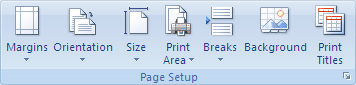
  3. In the “Page Setup” group, click the “Dialog Box Launcher” on the bottom right of the group (this tiny icon: Dialog box launcher).
  4. In the “Page Setup” dialog that appears, click on the “Sheet” tab.
  5. Under “Page order”, select either of these two options (the preview will change, see the images below).
    1. Down, then over
    2. Over, then down
  6. Click OK to close the “Page order” dialog.

Then the row/colum headings

This is actually much easier, and also works this way from Excel 2007 and up:

  1. Ensure your worksheet is active.
  2. Click the “Page Layout” tab.
  3. In the “Sheet Options” group, under “Headings”, select the “Print” check box.

–jeroen

via:

Image thanks to Microsoft:

Down, then over.

Down, then over.

Over, then down.

Over, then down.


Printing row/column headings

Posted in Excel, Office, Office 2007, Office 2010, Office 2013, Power User | Leave a Comment »

GoF Patterns in Delphi | Implementations of the famous Gang of Four Design Patterns in Delphi language – via Nick Hodges

Posted by jpluimers on 2015/08/20

Thanks to Nick Hodges for having Delphi-losophy | Flotsam and Jetsam #88 point me to GoF Patterns in Delphi | Implementations of the famous Gang of Four Design Patterns in Delphi language.

–jeroen

Posted in Delphi, Delphi 2007, Delphi 2009, Delphi 2010, Delphi XE, Delphi XE2, Delphi XE3, Delphi XE4, Delphi XE5, Delphi XE6, Delphi XE7, Development, Software Development | 2 Comments »

Locate and reset the last cell on a worksheet

Posted by jpluimers on 2015/08/19

The trick:

When you open the workbook again, the last cell of the data should be the last cell on the worksheet.

Which means that the “Last cell” only changes after a reload.

–jeroen

via Locate and reset the last cell on a worksheet.

Posted in Excel, Office, Power User | Leave a Comment »

Installing FireDAC 8 for Delpi 2007

Posted by jpluimers on 2015/08/19

Installing FireDAC 8 for Delpi 2007

Installation

  1. Obtain 29458_firedac_xe4_update_2_for_rad_studio_delphi_c_ent_ult_arch.zip from a registered Delphi XE4 or higher license: http://cc.embarcadero.com/item/29458:
  2. Extract it into FireDAC_8.0.5.3365.exe.
  3. Run FireDAC_8.0.5.3365.exe with the /showide parameter as described in http://support.embarcadero.com/article/42970:
  4. FireDAC_8.0.5.3365.exe /showide
    1. (When not running as Administrator: elevate to Administrator)
    2. Welcome screen: press next
    3. License screen: accept, then press next
    4. Destination selection screen: keep C:\Program Files (x86)\Embarcadero\FireDAC, then press next
    5. Select components screen: keep the selection (Full installation), then press next
    6. Select IDEs screen: choose Delphi 2007 (but not Delphi 2006), then press next
    7. Select Demo Databases screen: keep the settings (do not choose Interbase / Firebird server as then you have to provide the credentials for the server), then press next
    8. Start menu screen: keep Embarcadero FireDAC, then press next
    9. Ready to install screen: press install
    10. After installation: press finish, then read the readme
      1. or later browse to <file:///C:/Program%20Files%20(x86)/Embarcadero/FireDAC/Readme.html>
      2. That’s what actually tells you:

The installer automatically installs FireDAC in the Delphi XE4 and C++ Builder XE4 IDEs. For older versions of the IDEs, you can run the installer with the /SHOWIDE command line parameter.

After installation

To fix this when starting Delphi:

[Window Title]
Error

[Content]
Can't load package C:\Users\Public\Documents\RAD Studio\5.0\Bpl\AnyDAC_Dcl_D11.bpl.
The specified module could not be found.
Do you want to attempt to load this package the next time a project is loaded?

[Yes] [No]

The actual BPL sometimes is in C:\Users\<username>\AppData\Local\Documents\RAD Studio\5.0\Bpl\AnyDAC_Dcl_D11.bpl

The cause is that the BPL gets loaded from %BDSCOMMONDIR% which on some systems points to

  • %PUBLIC%\Documents\RAD Studio\5.0

and on others points to

  • %LOCALAPPDATA%\Documents\RAD Studio\5.0

This seems to be the case on machines where more different Windows users are using Delphi.

The installer does not fully recognize this distinction, so copies the BPL to %LOCALAPPDATA%\Documents\RAD Studio\5.0\Bpl and registers it as being in %PUBLIC%\Documents\RAD Studio\5.0\Bpl.

On these machines there is a difference between the definition of BDSCOMMONDIR in these registry keys:

  • HKEY_LOCAL_MACHINE\SYSTEM\CurrentControlSet\Control\Session Manager\Environment
    • points to C:\Users\Public\Documents\RAD Studio\5.0
  • HKEY_CURRENT_USER\Environment
    • points to C:\Users\<username>\AppData\Local\Documents\RAD Studio\5.0

Solution

reg delete "HKCU\Software\Borland\BDS\5.0\Known Packages" /v "%PUBLIC%\Documents\RAD Studio\5.0\Bpl\AnyDAC_Dcl_D11.bpl" /f
reg add "HKCU\Software\Borland\BDS\5.0\Known Packages" /v "%BDSCOMMONDIR%\Bpl\AnyDAC_Dcl_D11.bpl" /t REG_SZ /d "Embarcadero FireDAC Components" /f

–jeroen

via: jeroenp / BeSharp.net / source / Native / Delphi / Documentation / Install-FireDAC-8-in-Delphi-2007.md — Bitbucket.

Posted in Delphi, Delphi 2007, Delphi XE4, Development, Software Development | 4 Comments »

.NET enable and disable Fusion log to investigate assembly loading issues

Posted by jpluimers on 2015/08/18

Had to investigate some Assembly Loading issues, so I wrote two batch files to enable and disable the .NET Fusion Log:


reg add "HKLM\Software\Microsoft\Fusion" /v EnableLog /t REG_DWORD /d 0 /f


reg add "HKLM\Software\Microsoft\Fusion" /v EnableLog /t REG_DWORD /d 1 /f

They modify the HKLM\Software\Microsoft\Fusion key REG_DWORD value EnableLog.

A few notes:

  • It is very important to turn of the Fusion log settings as soon as you are finished investigating. Fusion logs potentially take a lot of resources.
  • When you have a .NET host like ISS, you have to restart that host (for instance by running iisreset)
  • There is also Fuslogvw.exe Assembly Binding Log Viewer, but I like logging over viewing as logs are persistent.
  • There are more values under HKEY_LOCAL_MACHINE\SOFTWARE\Microsoft\Fusion you can configure; see the answer by Gary Kindel on StackOverflow:
    • DWORD ForceLog set value to 1
    • DWORD LogFailures set value to 1
    • DWORD LogResourceBinds set value to 1
    • String LogPath set value to folder for logs e.g. C:\FusionLog\ (ensure the final backslash is there and the folder exists).

–jeroen

via:

Posted in .NET, .NET 1.x, .NET 2.0, .NET 3.0, .NET 3.5, .NET 4.0, .NET 4.5, C#, C# 1.0, C# 2.0, C# 3.0, C# 4.0, C# 5.0, C# 6 (Roslyn), Development, Software Development | Leave a Comment »

“USB Deivces Disabled: unplug the device using too much power to re-enable USB devices.” – via: Super User

Posted by jpluimers on 2015/08/17

I like how MaylorTaylor formulated his question around this topic on superuser:

USB Deivces Disabled: unplug the device using too much power to re-enable USB devices.

Basically he regression tested many permutations of devices, cables, ports, rebooting, etc.

I had a similar problem, and found it hard to track down as it was intermittent. In the end it was not 1 but 2 USB cables being not completely reliable.

So the warning can use some improvement:

  • sometimes it is not a device but a cable
  • it doesn’t indicate on which USB port this happens

–jeroen

via: mac – USB device Disabled Mavericks – Super User.

Posted in Apple, Mac, Mac OS X / OS X / MacOS, MacBook, MacBook Retina, MacBook-Pro, OS X 10.9 Mavericks, Power User | Leave a Comment »

python – Running Mercurial on Mavericks – Stack Overflow

Posted by jpluimers on 2015/08/15

Solution [WayBack] python – Running Mercurial on Mavericks – Stack Overflow.:

brew install hg

–jeroen (who forgot to publish this on 20150815T2248)

Posted in Apple, Mac OS X / OS X / MacOS, OS X 10.9 Mavericks, Power User | Leave a Comment »

ESXi: specifying the ciphers used to serve the vSphere Client

Posted by jpluimers on 2015/08/14

You can specify the ESXi ciphers used to serve the vSphere Client. You can do this both ways: either extend them (make it less secure, but more compatible, for instance to server vSphere Client on Windows Server 2003 / Windows XP), or restrict them to make it more secure.

VMware recommends the cipherList ALL to make it more compatible: VMware KB: vSphere Client and vSphere PowerCLI may fail to connect to vCenter Server 5.0, 5.1 and 5.5 due to a Handshake failure.

However, ALL  is far too wide to be secure. Since cipherList uses the standard cipher list format documented at ciphers – SSL cipher display and cipher list tool.

You can use the cipher lists from Strong SSL Security on nginx – Raymii.org:

Read the rest of this entry »

Posted in ESXi5, ESXi5.1, ESXi5.5, ESXi6, Power User, PowerCLI, Virtualization, VMware, VMware ESXi | Leave a Comment »

ESXi Embedded Host Client – VMware Labs

Posted by jpluimers on 2015/08/14

Interesting: ESXi Embedded Host Client – VMware Labs.

Posted in ESXi5, ESXi5.1, ESXi5.5, ESXi6, Power User, Virtualization, VMware, VMware ESXi | Leave a Comment »

Start URL for searching my own posts and comments – via: Ronnie Bincer.

Posted by jpluimers on 2015/08/14

Thanks to Ronnie Bincer, here is my start URL to find back posts and comments I made:

Note that

  • since my account is named and does not have an ID any more, I had to twiddle that URL a bit
  • https://plus.google.com/100853746448364695376 is a throw away account for a place that plays HTTPS man-in-the-middle on everyone using their network.

–jeroen

via: How to Easily Find Your Google+ Comments….

Posted in G+: GooglePlus, Google, Power User, SocialMedia | Leave a Comment »