


When the Delphi IDE gets slow…
Posted by jpluimers on 2019/10/24
A few tips for when the Delphi IDE gets slow, try these step by step:
- Install Delphi Fix-Pack by Andreas Hausladen (a.k.a. Andy)
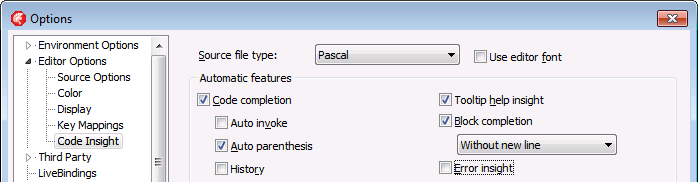
- Disable “Error Insight”
- Disable or install LiveBindings related packages
The first can be hard to find as his site disallows search engine indexing, but I’ve written about it before site:wiert.me delphi fixpack andy.
The second step is not a package, but an IDE setting:
The last step involves packages like these (package path followed by package description in the order of the registry):
$(BDSBIN)\dclBindCompFireDAC220.bpl            LiveBinding Expression Components FireDac
$(BDSBIN)\dclbindcomp220.bpl                   Embarcadero LiveBindings Components
$(BDSBIN)\dclbindcompvcl220.bpl                Embarcadero LiveBindings Components VCL
$(BDSBIN)\dclbindcompdbx220.bpl                LiveBindings Expression Components DbExpress
$(BDSBIN)\dclbindcompfmx220.bpl                Embarcadero LiveBindings Components FireMonkey
In those, $(BDSBIN) and $(BDS)\Bin point to the same directory.
Parts via: [WayBack] EDIT: Pretty sure Fix-Pack solved the speed issue, as I installed it and things started flying. I was trying to be as stock as possible, in order to und… – Vin Colgin – Google+
–jeroen

 The Wiert Corner - irregular stream of stuff
dummzeuch said
The url is outdated (It’s https://www.idefixpack.de/blog/ )and there is no longer a robots.txt