The Wiert Corner – irregular stream of stuff

Jeroen W. Pluimers on .NET, C#, Delphi, databases, and personal interests

  • My badges

  • Twitter Updates

  • My Flickr Stream

  • Pages

  • All categories

  • Enter your email address to subscribe to this blog and receive notifications of new posts by email.

    Join 1,861 other subscribers

Archive for 2019

IOTAProjectNotifier.Modified notifies when when Project Options have changed…

Posted by jpluimers on 2019/12/18

From: [WayBack] Is there any way using Open Tools to detect when Project Options have changed? This link from +David Hoyle covers a whole bunch of other notifications: … – David Nottage – Google+

IOTAProjectNotifier.Modified

Note a direct “IOTAProjectNotifier.Modified” – Google Search revealed nothing relevant, but a parts “IOTAProjectNotifier” “Modified” – Google Search revealed [WayBack] RadStudioVersionInsight/SvnIDENotifier.pas at master · rburgstaler/RadStudioVersionInsight · GitHub: TProjectNotifier

Further reading are these excellent blog posts:

–jeroen

Posted in Delphi, Development, Software Development | Leave a Comment »

Visual Studio Code: enable Python debugging and selecting the Python version used

Posted by jpluimers on 2019/12/18

A few links and screenshots for my archive (assuming development on MacOS):

Enable Python Debugging

  1. Start the debugger: key combination Shift-Command-D, or click the debug icon 
  2. Click on the wheel with the red dot in the debugger pane: , which will generate and open a launch.json file in the current workspace, remote the red dot and fill the drop down with debug configurations


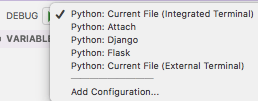
Via:

Selecting the Python version

  1. Key combination Ctrl-Shift-P
  2. Type Select Interpreter
  3. Select the Python version you want; on my system they were at the time of writing:
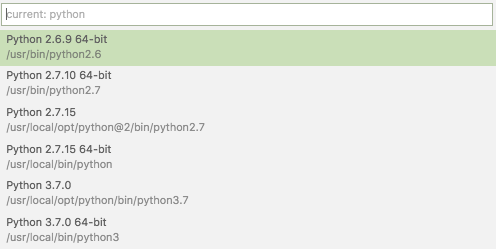
Via:

Setting command-line arguments

Commandline arguments are set in the same .vscode/launch.json file:

"args": [
    "--quiet", "--norepeat"
],

Though [WayBack] Python debugging configurations in Visual Studio Code: args could have been more clear that you should put that under the Python configuration section you are debugging with, for instance:

{
    // Use IntelliSense to learn about possible attributes.
    // Hover to view descriptions of existing attributes.
    // For more information, visit: https://go.microsoft.com/fwlink/?linkid=830387
    "version": "0.2.0",
    "configurations": [
        {
            "name": "Python: Current File (Integrated Terminal)",
            "type": "python",
            "request": "launch",
            "program": "${file}",
            "console": "integratedTerminal",
            "args": [
                "--quiet", "--norepeat"
            ]
        },

Setting the startup python program

The page above also has a section on [WayBack] Python debugging configurations in Visual Studio Code: _troubleshooting that you can use to start the same script each time you debug, for instance your integration tests:

{
    // Use IntelliSense to learn about possible attributes.
    // Hover to view descriptions of existing attributes.
    // For more information, visit: https://go.microsoft.com/fwlink/?linkid=830387
    "version": "0.2.0",
    "configurations": [
        {
            "name": "Python: Current File (Integrated Terminal)",
            "type": "python",
            "request": "launch",
            // "program": "${file}",
            "program": "${workspaceFolder}/snapperListDeleteFailures.FileTests.py",

Fazit

I should have read [WayBack] Get Started Tutorial for Python in Visual Studio Code first.

–jeroen

Posted in Development, Python, Scripting, Software Development | Leave a Comment »

Great quote destructors in Delphi development…

Posted by jpluimers on 2019/12/18

No destructor should ever throw an exception. If it does, there’s not really any way to recover from it anyway, so it doesn’t matter if anything leaks because of it.

Greate quote by [WayBackUser Rob Kennedy answering [WayBackinterface – Avoiding nested try…finally blocks in Delphi – Stack Overflow

It’s a basic development pattern for writing Delphi destructor code.

–jeroen

Posted in Delphi, Design Patterns, Development, Software Development | 6 Comments »

shell – Should I put #! (shebang) in Python scripts, and what form should it take? – Stack Overflow

Posted by jpluimers on 2019/12/17

It is very important to get the shebang correct. In case of Python, you both need env and the correct Python main version.

Answer

Correct usage for Python 3 scripts is:

#!/usr/bin/env python3

This defaults to version 3.latest. For Python 2.7.latest use python2 in place of python3.

Comment

env will always be found in /usr/bin/, and its job is to locate bins (like python) using PATH. No matter how python is installed, its path will be added to this variable, and env will find it (if not, python is not installed). That’s the job of env, that’s the whole reasonwhy it exists. It’s the thing that alerts the environment (set up env variables, including the install paths, and include paths).

Source: [WayBack] shell – Should I put #! (shebang) in Python scripts, and what form should it take? – Stack Overflow

Thanks GlassGhost and especially flornquake for the answer and Elias Van Ootegem for the comment!

The answer is based on [WayBack] PEP 394 — The “python” Command on Unix-Like Systems | Python.org.

The env is always in the same place, see env – Wikipedia and Shebang (Unix) – Wikipedia.

–jeroen

Posted in Development, Python, Scripting, Software Development | Leave a Comment »

InplaceExeWrapper for those tools that do not allow specifying an output file – twm’s blog

Posted by jpluimers on 2019/12/17

In my bin directory from [WayBack] InplaceExeWrapper Project Top Page – OSDN: [WayBackInplaceExeWrapper for those tools that do not allow specifying an output file – twm’s blog:

There are a lot of command line tools that are very useful, but have one flaw: They directly modify a file in place and do not allow you to specify an output file instead.

Enter InplaceExeWrapper which called as

InplaceExeWrapper --expectfilenameonstdout c:\path\to\dprojnormalizercmd.exe input.dproj output.dproj

does the following:

  1. Create a temporary directory under %TEMP%
  2. Copy the input file input.dproj there
  3. Call the tool as dprojnormalizer tempfile.dproj
  4. Copy the modified file to the output file output.dproj
  5. Delete the temporary directory

So basically it replaces the missing functionality of specifying an output file for the tool it calls.

Here is the full help on command line parameters and options:

Synopsis: InplaceExeWrapper [options] Executable InFile [OutFile]

Parameters:
Executable        : Executable to call (if set to "copy" we only copy InFile to OutFile)
InFile            : input filename
OutFile           : output filename, defaults to infile

Options:
--CheckResult=value : If set, the executable must return the value given for this option (must be a number)
--debug           : if given, some debug output is written to error.txt in the temp directory and the temp directory will not be deleted.
--ExpectFilenameOnStdout : if set, the output of the executable must contain the filename
--help
-?
-h
-H                : display parameter help
--ShowCmdLine     : Show command line as passed to the program.
--StartupLog=value : Write a startup log to the given file.
--TempDir=value   : directory to use for temporary files (must exist)
--toStdOut        : if set, output is written to stdout and infile is not changed

Via [WayBack] There are a lot of command line tools that are very useful, but have one flaw: They directly modify a file in place and do not allow you to specify an o… – Thomas Mueller (dummzeuch) – Google+

–jeroen

Posted in Delphi, Development, Software Development | 2 Comments »

Delphi: “Override method %s.%s should match case of ancestor %s.%s (H2365)”

Posted by jpluimers on 2019/12/17

If you write consistent code, you will never see [WayBackOverride method %s.%s should match case of ancestor %s.%s (H2365), but a long while ago I bumped into a project where some the developers had trouble using their shift key and failed to use code completion in quite a few parts of the source code.

So next a lot of lines containing things like Begin, whIle, repeaT, wrong indentations (not just at the wrong level, but even getting things indented at the same level wrong).

Code formatted like this was no exception, not even for methods bound to events:

procedure  TForm1.Button1CLick(SendeR  : TOBJect ) ;
 Begin
  Button2Click  (Sender );
end;

You cannot disable this hint individually as it is not on the list at [WayBack] Delphi XE2’s hidden hints and warnings options | Marc Durdin’s Blog, so you either have to fix the code (which I prefer), or disable all hints with {$ HINTS OFF} as per [WayBackcompiler construction – Can specific Delphi hints be disabled? – Stack Overflow (thanks Lars Truijens).

The above occasion was the first and only time I saw the hint H2365 until recently when I again bumped into a project that had grown over a long time needing some maintenance.

This reminded me I should have blogged about it, found back [Archive.is] H2365 Override method %s.%s should match case of ancestor %s.%s (Delphi) Today was the first time I have ever seen this compiler hint. Why does Delphi… – Graeme Geldenhuys – Google+ and dug a bit deeper.

Read the rest of this entry »

Posted in Delphi, Development, Software Development | Leave a Comment »

Ziggo Amsterdam Osdorp de Aker: netwerk-ID 4444, frequentie 164000, Modulatie 64QAM, Symboolfrequentie 6900

Posted by jpluimers on 2019/12/16

Since Ziggo had two URLs giving wrong/correct setup for digal TV, here is the thread and the correct information:

“Dit is fout:Frequentie: 47400, 474000 of 474Netwerk-ID: 4444 of 04444Modulatie: 64-QAMSymboolsnelheid: 6875Dit is goed:Vul bij het netwerk-ID 4444 in.Vul bij frequentie 164000 in.Selecteer bij Modulatie 64QAM.Vul bij Symboolfrequentie 6900 in.2/…”

Correct information for Ziggo Amsterdam de Aker:

  • netwerk-ID 4444,
  • frequentie 164000,
  • Modulatie 64QAM,
  • Symboolfrequentie 6900

URL with correct information: [Archive.is] Digitale en Interactieve Televisie installeren | Digitale Televisie | Klantenservice | Ziggo

Thread information:

  1. [WayBack] Jeroen Pluimers on Twitter : “Als ik op https://t.co/IUJu0G89O9 postcode huisnummer invul, krijg ik de foute informatie @ZiggoWebcare 1/…… “
  2. [WayBack] Jeroen Pluimers on Twitter: “Dit is fout: Frequentie: 47400, 474000 of 474 Netwerk-ID: 4444 of 04444 Modulatie: 64-QAM Symboolsnelheid: 6875 Dit is goed: Vul bij het netwerk-ID 4444 in. Vul bij frequentie 164000 in. Selecteer bij Modulatie 64QAM. Vul bij Symboolfrequentie 6900 in. 2/…”
  3. [WayBack] Jeroen Pluimers on Twitter: “De goede informatie kreeg ik via https://t.co/SRDJaJF9fT, na het invullen van dezelfde postcode/huisnummer combinatie uit de eerste link. Dus ergens is er iets mis met koppelen van de gegevens naar de diverse web pagina’s (; 3/3… https://t.co/g1iipNO16M”

–jeroen

Wrong URL: [Archive.is] Activeringscode, Frequentie of netwerk-ID instellen | Klantenservice | Ziggo

Read the rest of this entry »

Posted in LifeHacker, Power User | Leave a Comment »

if you allow users to register email addresses on your domain, make sure they can’t get: admin@ administrator@ hostmaster@…

Posted by jpluimers on 2019/12/16

Great tip from: [Archive.isMichal Špaček on Twitter: “Friendly reminder: if you allow users to register email addresses on your domain, make sure they can’t get: admin@ administrator@ hostmaste… https://t.co/wUHXrQC2J0”:

 Friendly reminder: if you allow users to register email addresses on your domain, make sure they can’t get:
  • admin@
  • administrator@
  • hostmaster@
  • postmaster@
  • webmaster@ (and others from RFC 2142)

otherwise users might be able to get an HTTPS certificate for your domain.

–jeroen

Read the rest of this entry »

Posted in Encryption, https, Let's Encrypt (letsencrypt/certbot), Power User, Security | Leave a Comment »

CHMOD – Applying Different Permissions For Files vs. Directories – Server Fault

Posted by jpluimers on 2019/12/16

The answers at [WayBackCHMOD – Applying Different Permissions For Files vs. Directories – Server Fault describe various ways to do this. Depending in why/when you want to change them you’d probably favour different ones, so be sure to read the answers.

I mostly use these combinations:

find . -type d -exec chmod 700 {} \;
find . -type f -exec chmod 600 {} \;

and

find . -type d -exec chmod 775 {} \;
find . -type f -exec chmod 664 {} \;

And since I forget how to do ocatal too often:

commonly used permissions:

Permission COMMAND
---------   ------------------
rwxrwxrwx   chmod 777 filename
rwxrwxr-x   chmod 775 filename
rwxr-xr-x   chmod 755 filename
rw-rw-rw-   chmod 666 filename
rw-rw-r--   chmod 664 filename
rw-r--r--   chmod 644 filename

permissions are divided into 3 divisions. The first rwx is for the owner. The next 3 is for the group. The last 3 is for everyone else.

rwx------  owner permissions - read, write, executable
---rwx---   group permissions - rwx
------rwx   other permissions - rwx

Source: [WayBackTitle

–jeroen

Posted in *nix, Power User | Leave a Comment »

Altnernatives for Ethernet Adapter for Chromecast – Google Store

Posted by jpluimers on 2019/12/13

A long time ago, I wrote Ethernet Adapter for Chromecast – Google Store « The Wiert Corner – irregular stream of stuff

As a reminder for self, order when I’m back in the USA: Ethernet Adapter for Chromecast – Google Store.

In between, it has been available in many countries, but when writing this, it is not available in The Netherlands, Belgium or Germany any more:

Alternatives are for instance [Archive.isUGREEN Ethernet Adapter für Chromecast und TV: AmazonSmile: Computer & Zubehör, or fiddling with OTG splitter cables and an a USB ethernet adapter which I found via [WayBack] Google Chromecast – Google Cast – Deel 1 – Mediaspelers en HTPC’s – GoT especially[WayBack] Google Chromecast – Google Cast – Deel 1 – Mediaspelers en HTPC’s – GoT: search for “ethernet.

The cool thing: these solutions also work for things like Raspberry Pi Zero, Fire TV Stick, etc.

Read the rest of this entry »

Posted in Chromecast, Google, Power User | Leave a Comment »
