


Display the relationships between formulas and cells – Excel
Posted by jpluimers on 2020/03/18
The “Formulas” tab has to buttons that help to Display the relationships between formulas and cells – Excel [WayBack]:
- Precedent cells — cells that are referred to by a formula in another cell. For example, if cell D10 contains the formula =B5, then cell B5 is a precedent to cell D10.
- Dependent cells — these cells contain formulas that refer to other cells. For example, if cell D10 contains the formula =B5, cell D10 is a dependent of cell B5.
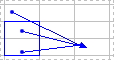
To assist you in checking your formulas, you can use the Trace Precedents and Trace Dependentscommands to graphically display and trace the relationships between these cells and formulas with tracer arrows, as shown in this figure.
Related:
- [WayBack] vba – Is there a way to tell which cells reference a selected cell in Excel? – Super User
- [WayBack] Macro Code To Trace Dependents/Precedents – Free Excel\VBA Help Forum
- [WayBack] Solved: Splitting all addresses in a formula – Page 2
- [WayBack] Tracing Cell Precedents in VBA (Finding formulae t – Free Excel\VBA Help Forum
–jeroen

 The Wiert Corner - irregular stream of stuff
Leave a comment