


Windows 8.1: default Windows Explorer to open “This PC” instead of “Libraries” without duplicating the taskbar icon
Posted by jpluimers on 2022/05/20
Every now and then you revisit old Windows versions. It seems a fact of life.
If course those lack more recent features, one of which is the default View with which Windows Explorer starts.
In Windows 10 you can switch it between “This PC” and “Quick Access”. Not so with Windows 8.1.
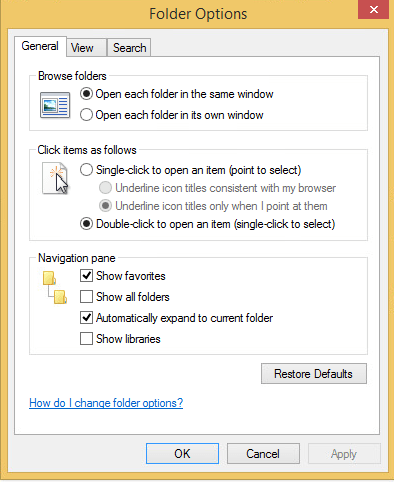
In Windows 8.1, when you have “Show Libraries” enabled, it will default to that. So the trick is to disable “Show Libraries” and refrain from using them. I never used them, so that is OK for my situation.
Based on:
- [Wayback] Set default/starting folder for Explorer in taskbar without duplicate icon on launch in Windows 8.1 – Super User (thanks [Wayback] code-flow)
You can hide “libraries”. This would make the default “This PC”.
- In File Explorer, select the View tab and click the Options button.
- In the General tab, under Navigation Pane, uncheck “View Libraries”
- Click OK, then restart File Explorer.
- [Wayback] How do I make Windows 10’s File Explorer open “This PC” by default? – Super User (thanks [Wayback] zzz and [Wayback] code-flow)
Win 8.1:
If you don’t use Libraries at all, you can hide them. This makes your default “This PC”.
- In File Explorer, select the View tab and click the Options button.
- In the General tab, under Navigation Pane, uncheck “View Libraries”
- Click OK, then restart File Explorer.
Screenshot:
Windows 8.1 – default to This PC by disabling Show Libraries
–jeroen

 The Wiert Corner - irregular stream of stuff
Leave a comment