


This usually is a toner error: OKI | “CHECK IMAGE DRUM UNIT / 540, 541, 542, 543:[COLOR] Image Drum Sensor Error” is displayed.(C332)
Posted by jpluimers on 2024/06/07
[Wayback/Archive] OKI | “CHECK IMAGE DRUM UNIT / 540, 541, 542, 543:[COLOR] Image Drum Sensor Error” is displayed.(C332)
This error indicates that a toner sensor error has occurred.
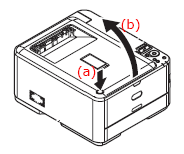
Press the Output tray release button (a), and open the output tray (b) until it stops.
If the toner cartridge is not installed, refer to the following item to install it.
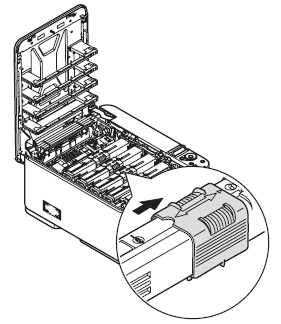
If the toner cartridge has been installed, slide the lock (blue) to the right to unlock the toner cartridge temporarily.
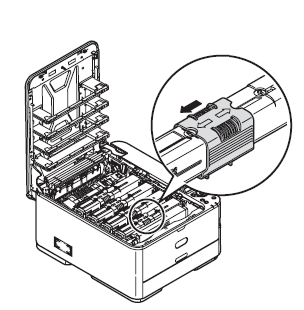
Then slide the lock (blue) back to the left to secure the toner cartridge.
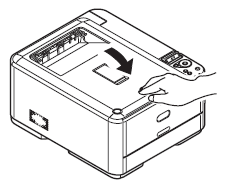
Close the output tray and press down firmly so that the cover latches closed.
If the problem still persists, turn the power off and then back on again.
See also
[Wayback/Archive] The complete guide to OKI Error Codes and how to fix them | okOKI (always try the toner steps first: they are easier to accomplish than the drum steps):
Error 540 Image Drum Sensor Error. Check Image Drum. Something is wrong with the Yellow Image Drum sensor.
Uninstall the image drum, and then install it again. If the message persists, uninstall the toner cartridge and install it again.
If the toner cartridge is not installed, install it.
Press the [Details] button for help.
Get Help Error 541 Image Drum Sensor Error. Check Image Drum. Something is wrong with the Magenta Image Drum sensor.
Uninstall the image drum, and then install it again. If the message persists, uninstall the toner cartridge and install it again.
If the toner cartridge is not installed, install it.
Press the [Details] button for help.
Get Help Error 542 Image Drum Sensor Error. Check Image Drum. Something is wrong with the Cyan Image Drum sensor.
Uninstall the image drum, and then install it again. If the message persists, uninstall the toner cartridge and install it again.
If the toner cartridge is not installed, install it.
Press the [Details] button for help.
Get Help Error 543 Image Drum Sensor Error. Check Image Drum. Something is wrong with the Black Image Drum sensor.
Uninstall the image drum, and then install it again. If the message persists, uninstall the toner cartridge and install it again.
If the toner cartridge is not installed, install it.
Press the [Details] button for help.
--jeroen

 The Wiert Corner - irregular stream of stuff
Leave a comment