The Wiert Corner – irregular stream of stuff

Jeroen W. Pluimers on .NET, C#, Delphi, databases, and personal interests

  • My badges

  • Twitter Updates

  • My Flickr Stream

  • Pages

  • All categories

  • Enter your email address to subscribe to this blog and receive notifications of new posts by email.

    Join 1,861 other subscribers

Archive for the ‘Database Development’ Category

Migrate/Transfer SQL Server 2008/2005/2000/7 Logins to SQL Server 2008

Posted by jpluimers on 2012/01/12

When moving databases across servers, you face the same problem as when upgrading servers: users are server specific, but permissions are databases specific. They are not bound by UserName, but through a SID (security identifier).

When adding the same UserName entries to a new server that already has the databases restored, you get error messages like these:

Error 21002 [SQL-DMO] User ‘account’ already exists

When adding the same UserName  entries, then restoring the databases, it won’t work, because the matching SIDs don’t exist.

There are many sites explaining the “Error 21002” and pointing to sp_change_users_login.

But sp_change_users_login (and the ALTER USER UserName WITH LOGINI = UserName2 in SQL Server 2005 and higher) is not the actual fix to the problem: it will re-add the user with a new SID, then correct the SID in the database currently in use.

Actually you are after “Orphaned” users: users that are defined in the various databases, but not present in the user list on the SQL Server instance. Running sp_change_users_login with the “Report’ parameter on the “new” server will show a list of orphaned users.

An even better way to show Orphaned Users is by running the ShowOrphanUsers script (thanks Vyas, wish more people republish your stuff with attribution!). In my own version (sourcecode is below), I have added an extra UserSID column of type varbinary(85).

In order to transfer users to a new server, you need a sp_help_revlogin stored procedure. Depending on the version of your SQL Server (7/2000/2005/2008), you need a slightly different version of a script that creates sp_help_revlogin for you. All versions are available at NetNerds.net.

–jeroen

via: Migrate/Transfer SQL Server 2008/2005/2000/7 Logins to SQL Server 2008.

USE master;
GO
IF OBJECT_ID ('dbo.ShowOrphanUsers') IS NOT NULL
  DROP PROCEDURE dbo.ShowOrphanUsers
GO
CREATE PROC dbo.ShowOrphanUsers
AS
BEGIN
	CREATE TABLE #Results
	(
		[Database Name] sysname COLLATE Latin1_General_CI_AS,
		[Orphaned User] sysname COLLATE Latin1_General_CI_AS,
                [UserSID]  varbinary(85)
	)

	SET NOCOUNT ON

	DECLARE @DBName sysname, @Qry nvarchar(4000)

	SET @Qry = ''
	SET @DBName = ''

	WHILE @DBName IS NOT NULL
	BEGIN
		SET @DBName =
				(
					SELECT MIN(name)
					FROM master..sysdatabases
					WHERE 	name NOT IN
						(
						 'master', 'model', 'tempdb', 'msdb',
						 'distribution', 'pubs', 'northwind'
						)
						AND DATABASEPROPERTY(name, 'IsOffline') = 0
						AND DATABASEPROPERTY(name, 'IsSuspect') = 0
						AND name > @DBName
				)

		IF @DBName IS NULL BREAK

		SET @Qry = '	SELECT ''' + @DBName + ''' AS [Database Name],
				CAST(name AS sysname) COLLATE Latin1_General_CI_AS  AS [Orphaned User],
                                SID AS [UserSID]
				FROM ' + QUOTENAME(@DBName) + '..sysusers su
				WHERE su.islogin = 1
				AND su.name <> ''guest''
				AND NOT EXISTS
				(
					SELECT 1
					FROM master..sysxlogins sl
					WHERE su.sid = sl.sid
				)'

		INSERT INTO #Results EXEC (@Qry)
	END

	SELECT *
	FROM #Results
	ORDER BY [Database Name], [Orphaned User]
END
GO

Posted in Database Development, Development, SQL, SQL Server, SQL Server 2000, SQL Server 2005, SQL Server 2008, SQL Server 2008 R2, SQL Server 2012, SQL Server 7 | 1 Comment »

Restarting InterBase from the command-line on Windows and Mac

Posted by jpluimers on 2011/12/08

I recently wrote this script for like the upteenth time, so now it is on bo.codeplex.com and in my BIN directory on Windows and in my sh directory on my Mac.

Note for the scripts in this post:

Windows

restart-InterBase.cmd:

net stop IBG_gds_db
net stop IBS_gds_db
net start IBG_gds_db
net start IBS_gds_db

It restarts only the default instance.

Usually it is enough to restart the Guarduan (IBG_gds_db), but sometimes that hangs, so I restart both the Guardian and the DB service (IBS_gds_db).

You can do the same with Firebird of course, and adapt for non-default instances: just find the right service names using a script like this:

sc query

then search the output for entries matching InterBase or Firebird like these:

SERVICE_NAME: IBG_gds_db
DISPLAY_NAME: InterBase XE Guardian gds_db
        TYPE               : 10  WIN32_OWN_PROCESS
        STATE              : 4  RUNNING
                                (STOPPABLE, NOT_PAUSABLE, IGNORES_SHUTDOWN)
        WIN32_EXIT_CODE    : 0  (0x0)
        SERVICE_EXIT_CODE  : 0  (0x0)
        CHECKPOINT         : 0x0
        WAIT_HINT          : 0x0

SERVICE_NAME: IBS_gds_db
DISPLAY_NAME: InterBase XE Server gds_db
        TYPE               : 10  WIN32_OWN_PROCESS
        STATE              : 4  RUNNING
                                (STOPPABLE, NOT_PAUSABLE, IGNORES_SHUTDOWN)
        WIN32_EXIT_CODE    : 0  (0x0)
        SERVICE_EXIT_CODE  : 0  (0x0)
        CHECKPOINT         : 0x0
        WAIT_HINT          : 0x0

Mac OS X

You can find the name of your Interbase service when you look at the user-installed services:

bash-3.2$ cd /Library/StartupItems/InterBase_gds_db/
bash-3.2$ ls -l
total 16
-rwxr-xr-x  1 root  wheel  636 Oct 21 15:44 InterBase_gds_db
-rwxr-xr-x  1 root  wheel  204 Sep 14  2007 StartupParameters.plist
bash-3.2$ cat StartupParameters.plist
{
  Description     = "InterBase Server";
  Provides        = ("InterBase Database Server");
  Requires        = ("DirectoryServices");
  Uses            = ("Disks", "NFS");
  OrderPreference = "None";
}
bash-3.2$

You can restart the InterBase Database Server using this command:

sudo SystemStarter -vdD restart "InterBase Database Server"

The SystemStarter -vdD parameters make the output add verbose, debugging information and dependencies.
–jeroen

Posted in Database Development, Development, InterBase | Leave a Comment »

SQL Server inverse of (equals) is ((not equals) or (is NULL)

Posted by jpluimers on 2011/12/07

Usually getting queries right with SQL Server comes down to handling NULL correctly.

For instance, on this table:

MYTABLE
ID LAST_NAME
6 COUNT(*)
1 FOO
2 BAR
3 FOO
4 **NULL**
5 BAR
6 FOO

What are the results of these SELECT statements

SELECT COUNT (*)
FROM MYTABLE

SELECT COUNT (*)
FROM MYTABLE
WHERE     (LAST_NAME = 'FOO')

SELECT COUNT (*)
FROM MYTABLE
WHERE     (LAST_NAME <> 'FOO')

SELECT COUNT (*)
FROM MYTABLE
WHERE     NOT (LAST_NAME = 'FOO')

You might think they are like these, as LASTNAME <> ‘FOO’ looks like the inverse of LASTNAME = ‘FOO’:

  • 6
  • 3
  • 3
  • 3

But in fact the results are these:

  • 6
  • 3
  • 2
  • 2

When you look closely to the SQL statements below, you will see that the inverse of EQUALS contains an IS NULL, the same for the inverse of NOT EQUALS:

SELECT COUNT (*)
FROM MYTABLE

-- inverse of NOT EQUALS
SELECT COUNT (*)
FROM MYTABLE
WHERE     (LAST_NAME = 'FOO') OR (LAST_NAME IS NULL)

SELECT COUNT (*)
FROM MYTABLE
WHERE     (LAST_NAME <> 'FOO')

SELECT COUNT (*)
FROM MYTABLE
WHERE     (LAST_NAME = 'FOO')

-- inverse of EQUALS
SELECT COUNT (*)
FROM MYTABLE
WHERE     (LAST_NAME <> 'FOO') OR (LAST_NAME IS NULL)

-- inverse of EQUALS
SELECT COUNT (*)
FROM MYTABLE
WHERE     (NOT (LAST_NAME = 'FOO')) OR (LAST_NAME IS NULL)
  • 6
  • 4
  • 2
  • 3
  • 3
  • 3

Lesson learned: always take into account NULL when trying to formulate your SQL comparisons well.

–jeroen

Posted in Database Development, Development, SQL Server, SQL Server 2000, SQL Server 2008 | Leave a Comment »

yyyy-mm-dd for vba – Parse data and time string to Access Date value – Stack Overflow

Posted by jpluimers on 2011/11/29

A co worker at a client had trouble importing textual date strings into Microsoft access.

Since many databases like yyyy-mm-dd as a universal import date format, I suggested trying that and searching for some backing on the Internet.

Indeed this StackOverflow answer confirmed my gues.

–jeroen

Via: vba – Parse data and time string to Access Date value – Stack Overflow.

Posted in Access, Database Development, Development, Software Development | Leave a Comment »

SQL Server 2000: export SQL Query Analyzer result data to Excel/CSV and more

Posted by jpluimers on 2011/11/16

I just visited a client which is still using SQL Server 2000, and not upgraded their tool set, nor allows different tools to be installed.

Which means back to basics, re-adjusting the project planning and frantically trying to remember things from the past.

Boy am I spoiled with a current toolset :)

This goes from simple things like saving a result set from the SQL Query Analyzer:

  1. Select a cell
  2. Press Ctrl-A to select all rows
  3. Right click in the grid and select “Copy” (to copy the cells as CSV) or “Save As” (to export the cells as CSV)

along the absence of support for XML, MARS, error handling (not even talking about spatial data!) to the way that in SQL Server 2000 DTS (Data Transformation Services) has its own mind of date/time format handing while importing stuff.

But it sure helps setting aims for the scheduled migration process to the far more current SQL Server 2008 R2 :)
(Mental note: migrating the SQL Server 2000 DTS packages to SQL Server 2008 R2 will be a challange).

Oh, some of the SQL Queries that come in handy when moving stuff around in an OTAP/DTAP environment:

1. Selecting relevant DTS packages (that are always in the MSDB database)

select
name
from msdb..sysdtspackages -- 2005: sysdtspackages90; 2008: sysssispackages
where
name like '%my-app-ID%'

2. Selecting relevant objects from a database (watch the xtype values that can exist in SQL Server 2000)

using my-database
select 
name, xtype
from 
sysobjects
where 
name like '%my-app-id%'
and xtype in ('U', 'V', 'TR', 'P', 'X') -- tables/views/triggers/procedures/xprocedures only
order by xtype, name

Blast from the past :)

–jeroen

via: export sql query analyzer data to excel SQL Server.

PS: For the statistics, SQL Server 2000 has been EOL for a while; mainstream support ended in 2008, extended support ends in 2013.

Posted in CSV, Database Development, Development, Software Development, SQL, SQL Server, SQL Server 2000 | Leave a Comment »

I was baffled…

Posted by jpluimers on 2011/11/15

When I saw code like this in a production app, I was speachless:

			if (matcher.Trim().Length > 0)
			{
				if (eesteWhere){sqlWhere += "WHERE ";eesteWhere = false;}
				else{sqlWhere += "AND ";}
				sqlWhere += "m.matcher like '" + matcher.Trim() + "%' ";
			}

Not once, twice, but hundred of fragments like these. Not generated, but hand copy-pasted. And the client thought they were running stable, reliable apps :(

This is soo XSCD ‘Exploits of a Mom‘ (aka Bobby Tables):

The department that wrote the code has been closed a while ago, but some serious refactoring time needs to be invested here, as all applications delivered by that department are vulnerable to SQL Exploits.

–jeroen

Posted in .NET, C#, C# 2.0, Database Development, Development, Software Development, SQL, SQL Server | Leave a Comment »

Excel CSV: watch and set your delimiters (and the #NSBusinessCard – Digitale specificatie #fail)

Posted by jpluimers on 2011/10/19

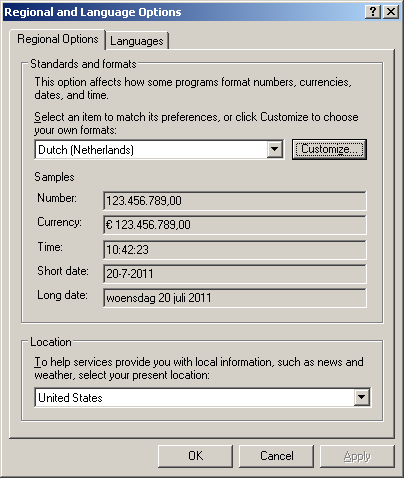
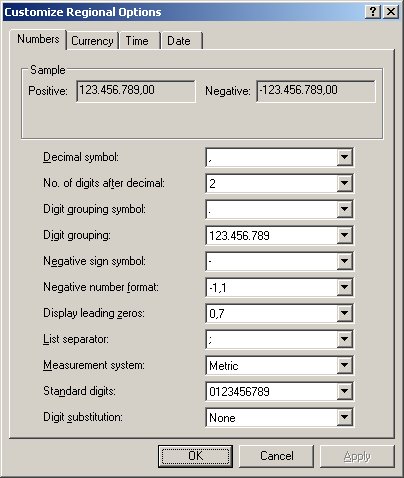
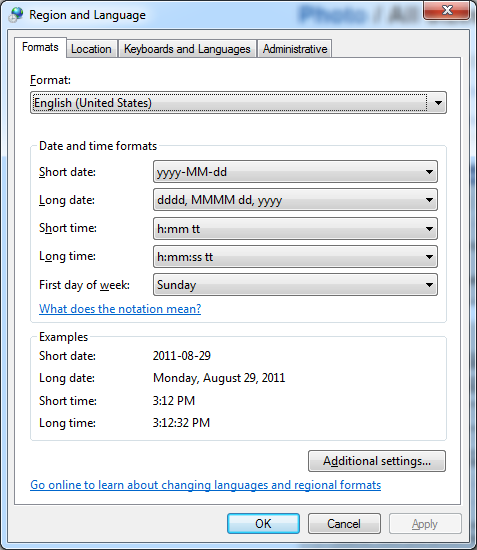
A while ago, a friend asked my why Excel sometimes doesn’t import CSV files correctly. Recently, I was reminded because NB Business Card sends their invoice as Excel CSV. And expected CSV to be universal. Which it isn’t. Besides pople doing all sorts of crazy things with CSV (like What would happen if you defined your system CSV delimiter being a Quotation), Excel CSV isn’t universal either, as it depends on a crucial entry your Windows regional settings: the “List Delimiter”. Two series of screeen shots show this: The first for Windows XP and systems like it:


And for Windows 7 and similar systems:

  A few tips: When you export CSV, be sure to use this setting from the registry. Or at least allow your users to specify it in your application, because: when you are not using Windows, you might be out of luck as there is no operating system neutral way of querying this value. And when you get some CSV and cannot import it in Excel, make sure you change your list delimiter to match it. And don’t forget to restore it to the original setting when you are done: it is a user session wide setting, so it applies to all applications (including the ones that do watch it). –jeroen

Posted in CSV, Database Development, Development, Power User, Software Development | 3 Comments »

Entity Framework: EF4 – update model from database ignores some changes

Posted by jpluimers on 2011/09/13

Almost a year ago there was a post on the MSDN forums titled EF4 – update model from database ignores some changes.

These are the changes it ignores that I found so far:

  • Column renames
  • Column data type changes
  • Changed foreign key relations

Have you found others?

Which EF versions are worse/better in this respect?

Note that the EF support in Visual Studio 2010 does not warn you if the the model is incompatible with your database.
You will get errors like this at run-time:

Read the rest of this entry »

Posted in .NET, .NET ORM, Database Development, Development, EF Entity Framework, Software Development | 2 Comments »

How do you add an administrator user to SQL Server 2008 (via Server Faultl)

Posted by jpluimers on 2011/05/18

When you (or the one that installed SQL Server 2008) forgot to add an administrator, it is still possible to add one.

The How do you add an administrator user to SQL Server 2008 question on Server Fault pointed me to the right page SQL Server 2008: Forgot to add an Administrator account? by Chris Randall.

Note that you might want to run SQL Server in Single User Mode; the first answer on the above question doesn’t mention that, but the second does (and pointed me to Chris Randall’s page).

–jeroen

via: How do you add an administrator user to SQL Server 2008? – Server Fault.

Posted in Database Development, Development, SQL Server | Leave a Comment »

Don’t sleep when you use your Entity Framework model from a separate assembly

Posted by jpluimers on 2011/05/05

The Entity Framework needs you to have a connection string in your App.Config.

It is good practice having your Entity Framework model in a separate assembly.

When using it in your main app, be aware that the connection string that belongs to your model needs to be in the App.config of your main app.

If not, you get an exception like this:

System.ArgumentException was unhandled
Message=The specified named connection is either not found in the configuration, not intended to be used with the EntityClient provider, or not valid.
Source=System.Data.Entity
StackTrace:
at System.Data.EntityClient.EntityConnection.ChangeConnectionString(String newConnectionString)
at System.Data.EntityClient.EntityConnection..ctor(String connectionString)
at System.Data.Objects.ObjectContext.CreateEntityConnection(String connectionString)
at System.Data.Objects.ObjectContext..ctor(String connectionString, String defaultContainerName)

The clue is the contents of the defaultContainerName parameter: you will see that in the App.config of your Entity Framework assembly.

Copy that over to the App.config of your main assembly, then make sure it points to your right database (if you use OTAP), then go :-)

Your App.config then looks like this:

<?xml version="1.0" encoding="utf-8"?>
<configuration>
  <connectionStrings>
    <add name="MyEntities" connectionString="metadata=res://*/My_EntityModel.csdl|res://*/My_EntityModel.ssdl|res://*/My_EntityModel.msl;provider=System.Data.SqlClient;provider connection string=&quot;data source=my-sql-server;initial catalog=my-database;persist security info=True;user id=my-user;password=my-password;multipleactiveresultsets=True;App=EntityFramework&quot;" providerName="System.Data.EntityClient" />
  </connectionStrings>
</configuration>

–jeroen

Posted in .NET, C#, Database Development, Development, EF Entity Framework, Software Development, SQL Server | Leave a Comment »