The Wiert Corner – irregular stream of stuff

Jeroen W. Pluimers on .NET, C#, Delphi, databases, and personal interests

  • My badges

  • Twitter Updates

  • My Flickr Stream

  • Pages

  • All categories

  • Enter your email address to subscribe to this blog and receive notifications of new posts by email.

    Join 1,839 other subscribers

Archive for the ‘Development’ Category

SccProjectName value in .csproj hosed – strange build results (via: Interesting support case – Visual Studio solution prompts for entire SCC check-out on open – Developer Support Team Foundation Server – Site Home – MSDN Blogs)

Posted by jpluimers on 2011/03/24

Something in TFS screwed a SCC references in one of the .csproj files at a client.

As a result, it generated strange build errors (unfound projects in the wrong branch), because when loading project from the correct, the IDE in fact loads it from the wrong branch.

When you read the blog post from the Microsoft TFS development support team, the solution looks simple: in a regular project the values for SccProjectName, SccLocalPath, SccAuxPath and SccProvider should all be SAK (indicating the SCC should ignore their values).

That is only 1 piece of the solution. Somehow, Visual Studio and/or TFS seem to cache some information in hidden places, so it keeps insisting to use the project from the wrong branch.

So, in addition to changing the above SAK values in the project in the correct branch, you need to:

  1. Also check (and if wrong change) the above values to SAK for the project in the wrong branch
  2. Remove the references to the project in the wrong branch from the Visual Studio MRU list in the registry (HKEY_CURRENT_USER\Software\Microsoft\VisualStudio\9.0\ProjectMRUList)
  3. Delete the .suo file for the good solution
  4. Add the project from the correct branch to the solution
  5. Manually modify the .sln file in the correct branch to remove the relative directory paths to the project in the wrong branch (values in keys named like SccProjectUniqueName58, SccProjectName58 and SccLocalPath58)
  6. Reload the solution in Visual Studio and check everything works correctly

It took at least a couple of hours to find this all out, for these reeasons: Read the rest of this entry »

Posted in .NET, C#, Development, Software Development | 2 Comments »

Delphi XE introduced SafeIntfAsClass to cast back interface to class (via: oop – Delphi – Proxy Design Pattern – interface problem – Stack Overflow)

Posted by jpluimers on 2011/03/23

Delphi XE introduced the SafeIntAsClass to cast back from an interface to a class.

This is one of the things I really started to miss after doing a lot of .NET work (where that worked starting with .NET 1).

Older versions of Delphi did not support safely casting from an interface back to an object.

–jeroen

via: oop – Delphi – Proxy Design Pattern – interface problem – Stack Overflow.

Posted in Delphi, Development, Software Development | 4 Comments »

Delphi Labs: DataSnap XE and jQueryMobile; a Web Frontend accessing DataSnap through a Delphi WebBroker server

Posted by jpluimers on 2011/03/22

[Wayback] Paweł Głowacki recently released two very interesting blog articles, together with 5 (five!) demonstration videos on how to get your mobile device to talk to a DataSnap backend using [Wayback] jQueryMobile so you get a very native look & feel UI on your mobile device without putting a lot of effort in writing a native device app.

  1. [Wayback] Part 1: Delphi Labs: DataSnap XE – WebBroker jQueryMobile Boilerplate – DelphiFeeds.com.
  2. [Wayback] Part 2: Delphi Labs: DataSnap XE – jQueryMobile Web Frontend – DelphiFeeds.com.

Highly recommended!

–jeroen

Read the rest of this entry »

Posted in Delphi, Development, JavaScript/ECMAScript, jQuery, Scripting, Software Development | Leave a Comment »

How to clear the “ErrorList” window before compiling

Posted by jpluimers on 2011/03/22

It seems that all versions of Visual Studio suffer from this behaviour:

Visual Studio (VS) doesn’t always clear the “Error List” window of existing errors when you compile a different project but simply appends new errors to it.

Simplest solution: Build | Clean All.
That takes some time (especially on large solutions), but I haven’t found an easier way.

Have you?

–jeroen

via: How to clear the “ErrorList” window before compiling.

Posted in .NET, Development, Software Development, Visual Studio and tools | Leave a Comment »

How big of a team do you need to benefit from bug tracking software? – Programmers – Stack Exchange

Posted by jpluimers on 2011/03/21

Interesting comment on this StackExchange question:

The Student and Startup Edition at Fog Creek includes FogBugz AND Kiln (source control).

–jeroen

via How big of a team do you need to benefit from bug tracking software? – Programmers – Stack Exchange.

Posted in Development, Software Development, Source Code Management | 1 Comment »

Ideone.com | Online IDE & Debugging Tool >> C/C++, Java, PHP, Python, Perl and 40+ compilers and intepreters

Posted by jpluimers on 2011/03/18

Really cool stuff; dozens of computer languages are supported, including C# and VB.NET (both on Mono) and a few Pascal flavours.

Briefly about ideone

ideone.com is a… pastebin. But a pastebin like no other on the Internet. More accurate expression would be online mini IDE and debugging tool.

Ideone is an Italian word for great ideas – because ideone.com is a place where your greatest ideas can spring to life.

ideone.com is designed mostly for programmers (but, of course, common plain text can also be uploaded). You can use it to:

share your code (that’s obvious – it is a pastebin, isn’t it? :)) in a neat way,

run your code on server side in more than 40 programming languages (number still growing)

and do it all with your own input data!

ideone.com also provides free Ideone API which is availabe as a webservice. It’s functionality allows you to build your own ideone-like service!

for logged in users Ideone offers possibility to manage their codes, publish multiple submissions at one go, and more.

All codes can be accessed through convenient hash links. Source code pages provide information about the code and its execution: memory usage, execution time, language and compiler version, code itself, input uploaded by the user, output generated by the program and error messages from compilers and interpreters.

–jeroen

via Ideone.com | Online IDE & Debugging Tool >> C/C++, Java, PHP, Python, Perl and 40+ compilers and intepreters.

Posted in .NET, C#, Delphi, Development, Software Development, VB.NET | 4 Comments »

Solution for “Why do I get a ‘LoaderLock’ Error when debugging my Managed DirectX application” (The ZBuffer)

Posted by jpluimers on 2011/03/17

I maintain some .NET code that still uses the MDX 1.1 (since MDX 2.0 got cancelled, and this project cannot be brought to XNA).

Every now and then, you get a Loader Lock error.

ZBfufer provides the solution (I always use choice #3): Read the rest of this entry »

Posted in .NET, C#, C# 2.0, C# 3.0, Development, Software Development, Visual Studio 2005, Visual Studio 2008, Visual Studio and tools | Leave a Comment »

Visual Studio 2010 Ux #fail: finding the Macro Recorder and Context Menus toolbars #VS2010 #Ux

Posted by jpluimers on 2011/03/16

When you want to enable (or disable) a toolbar in Visual Studio 2010, there are three options to go, of which the last two are equivalent:

  1. Right click in the toolbar area to get a Context Menu, then check/unckeck the toolbar
  2. Right click in the toolbar area to get a Context Menu, choose Customize and check/uncheck the toolbar(s) in the dialog.
  3. In the Tools Menu, choose Customize and check/uncheck the toolbar(s) in the dialog.

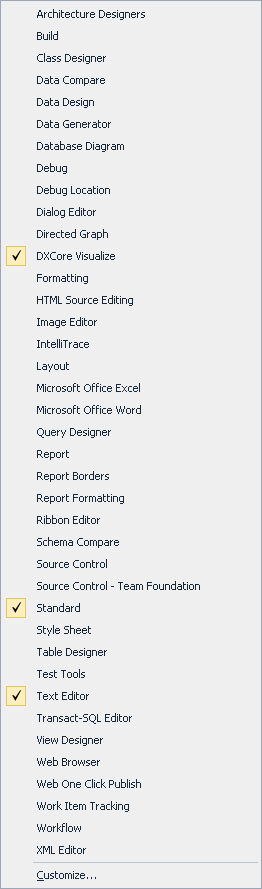
The first one is the easiest; you can see the resulting Context Menu in the left picture (click on it to enlarge).
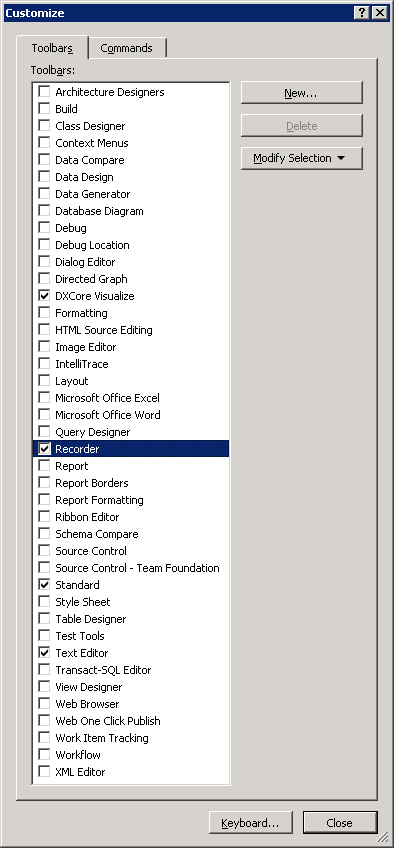
The last two require an extra step; you can see the resulting dialog in the right most picture (click on it to enlarge).

Given the size of those lists, you’d think all toolbars are in both.

Wrong!

These are missing from the Context Menu:

  • Context Menus
  • Recorder

I consider this a serious Ux problem; if the Context Menu was much shorter (like 10 entries or so), it would be pretty obvious they are not.

It took me more than 10 minutes to find the Recorder toolbar which would have been vastly shorter if both lists were the same.

(Another Ux failure that caused my search to be this long is that I was looking for ‘Macro Recorder’ since all entries in the menu contain the word ‘Macro’; Recorder could as well point to a Toolbar for screen, video or audio recording).

–jeroen

Posted in .NET, Development, Software Development, Usability, User Experience (ux), Visual Studio 2010, Visual Studio and tools | Leave a Comment »

Why does Recording the TemporaryMacro sometimes fail in Visual Studio 2010? #durftevragen #dtv #daretoask

Posted by jpluimers on 2011/03/16

Every now and then, while recording a TemporaryMacro in Visual Studio 2010, I get this error message:


---------------------------
Microsoft Visual Studio
---------------------------
No TemporaryMacro in designated Recording Project
---------------------------
OK
---------------------------

The Recording a macro topic on MSDN suggest this solution:

Sounds like your macros directory is messed up.  Open Macro Explorer (View\Other Windows\Macro Explorer) and make sure you get the MyMacros element.

However, that works.

And if I check that, the next time I record a TemporaryMacro it just works.

I never had this in Visual Studio 2008, 2005 or older.

Anyone seen this behaviour too?

Anyone who knows why this happens?

–jeroen

via: Recording a macro.

Posted in .NET, Development, Software Development, Visual Studio 2010, Visual Studio and tools | Leave a Comment »

“Try to avoid foreach/for loops”–Over my Dead Body! | Visual Studio Feeds

Posted by jpluimers on 2011/03/16

Zack Owens wrote a nice article comparing various loop constructs.

Summary:
If the semantics are the same, it does not matter if you use foreach, for, while or do while: they all  have equal speed.

So: choose the loop construct that best fits the problem you are trying to solve.

–jeroen

via: “Try to avoid foreach/for loops”–Over my Dead Body! | Visual Studio Feeds.

Posted in .NET, C#, Delphi, Prism, Software Development | 12 Comments »