The Wiert Corner – irregular stream of stuff

Jeroen W. Pluimers on .NET, C#, Delphi, databases, and personal interests

  • My badges

  • Twitter Updates

  • My Flickr Stream

  • Pages

  • All categories

  • Enter your email address to subscribe to this blog and receive notifications of new posts by email.

    Join 1,860 other subscribers

Archive for the ‘Unit Testing’ Category

Some links on DUnit, JUnit and NUnit XSD specifications of their XML formats (JUnit is actually Ant XML)

Posted by jpluimers on 2019/04/02

For my link archive:

–jeroen

Posted in Agile, Development, Software Development, Unit Testing | Leave a Comment »

Some Delphi unit testing notes

Posted by jpluimers on 2019/03/21

A few notes I wrote down when coaching a team to write better unit tests and test tooling form themselves.

  • unit tests test a unit of code
  • integrating tests test multiple units of code, which can go as far as having external dependencies
  • mocks simulate depencencies
  • unit tests are being executed by a unit test runner
  • you can group tests into test suites, which can contain other suites, and determine order of tests (which can be important for integration tests).
  • unit tests and suites register them to be eligible for running (a test without an encompassing suite presents itself as a suit with one test)
  • the runner optionally has a mechanism to filter the eligible suites and tests down to the ones actually being run

References:

In the particular case for this team, testing was mostly done using DUnit for Delphi.

Here, these are worth mentioning:

  • The configuration is not limited to the GuiTestRunner: any DUnit based test runner can use it (though the default console TextTestRunner skips it, but https://github.com/graemeg/fptest/blob/master/src/TextTestRunner.pas and https://github.com/VSoftTechnologies/DUnit-XML/blob/master/Example/DUnitXMLTest.dpr shows how it can be used).
    • It comes down to either Suite.LoadConfiguration(IniFileName, UseRegistry, True) or RegisteredTests.LoadConfiguration(IniFileName, UseRegistry, True) where
      • IniFileName contains the INI filename, for instance from ExtractFilePath(ParamStr(0)) + 'dunit.ini' or from a ParamStr parameter on the command-line.
      • UseRegistry usually is False
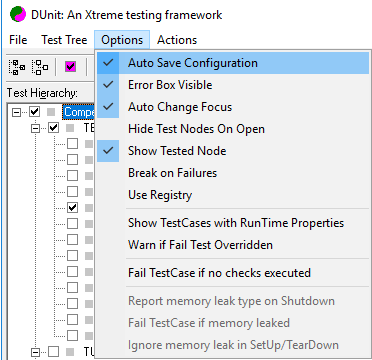
  • If you want to disable all exceptions for easier debugging, but still want to catch failures, then you can enable Break on Failures (see screenshot below) so breaking tests will throw an EBreakingTestFailure.
  • Registration
    • Per test or per suite
    • You do not need a ITestSuite implementing class in order to register a suite (just pass a SuitePath when registering multiple tests)
    • Basically the only reasons for having a ITestSuite implementing class (like descending from TTestSuite) are
      • to have a specific SetUp or TearDown for that suite level
      • to allow \ backslash or / forward slash in test suite names (which is unwise because a lot of tooling sees those as suite hierarchy separators)
    • function TestSuite(AName: string; const Tests: array of ITest): ITestSuite;
    • procedure RegisterTest(SuitePath: string; test: ITest); overload;
    • procedure RegisterTest(test: ITest); overload;
    • procedure RegisterTests(SuitePath: string; const Tests: array of ITest); overload;
    • procedure RegisterTests(const Tests: array of ITest); overload;
    • function RegisteredTests: ITestSuite;
  • Configuration is exclusion based
    • procedure TTestSuite.LoadConfiguration(const iniFile: TCustomIniFile; const section: string);
    • procedure TTestSuite.SaveConfiguration(const iniFile: TCustomIniFile; const section: string);
    • The configuration file default name is DUnit.ini
    • The DUnit.ini file will be saved after the GUI tests are run (overwriting any changes) when the Auto Save Configuration is enabled (which is the default)
    • All tests are configured in
      • sections
        • named (of course inside [] brackets) as Tests.TestPath, where TestPath either
          • is the name of the test class
          • is a . period separated path of suites ending in an test class
        • values having keys named either
          • the test method with a value 0 to disable the test
          • a test method followed by .RunCount with an integer value indicating how often that test needs to be executed
        • note that with either TestName=1 or TestName.RunCount=1 will disappear from the ini file because those are default values
      • There are no values to indicate tests need to be run (so by default registered tests eligible to be run are being run)
    • An example file (without .RunCount ) is at [WayBack] delphidicontainer/dunit.ini at master · danieleteti/delphidicontainer · GitHub
    • You can add comments to INI files using a semi colon at the start of the line; see [WayBack] Do standard windows .ini files allow comments? – Stack Overflow

Registration and exclusion are two separate concerns.

To configure non-GUI tests, first run the GUI tester, configure it, then copy the resulting DUnit.ini file to the environment where the non-GUI tests are being run.

Be sure to check out test decorators, and maybe amend them with dependency injection. Example for apply database setup/teardown to a full suite of tests: [WayBack] How to organize testing of DB in dUnit — IT daily blog, news, magazine, technologies

Some resurrected documentation links because not all links from [WayBack] DUnit – Xtreme testing for Delphi and [WayBack] DUNIT: An Xtreme testing framework for Delphi programs succeed.

–jeroen

Posted in Agile, Conference Topics, Conferences, Development, Event, Software Development, Unit Testing | Leave a Comment »

Testing and static methods don’t go well together

Posted by jpluimers on 2016/08/16

A few links as, in code I’ve inherited, I see way too many static methods hindering testing:

–jeroen

Posted in Agile, Development, Software Development, Unit Testing | 1 Comment »

TDD: all unit tests passed.

Posted by jpluimers on 2016/08/02

TDD via Dave Hulbert on Twitter: “Yay, all unit tests passing! http://t.co/ax2uxPsZqv”.

Dave Hulbert on Twitter:

Dave Hulbert on Twitter: “Yay, all unit tests passing! http://t.co/ax2uxPsZqv”.


Posted in Agile, Development, Fun, Software Development, Unit Testing | Leave a Comment »

Martin Fowler’s “Mocks Aren’t Stubs” – recommended reading

Posted by jpluimers on 2016/03/31

A classic read about Test Doubles: Martin Fowler’s Mocks Aren’t Stubs.

–jeroen

Posted in Agile, Development, Software Development, Unit Testing | Leave a Comment »

nunit – How can I view .NET trace logs in TeamCity? – Stack Overflow

Posted by jpluimers on 2016/02/23

This indeed works very well:

All console output is shown in the build log.

So when you need more context on tests that succeed, you can just output them on the Console.

A practical use: testing the sending of SMS messages over HTTPS where the intermediate proxy can change and was giving different effects.

Logging the actual proxy used correlated some run-time findings. Based on that we could write better tests.

–jeroen

via: nunit – How can I view .NET trace logs in TeamCity? – Stack Overflow.

Posted in .NET, Agile, C#, Continuous Integration, Development, MSTest, Software Development, TeamCity, Testing.NET, Unit Testing, VSTest | Leave a Comment »

Some links on DUnit test cases and test suites, XML and XSD

Posted by jpluimers on 2015/12/17

DUnit registration can mix TestSuites and TestCases.

Some links:

–jeroen


Posted in Agile, Delphi, Delphi 10 Seattle, Delphi 2005, Delphi 2006, Delphi 2007, Delphi 2009, Delphi 2010, Delphi 5, Delphi 6, Delphi 7, Delphi XE, Delphi XE2, Delphi XE3, Delphi XE4, Delphi XE5, Delphi XE6, Delphi XE7, Delphi XE8, Development, Software Development, Unit Testing | Leave a Comment »

NUnit XSD for verification and XML to HTML conversion

Posted by jpluimers on 2015/10/01

Of course NUnit will emit NUnit compatible XML, but other tools do too.

To verify if such XML is indeed compliant to the NUnit standard, there is an XML Schema for it which – at the time of writing – the latest version was here:

http://www.nunit.org/docs/2.6.4/files/Results.xsd

Many CI tools map the resulting XML into some form of output. To get HTML output, XSLT is a logical choice, but there are other means too. Here are a few links to get started converting the output:

–jeroen

Posted in Agile, Development, Software Development, Unit Testing | Leave a Comment »

On why there is no Assert.AreEqual(T t1, T t2) where T: IEquatable – via Stack Overflow

Posted by jpluimers on 2015/09/08

On why there is no

Assert.AreEqual<T>(T t1, T t2) where T: IEquatable<T>

Interesting. And I need to give some thought because when calling Assert.AreEqual<T1, T2>(T1 object1, T2 object2) where T1 does not equal T2 will map to Assert.AreEqual(object, object) without compile time warning.

Assert.AreEqual(object, object) ultimately calls Assert.AreEqual<T>(T, T, String, Object[]) which calls Object.Equals(object, object) failing only at run-time.

This has bitten me too many times.

I wonder what NUnit provides here; will look into that later.

–jeroen

via: c# – Microsoft.VisualStudio.TestTools.UnitTesting.Assert generic method overloads behavior – Stack Overflow.

Posted in .NET, Agile, C#, C# 3.0, C# 4.0, C# 5.0, C# 6 (Roslyn), Development, MSTest, NUnit, Software Development, Testing.NET, Unit Testing, VSTest | Leave a Comment »

Things I Wish I’d Known Earlier | Dr Dobb’s

Posted by jpluimers on 2015/06/03

Like regular life, a programmer’s life is constant learning. And sometimes you’d wish you had known things earlier.

A few quotes from the article:

Test constantly while coding. Personally, I think the single most important contribution of the Agile movement to programming is communicating the value of developer testing (generally, unit testing). I am not an advocate of TDD and feel that many of the critiques directed at it are valid. But I am a passionate believer in unit testing. Of all the practices here, this is the one that would have served me best in my salad days. The ability to check in code knowing that it’s unlikely to contain silly errors and overlooked conditions allows me to have a much clearer idea of what progress I’ve made. I don’t have to worry nearly as much that there is still an extended debugging cycle of unknown length ahead of me. I now compile with the expectation the code will work the first time, rather than entertaining the fond hope that it might.

Fully automate the pipeline. This seems like unremarkable advice. But it got me to continuous delivery before that concept had a name. I automated build, test, deploy. I also automated updates to the website, to the Javadocs, to just about everything I could possibly update as part of the regular build. While this took a lot of time to write out (using Ant), the payoffs are continual. By having automated everything (well, except for some manual tests) I can build with high confidence in the generated software, even if a given feature is incomplete. I don’t worry at all about fragility. In the future, I expect to automate things even more: I want to write more scripts that simulate all the possible installation options and make sure they all work correctly or provide accurate error messages. Right now, I’m pretty sure they do, but I don’t know for certain because of the absence of this step from the automated pipeline.

–jeroen

via: Things I Wish I’d Known Earlier | Dr Dobb’s.

Posted in Agile, Continua CI, Continuous Integration, CruiseControl.net, Development, msbuild, Software Development, Testing, Unit Testing | 2 Comments »