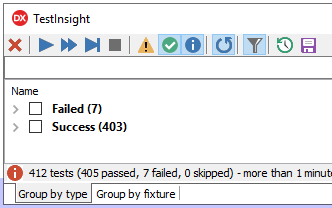
You’d think the math does not add up:
But it does: both “Success” and “Warnings” are counted as “passed”.
TL;DR: ensure the yellow “Warning” triangle is enabled
–jeroen
Posted by jpluimers on 2021/08/04
You’d think the math does not add up:
But it does: both “Success” and “Warnings” are counted as “passed”.
–jeroen
Posted in Delphi, Development, Software Development, TestInsight | Leave a Comment »
Posted by jpluimers on 2021/08/03
The most current Lex and Yacc for Delphi is [WayBack] GitHub – RomanYankovsky/ndyacclex: Parser generator toolset for Delphi (Yacc & Lex).
It came up during a funny Twitter thread, where one of the Delphi team members asked for it, despite – after decades of asking – there still being no official Delphi grammar available from the Delphi team, nor Google Search skills [WayBack].
Basically a parser generator is only as useful as the grammar you have for it.
There is no open source grammar for Delphi yet, so the best you can start with is from the same author: [WayBack] GitHub – RomanYankovsky/DelphiAST: Abstract syntax tree builder for Delphi
With DelphiAST you can take real Delphi code and get an abstract syntax tree. One unit at time and without a symbol table though.
Relevant tweets:
[WayBack] GitHub – RomanYankovsky/ndyacclex: Parser generator toolset for Delphi (Yacc & Lex).
–jeroen
Posted in Delphi, Development, Software Development, Undocumented Delphi | 1 Comment »
Posted by jpluimers on 2021/07/29
Since I always forget where to get the full list: there is none in the documentation. Only parts.
Usually the mapping is from run-time errors to exceptions:
In addition, exceptions are converted to run-time errors when the exception handling mechanism in the SysUtils unit is not up.
This can happen early in start-up, or late un shut-down of an application.
The one I encountered most is the runtime error 216 during shutdown: it is an Access Violation (EAccessViolation).
Posted in Delphi, Development, Software Development | Leave a Comment »
Posted by jpluimers on 2021/07/28
Sometimes after a regular FastMM memory leak test report you get a dialog like this:
--------------------------- Unexpected Memory Leak --------------------------- An unexpected memory leak has occurred. The unexpected small block leaks are: 61 - 68 bytes: Unknown x 1 --------------------------- OK ---------------------------
The normal FastMM memory leak reporting dialog looks like this:
--------------------------- MyTestApplication.exe: Memory Leak Detected --------------------------- ... Note: Memory leak detail is logged to a text file in the same folder as this application. To disable this memory leak check, undefine "EnableMemoryLeakReporting". --------------------------- OK ---------------------------
Searching for “Unexpected Memory Leak” in RTL or FastMM code did not reveal results, but that might be me not doing a proper search.
One big problem is that the regular memory leak dialog is being suppressed by setting SuppressMessageBoxes to True (see for instance my blog post Application shutdown: wait for all threads to terminate or not? or [WayBack] delphi – Generating a FASTMM report WITHOUT the shutdown dialog – Stack Overflow).
However the “Unexpected Memory Leak” message box is always shown.
GETMEM.INC has an identifier LeakMessageTitle:LeakMessageTitle: _PAnsiChr = 'Unexpected Memory Leak';
FastMM4.pas, GETMEM.INC does not take into account SuppressMessageBoxes.FastMM4.pas, GETMEM.INC does take into account ReportMemoryLeaksOnShutdown.More on GETMEM.INC: [WayBack] delphi – Reporting memory leaks on shutdown with a console application – Stack Overflow
Versioned FastMM4.pas.
Not all allocations go via the memory manager. A complicating factor is that:
TMonitor.Create allocations go through SysAllocMem:class function TMonitor.Create: PMonitor; begin if CacheLineSize = 0 then AtomicExchange(CacheLineSize, GetCacheLineSize); if (CPUCount > 1) and (FDefaultSpinCount = 0) then AtomicExchange(FDefaultSpinCount, 1000); if CacheLineSize > SizeOf(Result^) then Result := SysAllocMem(CacheLineSize) else Result := SysAllocMem(SizeOf(Result^)); Result.FSpinCount := FDefaultSpinCount; end;
TMonitor.Destroy deallocations go through SysFreeMem:procedure TMonitor.Destroy; begin if (MonitorSupport <> nil) and (FLockEvent <> nil) then MonitorSupport.FreeSyncObject(FLockEvent); SysFreeMem(@Self); end;
Debugging this is easiest to set a breakpoint in the FastMM4.pas finalization section enabling a breakpoint group that has breakpoints on these methods inside GETMEM.INC:
function SysGetMem(Size: NativeInt): Pointer;function SysFreeMem(P: Pointer): Integer;function SysReallocMem(P: Pointer; Size: NativeInt): Pointer;function SysAllocMem(Size: NativeInt): Pointer;For inspecting for instance an asm construct like TSmallPoolBlockPoolHeader[edx], use a conversion PSmallBlockPoolHeader(Pointer(EDX))^,r
This will hide all the SysAllocMem related leaks:
unit FastMM4WrapperUnit; interface {$ifdef UseFastMM4} uses FastMM4, FastMM4Messages; {$endif UseFastMM4} implementation initialization // finalization // Disable GETMEM.INC reports that neglect SuppressMessageBoxes and NoErrMsg; this will effectively hide the leak as GETMEM.INC also does not write the leaks to a log file {$ifdef UseFastMM4} if SuppressMessageBoxes then begin {$WARN SYMBOL_PLATFORM OFF} NoErrMsg := True {$WARN SYMBOL_PLATFORM ON}; // no ShowMessage from the RTL (except for memory leaks) ReportMemoryLeaksOnShutdown := False; // No ShowMessage from the RTL in the GETMEM.INC teardown end; {$endif UseFastMM4} end.
Note that I tried embedding this in the then portion, but enabling IsConsole fails:
IsConsole := True; // can only force run-time error messages to be written to the console if the "Project/Options/Linking/Generate console application" is set.
The reason is that this does not allocate a console handle, so you really need to ensure the linker has allocated a console for you by enabling Project/Options/Linking/Generate console application (or option DCC_ConsoleTarget in the .dproj file)
For more details, see my post console – When is System.IsConsole true in Delphi? – Stack Overflow.
–jeroen
Posted in Conference Topics, Conferences, Delphi, Development, Event, FastMM, Software Development | Leave a Comment »
Posted by jpluimers on 2021/07/27
Lots of interesting profilers in [WayBack] Profiler and Memory Analysis Tools for Delphi – Stack Overflow:
--jeroen
Posted in Delphi, Development, Software Development | 2 Comments »
Posted by jpluimers on 2021/07/22
Some highlights from [WayBack] console – When is System.IsConsole true in Delphi? – Stack Overflow:
Project/Options/Linking/Generate console application and {$APPTYPE CONSOLE} are two separate things. – [WayBack] Andreas Rejbrand.-cc commandline parameter for dcc32.exe (which could be in your ProjectX.cfg file!) is equivalent to “Generate console application):Found it: the executable has been created using
dcc32.exeand thedpr/cfgfile, thecfgcontains a line-cc
The linker option “Project/Options/Linking/Generate console application” is the same as “DCC_ConsoleTarget” in the .dproj file:
<PropertyGroup Condition="'$(Base_Win32)'!=''"> <DCC_ConsoleTarget>true</DCC_ConsoleTarget> </PropertyGroup>
Even setting IsConsole to True does not allocate a new console, so the STD_OUTPUT_HANDLE handle does not work!
The below method in the System unit, then does not show output:
procedure WriteErrorMessage; {$IFDEF MSWINDOWS} var Dummy: Cardinal; begin if IsConsole then begin with TTextRec(Output) do begin if (Mode = fmOutput) and (BufPos > 0) then TTextIOFunc(InOutFunc)(TTextRec(Output)); // flush out text buffer end; // Leave #0 off end of runErrMsg WriteFile(GetStdHandle(STD_OUTPUT_HANDLE), @runErrMsg, Sizeof(runErrMsg) - 1, Dummy, nil); WriteFile(GetStdHandle(STD_OUTPUT_HANDLE), @sLineBreak[1], 2, Dummy, nil); end else if not NoErrMsg then MessageBoxA(0, runErrMsg, errCaption, 0); end;
For console output, you have to enable the linker option DCC_ConsoleTarget allocates a console (if not yet allocated), enables the “STD_OUTPUT_HANDLE” handle, and sets IsConsole to True.
–jeroen
Posted in Conference Topics, Conferences, Delphi, Development, Event, Software Development | Leave a Comment »
Posted by jpluimers on 2021/07/21
Below, for my link archive, some searches and relevant posts on FastMM related method calls to track or report memory usage.
Searches:
Posts (note that not all of them get their calculations right):
I have tracked this down to be a version mismatch of the support library
FastMM_FullDebugMode.dll.An older version of the library works with the newer version compiled into the executable. There seems to be no check that versions do match. However, modules don’t really work together at run-time.
- use non-FastMM tools: AQTime, MemProof, SleuthQA
- use FastMM methods GetMemoryManagerSTate, GetMemoryManagerUsageSummary, LogMemoryStateToFile
FastMM4991 introduced a new method,
LogMemoryManagerStateToFile:Added the LogMemoryManagerStateToFile call. This call logs a summary of the memory manager state to file: The total allocated memory, overhead, efficiency, and a breakdown of allocated memory by class and string type. This call may be useful to catch objects that do not necessarily leak, but do linger longer than they should.
These help you track leaks that do not appear as leaks during shutdown: memory allocations that will be released at the end of your application, but are mostly unused while your application is still alive.
A few things to take away from these:
EOutOfMemor) could mean that the memory manager structures are hosed, but memory is still available.A gist with a MemoryManagerUnit showing a few of these calls is below.
An example of its usage is this:
procedure TMyTestClass.TestMethod(); begin TLogMemoryStatesHelper.DumpMemoryStatesBeforeAndAfter('TestMethod', TLogging.LogDir, TFileLogger.GetLogFileName, procedure (const AFormat: string; const Args: array of const) begin TLogging.LogEvent(ltInfoHigh, aFormat, Args); end, procedure() begin try // Given BuildSomeTestScenario(); // When InitializeTestScenario(); // Then CheckEquals(0, TestScenarioSummary()); finally // Cleanup CleanUpTestScenario(); end; end ); end;
–jeroen
Posted in Delphi, Development, FastMM, Software Development | Leave a Comment »
Posted by jpluimers on 2021/07/20
[WayBack] delphi – How can I enable the memory leak tracking with FastMM in DUnit? – Stack Overflow answered by [WayBack] The_Fox:
You have to build your DUnit GUI-testrunner with the FASTMM and ManualLeakReportingControl directive. This will enable the memoryleak items (Take a look in GUITestRunner.pas).
DUnit with advanced test integrity and memory leak detection
–jeroen
Posted in Conference Topics, Conferences, Delphi, Development, DUnit, Event, FastMM, Software Development | Leave a Comment »
Posted by jpluimers on 2021/07/15
Officially, the answer to [WayBack] inheritance – Delphi: How to call inherited inherited ancestor? – Stack Overflow is that you can’t on the language level as I explained in my answer
You can’t in a regular language way, as this would break the object oriented aspects of the language.
You can fiddle around with pointers and clever casts to do this, but before even starting to answer that: is this really what you want?
As others mentioned: your need sounds like a serious “design smell” (which is similar to code smell, but more severe.
Edit:
Going down the pointer fiddling road might save you work in the short term, and cost you weeks of work in the long term.
This makes for some good reading on that: Upstream decisions, downstream costs.
If you really want, then there is a clever hack around this by [WayBack] User kludg – Stack Overflow.
His hack is centered around understanding what what the [WayBack] System.TMethod Record essentially is:
Posted in Conference Topics, Conferences, Delphi, Development, Event, Software Development | Leave a Comment »
Posted by jpluimers on 2021/07/14
For my link archive:
Timed Task.
Timed task nameYou create a reference like this:
TimedTask := Parallel.TimedTask.Execute( procedure(const task: IOmniTask) begin // ... end);
In the background, Parallel.TimedTask calls TOmniTimedTask.Create() which calls CreateTask(TOmniTimedTaskWorker.Create(), 'Timed task').Unobserved.Run
The problem is that TOmniTimedTaskWorker is private to the OtlParallel unit, which means you cannot take that call out without also copying that class.
There might be a workaround which I need to research based on the Apply method of IOmniTaskConfig, maybe through Parallel.ApplyConfig. These links might help:
–jeroen
Posted in Delphi, Development, Multi-Threading / Concurrency, Software Development | Leave a Comment »