The Wiert Corner – irregular stream of stuff

Jeroen W. Pluimers on .NET, C#, Delphi, databases, and personal interests

  • My badges

  • Twitter Updates

  • My Flickr Stream

  • Pages

  • All categories

  • Enter your email address to subscribe to this blog and receive notifications of new posts by email.

    Join 1,862 other subscribers

Archive for the ‘Delphi’ Category

Delphi: Any idea why Delphi (At least since Seattle) does this to Dproj files:  nodes change places – Tommi Prami – Google+

Posted by jpluimers on 2021/03/25

From a while back, but still so very relevant: [WayBackAny idea why Delphi (At least since Seattle) does this to Dproj files:  <DeployClass …> nodes change places – Tommi Prami – Google+.

Luckily most of the thread is archived by now, as G+ is dead.

This thread brought DProjNormalizer to my attention, but by now you should be better using Project Magician.

DProjNormalizer normalizes the XML structure of Delphi .dproj files, both during IDE save actions, and manually using the command-line tool DprojNormalizerCmd.exe too.

Note that the manual tool does an in-place modification of your .dproj files, so better use version control, have good backups, or use InplaceExeWrapper .

In the mean time, Project Magician has been released that too has a command-line tool ProjectMagicianCmd.exe:

The general usage is:
ProjectMagicianCmd [-v:<version> | -n | -r | -x | -f] [<filepath>]<filename> [-l:<logfile>] [-s]

The parameters have the following meaning:

  • -v = Sets VersionInfo in dproj files to a given value. Clears all version info entries in child build configurations.
    <version> up to 4 numbers separated by dots
  • -n = Normalize
  • -r = Removes unused platforms
  • -x = Removes “Excluded Packages”
  • -f = Refreshes and adds missing form type entries
  • <filename> may contain wildcards. If no extension is given .dproj is assumed

Project Magician adds more functionality, including the ability to specify settings on project, project group and global levels. An explanation of settings is at [WayBack] Keep Your Project Files Clean With Project Magician – The Art of Delphi Programming.

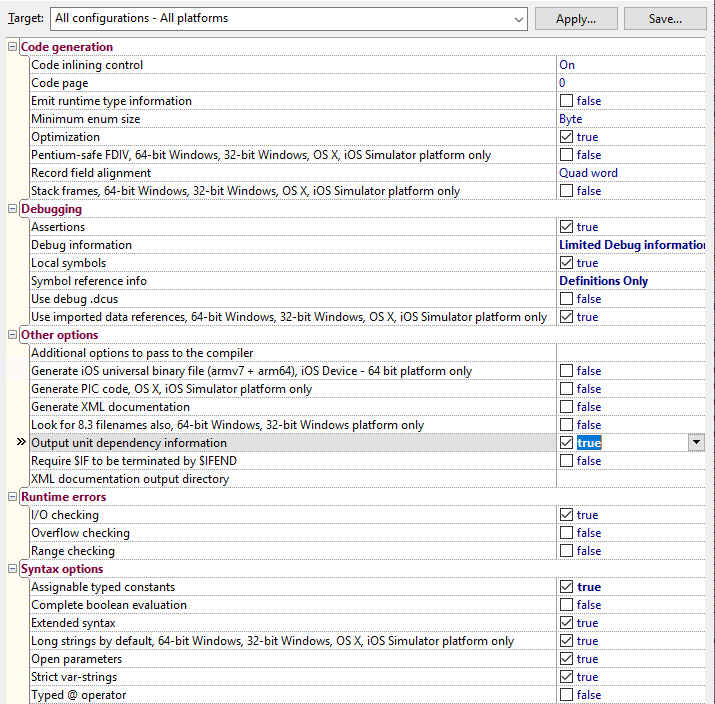
These are my global default settings from the Tools -> Options menu option, then following these bits of the tree:

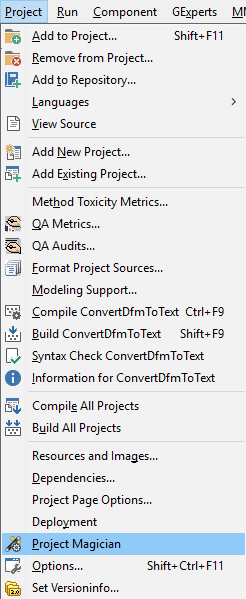
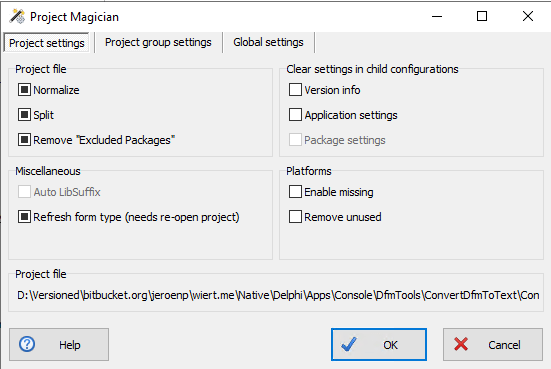
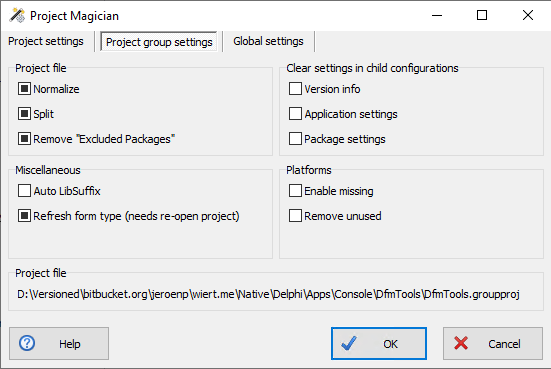
You can get to all levels via the Project -> Project Magician menu option, then following the various tabs:
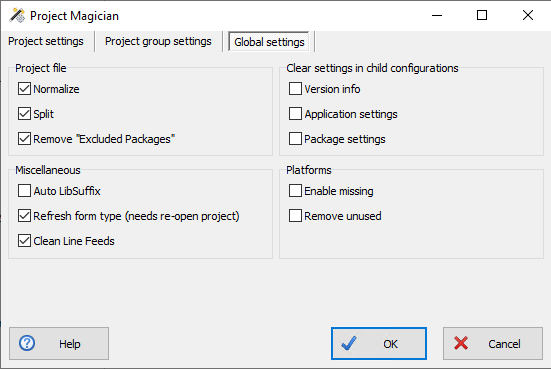

Note that if you have combinations of installed previous versions before, that you should ensure you install the most recent versions of these, as there have been incompatibility issues between them:

  • ProjectMagician (or DProjNormalizer)
  • SelectiveDebugging

Related searches

Thread

  • Jeroen Wiert Pluimers's profile photo

    +Walter Prins interesting tool! Do you know of a tool that can downgrade .dproj files so you can use them with older Delphi versions? (the opposite of what the IDE does)?

    Or someone that has written more than my XSD on .dproj files? My one is so small that’s hardly a real attempt. https://wiert.me/2013/08/31/delphi-first-try-on-an-xsd-for-groupproj-files/

  • Walter Prins's profile photo
    +Jeroen Wiert Pluimers No, but interesting idea. I suppose you’re probably aware that the JEDI JCL/JVCL takes a somewhat similar (ish) related approach, in that it generates project and package files that are compatible with every desired version of Delphi from minimalist (XML) template files. Every so often I think it might be worth looking whether one can re-use the code from there easily but haven’t gotten around to it. Always something else to do first. :/
  • Jeroen Wiert Pluimers's profile photo
    +Walter Prins no I didn’t. Where should I start reading on that minimalist template approach?
  • Walter Prins's profile photo

    +Jeroen Wiert Pluimers  Sorry I see I missed out the word installer in my comment: It’s the Jedi JCL/JVCL installers that uses xml templates etc.

    But the point stands: I guess it should be (perhaps) possible to reuse its infrastructure for ones own projects, though as I say I keep meaning to look into this but haven’t really done so.

    (BTW I’m assuming you are familiar with the JCL/JVCL and in in particular their installers that bootstrap from source code? If not then perhaps my comments may not be that useful?)

    Anyway, not sure if or where there’s particular documentation about this (kind of doubt it), but if you have the JCL/JVCL installed somewhere, then first of all have a look at the “xml” folders e.g. “<jclroot>\jcl\packages\xmls” and “<jvclroot>\jvcl\packages\xml“.

    These files appear to define projects and packages in a seemingly abstract/somewhat minimal way using XML. This seemingly is then used to automatically produce .dproj and .dpk files which are placed in e.g. “<jclroot>\jcl\packages\dXX” and “<jvclroot>\jvcl\packages\dXX” where dXX corresponds to a folder for each of the supported Delphi versions and compiled/used during installation.

    Having just looked into this briefly a bit further as a result of this conversation: Key units here (in the case of JVCL) seems to be “jvclroot>\devtools\PackagesGenerator\PackageGenerator.pas“, “<jvclroot>\install\JVCLInstall\PackageUtils.pas” and “jvclroot>\devtools\common\PackageInformation.pas” (used predictably by <jvclroot>\JVCLInstall.dproj)

    (Additionally, having looked at this a bit more closely, it also appears that the JCL does not actually replace all or even most of its .dproj and .dpk files after all, but ships version specific .dproj and .dpk files in most cases, though the JVCL does appear to mostly do so. )

    Edit: The JCL also has this interesting sounding unit “<jclroot>\source\windows\JclMsBuild.pas” which appears to be an MSBuild project file parser…

  • Jeroen Wiert Pluimers's profile photo
    +Walter Prins​ I was aware of the bootstrap and it’s been on my “eventually I’ll take a look” list like forever. One day…
  • Walter Prins's profile photo
    Same as me then basically, ha. ^^

–jeroen

Posted in Conference Topics, Conferences, Delphi, Development, Event, Software Development | Leave a Comment »

When your Delphi IDE suddenly skips unsaved changes during compilation(TL;DR: watch early signs your IDE is hosed, then restart without saving)

Posted by jpluimers on 2021/03/24

A while ago, I observed that when compiling, my Delphi IDE would not take into account unsaved changes any more.

This ws in a time when I was tracking down some hard to reproduce problems of code that sometimes would and sometimes would not compile at all.

The solution was this:

[HKEY_CURRENT_USER\Software\Embarcadero\BDS\18.0\Compiling]
"BackgroundCompilation"="False"

Somehow, the Delphi IDE had turned this flag to True without me telling it did, nor me changing an option (heck if you do a “Delphi” “BackgroundCompilation” – Google Search you hardly get any meaningful results).

Luckily, I did remember what happened around the bahaviour change: the compiler had encountered a strange error, and the IDE had become unstable.

With an unstable IDE, I did have seen damage in saved source files in the past, so I always use version control with Delphi as that allows easier to spot file differences.

What I did not anticipate was that it could corrupting my persisted IDE settings, though every now and then.

Detecting early signs of the IDE becoming unstable

  • any internal compiler error (AV or not)
  • refactoring not succeeding while it should
  • insert mode suddenly becomes override or vice versa
  • editor block selection is suddenly turned on
  • any access violation or pointer error exception

Sometimes (but not always) these can be early signs too

  • debugger blue dots not matching compiled code lines
  • the debugger not being able to debug code despite blue dots being there
  • properties in the object inspector having changed without manual action

Be prepared for an unstable IDE

  • Save your work often
  • At the earliest sign of an unstable IDE: kill (do not save work!) the affected bds.32 process using Process Explorer

BackgroundCompilation

A “Delphi” “BackgroundCompilation” – Google Search did not get much relevant results. Below are the most relevant ones I could find from it:

Too bad Google does not index the WayBack machine, as I think it contains relevant material that is now hard to find.

So it looks like the feature was introduced somewhere close to Delphi 5:

[HKEY_CURRENT_USER\Software\Borland\Delphi\5.0\Compiling]
"Show Compiler Progress"="True"
"Warn on Package Rebuild"="-1"
"Compile Beep"="0"
"Cache Headers"="0"
"BackgroundCompilation"="0"

“Delphi” “Background Compilation” – Google Search shows much more information, based on what it returned I found that the first actual documentation was for Background Compilation in Delphi 2010, some 10 years after it became available:

The image in the blog post of former product manager Andreano Lanusse shows why I did not see the behaviour: when background compiling is active, the progress dialog is transparent (and non-modal). I did not have the compiler progress enabled, so never saw that dialog change behaviour.

–jeroen


Posted in Conference Topics, Conferences, Delphi, Development, Event, Software Development, Undocumented Delphi | Leave a Comment »

Delphi object instance lifetime demo; do not use AfterConstruction as a poor-mans way to work around non-virtual constructor or undetermined Create hierarchy calls

Posted by jpluimers on 2021/03/23

I think using AfterConstruction is a poor man’s solution that you should only use in exceptional cases, as it is:

  • called only after the last constructor in the chain is called.
  • called outside of the constructor chain (i.e. exceptions in it will not automatically call the destructor chain, nor BeforeDestruction)
  • meant to add any initialization code that requires a fully created object instance.

There were quite a few customer sites I visited that were using AfterConstruction. Usage roughly falls into two cases:

Read the rest of this entry »

Posted in Conference Topics, Conferences, Delphi, Development, Event, Software Development, Undocumented Delphi | 1 Comment »

delphi – Invalid floating point operation calling Trunc() – Stack Overflow

Posted by jpluimers on 2021/03/18

I bumped into [WayBack] delphi – Invalid floating point operation calling Trunc() – Stack Overflow, while searching for what might have tests like these fail:

TValueRecordTests.Int64_Through_Value_Container_via_Currency_Intermediate_Is_Identity_Operation(9223372036854775807) = 9223372036854775807
EInvalidOp with message 'Invalid floating point operation'

In the end, it reproduced with a much more simple test case class of which the first three fail (EInvalidOp with message 'Invalid floating point operation'), but the last three succeed.

Lesson learned:

  • High(Int64) stored in Currency or Double, will not Trunc back to their original value.
  • Low(Int64) stored in Currency will not Trunc back to their original value.
  • Testing boundary conditions is nice, but be sure what your boundary conditions are in the first place.

Read the rest of this entry »

Posted in Conference Topics, Conferences, Delphi, Development, Event, Software Development | Leave a Comment »

A DUnit Folder Iterator Extension – The Art of Delphi Programming

Posted by jpluimers on 2021/03/17

Reminder to self: experiment with [WayBack] A DUnit Folder Iterator Extension – The Art of Delphi Programming.

This could be extended to virtual folders, allowing many integration tests to be run depending on some configuration hierarchy defined in a folder structure.

–jeroen

Posted in Conference Topics, Conferences, Delphi, Development, DUnit, Event, Software Development, Unit Testing | Leave a Comment »

Delphi use of FS segment: structured exception handling

Posted by jpluimers on 2021/03/16

A while ago, I had to trace through a lot of code in the CPU pane to track down some memory allocation related issues.

I wondered what the use of the FS segment was about, so via [Archive.is] delphi what is fs segment used for – Google Search, I found that it is related to Win32 Structured Exception handling and therefore not limited to Delphi, through these links:

A few disassembly parts to show how the Delphi Win32 compiler uses this for try finally blocks and try except blocks is below. Note that often, there are implicit try finally blocks when having managed method parameters or local variables.

–jeroen

Read the rest of this entry »

Posted in Delphi, Development, Software Development, Undocumented Delphi, Windows Development | Leave a Comment »

GExperts grep search: skipping searching certain files, irrespective of their directory

Posted by jpluimers on 2021/03/11

Especially when including [WayBack] form files (dfm now, but in the past also nfm and xfm) in your search, you might want to exclude one or more of them, for instance when they do not adhere to the form file syntax.

One of such files is for instance [WayBack] jcl/ExceptDlg.CBuilder32.dfm at master · project-jedi/jcl · GitHub. It has the contents is NONE (by intent, just like the corresponding .h and .cpp files, as only the Delphi equivalents .dfm and .pas have been implemented).

Doing this was way easier than I thought: just put ExceptDlg.CBuilder32.dfm in the “Exclude Dirs” field – which also excludes files. How cool is that!

–jeroen


Posted in Delphi, Development, GExperts, Software Development | 1 Comment »

Debouncing and Throttling Explained Through Examples | CSS-Tricks

Posted by jpluimers on 2021/03/10

TL;DR of https://css-tricks.com/debouncing-throttling-explained-examples/:

  • debounce: Grouping a sudden burst of events (like keystrokes) into a single one.
  • throttle: Guaranteeing a constant flow of executions every X milliseconds. Like checking every 200ms your scroll position to trigger a CSS animation.
  • requestAnimationFrame: a throttle alternative. When your function recalculates and renders elements on screen and you want to guarantee smooth changes or animations. Note: no IE9 support.

Full article [WayBackDebouncing and Throttling Explained Through Examples | CSS-Tricks

Delphi implementations:

–jeroen

Posted in Algorithms, Delphi, Development, JavaScript/ECMAScript, Scripting, Software Development | Leave a Comment »

MESSAGE directive Delphi

Posted by jpluimers on 2021/03/09

I totally forgot to queue this, after putting in a draft in 2010. Luckily, nothing has changed since then: the [WayBack] MESSAGE directive Delphi which allows you to emit hint, warning, error (multiple) and fatal (single) messages to the Delphi from Delphi IDE “Messages” pane or to the command-line compiler output:

{$MESSAGE 'Boo!'}                   emits a hint 
{$Message Hint 'Feed the cats'}     emits a hint 
{$messaGe Warn 'Looks like rain.'}  emits a warning 
{$Message Error 'Not implemented'}  emits an error, continues compiling 
{$Message Fatal 'Bang.  Yer dead.'} emits an error, terminates compiler 

You can use it like this to list a TODO, that might get more attention than a TODO comment in the code (earliest on-line documentation in Delphi 2007’s [WayBack] devcommon.pdf and [WayBack] Using To-Do Lists):

{$MESSAGE Hint 'TODO finish some work here'}

The most important thing to remember is do not forget the single quotes around the message.

Example from production code which tests for the permutations of defines related to [WayBack] FastMM4Options.inc:

{$ifdef RELEASE}
//...
{$else}
  {$ifdef DEBUG}
//...
  {$else}
    {$Message Error 'Unsupported FastMM4Options.inc build configuration: supported are RELEASE and DEBUG'}
  {$endif not DEBUG}
{$endif not RELEASE}

{$ifdef NoMessageBoxes}
  {$ifndef UseOutputDebugString}
    {$Message Error 'Unsupported combination: without NoMessageBoxes or UseOutputDebugString, no severe FastMM4 errors are emitted at all.'}
  {$endif not UseOutputDebugString}
{$endif NoMessageBoxes}

--jeroen

Posted in Delphi, Development, Software Development | Leave a Comment »

Short Delphi tip: ensuring RTTI for classes is included

Posted by jpluimers on 2021/03/04

When using RTTI in Delphi, you really want the RTTI to be available.

The compiler includes RTTI for classes, as soon as it found that a class is touched by code that will be executed.

So in order to include RTTI for classes into the executable, you have to ensure you touch the class.

Basically there are two tricks for that.

  1. A small one step process which incurs a tiny bit of string overhead:
    class function TObject.ClassName: string;
    begin
      Result := UTF8ToString(_PShortStr(PPointer(PByte(Self) + vmtClassName)^)^);
    end;
    • Touch the [WayBack] ClassName class function for each class, for instance in an initialization section or registration method, like this:
      TMyClass.ClassName;
      TMyOtherClass.ClassName;
  2. A small two step process
    1. Create a method like this: procedure EnsureRttiIsAvailable(const Classes: array of TClass); begin end;
    2. Pass the classes to it like this:
      EnsureRttiIsAvailable([TMyClass, TMyOtherClass]);

I like the second solution more, as it clearly states the intent.

The first trick is calling a function without using the result. This is a Pascal construct that looks odd, but is perfectly valid to use: basically you discard the result.

–jeroen

Posted in Conference Topics, Conferences, Delphi, Development, Event, Software Development, Undocumented Delphi | Leave a Comment »