


[Wayback/Archive] Jason Levin on X: “Jira marketing team was like “what infrastructure is as inefficient and frustrating as us?” and then puts ads on the New York City subway”
Picture via [Wayback/Archive] Tweet JSON:
Posted by jpluimers on 2024/10/22
[Wayback/Archive] Jason Levin on X: “Jira marketing team was like “what infrastructure is as inefficient and frustrating as us?” and then puts ads on the New York City subway”
Picture via [Wayback/Archive] Tweet JSON:

Posted in Conference Topics, Conferences, Development, Event, Fun, Issue/Bug tracking, JIRA, Software Development | Leave a Comment »
Posted by jpluimers on 2021/04/13
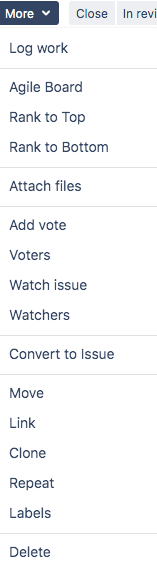
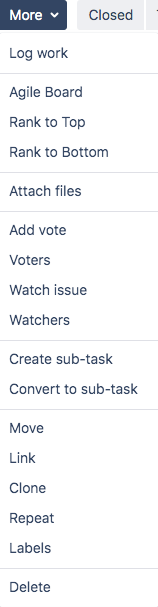 Depending on the issue type, a workflow might be different.
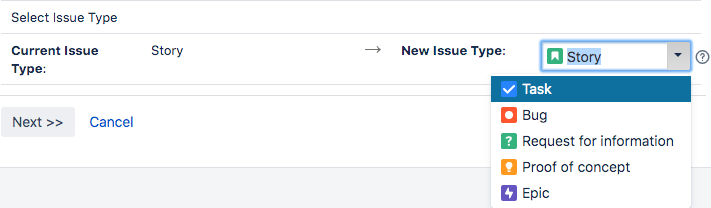
Since for Software projects, the default workflow Story might not be appropriate during the workflow, it makes sense to convert it.
For issue types other than sub-task, the dropdown only has one conversion entry: “convert to sub-task” (a sub-task has only “Convert to Issue”).
In order to convert to other issue types, use the “Move” option. There in the first step, you can change the issue type.
Related:

Posted in Development, Issue/Bug tracking, JIRA, Software Development | Leave a Comment »
Posted by jpluimers on 2020/12/25
 Found out that Jira has its own markdown for issues and comments.
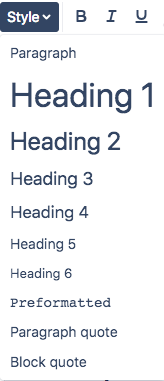
I knew the editor for it has a Style drop down with a “Preformatted” entry.
Initially, pasted text looks preformatted, but after saving the issue or comment, often all or part of that text did either:

A co-worker indicated the plus sign on the right can insert blocks (I thought that while it was next to inserting emoticons, it was for inserting unicode symbols like plus).
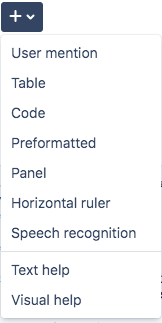 Alas, no: it is for adding things that are not symbols at all, and too has a “Preformatted” entry.
For sake of consistency, both “Preformatted” entries produce different markup.
The “Style” entry of “Preformatted” basically surrounds all lines with curly braces, then upon saving tries to do some interpretation and removes parts.
The “Plus” entry of “Preformatted” surrounds a block of lines with {noformat} entries at start of end.
Then there is the “Code” entry under “Plus”. It insert a code block, does not allow you to select the language, but assumes everyone loves programming in Java, as now the surrounding entries are {code:java} at the start and {code} at the end. The default block is this one in “Visual” mode:
{code:java}
// code placeholder
{code}
and this one in “Text” mode:

Posted in Development, Issue/Bug tracking, JIRA, Power User, Software Development | Leave a Comment »
Posted by jpluimers on 2019/02/28
For my link archive, as a reminder to check the Sistel JIRA tool, which is an IDE like tool for JIRA: [WayBack] Business Process Studio for JIRA | Sistel
He has some very interesting posts at [Archive.is] Jose León – Medium.
Via:
–jeroen

Posted in Delphi, Development, Issue/Bug tracking, JIRA, Software Development | Leave a Comment »
Posted by jpluimers on 2014/05/02
Too bad Atlassian don’t specify that the {code} tag now supports more languages.
The trick is to specify an invalid one (like JSON, for which you can use javascript), then it emits an error telling you which languages are supported:
Available languages are: javascript, sql, xhtml, actionscript, none, html, xml, java
(Yes I know there is a JIRA MarkDown plugin, but not every customer installs plugins at will)
–jeroen
via: Text Formatting Notation Help – Atlassian JIRA.

Posted in Development, Issue/Bug tracking, JIRA, Software Development | Leave a Comment »

 The Wiert Corner - irregular stream of stuff