The Wiert Corner – irregular stream of stuff

Jeroen W. Pluimers on .NET, C#, Delphi, databases, and personal interests

  • My badges

  • Twitter Updates

  • My Flickr Stream

  • Pages

  • All categories

  • Enter your email address to subscribe to this blog and receive notifications of new posts by email.

    Join 1,854 other subscribers

Archive for the ‘C#’ Category

human readable number formatting – C#: File-size format provider – Stack Overflow

Posted by jpluimers on 2011/04/20

Boy, I love stackoverflow.

Unlike a forum – which is focussed on discussion – stackoverflow is focussed on questions and answers, and they have lots of good answers.

Recently, I had to format numbers in a human readable way.

The formatting – C#: File-size format provider – Stack Overflow question had at least 3 good ways.

I chose the FileSizeFormatProvider answer, as it best fitted my goal and it is easy to extend, but the StrFormatByteSize answer works very well too if you need an ‘out of the box’ solution that works on native Windows.

–jeroen

Posted in .NET, C#, C# 2.0, C# 3.0, C# 4.0, Development, Software Development | Leave a Comment »

Convert linq query to string array/list – C# – Stack Overflow

Posted by jpluimers on 2011/04/19

Sometimes little snippets of code help you big time.

Note the below ones are not performant (they will load all the data), but can make your code a lot more readable.

Use with care!

return list.Select(x => x.ToString()).ToArray();

return list.Select(x => x.ToString()).ToList();

–jeroen

via: Convert linq query to string array – C# – Stack Overflow.

Posted in .NET, C#, C# 3.0, C# 4.0, Development, LINQ, Software Development | Leave a Comment »

Entity Framework 4 – security warning popup workaround: Do you trust all the T4 “text templates” on your system, even future ones?

Posted by jpluimers on 2011/04/13

When using Entity Framework 4, your transofmrations (model to classes, DB to model, etc) are performed by T4 Text Templates.

Those templates are executed all over the place (when saving your project, building your project, changing your model, etc).

Since anyone can insert a T4 Text Template into Visual Studio, and those are scripts, it is a potential vulnerability.

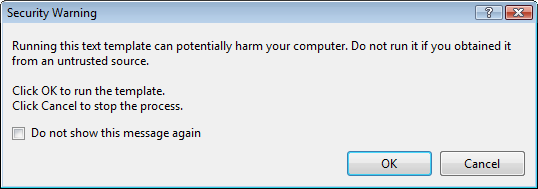
The default Visual Studio behaviour is to show you a dialog like this:

[Security Warning]

Running this text template can potentially harm your computer. Do not run it if you
obtain if rtom an untrusted source.

Click OK. to run the template.
Click Cancel top stop the process.

[X] Do not show this message again

[OK]  [Cancel]

Some blogs mention Just click OK and feel free to check “do not show this message again.”

I’m not sure I want that: it would indicate I always trust T4 Text Templates, even the ones added in the future (T4 Text Templates are executable content, malicious software could find it’s way into your development environment; anyone remember the virus that hooked itself into the run-time library sources of a development system so it would spread through anything compiled on that system?).

But I also don’t want to click OK on that dialog.

It would be so nice if the dialog:

  1. Showed which template is about to be executed
  2. Allowed me to skip only for that particular template

Anyone better thoughts on this?

–jeroen

via Customizing EDM Code Gen in EF4 : Don’t Be Iffy.

Posted in .NET, C#, Delphi, Development, EF Entity Framework, Prism, Software Development | 4 Comments »

c# – List of new features in C#2.0, 3.0 and 4.0 – Stack Overflow

Posted by jpluimers on 2011/04/12

When maintaining software, you can’t always use the latest versions of your tools and languages.

Since C# has added a lot since version 1, it is handy to know what changed in which version.

Of course nothing beets the (paper and electronic!) editions of C# in Depth (covering C# 1, 2 and 3) and C# in Depth second edition (covering C# 2, 3 and 4).

Those books are thick (they need to, there is a truckload to cover!).
(The publisher (Manning) actually did a very good job on the e-book versions. Highly recommended, as it makes searching stuff so much easier).

The answers to the c# – List of new features in C#2.0, 3.0 and 4.0 Stack Overflow question contains a few concise lists of major changes in the language.

I really like the Bluffer’s Guide to C# 2, and the Bluffer’s Guide to C# 3 that Jon Skeet mentioned in his answer (and wish he wrote a Bluffer’s Guide to C# 4 as well), as they focus on some essential stuff in a very concise way.

If you want more detailed info, start with these stackoverflow questions:

Since stackoverflow wasn’t there when C# 2 was introduced in 2005, start with this nice C# 2 overview article on CSharpCorner.

Note: contrary to popular belief, there is no C# 3.5. There is .NET 3.5 (adding LINQ) and .NET 3.0 (adding WPF, WCF and WF) all based on the C# 3.0 and CLR 2 SP1 features.
(Yes, some expression tree features don’t work on CLR2 RTM, as that one has a few bugs, see Jared’s comment on this answer).

--jeroen

via: c# – List of new features in C#2.0, 3.0 and 4.0 – Stack Overflow.

Posted in .NET, C#, C# 2.0, C# 3.0, C# 4.0, Development, Jon Skeet, Software Development | Leave a Comment »

SharePoint 2010 error: Retrieving the COM class factory for component with CLSID {BDEADF26-C265-11D0-BCED-00A0C90AB50F} failed due to the following error: 800703fa – SharePointWiz

Posted by jpluimers on 2011/04/11

Somehow in a production environment I did get this error too:

System.Runtime.InteropServices.COMException (0x80040154): Retrieving the COM class factory for component with CLSID {BDEADF26-C265-11D0-BCED-00A0C90AB50F} failed due to the following error: 80040154.

These two posts helped me to solve it:

SharePoint 2010 beta error: Retrieving the COM class factory for component with CLSID {BDEADF26-C265-11D0-BCED-00A0C90AB50F} failed due to the following error: 800703fa – SharePointWiz – Site Home – MSDN Blogs.

Rhythmic Coding: Retrieving the COM class factory for component with CLSID {BDEADF26-C265-11D0-BCED-00A0C90AB50F} failed due to the following error: 80040154.

The solution is deceptively simple:

Resolution: It is because you are trying to build a x86 application. Go to project properties and set type to x64 everywhere. Then rebuild and debug. The Error Vanishes!

The SharePoint 2010 dll’s are all x64, and Visual Studio 2010 by default still starts .NET projects in x86 mode for both Release and Debug settings.

–jeroen

Posted in .NET, .NET 4.0, C#, C# 4.0, Development, SharePoint, Software Development, Visual Studio 2010, Visual Studio and tools, Web Development | 8 Comments »

Recommended blog post: Favorite C# Idioms | Blue Onion Software

Posted by jpluimers on 2011/04/05

While browsing for some less used but useful C# features, I came across a great post by Michael (Mike) Ward from Blue Onion Software on Favorite C# Idioms based on the great Hidden Features of C# thread on StackOverflow.

Mike starts with

There’s a great post on Stackoverflow about hidden features in C#. I prefer to think of these as idioms rather than hidden features since most are actually documented. Here are my favorites.

Then he continues with some nice examples of C# idioms.

Recommended reading!

–jeroen

via Favorite C# Idioms | Blue Onion Software.

Posted in .NET, C#, C# 2.0, C# 3.0, C# 4.0, Development, Software Development | Leave a Comment »

C# Toolbox: Debug-able, Self-Installable Windows Service Template Redux | Visual Studio Feeds

Posted by jpluimers on 2011/03/29

James Michael Hare finally published his Debug-able, Self-Installing Windows Service Template download.

Quote: Read the rest of this entry »

Posted in .NET, C#, Development, Software Development | 2 Comments »

SccProjectName value in .csproj hosed – strange build results (via: Interesting support case – Visual Studio solution prompts for entire SCC check-out on open – Developer Support Team Foundation Server – Site Home – MSDN Blogs)

Posted by jpluimers on 2011/03/24

Something in TFS screwed a SCC references in one of the .csproj files at a client.

As a result, it generated strange build errors (unfound projects in the wrong branch), because when loading project from the correct, the IDE in fact loads it from the wrong branch.

When you read the blog post from the Microsoft TFS development support team, the solution looks simple: in a regular project the values for SccProjectName, SccLocalPath, SccAuxPath and SccProvider should all be SAK (indicating the SCC should ignore their values).

That is only 1 piece of the solution. Somehow, Visual Studio and/or TFS seem to cache some information in hidden places, so it keeps insisting to use the project from the wrong branch.

So, in addition to changing the above SAK values in the project in the correct branch, you need to:

  1. Also check (and if wrong change) the above values to SAK for the project in the wrong branch
  2. Remove the references to the project in the wrong branch from the Visual Studio MRU list in the registry (HKEY_CURRENT_USER\Software\Microsoft\VisualStudio\9.0\ProjectMRUList)
  3. Delete the .suo file for the good solution
  4. Add the project from the correct branch to the solution
  5. Manually modify the .sln file in the correct branch to remove the relative directory paths to the project in the wrong branch (values in keys named like SccProjectUniqueName58, SccProjectName58 and SccLocalPath58)
  6. Reload the solution in Visual Studio and check everything works correctly

It took at least a couple of hours to find this all out, for these reeasons: Read the rest of this entry »

Posted in .NET, C#, Development, Software Development | 2 Comments »

Ideone.com | Online IDE & Debugging Tool >> C/C++, Java, PHP, Python, Perl and 40+ compilers and intepreters

Posted by jpluimers on 2011/03/18

Really cool stuff; dozens of computer languages are supported, including C# and VB.NET (both on Mono) and a few Pascal flavours.

Briefly about ideone

ideone.com is a… pastebin. But a pastebin like no other on the Internet. More accurate expression would be online mini IDE and debugging tool.

Ideone is an Italian word for great ideas – because ideone.com is a place where your greatest ideas can spring to life.

ideone.com is designed mostly for programmers (but, of course, common plain text can also be uploaded). You can use it to:

share your code (that’s obvious – it is a pastebin, isn’t it? :)) in a neat way,

run your code on server side in more than 40 programming languages (number still growing)

and do it all with your own input data!

ideone.com also provides free Ideone API which is availabe as a webservice. It’s functionality allows you to build your own ideone-like service!

for logged in users Ideone offers possibility to manage their codes, publish multiple submissions at one go, and more.

All codes can be accessed through convenient hash links. Source code pages provide information about the code and its execution: memory usage, execution time, language and compiler version, code itself, input uploaded by the user, output generated by the program and error messages from compilers and interpreters.

–jeroen

via Ideone.com | Online IDE & Debugging Tool >> C/C++, Java, PHP, Python, Perl and 40+ compilers and intepreters.

Posted in .NET, C#, Delphi, Development, Software Development, VB.NET | 4 Comments »

Solution for “Why do I get a ‘LoaderLock’ Error when debugging my Managed DirectX application” (The ZBuffer)

Posted by jpluimers on 2011/03/17

I maintain some .NET code that still uses the MDX 1.1 (since MDX 2.0 got cancelled, and this project cannot be brought to XNA).

Every now and then, you get a Loader Lock error.

ZBfufer provides the solution (I always use choice #3): Read the rest of this entry »

Posted in .NET, C#, C# 2.0, C# 3.0, Development, Software Development, Visual Studio 2005, Visual Studio 2008, Visual Studio and tools | Leave a Comment »