The Wiert Corner – irregular stream of stuff

Jeroen W. Pluimers on .NET, C#, Delphi, databases, and personal interests

  • My badges

  • Twitter Updates

  • My Flickr Stream

  • Pages

  • All categories

  • Enter your email address to subscribe to this blog and receive notifications of new posts by email.

    Join 1,861 other subscribers

Archive for the ‘.NET’ Category

DealExtreme uses ASP.NET

Posted by jpluimers on 2011/05/03

It is always fun to see error messages on web-sites; they reveal a lot about the technology they use.

For instance, DealExtreme – a very popular site to order electronics and gadgets from the far east – uses ASP.NET.

They have verbose logging enabled, which even includes a warning to turn it off in production sits, as per this comment in the page source:

This error page might contain sensitive information because ASP.NET is configured to show verbose error messages using <customErrors mode=”Off”/>. Consider using <customErrors mode=”On”/> or <customErrors mode=”RemoteOnly”/> in production environments.

This is the full text, indicating they use .NET 2.0 and SQL Server with connection pooling (which is a good thing), and the BLToolkit extensions, Callbacks, a separation of Business Logic and Data Abstraction (BLL, DAL/DAO) probably using Spring.net and Data Binding by calling BindData() in stead of DataBind().

Server Error in ‘/’ Application.


A network-related or instance-specific error occurred while establishing a connection to SQL Server. The server was not found or was not accessible. Verify that the instance name is correct and that SQL Server is configured to allow remote connections. (provider: Named Pipes Provider, error: 40 – Could not open a connection to SQL Server)

Description: An unhandled exception occurred during the execution of the current web request. Please review the stack trace for more information about the error and where it originated in the code.

Exception Details: System.Data.SqlClient.SqlException: A network-related or instance-specific error occurred while establishing a connection to SQL Server. The server was not found or was not accessible. Verify that the instance name is correct and that SQL Server is configured to allow remote connections. (provider: Named Pipes Provider, error: 40 – Could not open a connection to SQL Server)

Source Error:

An unhandled exception was generated during the execution of the current web request. Information regarding the origin and location of the exception can be identified using the exception stack trace below.

Stack Trace:

[SqlException (0x80131904): A network-related or instance-specific error occurred while establishing a connection to SQL Server. The server was not found or was not accessible. Verify that the instance name is correct and that SQL Server is configured to allow remote connections. (provider: Named Pipes Provider, error: 40 - Could not open a connection to SQL Server)]
   System.Data.ProviderBase.DbConnectionPool.GetConnection(DbConnection owningObject) +578
   System.Data.ProviderBase.DbConnectionFactory.GetConnection(DbConnection owningConnection) +88
   System.Data.ProviderBase.DbConnectionClosed.OpenConnection(DbConnection outerConnection, DbConnectionFactory connectionFactory) +6265031
   System.Data.SqlClient.SqlConnection.Open() +258
   BLToolkit.Data.DbManager.ExecuteOperation(OperationType operationType, Action operation) +64
[DataException: A network-related or instance-specific error occurred while establishing a connection to SQL Server. The server was not found or was not accessible. Verify that the instance name is correct and that SQL Server is configured to allow remote connections. (provider: Named Pipes Provider, error: 40 - Could not open a connection to SQL Server)]
   BLToolkit.Data.DbManager.OnOperationException(OperationType op, DataException ex) +176
   BLToolkit.Data.DbManager.ExecuteOperation(OperationType operationType, Action operation) +135
   BLToolkit.Data.DbManager.OpenConnection() +91
   BLToolkit.Data.DbManager.get_Connection() +42
   BLToolkit.Data.DbManager.OnInitCommand(IDbCommand command) +31
   BLToolkit.Data.DbManager.get_SelectCommand() +28
   BLToolkit.Data.DbManager.GetCommand(CommandAction commandAction, CommandType commandType, String sql) +18
   BLToolkit.Data.DbManager.PrepareCommand(CommandAction commandAction, CommandType commandType, String commandText, IDbDataParameter[] commandParameters) +91
   BLToolkit.Data.DbManager.SetCommand(CommandAction commandAction, CommandType commandType, String commandText, IDbDataParameter[] commandParameters) +51
   BLToolkit.Data.DbManager.SetCommand(String commandText, IDbDataParameter[] commandParameters) +25
   DealExtreme.Mall.Common.DAL.DAO.BLToolkitExtension.CategoryAccessor.GetAll() +168
   DealExtreme.Mall.Common.BLL.CategoryBL.CategoryLogic.GetAllCategory() +53
   DealExtreme.Mall.Common.Caching.ProductCaching.CategoryCache.GetAllCategories() +9
   DealExtreme.Mall.Common.Caching.ProductCaching.BLToolkitExtension.CategoryCache.GetAllCategories() +433
   DealExtreme.Mall.Search.BLL.SearchLogic.GetSearchedCategory(String request) +255
   DealExtreme.Mall.Search.Web.Search.BindData() +416
   DealExtreme.Mall.Search.Web.Search.Page_Load(Object sender, EventArgs e) +16
   System.Web.Util.CalliHelper.EventArgFunctionCaller(IntPtr fp, Object o, Object t, EventArgs e) +25
   System.Web.Util.CalliEventHandlerDelegateProxy.Callback(Object sender, EventArgs e) +42
   System.Web.UI.Control.OnLoad(EventArgs e) +132
   System.Web.UI.Control.LoadRecursive() +66
   System.Web.UI.Page.ProcessRequestMain(Boolean includeStagesBeforeAsyncPoint, Boolean includeStagesAfterAsyncPoint) +2428


[SqlException]: A network-related or instance-specific error occurred while establishing a connection to SQL Server. The server was not found or was not accessible. Verify that the instance name is correct and that SQL Server is configured to allow remote connections. (provider: Named Pipes Provider, error: 40 - Could not open a connection to SQL Server)
at System.Data.ProviderBase.DbConnectionPool.GetConnection(DbConnection owningObject)
at System.Data.ProviderBase.DbConnectionFactory.GetConnection(DbConnection owningConnection)
at System.Data.ProviderBase.DbConnectionClosed.OpenConnection(DbConnection outerConnection, DbConnectionFactory connectionFactory)
at System.Data.SqlClient.SqlConnection.Open()
at BLToolkit.Data.DbManager.ExecuteOperation(OperationType operationType, Action operation)
[DataException]: A network-related or instance-specific error occurred while establishing a connection to SQL Server. The server was not found or was not accessible. Verify that the instance name is correct and that SQL Server is configured to allow remote connections. (provider: Named Pipes Provider, error: 40 - Could not open a connection to SQL Server)
at BLToolkit.Data.DbManager.OnOperationException(OperationType op, DataException ex)
at BLToolkit.Data.DbManager.ExecuteOperation(OperationType operationType, Action operation)
at BLToolkit.Data.DbManager.OpenConnection()
at BLToolkit.Data.DbManager.get_Connection()
at BLToolkit.Data.DbManager.OnInitCommand(IDbCommand command)
at BLToolkit.Data.DbManager.get_SelectCommand()
at BLToolkit.Data.DbManager.GetCommand(CommandAction commandAction, CommandType commandType, String sql)
at BLToolkit.Data.DbManager.PrepareCommand(CommandAction commandAction, CommandType commandType, String commandText, IDbDataParameter[] commandParameters)
at BLToolkit.Data.DbManager.SetCommand(CommandAction commandAction, CommandType commandType, String commandText, IDbDataParameter[] commandParameters)
at BLToolkit.Data.DbManager.SetCommand(String commandText, IDbDataParameter[] commandParameters)
at DealExtreme.Mall.Common.DAL.DAO.BLToolkitExtension.CategoryAccessor.GetAll()
at DealExtreme.Mall.Common.BLL.CategoryBL.CategoryLogic.GetAllCategory()
at DealExtreme.Mall.Common.Caching.ProductCaching.CategoryCache.GetAllCategories()
at DealExtreme.Mall.Common.Caching.ProductCaching.BLToolkitExtension.CategoryCache.GetAllCategories()
at DealExtreme.Mall.Search.BLL.SearchLogic.GetSearchedCategory(String request)
at DealExtreme.Mall.Search.Web.Search.BindData()
at DealExtreme.Mall.Search.Web.Search.Page_Load(Object sender, EventArgs e)
at System.Web.Util.CalliHelper.EventArgFunctionCaller(IntPtr fp, Object o, Object t, EventArgs e)
at System.Web.Util.CalliEventHandlerDelegateProxy.Callback(Object sender, EventArgs e)
at System.Web.UI.Control.OnLoad(EventArgs e)
at System.Web.UI.Control.LoadRecursive()
at System.Web.UI.Page.ProcessRequestMain(Boolean includeStagesBeforeAsyncPoint, Boolean includeStagesAfterAsyncPoint)
[HttpUnhandledException]: Exception of type 'System.Web.HttpUnhandledException' was thrown.
at System.Web.UI.Page.HandleError(Exception e)
at System.Web.UI.Page.ProcessRequestMain(Boolean includeStagesBeforeAsyncPoint, Boolean includeStagesAfterAsyncPoint)
at System.Web.UI.Page.ProcessRequest(Boolean includeStagesBeforeAsyncPoint, Boolean includeStagesAfterAsyncPoint)
at System.Web.UI.Page.ProcessRequest()
at System.Web.UI.Page.ProcessRequest(HttpContext context)
at ASP.search_aspx.ProcessRequest(HttpContext context)
at System.Web.HttpApplication.CallHandlerExecutionStep.System.Web.HttpApplication.IExecutionStep.Execute()
at System.Web.HttpApplication.ExecuteStep(IExecutionStep step, Boolean& completedSynchronously)


Version Information: Microsoft .NET Framework Version:2.0.50727.4952; ASP.NET Version:2.0.50727.4955

Posted in .NET, ASP.NET, C#, Development, Software Development | Leave a Comment »

Tortoise SVN Global Ignore Pattern for Delphi and Visual Studio

Posted by jpluimers on 2011/04/26

Since I use (among others) both Visual Studio and Delphi, I changed the Tortoise Global Ignore Pattern to be this:

Debug lib *.identcache *.local *bin *obj RECYCLER Bin *.user *.suo *.dcu __history ModelSupport_* *.rsm thumbs.db *.bak *.~* __recovery *.tvsconfig *.o *.lo *.la *.al .libs *.so *.so.[0-9]* *.a *.pyc *.pyo *.rej *~ #*# .#* .*.swp .DS_Store

The bold portion is what I changed when compared to the original one:

*.o *.lo *.la *.al .libs *.so *.so.[0-9]* *.a *.pyc *.pyo *.rej *~ #*# .#* .*.swp .DS_Store

Input from [WayBack] Tortoise SVN Global Ignore Pattern for Visual Studio (which also included some of the Delphi patterns), [WayBack] this Stackoverflow question (that indicated the patterns are case sensitive) and [WayBackShawn Oster | TortoiseSVN global ignore pattern for Visual Studio and Delphi.

–jeroen

PS: Added __recovery as Delphi 10.* started to use that for recovery files, which – unlike __history  is not documented, see [WayBack] What is the __recovery folder ? In C++ Seattle 10 Professional running under Win 7 I now get a folder called __recovery.

Posted in .NET, Delphi, Development, Software Development, Source Code Management, Subversion/SVN | Leave a Comment »

Delphi Constraints in Generics – RAD Studio XE documentation wiki

Posted by jpluimers on 2011/04/21

Quite a few things are similar when doing Generics in both Delphi and C#.

But constraints are a bit different.

To quote the Delphi Wiki page on Constraints in Generics – RAD Studio XE:

Constraints can be associated with a type parameter of a generic. Constraints declare items that must be supported by any particular type passed to that parameter in a construction of the generic type

Constraint items include:

  • Zero, one, or multiple interface types
  • Zero or one class type
  • The reserved word “constructor“, “class“, or “record

You can specify both “constructor” and “class” for a constraint. However, “record” cannot be combined with other reserved words.
Multiple constraints act as an additive union (“AND” logic).

A few other differences are these:

  • In .NET, there is a unified typing system: everything descends from System.Object, including both value types and reference types. In Delphi this is not the case. In .NET, when you don’t specify a constraint, but use the type in a reference way, it will do automatic boxing. Delphi has no concept of automatic boxing, so you cannot use a non-constrained type as a reference
  • In both .NET and Delphi, you cannot specify a constraint on an enumeration type. In .NET you can work around this by constraining on the underlying interfaces. In Delphi you cannot do that because enumeration types are ordinal types that do not implement interfaces.
  • In Delphi you cannot constrain on ordinal types.

Note that – like the Delphi documentation – the C# constraints on type parameters documentation is not complete on those either.

Related: a great post [WayBack] Using Generics in Delphi – Phil Gilmore covering the comparison between C# and Delphi in more depth.

–jeroen

via: Constraints in Generics – RAD Studio XE.

Posted in C#, Delphi, Development, Software Development | 10 Comments »

human readable number formatting – C#: File-size format provider – Stack Overflow

Posted by jpluimers on 2011/04/20

Boy, I love stackoverflow.

Unlike a forum – which is focussed on discussion – stackoverflow is focussed on questions and answers, and they have lots of good answers.

Recently, I had to format numbers in a human readable way.

The formatting – C#: File-size format provider – Stack Overflow question had at least 3 good ways.

I chose the FileSizeFormatProvider answer, as it best fitted my goal and it is easy to extend, but the StrFormatByteSize answer works very well too if you need an ‘out of the box’ solution that works on native Windows.

–jeroen

Posted in .NET, C#, C# 2.0, C# 3.0, C# 4.0, Development, Software Development | Leave a Comment »

Convert linq query to string array/list – C# – Stack Overflow

Posted by jpluimers on 2011/04/19

Sometimes little snippets of code help you big time.

Note the below ones are not performant (they will load all the data), but can make your code a lot more readable.

Use with care!

return list.Select(x => x.ToString()).ToArray();

return list.Select(x => x.ToString()).ToList();

–jeroen

via: Convert linq query to string array – C# – Stack Overflow.

Posted in .NET, C#, C# 3.0, C# 4.0, Development, LINQ, Software Development | Leave a Comment »

Visual Studio 2010: you should run the Remote Debugging Monitor from a local drive to avoid 0x8007000E E_OUTOFMEMORY

Posted by jpluimers on 2011/04/14

Setting up remote debugging is always a precarious thing, no matter what kind of development platform: the online documentation tells you the standard steps, but usually they don’t suffice.

This case is Visual Studio 2010 remote debugging, where the development environment is on a workstation running Windows 7, and the debug target is on Windows Server 2008 R2.
Both are x64 versions.

There is a remote desktop connection to the server, and the server can see the workstation files on the \\TSCLIENT\C share.

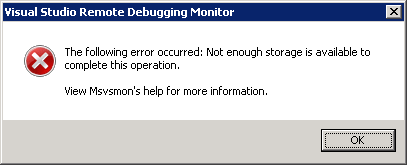
This is the error when running msvsmon.exe from \\tsclient\C\Program Files (x86)\Microsoft Visual Studio 10.0\Common7\IDE\Remote Debugger\x64:

[Visual Studio Remote Debugging Monitor]
The following error occurred: Not enough storage is available to complete this operation.

View Msvsmon's help for more information.
[OK]

(Funny BTW that the x64 Remote Debugging Monitor is in fact in an x86 path).

The solution is simple: copy the x64 directory local, then start it from there.

The reason in that the user credentials on the server don’t have enough rights on the \\TSCLIENT\C directory tree, so Windows barfs on it.

This pointed me into the right direction when I started Process Monitor from the same \\TSCLIENT\C share: Read the rest of this entry »

Posted in .NET, Debugging, Development, Remote Debugging, Software Development, Visual Studio 2010, Visual Studio and tools | Leave a Comment »

Entity Framework 4 – security warning popup workaround: Do you trust all the T4 “text templates” on your system, even future ones?

Posted by jpluimers on 2011/04/13

When using Entity Framework 4, your transofmrations (model to classes, DB to model, etc) are performed by T4 Text Templates.

Those templates are executed all over the place (when saving your project, building your project, changing your model, etc).

Since anyone can insert a T4 Text Template into Visual Studio, and those are scripts, it is a potential vulnerability.

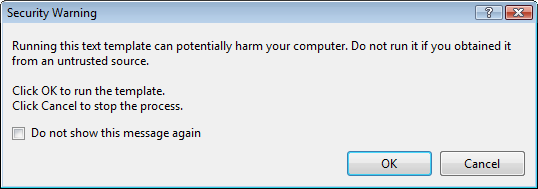
The default Visual Studio behaviour is to show you a dialog like this:

[Security Warning]

Running this text template can potentially harm your computer. Do not run it if you
obtain if rtom an untrusted source.

Click OK. to run the template.
Click Cancel top stop the process.

[X] Do not show this message again

[OK]  [Cancel]

Some blogs mention Just click OK and feel free to check “do not show this message again.”

I’m not sure I want that: it would indicate I always trust T4 Text Templates, even the ones added in the future (T4 Text Templates are executable content, malicious software could find it’s way into your development environment; anyone remember the virus that hooked itself into the run-time library sources of a development system so it would spread through anything compiled on that system?).

But I also don’t want to click OK on that dialog.

It would be so nice if the dialog:

  1. Showed which template is about to be executed
  2. Allowed me to skip only for that particular template

Anyone better thoughts on this?

–jeroen

via Customizing EDM Code Gen in EF4 : Don’t Be Iffy.

Posted in .NET, C#, Delphi, Development, EF Entity Framework, Prism, Software Development | 4 Comments »

c# – List of new features in C#2.0, 3.0 and 4.0 – Stack Overflow

Posted by jpluimers on 2011/04/12

When maintaining software, you can’t always use the latest versions of your tools and languages.

Since C# has added a lot since version 1, it is handy to know what changed in which version.

Of course nothing beets the (paper and electronic!) editions of C# in Depth (covering C# 1, 2 and 3) and C# in Depth second edition (covering C# 2, 3 and 4).

Those books are thick (they need to, there is a truckload to cover!).
(The publisher (Manning) actually did a very good job on the e-book versions. Highly recommended, as it makes searching stuff so much easier).

The answers to the c# – List of new features in C#2.0, 3.0 and 4.0 Stack Overflow question contains a few concise lists of major changes in the language.

I really like the Bluffer’s Guide to C# 2, and the Bluffer’s Guide to C# 3 that Jon Skeet mentioned in his answer (and wish he wrote a Bluffer’s Guide to C# 4 as well), as they focus on some essential stuff in a very concise way.

If you want more detailed info, start with these stackoverflow questions:

Since stackoverflow wasn’t there when C# 2 was introduced in 2005, start with this nice C# 2 overview article on CSharpCorner.

Note: contrary to popular belief, there is no C# 3.5. There is .NET 3.5 (adding LINQ) and .NET 3.0 (adding WPF, WCF and WF) all based on the C# 3.0 and CLR 2 SP1 features.
(Yes, some expression tree features don’t work on CLR2 RTM, as that one has a few bugs, see Jared’s comment on this answer).

--jeroen

via: c# – List of new features in C#2.0, 3.0 and 4.0 – Stack Overflow.

Posted in .NET, C#, C# 2.0, C# 3.0, C# 4.0, Development, Jon Skeet, Software Development | Leave a Comment »

SharePoint 2010 error: Retrieving the COM class factory for component with CLSID {BDEADF26-C265-11D0-BCED-00A0C90AB50F} failed due to the following error: 800703fa – SharePointWiz

Posted by jpluimers on 2011/04/11

Somehow in a production environment I did get this error too:

System.Runtime.InteropServices.COMException (0x80040154): Retrieving the COM class factory for component with CLSID {BDEADF26-C265-11D0-BCED-00A0C90AB50F} failed due to the following error: 80040154.

These two posts helped me to solve it:

SharePoint 2010 beta error: Retrieving the COM class factory for component with CLSID {BDEADF26-C265-11D0-BCED-00A0C90AB50F} failed due to the following error: 800703fa – SharePointWiz – Site Home – MSDN Blogs.

Rhythmic Coding: Retrieving the COM class factory for component with CLSID {BDEADF26-C265-11D0-BCED-00A0C90AB50F} failed due to the following error: 80040154.

The solution is deceptively simple:

Resolution: It is because you are trying to build a x86 application. Go to project properties and set type to x64 everywhere. Then rebuild and debug. The Error Vanishes!

The SharePoint 2010 dll’s are all x64, and Visual Studio 2010 by default still starts .NET projects in x86 mode for both Release and Debug settings.

–jeroen

Posted in .NET, .NET 4.0, C#, C# 4.0, Development, SharePoint, Software Development, Visual Studio 2010, Visual Studio and tools, Web Development | 8 Comments »

Mono for Android 1.0 released: develop .NET software that runs on Android

Posted by jpluimers on 2011/04/07

Just released: Mono for Android.

This – like MonoTouch for iOS – allows you to develop, debug and deploy Android applications using .NET

Mono for Anroid includes Visual Studio 2010 integration.

If you have a MonoTouch license, you temporarily get a discount on Mono for Android.

Now you can use .NET for the major mobile platforms: iOS, Android and Windows Phone 7 sharing major portions of your code across those platforms.

–jeroen

Posted in .NET, Development, Mono for Android, MonoTouch, Software Development | Leave a Comment »