The Wiert Corner – irregular stream of stuff

Jeroen W. Pluimers on .NET, C#, Delphi, databases, and personal interests

  • My badges

  • Twitter Updates

  • My Flickr Stream

  • Pages

  • All categories

  • Enter your email address to subscribe to this blog and receive notifications of new posts by email.

    Join 1,860 other subscribers

Archive for the ‘Visual Studio 2010’ Category

Visual Studio – How to: Reset Your Settings

Posted by jpluimers on 2012/07/17

There are features you rarely use. I once screwed up my Visual Studio desktop. Resetting to the default is easy, if you remember it is in the import/export settings dialog, which I didn’t (:

This is how I got back to the default:

To reset your settings

  1. On the Tools menu, click Import and Export Settings.
  2. On the Welcome to the Import and Export Settings Wizard page, click Reset all settings and then click Next.
  3. If you want to save your current settings combination, click Yes, save my current settings, specify a file name, and then click Next.
    —or—
    If you want to delete your current settings combination, choose No, just reset settings, overwriting my current settings, and then click Next. This option does not delete default settings, which will still be available the next time you use the wizard.
  4. In Which collection of settings do you want to reset to, select a settings collection from the list.
  5. Click Finish.
    The Reset Complete page alerts you to any problems encountered during the reset.

–jeroen

via: How to: Reset Your Settings.

Posted in .NET, Development, Software Development, Visual Studio 11, Visual Studio 2005, Visual Studio 2008, Visual Studio 2010, Visual Studio and tools | Leave a Comment »

Connecting Visual Studio 2010 to TFS over a Corporate Proxy (via: Visual studio 2010: cannot connect for any online resource – Stack Overflow)

Posted by jpluimers on 2012/07/11

One of the clients has tightened up their web proxy so much that Visual Studio 2010 does not want to connect to the HTTP 8080 port on the external TFS server (yes, I will switch to HTTPS if the workaround appears stable enough).

The problem is that Visual Studio often just tells you it cannot connect. No further error details.

Well, after you get most things working, you get this error every now and then:

[Microsoft Visual Studio]
Error
Team Foundation services are not available from server tfs.some-domain\PREFIX.
Technical information (for administrator):
HTTP code 407: Proxy Authentication Required
[OK]

There are a few problems involved:

  • Visual Studio does not allow you to enter credentials for the Proxy server.
  • Visual Studio doesn’t fully use the proxy settings from Internet Explorer either.
  • Visual Studio (unlike Internet Explorer) seems to loose the proxy session and or proxy authentication for that session over time.

All in all, it is fishy, even editing the devenv.exe.config proxy settings didn’t work (maybe I haven’t found the right combination of settings yet: that’s part of the research I need to do).

Workaround

So far, these are the current workaround steps (I will post a new entry when I found the solution or shortened the steps).

The workaround includes HTTP Fiddler, and sometimes doesn’t work without. HTTP Fiddler helps anyway as it shows the HTTP traffic (including error messages from the proxy server) between Visual Studio and TFS. Read the rest of this entry »

Posted in .NET, Development, Fiddler, Software Development, Visual Studio 2010, Visual Studio and tools, Web Development | 3 Comments »

Dear fellow programmer. If you aren’t experienced doing multi-threading, please don’t!

Posted by jpluimers on 2012/07/05

Recently I was asked to investigate a performance problem with a certain .NET application.

The first error I got when getting the app to build in Visual Studio 2010, and then run it was like this:

System.ComponentModel.InvalidAsynchronousStateException was caught
  Message=An error occurred invoking the method.  The destination thread no longer exists.
  Source=System.Windows.Forms
  StackTrace:
       at System.Windows.Forms.Control.WaitForWaitHandle(WaitHandle waitHandle)
       at System.Windows.Forms.Control.MarshaledInvoke(Control caller, Delegate method, Object[] args, Boolean synchronous)
       at System.Windows.Forms.Control.Invoke(Delegate method, Object[] args)
       at UI.Splash.SetStatus(String status) in C:\...\Splash.cs:line 395
       at UI.Menu.Main() in C:\...\Menu.cs:line 4275
  InnerException:

Someone built their own splash logic with multi-threading.

Funny that today, this got answered on StackOverflow by [WayBackmgie: [WayBack] multithreading – TMonitor synchronization / Application.ProcessMessages – Stack Overflow.

Though that is a Delphi link (and points to the nice libraries [Archive.is] AsynCalls and [WayBack] OmniThreadLibrary), the most important link it contains is to  [WayBackBorland Newsgroup Archive :: borland.public.delphi.internet.winsock :: Re: Disconnect TIdHttp in thread.

That sounds like a Delphi link too, but the subtitle “‘Ways to get into avoidable trouble with threads, V1.2′” hints the essence: it is a post that describes in an environment-agnostic way how to avoid multi-threading problems.

Recommended reading!

Anyway: Building multi-threaded code is hard. Even harder fleshing out all the corner cases and potential error conditions.

No matter what kind of programming environment: If you have not done lots of multi-threaded programming, then please don’t do it yourself: go ask someone that does know how to do it. Or better, try to avoid it.

I try to let libraries to the handling of multi-threading for me, if I use multi-threading at all, as others are far better at this than I am.

–jeroen

Posted in .NET, C#, C# 1.0, C# 2.0, C# 3.0, C# 4.0, C# 5.0, Conference Topics, Conferences, Delphi, Development, Event, Java, Software Development, VB.NET, VBS, Visual Studio 2010, Visual Studio and tools, WinForms | 6 Comments »

Visual Studio Smart Tag keyboard shortcuts: Ctrl-. and Shift+Alt-F10

Posted by jpluimers on 2012/07/04

I’m a keyboard fan, so recently I have put up a new Keyboards and Keyboard Shortcuts category and tried to add all old relevant posts to it (staying organized is time consuming, but in the end it pays back by being able to find back stuff faster).

At conferences, presentations, and clients people often wonder “how do you get to such-and-such IDE feature so quickly” and the answer usually is: be sure you know your keyboard shortcuts. Which isn’t easy, as documentation for them is often spread out, and to find the information: you have to know how the underlying actions are called.

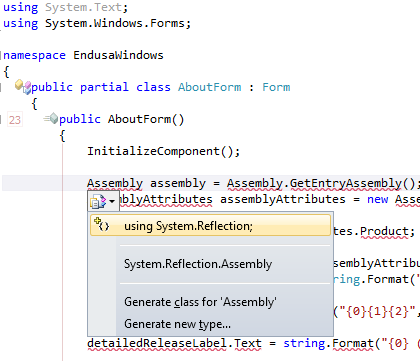
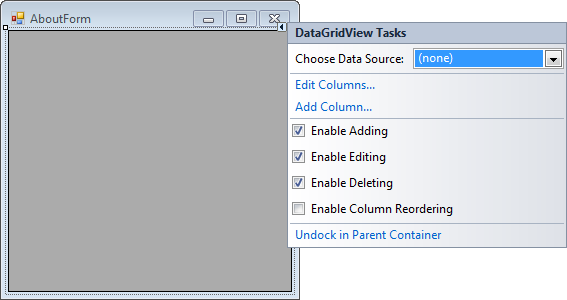
A long time ago (I think it was in version 2005) Visual Studio introduced Smart Tags. Most posts talk only about one kind of Smart Tags, but the Visual Studio IDE has two kinds:

  • A tiny triangle in the designer
  • A combobox drop-down button like control in the code editor

Both listen to these keyboard shortcuts (most cheat sheets miss at least one of these, but you can find them at Pre-defined keyboard shortcuts and at the VS2008 C# keyboard cheatsheet):

  • Shift-Alt-F10
    The shortcut is called View.ShowSmartTag, View.ObjectBrowserGoToSearchCombo
  • Ctrl-.                    (yes, the . is a period)
    The shortcut seems to be called Edit.Generate

The pictures below show the Smart Tag in action.


Oh BTW: the red squiggly lines and some of the other adornments in the screenshot are from CodeRush, one of the most keyboard-centric additions to Visual Studio I know.

–jeroen

Posted in Keyboards and Keyboard Shortcuts, Visual Studio 11, Visual Studio 2005, Visual Studio 2008, Visual Studio 2010, Visual Studio and tools | Leave a Comment »

Known #VS2010 issue + workaround: Visual Studio 2010 crashes when trying to edit a macro or record a temporary macro (via: Microsoft Connect)

Posted by jpluimers on 2012/07/03

Vsaenv: Cannot find one or more components. Please reinstall the application.One of my Visual Studio 2010 VMs gives me an error when recording a temporary macro:

---------------------------
Vsaenv
---------------------------
Cannot find one or more components. Please reinstall the application.
---------------------------
OK
---------------------------

Followed by: Read the rest of this entry »

Posted in .NET, Development, Software Development, Visual Studio 2010, Visual Studio and tools | Leave a Comment »

.NET/C# – WinForms splash screen research material

Posted by jpluimers on 2012/06/21

I’m in the midst of converting a suite of WinForms C# projects from a range of .NET versions (1.x till 3.x) to 4 totalling some million lines of code.

One of the problems is that some people hacked together some splash screen stuff using multi-threading, doing all sorts of things that was forbidden in .NET 1 (and broke in .NET 2+).

On my research list for getting this to work:

  1. Mahin Gupta | Winforms splash screen – Great work by Tom. which is an update of
  2. A Pretty Good Splash Screen in C# – CodeProject.

–jeroen

Posted in .NET, C#, C# 1.0, C# 2.0, C# 3.0, C# 4.0, Development, Software Development, Visual Studio 2002, Visual Studio 2003, Visual Studio 2005, Visual Studio 2008, Visual Studio 2010, Visual Studio and tools, WinForms | Leave a Comment »

TFS – Undelete File or Folder – brilliantly easy from the Visual Studio IDE: just enable “Show deleted items in the Source Control Explorer”

Posted by jpluimers on 2012/06/19

Never knew it was so brilliantly easy to undelete files from TFS: you can do it in Visual Studio, by enabling “Show deleted items in the Source Control Explorer” in the settings.

Just look at TFS – Undelete File or Folder for the screen shots.

Not sure in which Visual Studio version this got introduced, but it works in VS 2010 and up.

–jeroen

Posted in Development, Software Development, Source Code Management, TFS (Team Foundation System), Visual Studio 11, Visual Studio 2010, Visual Studio and tools | Leave a Comment »

Adding a “Reverse Assignment” to CodeRush for Visual Studio .NET (via: Q35048 – DevExpress Support Center, Knowledge Base, Code Samples)

Posted by jpluimers on 2012/05/16

As a Delphi user, I’m missing the “Reverse Assignment” feature in the Visual Studio version of CodeRush.

Since CodeRush is very extendable (Mark is still explaining to people how the idea for that came from Delphi Packages back in the mid 90s), you can add this one yourself, as the a answer to this DevExpress support issue shows:

Q:

Is there a quick way to reverse the assignment in CodeRush?  For example:

FROM:
Field[“test1”] = edTest1.Value;
Field[“test2”] = edTest2.Value;

TO:
edTest1.Value = Field[“test1”];
edTest2.Value = Field[“test2”];

I know Delphi had this capability in its refactoring, does CodeRush for Visual Studio?

Thanks

Daniel Schipper


Read the rest of this entry »

Posted in .NET, C#, C# 2.0, C# 3.0, C# 4.0, Development, Software Development, Visual Studio 2005, Visual Studio 2008, Visual Studio 2010, Visual Studio and tools | Leave a Comment »

Solution for TFS2005/2010 and VS2005/2010: Add/New Work Item menu still loading (try again in a moment)…

Posted by jpluimers on 2012/03/13

Sometimes when creating new Team work items in Visual Studio 2010 connected to Team Foundation System 2010, you get a sub menu like this:

New Work Item menu still loading... (try again in a moment)

“New Work Item menu still loading… (try again in a moment)”

There are not many results in the new work item menu still loading “try again in a moment” site:microsoft.com query, but luckily the first one shows a similar issue in Visual Studio 2005 with Team Foundation System 2005: the “Add Work Item menu still loading… (try again in a moment)”.

The solution is also very simple:

  1. Quit Visual Studio 2010
  2. Delete this registry key
    HKEY_CURRENT_USER\Software\Microsoft\VisualStudio\10.0\WorkItemTracking\TeamMenu\AddWorkItemMru
  3. Start Visual Studio 2010
  4. Retry (can take more than a minute, but it usually works)
The only difference between the Visual Studio 2010 (version 10.0) and Visual Studio 2005 (version 8.0) is the version number:
  • HKEY_CURRENT_USER\Software\Microsoft\VisualStudio\8.0\WorkItemTracking\TeamMenu\AddWorkItemMru

Not sure if this can fail in Visual Studio 2008 too, but if it does, just apply this fix with version number to 9.0, and if it happens with the Visual Studio 11 developer preview, change the version number to 11.0.

–jeroen

via: Add Work Item menu still loading….

Posted in .NET, Development, Software Development, Visual Studio 2005, Visual Studio 2010, Visual Studio and tools | Leave a Comment »

“Cannot navigate to definition” annoyance in Visual Studio 2010 – (did it implement the mouse equivalent to Delphi code browsing? No, it didn’t)

Posted by jpluimers on 2012/03/08

This use case drove me nuts in Visual Studio 2010 for a while, but can be solved.

Use cases:

  1. Cannot navigate to definition.double click on a word to select it
  2. press Ctrl-C to copy the selected text
  3. result is either of these two dialogs:

    ---------------------------
    Microsoft Visual Studio
    ---------------------------
    Cannot navigate to definition.
    ---------------------------
    OK
    ---------------------------

    Cannot navigate to definition. The cursor is not on a symbol.or

    ---------------------------
    Microsoft Visual Studio
    ---------------------------
    Cannot navigate to definition. The cursor is not on a symbol.
    ---------------------------
    OK
    ---------------------------

The reason is that Visual Studio 2010 still thinks I am clicking the identifier (which I’m not, I just released the mouse button) while pressing the Ctrl key. Read the rest of this entry »

Posted in .NET, Delphi, Development, Keyboards and Keyboard Shortcuts, Power User, Software Development, Visual Studio 2010, Visual Studio and tools | Leave a Comment »