Archive for the ‘RouterOS’ Category
Posted by jpluimers on 2023/04/13
MikroTik switches and routers are very flexible to configure, as everything is done through [Wayback/Archive] RouterOS settings.
This means that given enough ports, you can split a physical switch into logical switches. This can be very convenient when you run multiple networks without VLAN.
Earlier this week, I already wrote about Torching a specific port on a MikroTik switch or router running RouterOS which involved turning off hardware acceleration off for specific ports in order to have the flow through the underlying switch chip prohibiting torch and filter features.
For splitting noticing which ports are connected to which switch chip is also important: splitting works best if you can configure each logical switch to exclusively use network ports on one switch chip.
This post was to both research how to configure this, and if my MikroTik devices would allow for hardware acelleration.
Here are some links that should help me with configuring (via [Wayback/Archive] mikrotik split switch in two – Google Search):
–jeroen
Read the rest of this entry »
Posted in Development, Hardware, MikroTik, Network-and-equipment, Power User, RouterOS, routers, Scripting, Software Development | Leave a Comment »
Posted by jpluimers on 2023/04/11
On most recent [Wayback/Archive] RouterOS configurations of MikroTik Routers and Switches, running [Wayback/Archive] Torch a port will show zero traffic when they are part of a bridge configuration. The same holds for the Packet Sniffer.
The reason is that these bridges have hardware acceleration turned on, which makes all traffic go through the switch chip instead of the device CPU. Torch works on the CPU level, so won’t show hardly any traffic except for some configuration stuff (depending on the combination of switch chip and CPU type).
This is not documented in the Torch documentation, but it is documented in the Packet Sniffer documentation.
Further reading:
- [Wayback/Archive] Manual:Troubleshooting tools – Torch – MikroTik Wiki
- [Wayback/Archive] Manual:Tools/Packet Sniffer – MikroTik Wiki
Note: Unicast traffic between Wireless clients with client-to-client forwarding enabled will not be visible to sniffer tool. Packets that are processed with hardware offloading enabled bridge will also not be visible (unknown unicast, broadcast and some multicast traffic will be visible to sniffer tool).
- [Wayback/Archive] mikrotik nonhardware bridge – Google Search (yes that was a typo, but Google still got good results)
- [Wayback/Archive] Can not see trafic in TORCH – MikroTik
As the ethernet ports are marked as S(laves) in the tables, I would assume that they are member ports of bridges and “hardware acceleration” is enabled (the value of hw in the respective rows of /interface bridge port is set to yes). So any frames which pass through these ports to other ports of the same switch chip are counted by the switch chip counters, but as they never get to the CPU, the torch cannot see them.
- [Wayback/Archive] mikrotik torch ip ports of bridge – Google Search
- [Wayback/Archive] Manual:Layer2 misconfiguration; Packet flow with hardware offloading and MAC learning – MikroTik Wiki
Consider the following scenario, you setup a bridge and have enabled hardware offloading in order to maximize the throughput for your device, as a result your device is working as a switch, but you want to use Sniffer or Torch tools for debugging purposes, or maybe you want to implement packet logging.
- [Wayback/Archive] Manual:Layer2 misconfiguration; Packet flow with hardware offloading and MAC learning; Configuration – MikroTik Wiki
/interface bridge
add name=bridge1
/interface bridge port
add bridge=bridge1 hw=yes interface=ether1 learn=yes
add bridge=bridge1 hw=yes interface=ether2 learn=yes
- [Wayback/Archive] Manual:Layer2 misconfiguration; Packet flow with hardware offloading and MAC learning; Problem – MikroTik Wiki
When running
Sniffer or
Torch tool to capture packets you might notice that barely any packets are visible, only some unicast packets, but mostly broadcast/multicast packets are captured, while the interfaces report that much larger traffic is flowing through certain interfaces than the traffic that was captured.
Since RouterOS v6.41 if you add two or more Ethernet interfaces to a bridge and enable Hardware Offloading, then the switch chip will be used to forward packets between ports. To understand why only some packets are captured, we must first examine how the switch chip is interconnected with the CPU, in this example we can use a block diagram from a generic 5-Port Ethernet router:

For this device each Ethernet port is connected to the switch chip and the switch chip is connected to the CPU using the CPU port (sometimes called the
switch-cpu port).
For packets to be visible in Sniffer tools, the packet must be sent from an Ethernet port to the CPU port, this means that the packet must be destined to the CPU port (destination MAC address of the packet matches the bridge’s MAC address) or the packet’s MAC address has not be learnt (packet is flooded to all ports), this behavior is because of
MAC learning·
The switch chip keeps a list of MAC addresses and ports called the
Hosts table· Whenever a packet needs to be forwarded, the switch chip checks the packet’s destination MAC address against the hosts table to find which port should it use to forward the packet.
If the switch chip cannot find the destination MAC address, then the packet is flooded to all ports (including the CPU port). In situations where packet is supposed to be forwarded from, for example, ether1 to ether2 and the MAC address for the device behind ether2 is in the hosts table, then the packet is never sent to the CPU and therefore will not be visible to
Sniffer or
Torch tool..
- [Wayback/Archive] Manual:Layer2 misconfiguration; Packet flow with hardware offloading and MAC learning – MikroTik Wiki
Packets with a destination MAC address that has been learned will not be sent to the CPU since the packets are not not being flooded to all ports. If you do need to send certain packets to the CPU for packet analyser or for Firewall, then it is possible to copy or redirect the packet to the CPU by using ACL rules. Below is an example how to send a copy of packets that are meant for 4C:5E:0C:4D:12:4B:
/interface ethernet switch ruleadd copy-to-cpu=yes dst-mac-address=4C:5E:0C:4D:12:4B/FF:FF:FF:FF:FF:FF ports=ether1 switch=switch1
Note: If the packet is sent to the CPU, then the packet must be processed by the CPU, this increases the CPU load.
- [Wayback/Archive] mikrotik torch mac address – Google Search
–jeroen
Posted in Development, Hardware, MikroTik, Power User, RouterOS, routers, Scripting, Software Development | 1 Comment »
Posted by jpluimers on 2021/12/31
A few notes:
- WinBox configuration files are under
%APPDATA%\Mikrotik\Winbox
- The subdirectory
sessions contains binary *.viw files that seem to represent “view” configurations (the positions, dimensions and other properties of the open Windows in a Winbox session) where the * of the name seems to be an IPv4 address of a machine.
- Directories named like
6.40.3-2932358209 and 6.43.13-695307561 contain configuration files that seem to determine what WinBox features a certain RouterOS version should reveal; files in those directories seem to always be these:
advtool.crc / advtool.jgdhcp.crc / dhcp.jghotspot.crc / hotspot.jgicons.crc / icons.pngmpls.crc / mpls.jgppp.crc / ppp.jgroteros.crc / roteros.jgroting4.crc / roting4.jgsecure.crc / secure.jgwlan6.crc / wlan6.jg
- There are binary files
Addresses.cdb and settings.cfg.viw
- A text file named
sessionpath contains the expanded path %APPDATA%\Mikrotik\Winbox\sessions
The *.crc files contain a CRC code, presumably on the contents of the correspoding *.jg file. The *.jg files seem to contain some kind of JSON.
Some links I found:
–jeroen
Posted in Development, Internet, MikroTik, Power User, RouterOS, routers, Scripting, Software Development | Leave a Comment »
Posted by jpluimers on 2021/08/17
Not sure why, but Winbox 3.17 could not connect to out of the box blank MikroTik equipment at all.
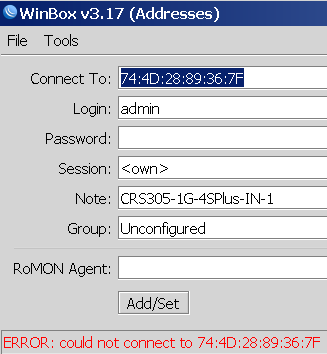
Winbox 3.19 complains every now and than, but usually connects fine.
This was while configuring a bunch of [WayBack] MikroTik Routers and Wireless – Products: CRS305-1G-4S+IN.
Read the rest of this entry »
Posted in Development, Internet, MikroTik, Power User, RouterOS, routers, Scripting, Software Development | Leave a Comment »
Posted by jpluimers on 2021/03/11
For my script list:
/system ntp client set enabled=yes server-dns-names=0.pool.ntp.org,1.pool.ntp.org,2.pool.ntp.org,3.pool.ntp.org
/delay 10
/system ntp client print
If the delay was long enough, you will see output like this:
             enabled: yes
         primary-ntp: 0.0.0.0
       secondary-ntp: 0.0.0.0
    server-dns-names: 0.pool.ntp.org,1.pool.ntp.org,2.pool.ntp.org,3.pool.ntp.org
                mode: unicast
       poll-interval: 15m
       active-server: 149.210.230.59
    last-update-from: 149.210.230.59
  last-update-before: 29s290ms
     last-adjustment: 702us
If the delay was too short, the lines after mode will not be present.
–jeroen
Posted in Development, RouterOS, Scripting, Software Development | Leave a Comment »
Posted by jpluimers on 2020/11/04
Multi-WAN routing always involves marking incoming connections to the replies go out on the same connection: [WayBack] Mikrotik Remote Access via Multiple WAN Links | Syed Jahanzaib Personal Blog to Share Knowledge !
# Mirkotik IP Firewall Mangle Section
/ ip firewall mangle
# Mark traffic coming via WAN-1 link
add chain=input in-interface=WAN1 action=mark-connection new-connection-mark=WAN1_incoming_conn
# Mark traffic coming via WAN-2 link
add chain=input in-interface=WAN2 action=mark-connection new-connection-mark=WAN2_incoming_conn
# Mark traffic routing mark for above marked connection for WAN-1 , so that mikrotik will return traffic via same interface it came in
add chain=output connection-mark=WAN1_incoming_conn action=mark-routing new-routing-mark=to_WAN1
# Mark traffic routing mark for above marked connection for WAN-2, so that mikrotik will return traffic via same interface it came in
add chain=output connection-mark=WAN2_incoming_conn action=mark-routing new-routing-mark=to_WAN2
# Finally Add appropriate routes in ROUTE section
/ ip route
add dst-address=0.0.0.0/0 gateway=1.1.1.2 routing-mark=to_WAN1 check-gateway=ping
add dst-address=0.0.0.0/0 gateway=2.2.2.2 routing-mark=to_WAN2 check-gateway=ping
|
Related:
–jeroen
Posted in Development, Internet, MikroTik, Power User, RouterOS, routers, Scripting, Software Development | Leave a Comment »
Posted by jpluimers on 2019/03/06
With the removal of the C# based Windows vSphere Client in ESXi 6.5, the vSphere HTML5 Web Client is the way to go.
It doesn’t cover all functionality yet, and some functionality is in different places in the UI, so below the steps to change the hostname.
Since I prefer a central location of name and address management, I’ve also documented on how to do this with DHCP option 12.
Oh: I’m not alone in finding the changed place
Before I begin, some background reading on DHCP Options as I plan to do more with that in the future:
Read the rest of this entry »
Posted in Development, ESXi6.5, Power User, RouterOS, Scripting, Software Development, Virtualization, VMware, VMware ESXi | Leave a Comment »


 The Wiert Corner - irregular stream of stuff