


I didn’t know about this. When SourceTree doesn’t improve, I might try it one day.
–jeroen
Posted by jpluimers on 2017/02/10
I didn’t know about this. When SourceTree doesn’t improve, I might try it one day.
–jeroen

Posted in Development, DVCS - Distributed Version Control, git, GitKraven, Mercurial/Hg, Source Code Management, SourceTree | 1 Comment »
Posted by jpluimers on 2017/02/02
A few links I collected:
–jeroen
Posted in Agile, Code Quality, Code Review, Development, DVCS - Distributed Version Control, git, Software Development, Source Code Management | Leave a Comment »
Posted by jpluimers on 2017/01/24
Interesting read:
SourceTree is the middleman between you and Git, making it really easy to change your commit history through a simple user interface. You can drag and drop commits to reorder them or squash them, you can delete commits, reword the commit messages, edit them, or just leave them be.
More details at Atlassian Blogs: Interactive Rebase with SourceTree
Posted in Development, DVCS - Distributed Version Control, git, Software Development, Source Code Management, SourceTree | Leave a Comment »
Posted by jpluimers on 2017/01/23
There is a great description for Windows users at: the urban canuk, eh: Configure SourceTree to Rebase by default
Note that this is a global setting for git (which you can override each time you do a pull). So there is no way to differentiate this by repository.
The screenshots for Mac OS X users to configure SourceTree to perform git rebase by default are these:

Posted in Development, DVCS - Distributed Version Control, git, Source Code Management, SourceTree | Leave a Comment »
Posted by jpluimers on 2017/01/02
A long time ago (2014!), [WayBack] Great tutorial on how to split older Git commits: http://bit.ly/1rE72cI – should be used with care, but this can be a lifesaver and a really useful trick… – Ilya Grigorik – Google+ pointed me the below tutorial.
It has been in my drafts since then, but recently I found it back when I needed to rebase unpushed commits. Indeed it’s a great tutorial!
Executing the git rebase --interactive concepts can be tricky as they are on a way higher level than regular git work. So sometimes you want to exit vim notifying git to stop the current action. The easiest way I found was this vim command I found at [WayBack] How to abort a git rebase in interactive editor (thanks [WayBack] Telmo Costa!):
:cx
Via the tutorial, I also bumped into a few advanced git add features:
Another very powerfull feature is
git add -pa.k.a.git add --patchwhich allows you to stage parts (or hunks) of a file.[WayBack] git add -p: The most powerful git feature you’re not using yet
You can go even further with
git add --interactiveas this blog post shows:
Back to the tutorial:
[WayBack] Going back in time to split older commits by thoughtram
Rebasing in Git allows you to go back in time to split older commits. In this article we’ll explore how to do exactly that!
git rebase –interactive
Before the tutorial explains how to amend git commits, it covers these git rebase --interactive commands:
Note that squash will combine the commit on that line with the commit on the line above it.
There is one more little trick: to limit the number of commits (that’s normally limited to the unpushed ones), add like HEAD~4 which limits it to 4 commits.
Finally you can even use this for cherry picking, which I need to put on my research list: [WayBack] git: obtain the benefits of git rebase --interactive for cherry picks – Stack Overflow
Further reading:
–jeroen

Posted in Development, DVCS - Distributed Version Control, git, Source Code Management | Leave a Comment »
Posted by jpluimers on 2016/12/30
When you ship OpenSSL DLLs, you should provide an update mechanism outside of your regular product cycle that updates these shortly after vulnerabilities are fixed.
Few if any products do that. So I made an overview from products and OpenSSL DLL versions I had installed on various systems.
I’m a developer, so the list is biased towards tools I use often.
All of them are vulnerable: [WayBack] https://www.openssl.org/news/vulnerabilities.html
–jeroen
via: [WayBack] Does Delphi installer install OpenSSL dll’s?
PS: Below some Software Archeology related links in the comments.
Posted in .NET, CollabNet, Delphi, Development, DVCS - Distributed Version Control, git, OpenSSL, Power User, Ruby, Security, Software Development, Source Code Management, SourceTree, Subversion/SVN | 7 Comments »
Posted by jpluimers on 2016/12/29
For a file:
git rm --cached mylogfile.log
For a directory:
git rm --cached -r mydirectory
Thanks bdonlan for answering that: Remove a file from a Git repository without deleting it from the local filesystem – Stack Overflow
–jeroen
Posted in Development, DVCS - Distributed Version Control, git, Source Code Management | Leave a Comment »
Posted by jpluimers on 2016/12/27
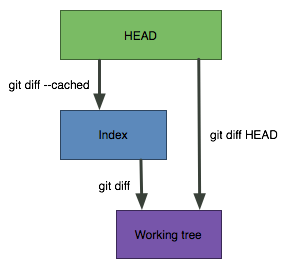 I love this StackOverflow answer by Abizern (who maintained a great 365git blog as well):
A simple graphic makes this clearer
git diffShows the changes between the working directory and the index. This shows what has been changed, but is not staged for a commit.
git diff --cachedShows the changes between the index and the HEAD(which is the last commit on this branch). This shows what has been added to the index and staged for a commit.
git diff HEADShows all the changes between the working directory and HEAD (which includes changes in the index). This shows all the changes since the last commit, whether or not they have been staged for commit or not.
–jeroen
Source: git – How do I show the changes which have been staged? – Stack Overflow

Posted in Development, DVCS - Distributed Version Control, git, Source Code Management | Leave a Comment »
Posted by jpluimers on 2016/12/08
How to: Migrate your SVN repository to Git – Nathan Hoad:
You’ve probably heard a lot about how awesome Git is from all the _cool_ people who are already using it. If you want to be part of the trendy crowd but feel tied down by your old Subversion repositories have no fear; Migrating all of those SVN repos to Git could not be easier **and** you get to keep the entire commit history of your project.
This is much better than what I did with FastMM:
Synced clone of FastMM SVN repository at http://sourceforge.net/projects/fastmm/ normally obtained through`svn checkout http://svn.code.sf.net/p/fastmm/code/ fastmm-code` but cloned by `git svn clone http://svn.code.sf.net/p/fastmm/code/ FastMM`
Source: jeroenp / FastMM — Bitbucket
Some more links for if I get stuck:
–jeroen
via: Stefan Glienke; For all the people migrating their svn repository to git – this guide really…
Posted in Development, DVCS - Distributed Version Control, git, Software Development, Source Code Management, Subversion/SVN | Leave a Comment »
Posted by jpluimers on 2016/12/01
My experience is that early upgrades are very unstable and they take an eternity to fix bugs, I need to find a way to push myself from the early stage to the late stage.
[WayBack] Adding staged updates to SourceTree | SourceTree Blog
–jeroen

Posted in Development, DVCS - Distributed Version Control, git, Mercurial/Hg, Source Code Management, SourceTree | Leave a Comment »

 The Wiert Corner - irregular stream of stuff