Archive for the ‘gist’ Category
Posted by jpluimers on 2024/01/09
It is not a full fork and misses a few things (including the Gist description), but is the easiest way to clone a gist to a regular GitHub repository.
I needed it because somehow pushing to gists was denied without explanation or real GitHub feedback.
Another reason is that regular GitHub repositories show you way more information about the commits than Gists do.
Thanks [Wayback/Archive] Noitidart for asking and [Wayback/Archive] Bruno Bronosky for answering at [Wayback/Archive] Fork Gist to Repo on GitHub – Stack Overflow:
Read the rest of this entry »
Posted in Authentication, Development, DVCS - Distributed Version Control, gist, git, GitHub, LifeHacker, Power User, Security, Source Code Management | Leave a Comment »
Posted by jpluimers on 2023/10/05
I like JSFiddle, but rather keep source code under my own version control.
I was curious, so queried [Wayback/Archive] gist as jssfiddle – Google Search and found [Wayback/Archive] Publishing a Github Gist to JSFiddle | Toolbox Tech
It has better steps than the official documentation at these links:
- [Wayback/Archive] Pass response directly from a Github repo – JSFiddle Docs
- [Wayback/Archive] Display fiddle from a Github repository – JSFiddle Docs
Demo Directory/
demo.js
demo.html
demo.css
demo.details
demo.[ js | html | css ] contains fiddle code for the specific paneldemo.details is a description of the demo written in YAML
---
name: Name of the Demo
description: Some description, please keep it in one line
authors:
- John Doe
- Jan Wisniewski
resources:
- http://some.url.com/some/file.js
- http://other.url.com/other_filename.css
normalize_css: no
load_type: d
...
- [Wayback/Archive] Display fiddle from Gist – JSFiddle Docs
Read a demo from Github Gist and present it as a fiddle.
Gist files structure
fiddle.js
fiddle.html
fiddle.css
fiddle.manifest
|
|
|
|
|
Contains fiddle code for the specific panel
|
|
|
YAML description of the Gist for JSFiddle to parse
|
Manifest file example
name: The Name of the Fiddle
description: Some description, please keep it in one line
authors:
  - John Doe
  - Jan Wisniewski
resources:
  - http://some.url.com/some/file.js
  - http://other.url.com/other_filename.css
normalize_css: no
wrap: bpanel_js: 1
panel_css: 1
Manifest fields
-
panel_html – Language for HTML panel. Accepts:
-
panel_css – Language for CSS panel. Accepts:
-
panel_js – Language for the JS panel. Accepts:
-
resources – List of external resources.
-
-
description – Fiddle description
-
normalize_css – Normalize CSS by loading normalize.css before any CSS declarations.
-
wrap – Set the JS code wrap. Options:
–jeroen
Posted in Development, DVCS - Distributed Version Control, gist, GitHub, JavaScript/ECMAScript, JSFiddle, Scripting, Software Development, Source Code Management | 1 Comment »
Posted by jpluimers on 2023/03/08
This revealed so much pain: [Wayback] gist include image in markdown in current directory – Google Search
I wished that – like in the past – it would work just like in a normal github hosted git repository: [Wayback/Archive] How do I display local image in markdown? – Stack Overflow.
The core problem is that though a gist underneath is a git repository, it is rendered in a way that is different than a github repository is rendered, and that way of rendering has changed over the years effectively making it difficult to embed a picture. When you do embed an image requires the uuid/guid of the raw image URL to be included in the markdown, unlike with a regular repository hosted on github.
That is so much pain that I decided to not host documentation in gists any more.
A bit of the pain:
This is an example gist where I tried to host an image: [Wayback/Archive] Windows 7 with PowerShell v2 fails to upgrade to PowerShell v3 through chocolatey: You must provide a value expression on the right-hand side of the '-' operator.
That gist was prelude to my post Chocolatey on Windows 7: “You must provide a value expression on the right-hand side of the ‘-‘ operator.”.
–jeroen
Posted in Development, DVCS - Distributed Version Control, gist, git, GitHub, Lightweight markup language, MarkDown, Software Development, Source Code Management | Leave a Comment »
Posted by jpluimers on 2019/02/04
[WayBack] RawGit: RawGit served raw files directly from GitHub with proper Content-Type headers.
This means you have to redirect your existing RawGit links before October 2019, and you cannot add new links on RawGit.
You might want to try alternatives, for instance this one I mentioned in 2017: raw.githack.com – like rawgit.com but supports bitbucket as well and runs on plain nginx.
[WayBack] raw.githack.com:
raw.githack.com serves raw files directly from GitHub, Bitbucket or GitLab with proper Content-Type headers.
There are some other options that RawGit itself mentions:
What you should use instead
The following free services offer fantastic alternatives to some or all of RawGit’s functionality. You may like them even more than RawGit.
RawGit source is still at [WayBack] GitHub – rgrove/rawgit: Served files from raw.githubusercontent.com, but with the correct content types., so if you want to host your own alternative you can.
It means I need to change these pages:
–jeroen
Posted in Development, DVCS - Distributed Version Control, gist, GitHub, Power User, rawgit, Source Code Management | Leave a Comment »
Posted by jpluimers on 2018/12/20
[WayBack] About Blocks – bl.ocks.org is so cool:
Bl.ocks (pronounced “Blocks”) is a simple viewer for sharing code examples hosted on GitHub Gist.
…
The main source for your example is in index.html. This file can contain relative links to other files in your Gist, such as images, scripts or stylesheets. And of course you can use absolute links, such as CDN-hosted D3, jQuery or Leaflet. To explain your example, add a README.md written in Markdown. (You can omit the index.html if you just want to write, too.)
[WayBack] Code-only-Blocks are cool too:
When your Gist is missing an index.html file, will hide the example iframe but continue to display everything else.
Just compare these:
–jeroen
Posted in Development, DVCS - Distributed Version Control, gist, GitHub, jQuery, Scripting, Software Development, Source Code Management, Web Development | Leave a Comment »
Posted by jpluimers on 2016/07/08
I’m not yet sure what the exact cause is, but at irregular intervals when clicking on Google Plus links, they show as “403. That’s an error.”.
They appear both when I have multiple WAN connections or a single WAN connection, which leads me to suspect that G+ doesn’t cope well when
- you have a lot (dozens) of Google related pages open (Drive, Mail, Search, Documents, etc) as Google Plus is embedded in each of them
- you rapidly browse through your G+ backlog (the G+ counter is > 50 since you follow a lot of people/communities and you quickly do catch-up on them)
In a future post, I will explain how I created the workaround, but here it is:
Work around G+ “403. That’s an error.” errors
Basically it translates links
The latter was the original link I clicked in the first place. The former what G+ comes up with.
After a while, G+ comes back to its senses and allows the latter links again, so the page allows you to parse the former then put them in a list like this:

One decoded URL per list-item.
–jeroen _ _ _ _
Posted in Development, G+: GooglePlus, gist, GitHub, Google, Power User, rawgit, SocialMedia, Source Code Management | Leave a Comment »
Posted by jpluimers on 2016/06/28
At first you’d think that gists can only hold text files. That’s not true, and I hinted to this last week in Hosting an HTML gist containing JavaScript.
As gists are git repositories, you can put any file in it through git, even binary files, though the gist UI nor a lot of the tools – including gist(1) – support uploading binary files in a gist.
This post – though old, so the screenshots are not current any more, but the commands still are current – explains how to clone the gist and add binaries (in this case images): How To Upload Image / Binary File to Gist | Hanxue and IT
This is for instance how I created a gist containing openssl Darwin binaries to help solve https://github.com/drwetter/testssl.sh/issues/362.
–jeroen
Posted in Development, DVCS - Distributed Version Control, gist, git, GitHub, Source Code Management | Leave a Comment »
Posted by jpluimers on 2016/06/22
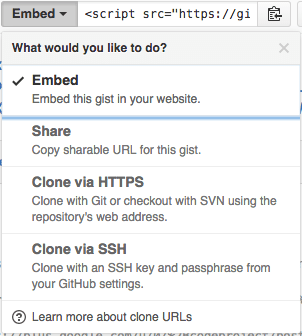
The “embed” dropdown allows to get URLs for sharing and git cloning.
Recently I did my very first JavaScript in HTML development. Since it was a one page experiment, I didn’t want to put it in an official repository of it’s own.
I will explain about the content in a future post, but first about getting it on-line as a HTML file that can run JavaScript.
This is the hosted page: Work around G+ “403. That’s an error.” errors.
Gists are the base
Gists are pretty amazing. They have history, syntax highlighting (which you can embed on your own page, see Using Github as a Syntax Highlighter for Your Blog or Website), can show an overview of files or even raw content. This holds for public and secret gists.
The history of all the files comes from a repository: in fact all gists are in fact git repositories of which you can get the URL (be it https or ssh) is under the “Embed” dropdown: see the screenshot on the right.
So the gist itself is available under these URLs:
- gist
- syntax highlight script
- git https
- git ssh
The individual files can either be viewed as syntax highlighted (when they’re small enough, not binary and github knows how to highlight them), or as raw files:
Read the rest of this entry »
Posted in Development, DVCS - Distributed Version Control, gist, git, GitHub, rawgit, Source Code Management | 2 Comments »


 The Wiert Corner - irregular stream of stuff