The Wiert Corner – irregular stream of stuff

Jeroen W. Pluimers on .NET, C#, Delphi, databases, and personal interests

  • My badges

  • Twitter Updates

  • My Flickr Stream

  • Pages

  • All categories

  • Enter your email address to subscribe to this blog and receive notifications of new posts by email.

    Join 1,861 other subscribers

Archive for the ‘Event’ Category

Delphi XE6 and up regression: “‘9999-12-31 23:59:59,1000’ is not a valid date and time” when passing a SOAP message with 9999-11-31T23:59:59.9999999; QC144171

Posted by jpluimers on 2018/09/06

A valid SOAP message with <urn:timeStamp>9999-11-31T23:59:59.9999999</urn:timeStamp> in a xs:dateTime field return '9999-12-31 23:59:59,1000' is not a valid date and time from a Delphi application with this SOAP response:

<SOAP-ENV:Envelope xmlns:SOAP-ENV="http://schemas.xmlsoap.org/soap/envelope/" xmlns:xsd="http://www.w3.org/2001/XMLSchema" xmlns:xsi="http://www.w3.org/2001/XMLSchema-instance" xmlns:SOAP-ENC="http://schemas.xmlsoap.org/soap/encoding/">
  <SOAP-ENV:Body>
    <SOAP-ENV:Fault>
      <faultcode>SOAP-ENV:Server</faultcode>
      <faultstring>'9999-12-31 23:59:59,1000' is not a valid date and time</faultstring>
      <faultactor/>
    </SOAP-ENV:Fault>
  </SOAP-ENV:Body>
</SOAP-ENV:Envelope>

The reason is this exception:

exception class EConvertError with message ''9999-12-31 23:59:59,1000' is not a valid date and time'.

This is from a .NET based test case passing in timeStamp = DateTime.MaxValuewhich is handled perfectly fine by other SOAP web services tested.

I know about different resolutions of time stamps, but would never expect the 999.9999 milliseconds to be rounded up to 1000 as it is always safer to truncated away from an upper limit.

A test using Soap UI [WayBack] with this parameter finally worked (max 3 digits second fraction):

<urn:timeStamp>9999-12-31T23:59:59.999</urn:timeStamp>

The true origin of problem is in this method in the Soap.XSBuiltIns unit which has been unchanged since at least Delphi 7:

function TXSBaseTime.GetMilliSecond: Word;
begin
  Result := Round(FractionalSeconds*1000);
end;

The problem exposed itself because as of Delphi XE6 the core of function TXSBaseCustomDateTime.GetAsDateTime piece was changed from

Result := EncodeDateTime(Year, Month, Day, Hour, Minute, Second, 0);

to

Result := EncodeDateTime(Year, Month, Day, Hour, Minute, Second, Millisecond);

A combination of lack of test cases and understanding XML specifications failed to reveal this bug.

The standards specify (among others):

  • '.' s+ (if present) represents the fractional seconds;
    The above is not limiting the amount of digits, not talking about milliseconds either.
  • All ·minimally conforming· processors ·must· support year values with a minimum of 4 digits (i.e., YYYY) and a minimum fractional second precision of milliseconds or three decimal digits (i.e. s.sss). However, ·minimally conforming· processors ·may· set an application-defined limit on the maximum number of digits they are prepared to support in these two cases, in which case that application-defined maximum number ·must· be clearly documented.
    Delphi not only limits the fractional second precission, it changes the limit over time and does not document the limit. Three strikes…
  • s -- represents a digit used in the time element "second". The two digits in a ss format can have values from 0 to 60. In the formats described in this specification the whole number of seconds ·may· be followed by decimal seconds to an arbitrary level of precision. This is represented in the picture by "ss.sss". A value of 60 or more is allowed only in the case of leap seconds.
    Given buggy the fractional second handling through milliseconds, the leap second handling is ripe for a test case as well.
    Strictly speaking, a value of 60 or more is not sensible unless the month and day could represent March 31, June 30, September 30, or December 31 in UTC. Because the leap second is added or subtracted as the last second of the day in UTC time, the long (or short) minute could occur at other times in local time. In cases where the leap second is used with an inappropriate month and day it, and any fractional seconds, should considered as added or subtracted from the following minute.

The reproduction is quite simple:

Read the rest of this entry »

Posted in .NET, C#, Conference Topics, Conferences, Delphi, Development, Event, SOAP/WebServices, Software Development, XML, XML/XSD | Leave a Comment »

Some search links on Delphi and C# WSDL imports I need to investigate further

Posted by jpluimers on 2018/09/05

Sometimes, the Delphi WSDL importer imports fine, but the generated code does not accept test cases sent by other tools.

Below are some links for messages and comment fragments that I want to investigate further.

I have included the .NET message, because my experience is that searching on those gives more accurate results for something that could be broken in more than one environment.

Based on those:

Some on-line tools prefer the WSDL to be in one document, but a lot of WSDL documents use import and or include features, so here are some links on that too:

Bruneau Babet correctly informed me that – though Delphi SOAP clients support both document literal and RPC encoded – Delphi SOAP servers cannot support document literal, as they can only support RPC encoded. Through that I found

  • [WayBack] Apache CXF — WSDLValidator
    • Check the WSDL document for XML well-formedness.
    • Validate the WSDL document against its XML schema.
    • Validate the WSDL document using some of the semantic rules defined in the WSDL specification.
    • Validate the WSDL document against custom validation rules, such as those defined by the Web Services Interoperability (WS-I) organization (i.e. WS-I Basic Profile rules).
    • Validate the WSDL against strange exceptions, incorrectly generated code and general bad WSDL issues.

Back on those days, the big plan was to move everything Delphi to the .NET platform which supports both document literal and RPC encoded.

All in all, document literal has been on the radar with the Delphi R&D team since at least 2009, and nothing has been done.

References:

I looks like a wsdl message request part entries need to be named parameters for some tooling to correctly infer document/literal in a wrapped way. Some links for further research on this:

When you are surely running SOAP over HTTP, you can use this small class to raise exceptions which automatically get translated into SOAP Faults having the right return code using a trick I bumped into a few years ago from [WayBack] web services – Accessing the original TWebRequest object in a Delphi SOAP Server – Stack Overflow:

unit SoapFaultWithHttpCodeExceptionUnit;

interface

uses
  System.SysUtils;

type
  ESoapFaultWithHttpCodeException = class(Exception)
  strict private
    FHttpStatusCode: Integer;
  public
    constructor Create(const AHttpStatusCode: Integer);
    property HttpStatusCode: Integer read FHttpStatusCode;
  end;

implementation

uses
  Winapi.WinHTTP,
  Soap.WebBrokerSOAP,
  Web.HTTPApp,
  IdCustomHTTPServer;

constructor ESoapFaultWithHttpCodeException.Create(const AHttpStatusCode: Integer);
var
  IdHTTPResponseInfo: TIdHTTPResponseInfo;
  ReasonString: string;
  WebDispatcher: IWebDispatcherAccess;
begin
  IdHTTPResponseInfo := TIdHTTPResponseInfo.Create(nil, nil, nil);
  try
    FHttpStatusCode := AHttpStatusCode;
    IdHTTPResponseInfo.ResponseNo := AHttpStatusCode;
    ReasonString := Format('%d: %s', [AHttpStatusCode, IdHTTPResponseInfo.ResponseText]);
    inherited Create(ReasonString);

    // https://stackoverflow.com/questions/10405227/accessing-the-original-twebrequest-object-in-a-delphi-soap-server
    if Supports(GetSOAPWebModule, IWebDispatcherAccess, WebDispatcher) then
    begin
      WebDispatcher.Response.StatusCode := HTTP_STATUS_SERVER_ERROR;
      WebDispatcher.Response.ReasonString := ReasonString;
    end

  finally
    IdHTTPResponseInfo.Free;
  end;
end;

end.

jeroen

Read the rest of this entry »

Posted in .NET, C#, Conference Topics, Conferences, Delphi, Development, Event, SOAP/WebServices, Software Development, XML/XSD | Leave a Comment »

Delphi: delete temporary file after response dispatched – Stack Overflow

Posted by jpluimers on 2018/08/30

A while ago, Marjan Venema was in need for [Archive.isDelphi SOAP: delete temporary file after response dispatched – Stack Overflow.

The solution there is a truly temporary file: a file stream that when the handle closes will have Windows delete the file by setting the correct flags.

The construct is functionally identical to the JclFileUtils.TJclTempFileStream [Archive.is].

It passes these [Archive.isfile attribute constant flags to the [Archive.isCreateFileW Windows API function:

  • FILE_ATTRIBUTE_TEMPORARY
  • FILE_FLAG_DELETE_ON_CLOSE

I was glad she asked, though I wanted a temporary file to last after debugging, so I wrote code like this because internally the same FileGetTempName method is used by the JCL:

var
// ...
  TempPath: string;
  TempStream: TFileStream;
  TempStreamWriter: TStreamWriter;
begin
// ...
  TempPath := FileGetTempName('Prefix');
  TempStream := TFile.Open(TempPath, TFileMode.fmOpenOrCreate, TFileAccess.faReadWrite, TFileShare.fsRead);
  try
    TempStreamWriter := TStreamWriter.Create(TempStream);
    try
      TempStreamWriter.WriteLine('Debug starts:');
      MyStringList.SaveToStream(TempStream);
      TempStreamWriter.WriteLine();
// ...
      TempStreamWriter.WriteLine('Debug finishes.');
    finally
      TempStreamWriter.Free();
    end;
  finally
    TempStream.Free();
  end;

–jeroen

Posted in Conference Topics, Conferences, Delphi, Development, Event, Software Development | Leave a Comment »

How To Make A Good Code Review — Geek&Poke

Posted by jpluimers on 2018/08/23

Source: [WayBackHow To Make A Good Code Review — Geek&Poke

At least we don’t ened to obfuscaste it before shipping.

Rule 1: try to find at least something postive.

–jeroen

via:

Read the rest of this entry »

Posted in Agile, Conference Topics, Conferences, Development, Event, Fun, Software Development | Leave a Comment »

Property/event differences between Delphi forms and frames

Posted by jpluimers on 2018/08/22

From a while back, but still interesting especially because there some differences similar to base/inherited designer objects: [WayBackvcl – How to do bulk -transformation of form to frame- in Delphi? – Stack Overflow:

Observe the differences of a Form and a Frame in your project.

First the project.dpr source:

program Project1;

uses
  Forms,
  Unit1 in 'Unit1.pas' {Form1},
  Unit3 in 'Unit3.pas' {Frame3: TFrame};

{$R *.res}

begin
  Application.Initialize;
  Application.MainFormOnTaskbar := True;
  Application.CreateForm(TForm1, Form1);
  Application.Run;
end.

Differences:

  1. Frame as a more elaborated comment to tell the IDE which designer it should use
  2. Form can be autocreate

Dfm files:

object Form1: TForm1
  Left = 0
  Top = 0
  Caption = 'Form1'
  ClientHeight = 348
  ClientWidth = 643
  Color = clBtnFace
  Font.Charset = DEFAULT_CHARSET
  Font.Color = clWindowText
  Font.Height = -11
  Font.Name = 'Tahoma'
  Font.Style = []
  OldCreateOrder = False
  PixelsPerInch = 96
  TextHeight = 13
end

and

object Frame3: TFrame3
  Left = 0
  Top = 0
  Width = 320
  Height = 240
  TabOrder = 0
end

Frame does not have these properties:

  • Caption
  • ClientHeight
  • ClientWidth
  • Color
  • Font.Charset
  • Font.Color
  • Font.Height
  • Font.Name
  • Font.Style
  • OldCreateOrder
  • PixelsPerInch
  • TextHeight

Sidenote: Frame does not have these events:

  • OnCreate
  • OnDestroy

A Frame has not global variable like this:

var
  Form1: TForm1;

And a Frame descends from TFrame, whereas a form descends from TForm.

Note: with Frame/Form inheritence, your steps become a bit longer.

–jeroen

Some of these are similar to the differences you see here:

–jeroen

PS: Idea: make a wizard or conversion tool for this.

Posted in Conference Topics, Conferences, Delphi, Development, Event, Software Development | Leave a Comment »

Delphi SOAP service: only publish WSDL in RELEASE mode

Posted by jpluimers on 2018/08/21

If you want to restrict the WSDL publishing so it only is published in DEBUG mode, then add a [WayBack] TWSDLHTMLPublish to your [WayBackTWebModule descendant, then add this in the [WayBack] OnCreate event handler of that TWebModule descendant:

// Enable/disable handling of "/wsdl*" requests during DEBUG/RELEASE mode. Enabling sends them via
//  Handled := WSDLHTMLPublish1.DispatchRequest(Sender, Request, Response);
{$ifdef DEBUG}
  WSDLHTMLPublish1.WebDispatch.Enabled := True;
{$endif DEBUG}
{$ifdef RELEASE}
  WSDLHTMLPublish1.WebDispatch.Enabled := False;
{$endif DEBUG}
end;

I have limited this because there are so many hard coded strings in the TWSDLHTMLPublish, see the thread by [WayBack] Marjan Venema at [WayBack] Hide WSDL document in SOAP app – delphi

–jeroen

Posted in Conference Topics, Conferences, Delphi, Development, Event, Software Development | Leave a Comment »

Work around for running out of memory when building multiple projects in Delphi < 10.2

Posted by jpluimers on 2018/08/16

I found out this is a problem until at least Delphi 10.1 Berlin, but my original question was for XE8:

Is there any tool that clears the Delphi memory overhead when a “build all” switches to the next project in a project group?

XE8 constantly runs out of memory with large project groups as the memory usage keeps increasing for each project it builds in the group.

There are actually two answers:

Uwe Raabe:  Have you tried with Use MSBuild checked for each project?

Jeroen Wiert Pluimers: +Uwe Raabe Much better. Much slower too (:

and:

Torbjörn Olsson: Have you tried DDevExtensions?
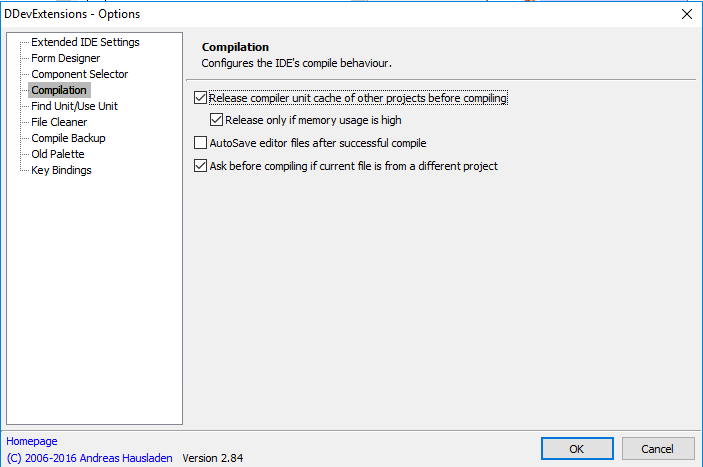
There is a setting named “Release compiler unit cache before compiling”

I’ve opted for the [Archive.is] DDevExtensions; I thought this VM had it installed, but apparently I forgot installing it as [Archive.is] IDE FixPack by the same author was installed.

This is how you configure DDevExtensions:

  1. Run Delphi
  2. Choose menu “Tools”, submenu “DDevExtensions Options…”
  3. In the dialog, select “Compilation” in the list on the left
  4. Ensure “Release compiler unit cache of other projects before compiling” is checked
  5. Confirm any changes

Source: [WayBackIs there any tool that clears the Delphi memory overhead when a “build all” s…

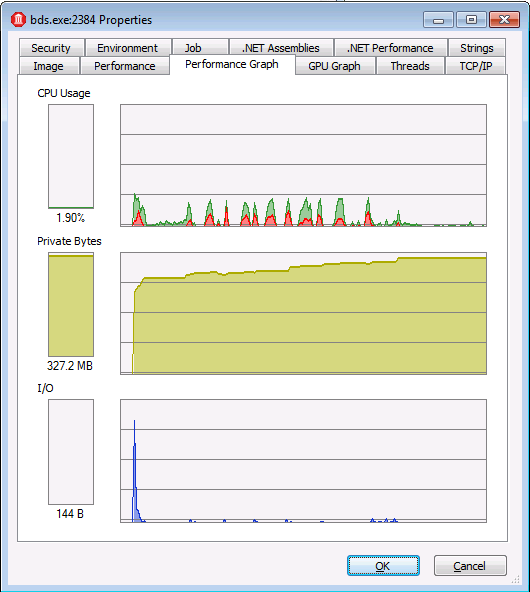
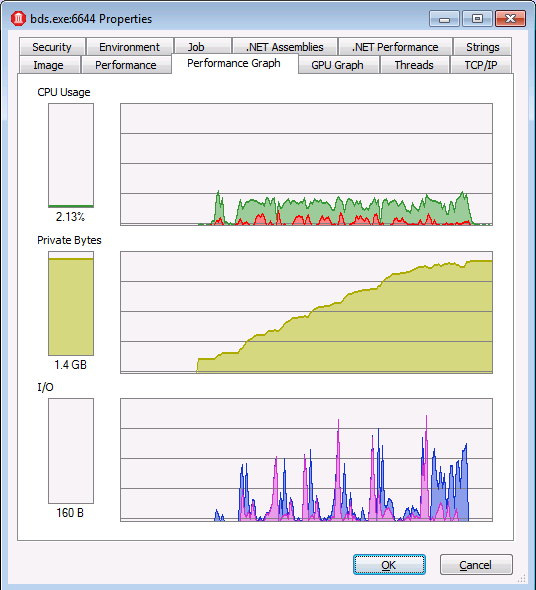
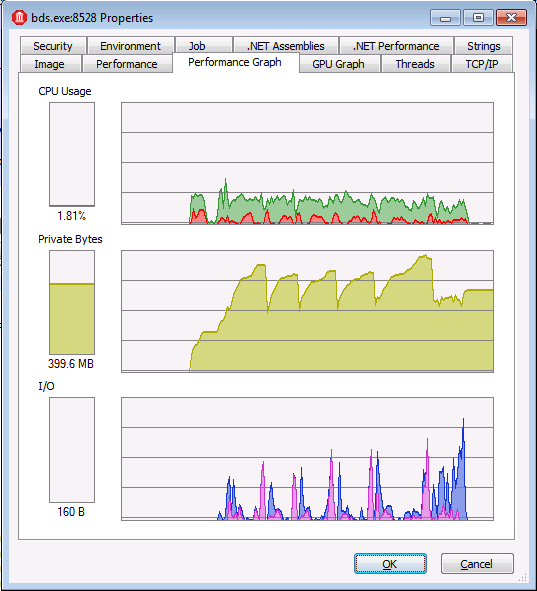
In the comparison below:

  • watch the scale of the graphs
  • observe that DDevExtensions uses about the same memory as msbuild, but builds much faster
With "Use MSBuild externally to compile"

With “Use MSBuild externally to compile”

Regular "Build all"

Regular “Build all”

With DDevExtensions

With DDevExtensions


Posted in Conference Topics, Conferences, Delphi, Development, Event, Software Development | Leave a Comment »

Delphi Build Groups: building all the Configuration/Target permutations of projects in your project group from inside the IDE

Posted by jpluimers on 2018/08/14

An automated build system for your Delphi applications is gold, and straightforward to setup using the Delphi support for msbuild.

Sometimes however, it is convenient to build any or all Configuration/Target permutations of all your projects from inside the Delphi IDE.

This has been possible since Delphi XE introduced the [Archive.is] Build Groups – RAD Studio XE. It is a really nifty feature which you can activate by clicking on the “people” icon in the project manager: .

Uwe Raabe has witten an excellent blog post on this a few years ago: [WayBack] Do you know Build Groups? | The Art of Delphi Programming

Since you can add multiple Build Groups, you can select which one contains what Configuration/Target permutations of any number of projects.

This for instance allows you to:

  • build all your server projects at once
  • only build debug versions of all projects

The Build Groups settings are saved as part of your groupproj settings and are a pretty stable feature.

Two extra tips:

–jeroen

Related:

Posted in Conference Topics, Conferences, Delphi, Development, Event, Software Development | Leave a Comment »

Some tips for your Delphi project options hierarchy

Posted by jpluimers on 2018/08/08

Over the years, various Delphi versions have cluttered the Project Options hierarchy quite a bit. This means that when you walk this hierarchy in the Project Options dialog, you will see many bold entries, indicating they have been changed for that level in the hierarchy.

The most important tip is to keep as much as possible at the top level, preferably using relative paths or paths containing $(...) macros.

I usually fill these entries there:

  • “All configurations – All platforms”
    • “Conditional defines” having the base conditional defines
    • “Output directory” (usually including a relative path that includes .\$(Platform)\$(Config)
    • “Search path” with .\$(Platform) when you nave libraries containing DCU files per platform
      • You can even do $(Platform)\$(Config) here if these DCU files are different for configurations (DEBUG/RELEASE) as well.
    • “Unit output directory” so each application gets a unique path (so I include .\$(SanitizedProjectName)\$(Platform)\$(Config) or .\$(Platform)\$(Config)\$(SanitizedProjectName) in the path)
    • Unit scope names (based onSource: Delphi unit prefixes for VCL applications)
  •  “Debug configuration – All platforms”
    • “Conditional defines”: add DEBUG
  • “Release configuration – All platforms”
    • “Conditional defines”: add RELEASE

I include the $(SanitizedProjectName) because it has the name of your project, which I documented at Source: Delphi XE8 does not adhere the $(PROJECTNAME) in a “Unit Output Directory”, but does recognise $(SanitizedProjectName) including many other macros.

Note:

A long time ago, +Uwe Raabe explained that you can use $(SanitizedProjectName) in your project settings to include the actual project name in https://plus.google.com/+DavidNottageDelphiExpert/posts/PcW8CwMQGmH

This works great for DCU output, but not so well for EXE output: when using for instance C:\Binaries\$(SanitizedProjectName) as target, the debugger cannot find the executable as the compiler puts it in the wrong place.

Example with a fresh console project:

0. Ensure C:\Binaries exists and you have write access to it
1. Set Output directory to C:\Binaries\$(SanitizedProjectName)
2. Set Unit output directory to .\$(SanitizedProjectName)\$(Platform)\$(Config)
3. Run:

---------------------------
Error
---------------------------
Could not find program, 'C:\Binaries\%SanitizedProjectName%\Project1.exe'.
---------------------------
OK
---------------------------

The executable is actually at C:\Binaries\Project1.exe, so the compiler does not take the “\$(SanitizedProjectName)” bit into account.

Anyone with a fix for that?

Via [WayBack] A long time ago, +Uwe Raabe explained that you can use $(SanitizedProjectName) in your project settings to include the actual project name in https://pl… – Jeroen Wiert Pluimers – Google+

Uwe Raabe

To make the compiler use the correct path the SanitizedProjectName item must be located before its use in the dproj file. DprojNormalizer assures that since version 2.2.1 and ProjectMagician does so, too. Thus my Project1.exe is written correctly to C:\Binaries\Project1\Project1.exe here on my system.
Unfortunately that won’t fix the main problem, which is that the call to the debugger doesn’t resolve this variable in the first place. Currently I don’t know how this could be fixed.
You may try
$(MSBuildProjectName)

It looks like the .dproj is this using itself too, for instance as this part:

    <Import Project="$(MSBuildProjectName).deployproj" Condition="Exists('$(MSBuildProjectName).deployproj')"/>

–jeroen

Posted in Conference Topics, Conferences, Delphi, Development, Event, Software Development | Leave a Comment »

E2026 or W1023 – take your pick (:

Posted by jpluimers on 2018/08/08

[WayBack] A compiler curiosity I’ve learned today … – David Berneda – Google+: depending on if TEST is defined or not, you get E1026 or W1023.

// This works:
{$IF Declared(Test) and (Test>=100)}
{$ENDIF}

// This not:
{$IF Declared(Test)}
{$IF Test>=100} // "E2026 Constant expression expected"
{$ENDIF}
{$ENDIF}

The W1023 can be alleviated by replacing 100 with +100.

Note that both errors have been documented since at least Delphi 2007:

–jeroen

Source: A compiler curiosity I’ve learned today: // This works: {$IF Declared(Test) …

Posted in Conference Topics, Conferences, Delphi, Development, Software Development | 2 Comments »