The Wiert Corner – irregular stream of stuff

Jeroen W. Pluimers on .NET, C#, Delphi, databases, and personal interests

  • My badges

  • Twitter Updates

  • My Flickr Stream

  • Pages

  • All categories

  • Enter your email address to subscribe to this blog and receive notifications of new posts by email.

    Join 1,860 other subscribers

Archive for the ‘Adobe Reader’ Category

Adobe Reader (a.k.a. Adobe Acrobat Reader DC): “Access denied” might not actually mean access denied

Posted by jpluimers on 2023/09/04

Adobe Acrobat Reader DC (née Adobe Reader) has a mind of it’s own not just in names. Error handling, messages and user experience are, well, peculiar.

A while ago, I bumped into this error when double clicking on a PDF file:
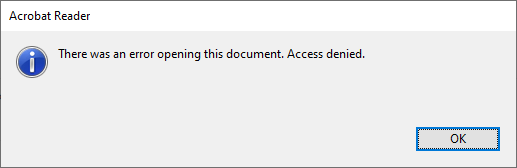
Access denied.

Access denied.

I tried Ctrl-C to copy the text, which has been a feature of standard dialogs as of Windows 2000 (see [Wayback] Cutting Edge: Using Windows Hooks to Enhance MessageBox in .NET | Microsoft Docs) and not hard to implement.

Well, Adobe decided to not support this great user experience: no dialog data on the clipboard, so I had to manually type it:

[Adobe Reader]
There was an error opening this document. Access denied.
[OK]

and searched for [Wayback] “There was an error opening this document. Access denied.” “Reader DC” – Google Search (I will explain the Reader DC bit below) without any useful hints (apart from “reinstall, Adobe Acrobat Reader DC might be corrupted”, lowering security settings and phishing sites wanting me to download so called “repair tools”).

So I decided to open the file using the File -> Open menu with the same file and got a fresh new error:
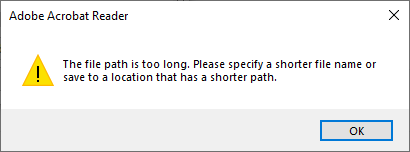
The file path is too long.

The file path is too long.

Of course, Ctrl-C here would fail too, so this is the error text:

[Adobe Acrobat Reader]
The file path is too long. Please specify a shorter file name or
save to a location that has a shorter path.
[OK]

Three things about this error message:

  1. It has a totally different message (with the actual reason the file cannot be opened)
  2. The caption is “Adobe Acrobat Reader”, where the first message had “Adobe Reader” as caption.
  3. It actually has an error icon (exclamation mark), where the first message (despite being an error) has the informational icon (encircled i).

Adobe still seems ambivalent on their product name, it is actually Adobe Acrobat Reader DC DC superseding version X, hence the Reader DC bit in the search), but they still call it Adobe Reader and Adobe acrobat Reader.

After all these years, Adobe is inconsistent at best.

–jeroen

Posted in Adobe, Adobe Reader, Power User | Leave a Comment »

Adobe Acrobat Reader download locations: a quick note

Posted by jpluimers on 2019/07/05

You can the final download locations through files like https://platformdl.adobe.com/adm/smanifest/readerdc_en_1801120058.xml, which contains https://ardownload2.adobe.com/pub/adobe/reader/win/AcrobatDC/1801120058/AcroRdrDC1801120058_en_US.exe

Related: [WayBack] Unorthodoxer Weg um an einen Offline Installer für Adobe Flash zu kommen – Administrator

–jeroen

Posted in Adobe, Adobe Reader, Power User | Leave a Comment »

Adobe Acrobat Reader – Content Preparation Progress window

Posted by jpluimers on 2019/04/08

I hope this gets rid of the content preparation progress window:

Disable the screen reader options in Adobe Acrobat:

  1. Within Adobe Acrobat, go to “Edit > Preferences > Reading”
  2. Locate the “Screen Reader Options” section.
  3. In the ‘Page vs Document’ dropdown box choose “Only read the currently visible pages”, and uncheck “Confirm before tagging documents”.

–jeroen

Read the rest of this entry »

Posted in Adobe, Adobe Acrobat, Adobe Reader, Power User | 2 Comments »

Does anyone have a proper solution for message “content preparation progress” when opening a PDF file?

Posted by jpluimers on 2015/09/25

It drives me nuts as the below “content preparation progress” solution fails for me on a Windows 8 system having Adobe Reader XI.

Anyone that has a proper solution?

Solution

  1. Go to Edit > Preferences > Reading.
  2. Under “Screen Reader Options” select “Only read the currently visible pages”.

–jeroen

Source: Message “content preparation progress” when opening a PDF file

Posted in Adobe, Adobe Reader, Power User | 1 Comment »

Adobe Reader installer download speed differences: FTP much slower than HTTP

Posted by jpluimers on 2014/08/17

The FTP download is much much slower than the http one:

4.2 MB/s – 73.4 MB of 73.4 MB: http://ardownload.adobe.com/pub/adobe/reader/win/11.x/11.0.08/en_US/AdbeRdr11008_en_US.exe

119 KB/s – 24.6 MB of 73.4 MB: ftp://ftp.adobe.com/pub/adobe/reader/win/11.x/11.0.08/en_US/AdbeRdr11008_en_US.exe

This over the same 50 megabit fiber connection.

So basically you have to:

  1. Browse the ftp://ftp.adobe.com/pub/adobe/reader/win/11.x  for a version in your language (en-US for intance has the youngest full install at ftp://ftp.adobe.com/pub/adobe/reader/win/11.x/11.0.10/en_US/ as younger versions only contain update MSP files, for instance in ftp://ftp.adobe.com/pub/adobe/reader/win/11.x/11.0.16/misc/)
  2. Copy the download URL
  3. Replace the ftp://ftp.adobe.com/pub/adobe/reader/win with http://ardownload.adobe.com/pub/adobe/reader/win (you cannot browse the latter as it genrates “Not Found; The requested URL /pub/adobe/reader/win/ was not found on this server.”)
  4. Download the URL that you just assembled

–jeroen

Posted in Adobe, Adobe Reader, Power User | 2 Comments »