Archive for the ‘macOS 10.12 Sierra’ Category
Posted by jpluimers on 2018/02/14
I’m still amazed this is not in stock Mac OS X:
In Finder > Select a folder > Right click, we get a popup with an option to create a new folder:Is there a way to add menu item New Textfile for adding a new text file?
[WayBack] macos – Right-click, create a new text file. How? – Ask Different
One way is to use Automator scripts, but: scripting…
–jeroen
Posted in Apple, Automator scripts, Development, iMac, Mac, Mac OS X / OS X / MacOS, MacBook, MacBook Retina, MacBook-Air, MacBook-Pro, MacMini, macOS 10.12 Sierra, OS X 10.10 Yosemite, OS X 10.11 El Capitan, OS X 10.9 Mavericks, Power User, Scripting, Software Development | Leave a Comment »
Posted by jpluimers on 2018/01/30
Most sites explaining how to decompress an xz file mention you should use unxz from the xz utils toolbox.
Running unzx on Msc OS X requires the xz formula from homebrew:
$ brew install xz
==> Downloading https://homebrew.bintray.com/bottles/xz-5.2.2.mavericks.bottle.tar.gz
######################################################################## 100.0%
==> Pouring xz-5.2.2.mavericks.bottle.tar.gz
🍺  /usr/local/Cellar/xz/5.2.2: 91 files, 1.4M
–jeroen
Posted in Apple, Home brew / homebrew, Mac OS X / OS X / MacOS, macOS 10.12 Sierra, OS X 10.10 Yosemite, OS X 10.9 Mavericks, Power User | Leave a Comment »
Posted by jpluimers on 2017/12/25
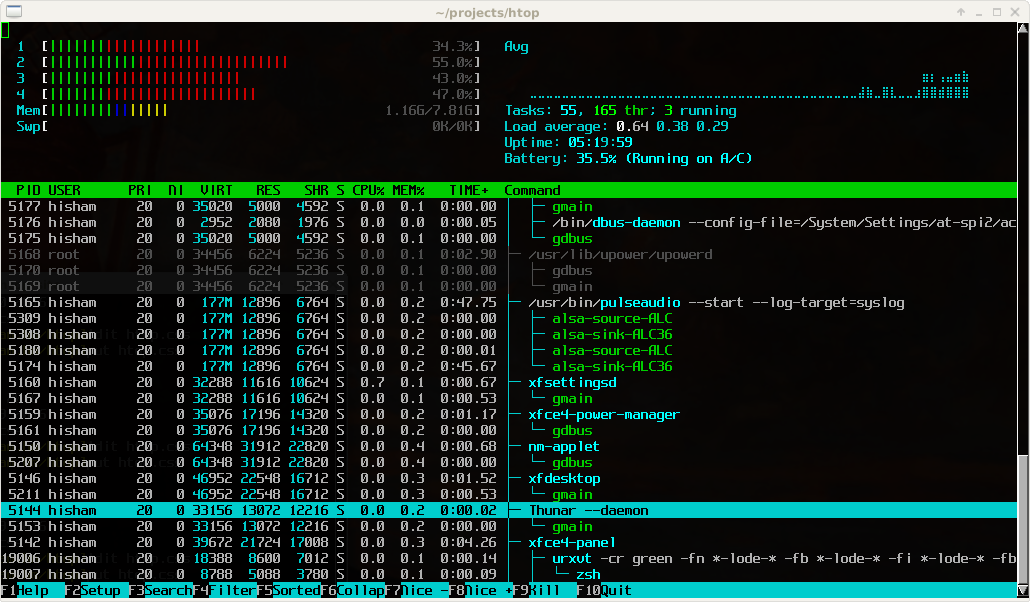
Great tool: [WayBack] htop – an interactive process viewer for Unix because it’s both interactive and supports a wide range of OSes: Linux, FreeBSD, OpenBSD and Mac OS X.
Thanks to Warren Postma who suggested it in his comment at [WayBack] 18 Useful Commands to Get Hardware Information on Linux – Linuxslaves.
Note that on OS X you get this warning after brew install htop :
htop requires root privileges to correctly display all running processes,

so you will need to run `sudo htop`.

You should be certain that you trust any software you grant root privileges.
On Linux you don’t get this message as there you have the /proc file system providing enough information as explained at [WayBack] osx – Why does htop on Mac OS X require root privileges to see data for all processes, but on Linux it runs without root – Super User.
A workaround (involving the setuid bit) is at [WayBack] Running htop on Mac OS X needs root. Why?! | Blog | JoeNyland.me or by running visudo ensuring you don’t need a password for it at [WayBack] osx – htop isn’t returning CPU or memory usage!? – Super User
–jeroen
Posted in *nix, *nix-tools, Apple, BSD, Linux, Mac OS X / OS X / MacOS, macOS 10.12 Sierra, OS X 10.11 El Capitan, OS X 10.9 Mavericks, Power User | Leave a Comment »
Posted by jpluimers on 2017/12/01
cd /Volumes/Backup/Backups.backupdb/Joshua\ Priddle’s\ MacBook\ Pro/Latest/Macintosh\ HD/Users/priddle
tmutil restore -v secret_docs.txt ~/
Learned from [WayBack] Restoring files from OS X Time Machine with Terminal.app:
- do not use
cp as it will give you wrong permissions
- do use
tmutil
More elaborate steps (including finding the backup in the first place) is at [WayBack] Commandline restoration of a file in Time Machine on OS X | Hacks for Macs
–jeroen
Posted in Apple, iMac, Mac, Mac OS X / OS X / MacOS, Mac OS X 10.4 Tiger, Mac OS X 10.5 Leopard, Mac OS X 10.6 Snow Leopard, Mac OS X 10.7 Lion, MacBook, MacBook Retina, MacBook-Air, MacBook-Pro, MacMini, macOS 10.12 Sierra, OS X 10.10 Yosemite, OS X 10.11 El Capitan, OS X 10.8 Mountain Lion, OS X 10.9 Mavericks, Power User | Leave a Comment »
Posted by jpluimers on 2017/11/17
I have the Atom editor and was wondering how you can open a file or folder from the terminal in Atom. I am using a Mac. I am looking for a way to do this: atom . (opens folder) atom file.js (
The answer to it isn’t any good any more (since then, Atom has evolved), but this comment works splendid:
I solved the issue by choosing “Install Shell Commands” under the “Atom” menu.
It will add a script in /usr/local/bin/atom that starts Atom with the parameters you entered.
Thanks [WayBack] rxgx!
[WayBack] github – Open Atom editor from command line – Stack Overflow
–jeroen
PS: Reminder to self to add a screenshot.
Posted in Apple, atom editor, Mac, Mac OS X / OS X / MacOS, MacBook, MacBook Retina, MacBook-Air, MacBook-Pro, MacMini, macOS 10.12 Sierra, OS X 10.11 El Capitan, Power User, Text Editors | Leave a Comment »
Posted by jpluimers on 2017/10/27
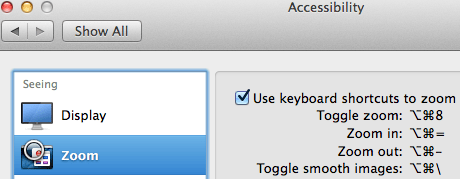
Accessibiity -> Zoom -> enable checkbox” class=”size-medium” /> Preferences -> Accessibiity -> Zoom -> enable checkbox
I didn’t know this was built-in since Mountain Lion and up, but it is, is startable from the keyboard and it’s tremendously convenient when presenting: [WayBack]: OS X Mountain Lion: Zoom content on the screen.
TL;DR:
- System Prefrecences
- Accesibility
- Zoom
- Checkbox
–jeroen
Posted in Apple, iMac, Keyboards and Keyboard Shortcuts, Mac, Mac OS X / OS X / MacOS, MacBook, MacBook Retina, MacBook-Air, MacBook-Pro, MacMini, macOS 10.12 Sierra, OS X 10.10 Yosemite, OS X 10.11 El Capitan, OS X 10.8 Mountain Lion, OS X 10.9 Mavericks, Power User | Leave a Comment »
Posted by jpluimers on 2017/10/13
Just in case you have this driver installed:
$ kextstat -kl | awk '!/com\.apple/{printf "%s %s\n", $6, $7}'

com.bresink.driver.BRESINKx86Monitoring (9.0)
[WayBack] Hardware Monitor Help shows how to remove it:
- Ensure you are logged in as user with administrative rights.
- Use the Finder to open the folder Library at the topmost level of your system volume, and inside it, the folder StartupItems. If the driver is still installed, you will see the folder BRESINKx86Monitoring at this location.
- Drag the folder BRESINKx86Monitoring to the Trash. OS X may ask for your administrator password.
–jeroen
Posted in Apple, Mac, Mac OS X / OS X / MacOS, MacBook, MacBook Retina, MacBook-Air, macOS 10.12 Sierra, OS X 10.10 Yosemite, OS X 10.11 El Capitan, OS X 10.9 Mavericks, Power User | Leave a Comment »
Posted by jpluimers on 2016/11/04
Skip the built-in curl and directly go to the homebrew one:
$ brew update

$ brew upgrade

$ brew install curl --with-nghttp2
Source: How to use curl command with http/2 on MacOS X [WayBack]
via: Using cURL with HTTP/2 on Mac OS X #sysadmin #unix #apple #macos – Joe C. Hecht – Google+ [WayBack]
–jeroen
Posted in Apple, Home brew / homebrew, Mac, Mac OS X / OS X / MacOS, MacBook, MacBook Retina, MacBook-Air, MacBook-Pro, MacMini, macOS 10.12 Sierra, OS X 10.9 Mavericks, Power User | Leave a Comment »


 The Wiert Corner - irregular stream of stuff