


At a site, something in the network filtering changed, so printing from a Mac failed.
In the end this was about port 631, which is for the IPP protocol a Mac uses.
—jeroen
Posted by jpluimers on 2019/07/12
At a site, something in the network filtering changed, so printing from a Mac failed.
In the end this was about port 631, which is for the IPP protocol a Mac uses.
—jeroen

Posted in Apple, Mac, Power User | Leave a Comment »
Posted by jpluimers on 2019/07/08
I might want to try and buy one of these: [WayBack] Applesauce – Make exact images of copy-protected Apple II floppy disks | Hacker News.
A truckload of information is at [WayBack] Applesauce – The ReActiveMicro Apple II Wiki
It is still being updated: [WayBack] applesauce – Apple II Floppy Drive Controller
Via [WayBack] This week, in 6502-related hardware, the Applesauce: a Disk II imaging kit for your Apple II disks. Thanks to the minimal nature of Woz’ disk interface,… – mos6502 – Google+
Related: [WayBack] Confessions of a Disk Cracker: The Secrets of 4am | Hacker News
Why did you choose to start aggressively de-protecting, archiving and re-distributing Apple II software? It’s tempting to rewrite history and give myself some noble purpose for starting this hobby, but in this case the truth [more…]
Paleotronic Magazine celebrates retro-technology with features, articles, interviews, projects, reviews, news and more!
Videos below the fold…
–jeroen
Posted in //e, 6502, Apple, History, Power User | Leave a Comment »
Posted by jpluimers on 2019/06/10
Via [WayBack] ms office – Keyboard shortcut to select all text in a cell in Excel – Ask Different a few keyboard tips.
Lets start with the shortest one:
Command–Z or Control–Z to undo the changeThis probably is unintended, but works great: all text is now selected, so you can copy/cut with Command-C/Command–X.
Now the “official” way:
Control–U or F2 to edit the cell (the cursor is now at the end)Shift–Alt–Home or Shift–Control–Home (to select all text)Home can also be Fn–Left.Other selections you can make while the cell is in edit mode:
Shift–Alt–End or Shift–Control–End (to select to the end of the cell)End can also be Fn–Right.Shift–Alt–Right or Shift–Control–Right (to select one word to the right)Shift–Alt–Left or Shift–Control–Left (to select one word to the left)Shift–Alt–Down or Shift–Control–Down (to select to the same position on the line below)Shift–Alt–Up or Shift–Control–Up (to select to the same position on the line up)Keyboard symbols (more at [WayBack] Command, Option, & Shift Symbols in Unicode):
⇧ – Shift^ – Control⌥ – Alt which is the same as Option⌘ – CommandFn – Function–jeroen
Posted in Apple, Excel, Mac, Mac OS X / OS X / MacOS, MacBook, MacBook Retina, MacBook-Air, MacBook-Pro, MacMini, macOS 10.12 Sierra, Office, Office 2011 for Mac, Power User | Leave a Comment »
Posted by jpluimers on 2019/06/10
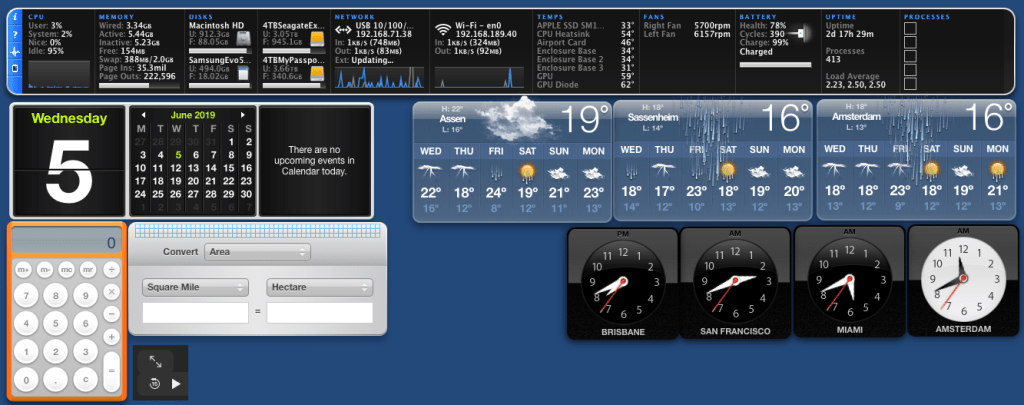
It was fun while it lasted: [WayBack] Did Apple remove dashboard in MacOS Catalina? – Appleosophy
I especially like the iStat Pro (though unsupported) widget, and that you can have a dashboard without the need to go on-line.
Related: [WayBack] Dashboard (macOS) – Wikipedia
Via: [WayBack] Apple verwijdert dashboard met widgets uit macOS Catalina – Computer – Nieuws – Tweakers
If might be that Übersicht can help me, but I am not sure yet if there is a good iStat Pro equivalent for it.
Future links to investigate:
Übersicht- Keep an eye on what is happening on your machine and in the World.
–jeroen

Posted in Apple, Mac OS X / OS X / MacOS, Power User | Leave a Comment »
Posted by jpluimers on 2019/06/07
For my link archive:
–jeroen
Posted in Apple, iMac, Mac, Mac OS X / OS X / MacOS, MacBook, MacBook Retina, MacBook-Air, MacBook-Pro, MacMini, macOS 10.12 Sierra, macOS 10.13 High Sierra, OS X 10.11 El Capitan, Power User | Leave a Comment »
Posted by jpluimers on 2019/06/03
What key combination do I have to press to create a line break in a cell in Excel for Mac 2011? The Windows combination of Alt+Enter does not work on the Mac.
Source: [WayBack] keyboard – How to add a line break in a cell in Excel for Mac – Ask Different
The answer depends on the Excel for Mac OS X version you are using.
Excel 2015 is simple (thanks esham): use Option+Enter.
In older Excel <= 2011 (thanks nwinkler), use Command+Option+Enter or Control+Option+Enter.
Some users report the also need the Fn key in addition to the above modifiers.
–jeroen
PS: Later I found out that [WayBack] Beckism.com: Use a linebreak in Excel on Mac also shows the Excel <= 2011 solution Control+Option+Return (note that Return is the same key as Enter).
Posted in Apple, Excel, Mac, Mac OS X / OS X / MacOS, MacBook, MacBook Retina, MacBook-Air, MacBook-Pro, macOS 10.12 Sierra, Office, Office 2011 for Mac, Power User | Leave a Comment »
Posted by jpluimers on 2019/04/29
From [WayBack] osx lion – osx change printer ip address without adding new printer – Super User:
Q
Is there a way to change a printer’s IP address in OSX (Lion) without having to add a new printer? I did find Printer IP Remedy, but was curious if there was an ‘official’ method.
A
You can do this in the CUPS web interface with the following steps:
- Open Terminal.app and run
cupsctl WebInterface=yes. This enables the CUPS web interface- Open
http://127.0.0.1:631/printersin your web browser- Click on the printer you want to change. From the “Administration” drop down, select “Modify Printer”.
- Log in with your local admin account
- Select the new printer IP either from “Discovered Network Printers” or add it manually with “Other Network Printers”. Make sure that you keep the same connection protocol as it says in “Current Connection” (for me, this was LPD).
Once you’re done with this, Mac OS X will directly print to the new IP address. There is no need to reboot or so. If you want to disable the CUPS web interface again, run
cupsctl WebInterface=no.
The CUPS solution works splendid in MacOS as well, so there was no need for [Archive.is] Printer IP Remedy 1.3 free download for Mac | MacUpdate.
Without the CUPS web interface enabled, the web-interface at http://127.0.0.1:631/printers looks like this:
Web Interface is Disabled
The web interface is currently disabled. Run “cupsctl WebInterface=yes” to enable it.
After enabling it like the CUPS web interface wit cupsctl WebInterface=yes, you can see I have the same printer configured multiple times with different communication protocols and output languages:
Printers
Search in Printers:
Showing 6 of 6 printers.
Queue Name Description Location Make and Model Status OKI_MC342_36855D OKI-MC342-PSO-36855D Office MC342-AirPrint Idle OKI_MC342_36855D_PCL OKI-MC342-36855D PCL 1060NP-Office Generic PCL Laser Printer Idle OKI_MC342_IPP OKI-MC342-IPP Office Generic PostScript Printer Idle OKI_MC342_LPR OKI-MC342-LPR Office Generic PostScript Printer Idle
The first two printers were mapped by DNS, but the last two were mapped by IP address.
Changing the IP address was simple:
This is also the place where you can change “Default options”, like paper size (which – for all but the first – somehow defaulted to US Letter 11 inch, while it is actually filled with A4 paper).
At the end, disable the web interface: cupsctl WebInterface=no.
Related:
–jeroen
Posted in *nix, *nix-tools, Apple, iMac, Mac, MacBook, MacBook Retina, MacBook-Air, MacBook-Pro, MacMini, macOS 10.12 Sierra, macOS 10.13 High Sierra, Power User | Leave a Comment »
Posted by jpluimers on 2019/04/25
Yes, occasionally, people still use DVD or CD disks, so thanks [Archive.is] Chris Bensen: macOS How to create an ISO from a CD or DVD:
Put in your CD or DVD, Open Terminal, type:
ls /VolumesFind the volume in the list, then type where
/path/to/volumeis the CD or DVD you want:
hdiutil makehybrid -iso -joliet -o Image.iso /path/to/volume
–jeroen
Posted in *nix, Apple, Mac, Mac OS X / OS X / MacOS, MacBook, MacBook Retina, MacBook-Pro, macOS 10.12 Sierra, Power User | Leave a Comment »
Posted by jpluimers on 2019/03/29
When connecting from my Mac to my ESXi rig, some commands (especially less) show this output:
So I created this alias to connect from my Mac to the internal address of my ESXi rig:
alias ssh-esxi-X10SRH-CF-internal='TERM=xterm ssh -p 22 root@192.168.71.91'
The trick is the bold part: TERM=xterm (which you can also replace by export TERM=xterm; if you want future ssh sessions to use the same [wayback] TERM setting).
The reason is that the Mac defines the TERM variable as containing xterm-256 which is defined on the Mac itself, but ESXi has a hard time coping with it.
Some Mac OS and Xcode combinations had a problem with
xterm-256not being present ([WayBack] macos – Terminal strangeness after installing Xcode on Lion – Super User), but this isn’t the case on my system:
$ ls -alh `find /usr/share/terminfo | grep 'xterm-256color'`

-rw-r--r-- 1 root wheel 3.2K Jul 30 2016 /usr/share/terminfo/78/xterm-256color
On the Mac you really want to use
xterm-256coloras it looks way better thanxterm-colororxterm: [WayBack] linux – What is the difference between xterm-color & xterm-256color? – Stack Overflow (thanks [WayBack] Chris Page!)
It seems I already did something similar on ESXi itself to get esxtop working: ESXi: when esxtop shows garbage. That was on the ESXi side and works as well for this problem too.
However, it is a bit harder to have a script run during ESXi boot time that sets this, so it is easier to fix this on the Mac side.
It works for all OS X and ESXi versions I’ve tested so far.
–jeroen
Posted in *nix, Apple, ESXi5.1, ESXi5.5, ESXi6, ESXi6.5, iMac, Mac, Mac OS X / OS X / MacOS, Mac OS X 10.4 Tiger, Mac OS X 10.5 Leopard, Mac OS X 10.6 Snow Leopard, Mac OS X 10.7 Lion, MacBook, MacBook Retina, MacBook-Air, MacBook-Pro, MacMini, macOS 10.12 Sierra, OS X 10.10 Yosemite, OS X 10.11 El Capitan, OS X 10.8 Mountain Lion, OS X 10.9 Mavericks, Power User, Virtualization, VMware, VMware ESXi | Leave a Comment »
Posted by jpluimers on 2019/02/22
This has happened to me on most Macs with most Apple Mac OS X / MacOS / whatever versions: the built in sound controls for internal speakers and head phones fail to work (keyboard shortcuts and UI both fail).
The solution at [WayBack] mavericks – Unable to modify the volume with the keyboard – Ask Different works, but be sure to require the kernel module steps:
open up a Terminal window and run:
sudo killall coreaudiodsudo kextunload /System/Library/Extensions/AppleHDA.kext sudo kextload /System/Library/Extensions/AppleHDA.kext
–jeroen
Posted in Apple, Mac, Mac OS X / OS X / MacOS, MacBook, MacBook Retina, MacBook-Air, MacMini, macOS 10.12 Sierra, OS X 10.10 Yosemite, OS X 10.11 El Capitan, OS X 10.9 Mavericks, Power User | Leave a Comment »
 The Wiert Corner - irregular stream of stuff