The Wiert Corner – irregular stream of stuff

Jeroen W. Pluimers on .NET, C#, Delphi, databases, and personal interests

  • My badges

  • Twitter Updates

  • My Flickr Stream

  • Pages

  • All categories

  • Enter your email address to subscribe to this blog and receive notifications of new posts by email.

    Join 1,860 other subscribers

Archive for the ‘Chromecast’ Category

Some links on Chromecast and stuttering

Posted by jpluimers on 2022/10/18

For my link archive (all my Chromecast devices are wired via LAN to low-latency fiber backed ISPs):

For v1 Chromecast devices, it seems Google does not care any more and will always stream at 1060p50 or 1060p60 without giving the opportunity to tune down the quality from the Android Chromecast app (my app always shows “Quality:Unavailable”, see the picture below the signature).

For v2 and up, there sometimes are firmware issues that take long times to get resolved.

–jeroen

Read the rest of this entry »

Posted in Chromecast, Google, Power User | Leave a Comment »

Altnernatives for Ethernet Adapter for Chromecast – Google Store

Posted by jpluimers on 2019/12/13

A long time ago, I wrote Ethernet Adapter for Chromecast – Google Store « The Wiert Corner – irregular stream of stuff

As a reminder for self, order when I’m back in the USA: Ethernet Adapter for Chromecast – Google Store.

In between, it has been available in many countries, but when writing this, it is not available in The Netherlands, Belgium or Germany any more:

Alternatives are for instance [Archive.isUGREEN Ethernet Adapter für Chromecast und TV: AmazonSmile: Computer & Zubehör, or fiddling with OTG splitter cables and an a USB ethernet adapter which I found via [WayBack] Google Chromecast – Google Cast – Deel 1 – Mediaspelers en HTPC’s – GoT especially[WayBack] Google Chromecast – Google Cast – Deel 1 – Mediaspelers en HTPC’s – GoT: search for “ethernet.

The cool thing: these solutions also work for things like Raspberry Pi Zero, Fire TV Stick, etc.

Read the rest of this entry »

Posted in Chromecast, Google, Power User | Leave a Comment »

If you have trouble getting an screen mirror from Samsung S7 Edge to Chromecast 2 to work: reboot phone

Posted by jpluimers on 2018/09/25

A friend of mine tried to get screen mirror (now called “Smart View”) from a Samsung S7 Edge to a Chromecast 2 working, but the connection would time out each try (but not when casting regular content using the Google Home app): try rebooting your S7 Edge.

Got that reboot tip and renamed functionality thanks to the somewhat related [WayBack] Galaxy S7: How to Screen Mirror to any Samsung Smart TV:

In order to connect (screen mirror) you Galaxy S7 or S7 Edge to your Samsung smart TV you need to swipe down to open your notification area, then on the top right click that little down arrow then select “smart view”. Previous Galaxy phones called it screen mirror, not sure why Samsung changed the name in the S7.

Got the renamed functionality via the video below.

–jeroen

Read the rest of this entry »

Posted in Chromecast, Google, Power User | Leave a Comment »

The fireplace yule Log visualiser in Google Play Music works, but only from web-browser, not from app

Posted by jpluimers on 2017/12/25

Kristian Köhntopp:

Dear Lazyweb, years ago I turned on the Yule log visualiser in GPMAA, Settings, Labs. Current Google music has no Labs. So how do I turn on cover art?

Turns out, the Settings -> Labs switch exists in Desktop Google Music only, and does not (longer) exist in the App.

Sad.

via: [WayBack] Dear Lazyweb… how do I turn on cover art? – Kristian Köhntopp – Google+

The setting is at https://play.google.com/music/listen?authuser&u=0#/accountsettings

More: https://www.youtube.com/watch?v=yYkyOaSNLb8

–jeroen

Posted in Chromecast, Google, Google Play Music, LifeHacker, Power User | Leave a Comment »

Play to Chromecast from VLC 3.0 on Mac OS X (OS X, macOS, or whatever other names apple comes up with)

Posted by jpluimers on 2017/08/14

On my Mac OS X machine, I got this to work with the 20170731 nightly of VLC 3.0.

[WayBackHow to stream from VLC to Your Chromecast (3.0 Updated Version) – VLC Media Player only explains the steps for Windows and Android, probably because they were the first platforms supported by VLC to render on Chromecast: [WayBackHow to Stream Videos from VLC to Chromecast (Including on Windows, Mac & Android) / [WayBackHow to Stream From VLC to Your Chromecast

To make it easier for end-users, on other platforms the menu entries are different.

  • Windows: Menu Video -> Render
  • Mac: Menu Playback -> Renderer (not Render as shown in some posts)
  • Linux: No UI yet.

I found this via [WayBackLatest VLC 3 Nightly Streams to Chromecast Perfectly! : Chromecast and [WayBackHow do I stream to Chromecast using VLC? – Unix & Linux Stack Exchange

On Linux, there is the command-line for now (which works on OS X and Windows as well), or if you insist: use MKChromecast as described in [WayBackHow To Cast Video from Ubuntu to a Chromecast – OMG! Ubuntu!. [WayBack]Mkchromecast This is a program to cast your macOS X, or Linux audio to your Google Cast or Sonos devices with sources at https://github.com/muammar/mkchromecast

On Windows and Mac OS X, after choosing the Render, the steps are the same:

  1. Choose Render discovery on
  2. Choose a Chromecast device
  3. Accept the security certificate for it

Download: [WayBackhttps://nightlies.videolan.org/build/macosx-intel/vlc-3.0.0-20170731-0451/vlc-3.0.0-20170731-0451-git.dmg via [WayBackhttps://nightlies.videolan.org/build/macosx-intel/vlc-3.0.0-20170731-0451/

I didn’t need [WayBack] https://nightlies.videolan.org/build/macosx-intel/vlc-3.0.0-20170731-0451/vlc-contrib-x86_64-apple-darwin15-20170731.tar.bz2 

–jeroen

Posted in Chromecast, Google, Media, Media Streaming, Power User, Video | Leave a Comment »

Casting the audio of application on your Linux machine via Chrome to a ChromeCast

Posted by jpluimers on 2017/02/06

Hopefully by now mkchromecast [WayBack] works on more Linux versions (and maybe even Mac OS X is better supported [WayBack]), but back then it was only available for Ubuntu 16.10 and up:

Do you want to stream the audio from Rhythmbox, VLC or another Linux app to your TV through Chromecast? Well, we’ve found a nifty little Linux tool that lets you do just that.

Source: How to Send Your Linux Desktop Audio to a Chromecast – OMG! Ubuntu!

The tool is at github: Linux · muammar/mkchromecast Wiki  [WayBack]: mkchromecast – Cast macOS, or Linux Audio to your Google Cast Devices

–jeroen

via:

Posted in *nix, Chrome, Chromecast, Google, Linux, Power User, Ubuntu | Leave a Comment »

Some ChromeCast URLs

Posted by jpluimers on 2017/02/01

I need to check these against a Chromecast v2 as the below URLs are from a v1 device:

More is possible by using cURL: Chromecast Hacking Has Begun | fiquett.com

sleep 8h; while true; do
curl -H "Content-Type: application/json" http://192.168.71.113:8008/apps/YouTube -X POST -d 'v=somevideo';
done

Related:

–jeroen

via:

Posted in Chromecast, Communications Development, Development, Google, Hardware Interfacing, HTTP, https, Internet protocol suite, REST, Security, TCP | 3 Comments »

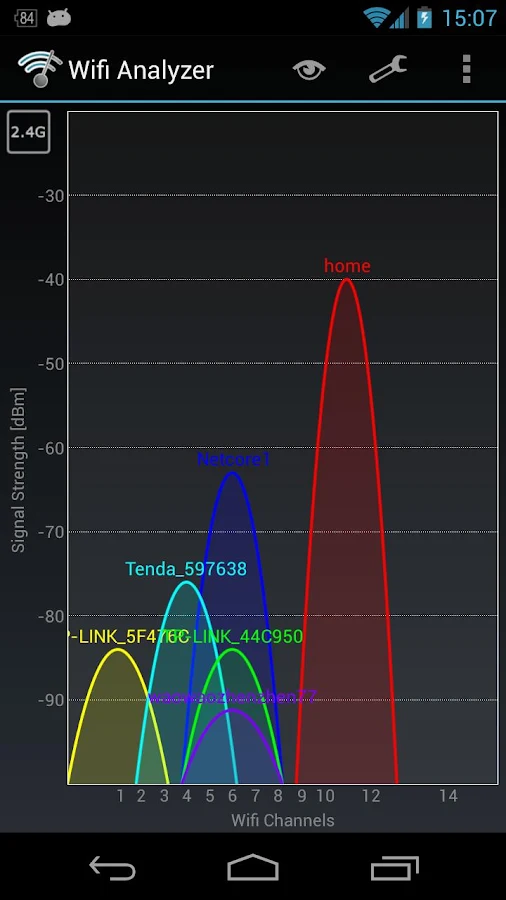
Wifi Analyzer – helped me analyse why an original Chromecast failed to see a Buffalo WLAE-AG300N

Posted by jpluimers on 2017/01/06

Brilliant! Helped me to track down why an original 1st generation Chromecast didn’t want to connect to a Buffalo WLAE-AG300N.

The problem there is that the original Chromecast does only 2.4Ghz WiFi and the WLAE-AG300N favours 5Ghz WiFi over 2.4Ghz when set to auto.

The solution is in the last picture: basically force the WLAE-AG300N to use 11n/g/b only which limits it to 2.4Ghz (it cannot use both frequencies at the same time).

Yes, I know the Microwaves drawback, but as the original Chromecast only does 2.4Ghz. I’d rather get the Chromecast Ethernet adapter but Google refuses to ship these outside the USA.

Source: Wifi Analyzer – Android Apps on Google Play


Force the WLAE-AG300N to use only 2.4Ghz

Force the WLAE-AG300N to use only 2.4Ghz

Posted in Chromecast, Google, Power User, WiFi | Leave a Comment »

How To Chromecast MKV, MP4, DVI Videos from Chrome (on a Mac, Windows or Linux machine)

Posted by jpluimers on 2016/11/18

There is a Chrome App called Videostream for Google Chromecast that lets you play your own local videos on your Chromecast from your PC with subtitles supported. Not like those Chrome Extensions, it’s a Chrome App that you can launch directly from your desktop through Chrome Launch.

Just launch the app, choose a video, select a Chromecast, and enjoy. Easy as 123.

via: [WayBackHow To Chromecast MKV, MP4, DVI Videos from Windows Computer | Next of Windows

Posted in Chrome, Chromecast, Google, Power User | Leave a Comment »

VidCast: Chromecast for the rest of the web

Posted by jpluimers on 2015/11/13

I know, friday 13, bla, bla, but this works great! VidCast: Chromecast for the rest of the web.

It works with: Vimeo, TED, and tons of other sites.

The first I tried is was a great half hour Devopsdays Amsterdam 2015 session “Leslie Hawthorn – Fear of Failing Fast: How to Avoid Sabotaging Your Success

The easiest way is to drag the VidCast bookmarklet button to your bookmarks bar once, then for videos you want to watch:

Read the rest of this entry »

Posted in Bookmarklet, Chrome, Chromecast, Google, Power User, Web Browsers | Leave a Comment »