Archive for the ‘Fritz!’ Category
Posted by jpluimers on 2021/05/31
If any of your Fritz!Box devices under “Wireless” -> “Radio Channel” -> “5-GHz band” the indicates “Radar detection enabled. At the moment no wireless LAN connection (5 GHz) is possible; please wait.” – Google Search:
- Click on the “Refresh Auto Channel” button
- Wait until it has chosen a new 5Ghz channel
- Verify you can connect over 5Ghz
- If you still cannot connect, retry steps 1…3 once.
I had this only happen on 1750E repeaters so far, but others seem to have had it on other Fritz!Box devices as well.
In the Netherlands, potentially affected channels seem to be 52 through 140.
Related:
–jeroen
Posted in Fritz!, Fritz!Box, Fritz!WLAN, Internet, Power User | Leave a Comment »
Posted by jpluimers on 2020/08/14
In the end, this list worked on a Fritz!Box, but I still do not know which other subdomains and protocols they silently let pass:
windowsupdate.microsoft.com

*.windowsupdate.microsoft.com

*.update.microsoft.com

*.windowsupdate.com

download.windowsupdate.com

download.microsoft.com

*.download.windowsupdate.com

test.stats.update.microsoft.com

ntservicepack.microsoft.com

update.microsoft.com

*.update.microsoft.com

*.download.microsoft.com

windowsupdate.com

wustat.windows.com

login.live.com

mp.microsoft.com

*.mp.microsoft.com

www.update.microsoft.com

support.microsoft.com

www.msftconnecttest.com
Some source materials:
–jeroen
Read the rest of this entry »
Posted in Fritz!, Fritz!Box, Internet, Power User, Windows, Windows 10, Windows 7 | Leave a Comment »
Posted by jpluimers on 2020/04/03
I totally forgot it was possible to usie an old Fritz!Box to act as a DECT repeater:
Um die Abdeckung von DECT für mobile Festnetztelefone zu verbessern, lässt sich eine ältere Fritzbox verwenden.
Source: [WayBack] Ältere Fritzbox als DECT-Repeater verwenden – PC-WELT
Via: [WayBack] Bludau Media – Google+
–jeroen
Posted in Fritz!, Fritz!Box, Internet, Power User | Leave a Comment »
Posted by jpluimers on 2019/07/19
Via [WayBack] Knowledge Base | AVM International:
3 Setting the maximum transmitter power
- Click “Wireless” (“WLAN”) in the FRITZ!Box user interface.
- Click “Radio Channel” in the “Wireless” (“WLAN”) menu.
- If the option “Set radio channel settings automatically (recommended)” is enabled, proceed with the following section.
- If the option “Adjust radio channel settings” is enabled:
- Click “Additional settings”.
- Select “100%” from the drop-down list “Maximum transmitter power”.
- Click “Apply” to save the settings.
For me, having minimal power was important since every now I needed to be able to connect to it, but only when I was in close proximity.
Hence the settings below: 6% Maximum transmit power is the lowest I could set.
For devices that cannot adjust their antenna output power which have RP-SMA connectors, I bought these to effectively throttle them:
Read the rest of this entry »
Posted in Fritz!, Fritz!Box, Internet, Power User | Leave a Comment »
Posted by jpluimers on 2019/02/13
Of course you don’t want this. So by the time you read this, the connection has been closed.
For testing some Internet of Shit stuff from a client that cannot do SFTP, I needed a temporary FTP accessible connection.
These links helped:
TL;DR:
- Preparing the USB stick:
- Ensure the USB disk is FAT/FAT32/NTFS
- Create a directory in the root of the USB disk for the FTP user (for now:
FtpDirectory)
- Insert the USB disk in the Fritz!Box
- Logon to the Fritz!Box web UI
- Configure a user for FTP:
- In the menu, go to
System, then FRITZ!Box Users
- Click
Add user
- Name the user (for now:
MyFtpUser)
- Ensure that user *only* has a checkmark for `Access to NAS contents`
- Click the button
Add directory
- In the popup click
Select folder
- Choose the
FtpDirectory you just made
- Click
OK
- Ensure the
read and write checkboxes are enabled
- Click
OK
- Configure the USB stick for FPT access
- In the menu, go to
Home Network, then USB Devices
- Observe if the device is visible and has the correct file system (if not: ask AVM)
- In the menu, go to
Internet, then Permit Access
- Click on the
FRITZ!Box Services
- Ensure there is a checkmark at
Internet access to your storage media via FTP/FTPS enabled
- At
TCP Port for FTP/FTPS, fill in 21 (many IoT devices cannot use a different port)
- Ensure there is *no* checkmark at
Allow only secure FTP connections (FTPS)
- Make a note of the value after
FTP address (something like ftp://example.org:21`)
- Click
Apply
- Test
–jeroen
Posted in Communications Development, Development, Fritz!, Fritz!Box, FTP, Internet protocol suite, IoT Internet of Things, Network-and-equipment, Power User, Software Development, TCP | Leave a Comment »
Posted by jpluimers on 2019/01/21
I have a bunch of [WayBack] FRITZ!WLAN Repeater 1750E | Overview | AVM International devices; this is the quickest way to install them as LAN -> WiFi bridge (connect ethernet to your LAN; use the WiFi as a bridge).
- Connect the FRITZ!WLAN to your LAN
- Connect the FRITZ!WLAN to power
- Connect your laptop to the WiFi SSID
FRITZ!WLAN Repeater 1750E with password 00000000 (that eight times a zero)
- Set your laptop with a fixed IP address
192.168.178.127 with netmask 255.255.255.0 and gateway 192.168.178.2 for WiFi.
- Connect to your FRITZ!WLAN at http://192.168.178.2
- Setup your FRITZ!WLAN for the first time (password, country) and have it reboot
- Logon to the FRITZ!WLAN
- Change the WiFI password and the SSID for 2.4 Ghz and 5.0 Ghz channels (I use a different SSID for both as many Fritz!Box devices have both bad 2.4Ghz performance and a hard time to automatically switch from 2.4Ghz to 5.0Ghz on the same SSID automagically).
- Change your laptop to use DHCP on WiFi
- Reconnect to the Fritz!Box with the new SSID and password
–jeroen
Posted in Fritz!, Fritz!WLAN, Internet, Power User | Leave a Comment »
Posted by jpluimers on 2018/11/30
I forgot to document this earlier.
Many Fritz!Box devices cannot be upgraded to recent firmwares. The behaviour differs on hardware revisions of the same model. I’ve seen it happen on Fritz!Box 7360 devices, but others are could be affected too.
You can get the firmware revision using the trick here: FRITZ!Box call http://fritz.box/cgi-bin/system_status.
If your hardware revision is affected, do not expose it to the outside world.
You could still turn it into a local switch though: [WayBack] Convert FRITZ!Box 7360 to Managed Switch (or even Access Point) having it’s own IP address: Setting up the FRITZ!Box as an IP client.
I did this before even discovering about the hardware revision limits as I wanted to keep the full phone history when migrating from ADSL to fiber (which came with a brand new Fritz!Box 7490) and could use the extra LAN ports.
Fritz!Box 7360 hardware revision v1: limited to firmware 06.3x
Read the rest of this entry »
Posted in Fritz!, Fritz!Box, Internet, Power User | Leave a Comment »
Posted by jpluimers on 2018/11/29
Was working to get fritzcap to emit a list of interfaces so I could specify which one to capture.
For that I needed to parse the output of http://fritz.box/capture.lua which consists of HTML fragments like below.
What I needed was for each consecutive entries of [WayBack] th and first [WayBack] button tags:
- content of the
th tag
- content of the
value attribute of the button tag having a type="submit" attribute and name=start attribute
So before starting to work on it, I created [WayBack] In order to fix #5, print a list of available interfaces to potentially capture from · Issue #6 · jpluimers/fritzcap
The goal was to get a series of key/value pairs:
4-138 = AP2 (2.4 + 5 GHz, ath1) - Interface 1

4-137 = AP2 (2.4 + 5 GHz, ath1) - Interface 0

4-132 = AP (2.4 GHz, ath0) - Interface 1

4-131 = AP (2.4 GHz, ath0) - Interface 0

4-129 = HW (2.4 GHz, wifi0) - Interface 0

4-128 = WLAN Management Traffic - Interface 0a
So I built a class descending from [WayBack] HTMLParser — Simple HTML and XHTML parser that ships with the [WayBack] Python standard libraries.
If in the future I need more complex HTML parsing, then these links will help me choosing more feature rich parsers:
Back to the HTMLParser descendant in interfaces_dumper.py which can basically be condensed down to the code below.
handle_data is called for both start tags and end tags. The th value in data is only present in the start tag (at the time of end tag the data is empty), so you need to keep track of both last_start_tag and last_end_tag.handle_endtag maintains last_end_tag to help handle_data.handle_starttag maintains last_start_tag to help handle_data and also handles the button behaviour.
- The
buttonis only relevant if it has type="submit" and name="start" and a value attribute in that order.
- Output is in
data which is an array of key/value pairs.
Read the rest of this entry »
Posted in Development, Fritz!, Fritz!Box, fritzcap, Internet, Power User, Python, Scripting, Software Development | Leave a Comment »
Posted by jpluimers on 2018/11/27
I’m not sure around which firmware versions Fritz!Box started to implement LUA links, but they are now on my research list.
Below a reference and where I found them.
A few notes first:
- There are many duplicates, which in due time I need to de-duplicate.
- The .lua links seem to override the old cgi-bin links (that are partially reverse engineered at [WayBack] Category:Befehle in /usr/www/cgi-bin – Fritz!Box).
- Usually, .lua links require a SID. In the web-ui, a Fritz!Box very much tries to hide that SID from URLs in the browser address bar (especially for firmware versions 06.50 and up) so the easiest to get them is this:
- Login to your Fritz!Box
- Manually copy any of the URLs in the left side
- Take the SID from there.
- More recent firmware versions hide the .lua links too, but you can see them when monitoring your network traffic in the developer mode of your web browser
Logging in programmatically needs a challenge response mechanism. It used to be at [Wayback] http://www.avm.de/de/Extern/Technical_Note_Session_ID.pdf but now has moved to [Wayback/Archive.is] https://avm.de/fileadmin/user_upload/Global/Service/Schnittstellen/AVM_Technical_Note_-_Session_ID.pdf
Here is the list:
Read the rest of this entry »
Posted in Development, Fritz!, Fritz!Box, Hardware Development, Hardware Interfacing, Internet, Power User | Leave a Comment »
Posted by jpluimers on 2018/11/22
While researching what the cgi-bin of Fritz!Box devices expose, I found this post on http://fritz.box/cgi-bin/system_status:
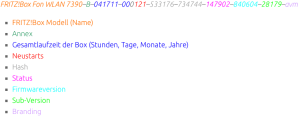 [WayBack] FRITZ!Box „Service Code“ auslesen und dekodieren – Antary
FRITZ!Box Fon WLAN 7390–B–041711–000121–533176–734744–147902–840604–28179–avm
- FRITZ!Box Modell (Name)
- Annex
- Gesamtlaufzeit der Box (Stunden, Tage, Monate, Jahre)
- Neustarts
- Hash
- Status
- Firmwareversion
- Sub-Version
- Branding
The site has the entries colour coded, but WordPress doesn’t allow for that.
I found out that on a Fritz!Box 7490 you do not need to logon, but on a Fritz!Box 7360 you have to.
The site has a few other interesting Fritz!Box posts as well:
–jeroen
Read the rest of this entry »
Posted in Fritz!, Fritz!Box, Internet, Power User | Leave a Comment »


 The Wiert Corner - irregular stream of stuff