


“Using Tailscale on Windows to network more easily with WSL2 and Visual Studio Code”
Points to [Wayback] Using Tailscale on Windows to network more easily with WSL2 and Visual Studio Code – Scott Hanselman’s Blog
Related:
–jeroen
Posted by jpluimers on 2022/03/23
“Using Tailscale on Windows to network more easily with WSL2 and Visual Studio Code”
Points to [Wayback] Using Tailscale on Windows to network more easily with WSL2 and Visual Studio Code – Scott Hanselman’s Blog
Related:
–jeroen

Posted in Hardware, Network-and-equipment, Power User, Tailscale, VPN, Wireguard | Leave a Comment »
Posted by jpluimers on 2022/03/22
Hey macOS desktop in the basement, thanks for going to sleep while I was in the middle of typing at you via SSH.
Maybe that should be a signal not to sleep, eh?
$ sudo wakeonlan ac:87:a3:19:7e:81
Sending magic packet to 255.255.255.255:9 withWell, at least that works.
Related:
–jeroen
Posted in Hardware, Network-and-equipment, Power User, Tailscale, VPN, Wireguard | Leave a Comment »
Posted by jpluimers on 2021/11/12
Wireguard seems more light-weignt and secure than OpenVPN and IPsec. So I’m anxious to know how it is supposed to work for road warriors that often depend on receiving DHCP addresses into the network of the VPN server.
Some links that hopefully get me started to install a Wireguard VPN server and provide services to road warrior clients.
First the Twitter thread that got me investigating:
Then some links I found:
–jeroen

Posted in Hardware, Network-and-equipment, Power User, Tailscale, VPN, Wireguard | Leave a Comment »
Posted by jpluimers on 2021/08/09
The chocolatey package for OpenVPN has not been updated for quite a while. It looks like it has to do with the current dependency to verify the OpenVPN signature.
The current [Wayback] Chocolatey Software | OpenVPN 2.4.7 version is both outdated on the major version number ([Wayback/Archive.is] Release OpenVPN v2.5.3 release · OpenVPN/openvpn) and minor version ([Wayback/Archive.is] Release OpenVPN v2.4.11 release · OpenVPN/openvpn). The version 2.4 Windows installers are now called “Legacy Windows Installers”.
Luckily less than a day after the start of the [Wayback/Archive.is] RFM – openvpn · Issue #1024 · chocolatey-community/chocolatey-package-requests, a volunteer stepped forward.
Hopefully by now the package is being maintained again.
–jeroen
Posted in Network-and-equipment, OpenVPN, Power User, VPN | Leave a Comment »
Posted by jpluimers on 2021/06/17
First of all: incoming Fritz!Box VPN behind an Experiabox version 10A fails, because the DMZ implementation of the Experiabox is faulty.
This worked just fine with the Fritz!Box as DMZ host behind a Ziggo Connectbox ([WayBack] Connectbox | Klantenservice | Ziggo).
First a few things to get regular TCP stuff to work: having your Fritz!Box as the DMZ host of an Experiabox.
I had a hart time figuring out some of them, so further below are also quite a few links just in case you bump into simular things.
ADMIN or KPN) you have to choose a new password, which has these undocumented restrictions:
!@#$%^&*()_+|~- =\`{}[]:";'<>?,./).
External port checker: [WayBack] Open Port Checker & Scanner | Test Port Forwarding | Internet Protocol Tools
Related:
Beste antwoord door wjb
Het wachtwoord staat echterop op een sticker, zichtbaar als je het kaartje er uit schuift.
–jeroen

Posted in Network-and-equipment, Power User, VPN | Leave a Comment »
Posted by jpluimers on 2021/04/16
I see lot’s of negative reactions on FortiClient, as it is very closed source, many intermittent issues, and is a product that tries to be a jack of all trades (over a couple of versions, in addition of being a proprietary VPN client, they started doing vulnerability scanning, interfering with anti-virus products, they blocked saving of passwords and allowing password managers to paste them, and I could go on).
Sometimes you have to use it in order to access a FortiGate based VPN server, so the best is to defer starting it until as late as possible.
Here are some links to get that configured correctly:
–jeroen
Posted in FortiGate/FortiClient, Network-and-equipment, Power User, VPN | Leave a Comment »
Posted by jpluimers on 2021/04/12
In [WayBack] How to remember password in FortiClient VPN? – Stack Overflow, the consensus seems to be “it varies, and usually is unreliable”.
Time to write a tool that snifs the Windows GUI and auto-enters the credentials.
That would be much like the Linux expect solution: [WayBack] Continuous run Forticlient VPN using expect. Automatically restart VPN if get disconnected or session closed. · GitHub
Via: [WayBack] Forticlient 5.6 – Save Credentials | Fortinet Technical Discussion Forums
–jeroen
Posted in FortiGate/FortiClient, Network-and-equipment, Power User, VPN | Leave a Comment »
Posted by jpluimers on 2020/08/28
 Still glad I got a few of [WayBack] GL-AR300M – GL.iNet: it makes travel life so much easier when you cannot use tethering.
I got the model GL-AR300M with external antennas (the GL-AR300M only has internal ones with a much shorter range).
Powered over USB, it runs OpenWRT and can NAT a local network towards an external network on the WAN, WiFi or (via USB) 3G/4G modem.
Despite doing only 2.4Ghz, it was a life saver in many occasions (there is a 5Ghz model, but it has over heating issues).

Posted in Development, Ethernet, GL-AR300M, GL.iNet, Hardware, Hardware Development, LifeHacker, Network-and-equipment, Power User, Raspberry Pi, routers, VPN, WiFi | Leave a Comment »
Posted by jpluimers on 2020/08/10
Links that will likely help me:
–jeroen
Posted in FortiGate/FortiClient, Hardware, Internet, Network-and-equipment, Power User, routers, Security, VPN | Leave a Comment »
Posted by jpluimers on 2019/11/25
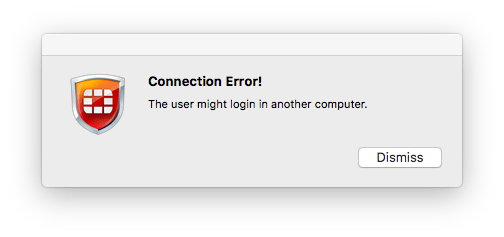 Could only find one reference using “the user might login in another computer” – Google Search, who also could not find out why this error happened:
When trying to log in on FortiClient, I get an error message that says, “the user might login in another computer” I assume that could mean that I’m logged in on another machine elsewhere? I could not find any information confirming that.
[WayBack] Error Message | Fortinet Technical Discussion Forums
So I reached out to Fortinet, the makers of Forticlient:
[WayBack] Jeroen Pluimers on Twitter: “@Fortinet what could cause this? Searching for the message “The user might login in another computer” did not get me any further: https://t.co/Bl4KoWJ7IB FortiClient 6.6.1.723 on MacOS High Sierra.…”
–jeroen

Posted in FortiGate/FortiClient, Network-and-equipment, Power User, VPN | Leave a Comment »


 The Wiert Corner - irregular stream of stuff