The Wiert Corner – irregular stream of stuff

Jeroen W. Pluimers on .NET, C#, Delphi, databases, and personal interests

  • My badges

  • Twitter Updates

  • My Flickr Stream

  • Pages

  • All categories

  • Enter your email address to subscribe to this blog and receive notifications of new posts by email.

    Join 1,839 other subscribers

Archive for the ‘Office’ Category

Quickly See All the Formulas in Excel with This Shortcut

Posted by jpluimers on 2020/04/13

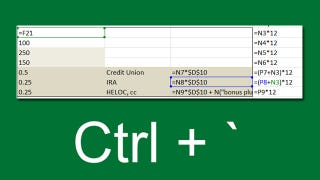
Toggle between regular view and view all formulas in a worksheet via [WayBack] Quickly See All the Formulas in Excel with This Shortcut which I wish I had known years ago:

  • Windows: Ctrl + ` (the acute accent key, found next to the number 1 on your keyboard).
  • MacOS: Cmd + `

Found using image search macos excel show all formulas – Google Search

–jeroen

Read the rest of this entry »

Posted in Apple, Excel, Mac, Mac OS X / OS X / MacOS, MacBook, MacBook Retina, MacBook-Air, MacBook-Pro, macOS 10.12 Sierra, macOS 10.13 High Sierra, Office, Office 2011 for Mac, Power User | Leave a Comment »

Hightlight active row/column in Excel without using VBA? – Stack Overflow

Posted by jpluimers on 2020/04/02

According to [WayBack] Hightlight active row/column in Excel without using VBA? – Stack Overflow: no, but you do not need much code.

On my list of things to try is to combine both answers there into one.

–jeroen

Posted in Development, Excel, Office, Power User, Software Development | Leave a Comment »

Excel formula: SUMIFS with multiple criteria and OR logic | Exceljet

Posted by jpluimers on 2020/03/31

As I need this one day:

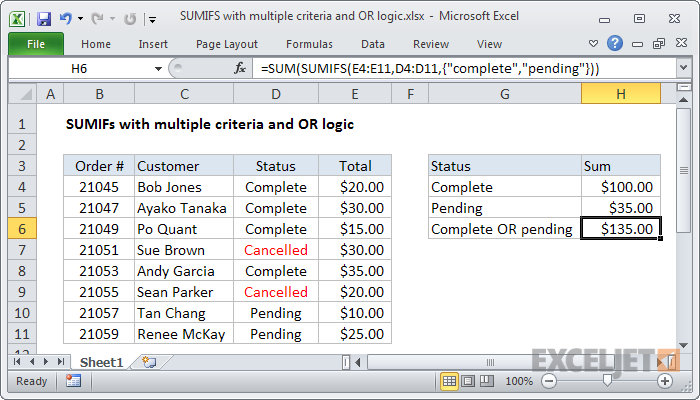
To sum based on multiple criteria using OR logic, you can use the SUMIFS function with an array constant. In the example shown, the formula in H6 is:

=SUM(SUMIFS(E4:E11,D4:D11,{"complete","pending"}))

Source: [WayBackExcel formula: SUMIFS with multiple criteria and OR logic | Exceljet

–jeroen

Posted in Development, Excel, Office, Office 2011 for Mac, Office 2013, Office 2016, Power User, Software Development | Leave a Comment »

Display the relationships between formulas and cells – Excel

Posted by jpluimers on 2020/03/18

The “Formulas” tab has to buttons that help to Display the relationships between formulas and cells – Excel [WayBack]:

  • Precedent cells —   cells that are referred to by a formula in another cell. For example, if cell D10 contains the formula =B5, then cell B5 is a precedent to cell D10.
  • Dependent cells —    these cells contain formulas that refer to other cells. For example, if cell D10 contains the formula =B5, cell D10 is a dependent of cell B5.

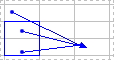
To assist you in checking your formulas, you can use the Trace Precedents and Trace Dependentscommands to graphically display and trace the relationships between these cells and formulas with tracer arrows, as shown in this figure.

Worksheet with tracer arrows

Related:

–jeroen

Posted in Development, Excel, Office, Power User, Software Development | Leave a Comment »

worksheet function – How to add or subtract to, or increment, column letters in Excel? – Super User

Posted by jpluimers on 2020/03/13

[WayBack] worksheet function – How to add or subtract to, or increment, column letters in Excel? – Super User:

Here’s the best I’ve found so far: =SUBSTITUTE(ADDRESS(1,( COLUMN() + 1 ),4),1,"")The part in the middle marked in bold is the only part that changes. In this example, it’s taking the current column and adding 1, so returning B if it’s in column A and AA if it’s in column Z.

It is related to the question and answer [WayBack] Formula to return just the Column Letter in excel – Super User:

FYI on your original formula you don’t actually need to call the CELL formula to get row and column you can use:

=ADDRESS(ROW(),COLUMN())

Then as an extension of that you can use MID & SEARCH to find the $ and trim down the output so you are just left with the letter:

=MID(ADDRESS(ROW(),COLUMN()),SEARCH("$",ADDRESS(ROW(),COLUMN()))+1,SEARCH("$",ADDRESS(ROW(),COLUMN()),SEARCH("$",ADDRESS(ROW(),COLUMN()))+1)-2)

edit You can even simplify this further:

=MID(ADDRESS(ROW(),COLUMN()),2,SEARCH("$",ADDRESS(ROW(),COLUMN()),2)-2)

And it is part of a much more elaborate answer

Read the rest of this entry »

Posted in Development, Excel, Office, Power User, Software Development | Leave a Comment »

Error “30029-1001” – Google Search; when installing Office 365 language packs

Posted by jpluimers on 2020/01/31

On my list of things to figure out: Error “30029-1001” – Google Search.

This happens when installing language packs for Office 365.

Related:

–jeroen

Posted in Office, Power User | Leave a Comment »

Removing “Workbook Contains Macros” Prompt – Free Excel\VBA Help Forum

Posted by jpluimers on 2019/11/22

This indeed was an Excel 2011 for Mac thing.

Even without macros or VBA modules, Excel 2011 for Mac shows this dialog when opening a .xls file.

The solution was simple: save as .xlsx.

–jeroen

via [WayBack] Removing “Workbook Contains Macros” Prompt – Free Excel\VBA Help Forum

Posted in Excel, Office, Office 2011 for Mac, Power User | Leave a Comment »

Return empty cell from formula in Excel – Stack Overflow

Posted by jpluimers on 2019/11/19

I never thought you could do it, but you can: [Archive.isReturn empty cell from formula in Excel – Stack Overflow.

You have to crate:

  • a VBA function
  • a reference to a range that evaluates the function so it returns blank
  • a cell with a function that blanks the cell using the range

Convoluted, but clever!

–jeroen


Posted in Development, Excel, Office, Office VBA, Power User, Software Development | Leave a Comment »

Download Earlier Versions of Office: 2010/2013

Posted by jpluimers on 2019/11/18

Not sure how long these will stay valid, but apparently my nl_office_professional_plus_2010_with_sp1_x86_x64_dvd_731121.iso was damaged (I forgot to check the hash) but I could download a fresh one from [WayBackDownload Earlier Versions of Office.

If you cannot find it by product key (I also tried it with a Visio one: worked fine too), then you can use [WayBackOffice 2010 direct link, X16-32250.exe, X16-32213.exe which are archived here:

–jeroen

via: [WayBack] Lost Office 2010 or 2013 CD/DVD? Legally Download Office From Microsoft

Posted in Office, Office 2010, Power User | Leave a Comment »

How to Extract a Number or Text from Excel with this Function

Posted by jpluimers on 2019/11/11

Lots of fuzz, but the formula towards the end worked:

=SUMPRODUCT(MID(0&A1,LARGE(INDEX(ISNUMBER(--MID(A1,ROW($1:$25),1))*
ROW($1:$25),0),ROW($1:$25))+1,1)*10^ROW($1:$25)/10)

Source: [Archive.isHow to Extract a Number or Text from Excel with this Function

More of those at [WayBack] Extract Only Numbers From Text String

–jeroen

Posted in Excel, Office, Office 2011 for Mac, Power User | Leave a Comment »