


As it combines VBA and AppleScript, I might need the script from this in the future [WayBack] Word for Mac 2011: create macro or shortcut to ‘Insert Picture – Microsoft Community.
–jeroen
Posted by jpluimers on 2021/11/02
As it combines VBA and AppleScript, I might need the script from this in the future [WayBack] Word for Mac 2011: create macro or shortcut to ‘Insert Picture – Microsoft Community.
–jeroen

Posted in Development, Office, Office 2011 for Mac, Office Automation, Office VBA, Scripting, Software Development | Leave a Comment »
Posted by jpluimers on 2021/10/01
Every now and then, for instance with a document including other documents, like in a homework assignment, you might want to exclude part of your Heading 1 (or Heading 2/Heading 3) entries from the table of contents.
Since presence in the Table of Contents is a ToC feature, not a style feature, you have to set the correct options in the ToC.
This is how you do it:
This is contrary to many advices to use the “Reference” toolbar, then “Add Text” marked “Do Not Show In Table Of Contents”. That advice will remove the heading formatting completely and remove it from the navigation pane, so do not follow [WayBack] Quick Tip: How to exclude headings from the Table of Contents in Microsoft Word – jeffreykusters.nl.
The above solution both keeps the formatting, and the appearance in the navigation pane. It only disappears from the Table of Contents.
It is based on:
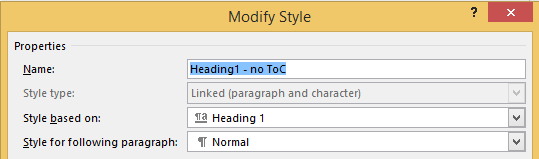
Following the above steps, you get styles like this:

Posted in Office, Office 2010, Office 2011 for Mac, Office 2013, Office 2016, Power User, Word | Leave a Comment »
Posted by jpluimers on 2021/07/23
On an old system, I found some x86 installers with names like RbudLR.cab, RosebudMUI.msi, RosebudMUI.xml, setup.xml.
They appeared to be the (now deprecated and never released as x64): MSDAIPP – Wikipedia (Microsoft Data Access Internet Publishing Provider).
Searching for RosebudMUI many returned detection scams like solvusoft, but somewhere further down was this only meaningful result: [WayBack] What is the RosebudMUI AddOn in Visio 2007?
–jeroen
Posted in Office, Office 2010, Power User, Windows | Leave a Comment »
Posted by jpluimers on 2021/06/11
Steps to have only the body parts of your Winword document Heading 1 numbered, but parts like Summary and Table of Contents without numbering.
Related:
Steps:
Ctrl+Shift+Alt+S, or ribbon “Home” -> section “Styles” -> small button on the lower right of the ribbon sectionCtrl+Alt+1 for this) to the multi-level one: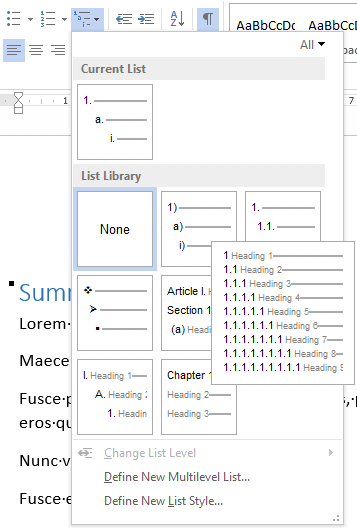

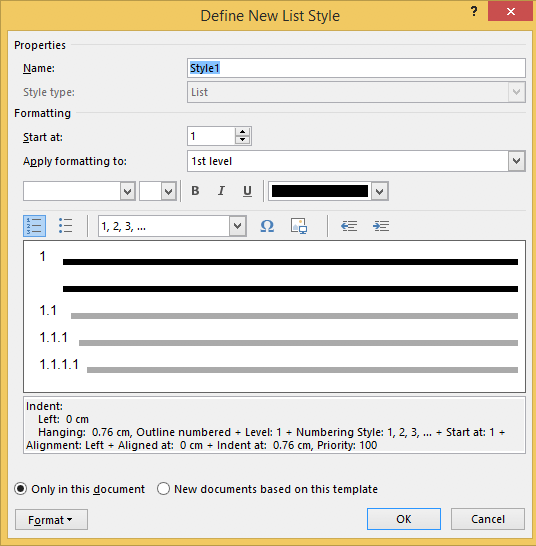 to “Heading
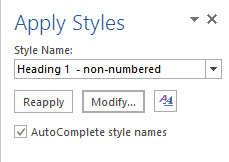
Ctrl+Shift+S to get to the “Apply Styles” 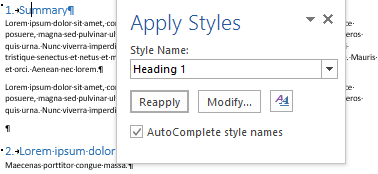
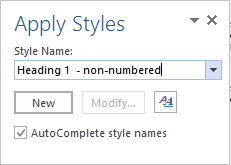

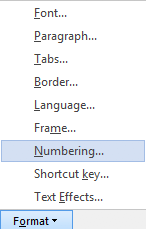
 to “None” and press “OK”
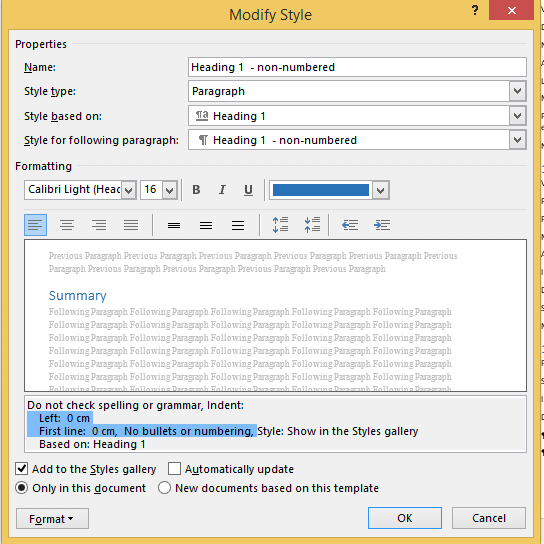
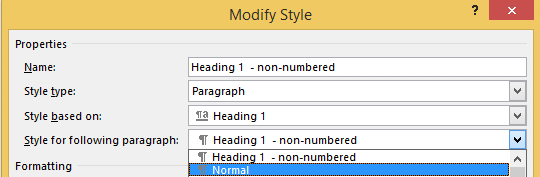
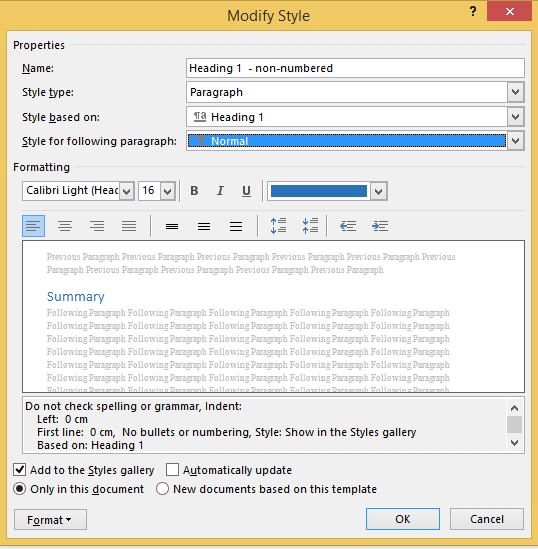
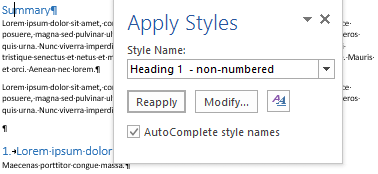
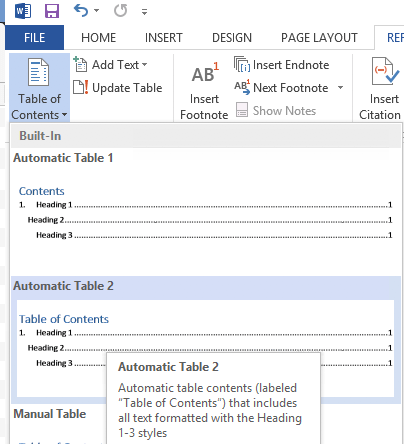
Ctrl+Shift+S when you are in the “Table of Contents” heading: 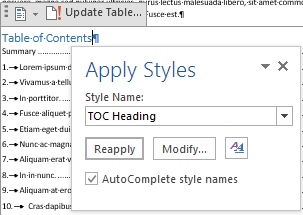
–jeroen

Posted in Office, Office 2007, Office 2010, Office 2013, Office 2016, Power User, Word | Leave a Comment »
Posted by jpluimers on 2021/06/07
Choices:
=lorem(...): Ramdom Lorem Ipsum text paragraphs.
=rand(...): Random English help text like paragraphs.
=rand.old(...): “The quick brown fox jumps over the lazy dog.” paragraphs (up until Word 2003, this was what rand(...) returned).
(...) parameters:
(x,y): x paragraphs of y sentences of text(y): y paragraphs of 3 sentences of text (lorem more towards 1, rand more towards 3)(): depends on the function:
=lorem(): 5 paragraphs of 3 sentences of text=rand(): 5 paragraphs of 3 sentences of text=rand.old(): 3 paragraphs of 3 sentences of textNote:
=rand(...)Based on:
Related: [WayBack] 10 awesome Lorem Ipsum alternatives – Justinmind via [WayBack] rand () in word – Microsoft Tech Community – 325554
For a random document demo, I usually do this:
=lorem(100,1) to get 100 paragraphs of 1 line of text–jeroen
Posted in Office, Office 2003, Office 2007, Office 2010, Office 2013, Office 2016, Power User, Word | Leave a Comment »
Posted by jpluimers on 2021/03/09
For my link archive as the Excel functions WORKDAY [WayBack] and NETWORKDAYS [WayBack] helped me finding the working days in a month a while ago: [WayBack] How to count the number of days / workdays / weekends between two dates in Excel?.
Note:
DATEDIF [WayBack], but I just subtracted two days and added 1 to the result for thatNETWORKDAYS.INTL [WayBack] has an extra weekdays parameter as compared to NETWORKDAYSWORKDAY.INTL [WayBack] with the same weekdays parameter–jeroen
Posted in Development, Excel, Office, Power User, Software Development | Leave a Comment »
Posted by jpluimers on 2021/03/05
For my link archive:
Via:
Posted in Office, Office 2013, Power User, Word | Leave a Comment »
Posted by jpluimers on 2021/02/12
I was trying to get the love of my life from using a mouse into keyboard shortcuts.
They come natural to me as I learned them step by step from Word for Windows 1.0 until now as I have been a keyboard person since the early 1990s.
But she has been a mouse person all her life, struggling to become faster using word. The mouse became a hindrance, especially since so much has moved around to deeper levels in the Word user interface over time.
This is what I came up with after doing a few searches on-line:
I was amazed at how scattered out and incomplete the information in these links is.
–jeroen
Posted in Office, Power User, Word | Leave a Comment »
Posted by jpluimers on 2020/11/11
Excel date times are almost identical to OLE/COM automation date times (that used in many Windows applications).
Which means that dates are 1 unit apart, and:
That way you can easily add one hour to a date/time value by adding 1/24.
Source: How to quickly add hours/minutes/second to date and time in Excel?
Related:
–jeroen
Posted in Development, Excel, LifeHacker, Office, Power User, Software Development | Leave a Comment »
Posted by jpluimers on 2020/06/26
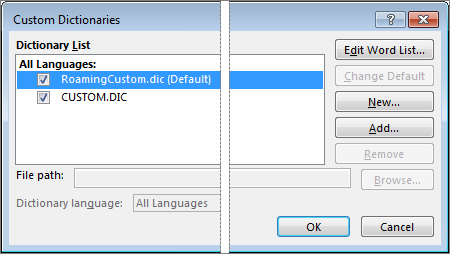
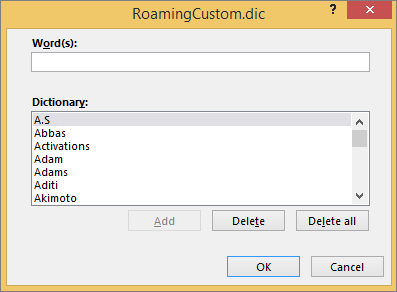
[WayBack] Add or edit words in a spell check dictionary – Office Support:
By default, the words are stored in a text file called “RoamingCustom.Dic” – Google Search.
You can get there from the menu:
–jeroen

Posted in Office, Power User | Leave a Comment »
 The Wiert Corner - irregular stream of stuff