The Wiert Corner – irregular stream of stuff

Jeroen W. Pluimers on .NET, C#, Delphi, databases, and personal interests

  • My badges

  • Twitter Updates

  • My Flickr Stream

  • Pages

  • All categories

  • Enter your email address to subscribe to this blog and receive notifications of new posts by email.

    Join 1,860 other subscribers

Archive for the ‘ISDN’ Category

Wijkcentrales – VVDSL.robinflikkema.nl

Posted by jpluimers on 2025/09/17

Voor mijn link archief: KPN telefooncentrales, waarvan een paar waar familie of ik een aansluiting had:

[Wayback/Archive] Wijkcentrales – VVDSL.robinflikkema.nl

Wijkcentrales
Code Plek
Ssh [Wayback/Archive] Wijkcentrale: Sassenheim – VVDSL.robinflikkema.nl
Asd-Bdh [Wayback/Archive] Wijkcentrale: Amsterdam-Badhoevedorp – VVDSL.robinflikkema.nl
Asd-Osdp [Wayback/Archive] Wijkcentrale: Amsterdam-Osdorp – VVDSL.robinflikkema.nl
Nhout [Wayback/Archive] Wijkcentrale: Noordwijkerhout – VVDSL.robinflikkema.nl
Lis [Wayback/Archive] Wijkcentrale: Lisse – VVDSL.robinflikkema.nl

Deze hadden Mojibake met de generic replacement character (“�”):

Wijkcentrales
Code Plek
Ctlr [Wayback/Archive] Wijkcentrale: Castelr� – VVDSL.robinflikkema.nl
(moet Castelré zijn)
Odi [Wayback/Archive] Wijkcentrale: St. Odili�nberg – VVDSL.robinflikkema.nl
(moet Sint Odiliënberg zijn)

Let op: de [Wayback/Archive] fourstack KPN UI (toenmalig gebouwd door [Wayback/Archive] FourStack) is sinds 2021 uit de lucht, zie [WaybackSave/ArchiveBad] FPI Fourstack Snelheid DSL – Internet en hosting – GoT , dus de gegevens worden niet meer bijgewerkt.

--jeroen

Posted in ADSL, Development, Encoding, Internet, ISDN, ISP, KPN, Mojibake, Power User, PSTN, Software Development, Telephony | Leave a Comment »

VoIP: passing on a phone number from one Fritz!Box to another Fritz!Box

Posted by jpluimers on 2024/03/11

Most Fritz!Box VoIP configurations have a phone number configured to only work on telephony devices (i.e. handsets) on the same Fritz!Box.

But it is possible to define a telephony device that itself is another VoIP end-point.

This way you can hook a second (or more) Fritz!Box up to the phone number(s) of the first Fritz!Box.

I am using this for two reasons:

Below is how to get this going, assuming the first Fritz!Box is a 7490 running firmware 7.29 and the second is a a 7360 with firmware 6.33 (other versions and firmware versions vary slightly).

But first the related post: Many links about free modem/router choice and their configurations for the Dutch KPN internet/VoIP provider where I figured out that just using a 7360 won’t cut it any more.

Read the rest of this entry »

Posted in DECT, Fritz!, Fritz!Box, Hardware, ISDN, Network-and-equipment, Power User, PSTN, Telephony, VoIP | Leave a Comment »

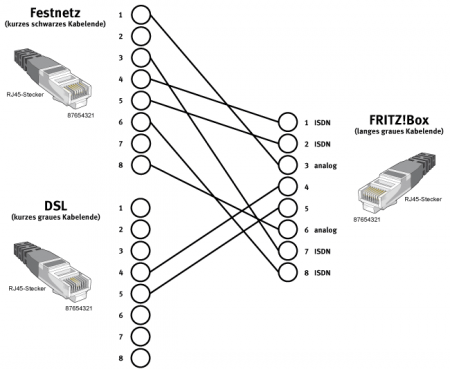
Fritzbox 7490 ISDN landline and intenral ISDN S0 bus links

Posted by jpluimers on 2022/08/08

Somehow WordPress.com failed to post it on the scheduled date 20150331, not sure why.

Though ISDN has been phased out in The Netherlands as and almost phased out in Germany, you can still use end user Terminal Equipment on the internal S-bus.

Since scheduling the post for 2015, the same information as the original diagram below appeared in text form on Wikipedia and there it also adds TAE connector information: Fritz!Box: Belegung der kombinierten DSL-Telefon-Buchse – Wikipedia

Die Anschlussbelegung der Kombibuchse ist wie folgt:[44]

  • Pin 1: ISDN 1a
  • Pin 2: ISDN 1b
  • Pin 3: analog La
  • Pin 4: DSL
  • Pin 5: DSL
  • Pin 6: analog Lb
  • Pin 7: ISDN 2a
  • Pin 8: ISDN 2b

Der RJ-45-Stecker am grauen DSL-Zweig des Y-Kombikabels zeigt folgende Belegung:[44]

  • Pin 4: DSL
  • Pin 5: DSL

Die übrigen Pins sind unbenutzt.

Am schwarzen Telefonzweig ist der RJ-45-Stecker folgendermaßen belegt:

  • Pin 1: analog La
  • Pin 2: frei
  • Pin 3: ISDN 2a
  • Pin 4: ISDN 1a
  • Pin 5: ISDN 1b
  • Pin 6: ISDN 2b
  • Pin 7: frei
  • Pin 8: analog Lb

Somit ist ein direkter Anschluss an ISDN möglich, für analoge Anschlüsse liegt für Deutschland ein Adapter auf TAE bei:

  • Pin 1 RJ-Buchse auf Pin 1 TAE
  • Pin 8 RJ-Buchse auf Pin 2 TAE

Ein normales Kabel mit TAE-Stecker und sechspoligem RJ-Stecker, wie es für den Anschluss analoger Telefone an eine TAE-Dose verwendet wird, funktioniert nicht.

Bei entbündelten Anschlüssen (ohne analoges oder ISDN-Telefon) kann ein direktes Kabel verwendet werden.

Das Kabel für deutsche Anschlüsse:

  • Pin 4 RJ-Stecker auf Pin 1 TAE
  • Pin 5 RJ-Stecker auf Pin 2 TAE

Original article

Some links:

–jeroen

FritzBox-7490-Y-Cable-DSL-ISDN-Fritz.33

Posted in DECT, Fritz!, Fritz!Box, Hardware, ISDN, Network-and-equipment, Power User, PSTN, Telephony | Leave a Comment »

Migrating KPN ISDN MSNs to XS4ALL VoIP: via https://mijn.xs4all.nl

Posted by jpluimers on 2019/01/24

Migrating KPN ISDN MSNs to XS4ALL VoIP: via https://mijn.xs4all.nl:

Reminder to self to finish this when the final ISDN A/D dependency has been resolved.

–jeroen

Read the rest of this entry »

Posted in ISDN, LifeHacker, Power User, Telephony, VoIP | Leave a Comment »

On my research list: connecting Fritz!Box devices together into a virtual PBX

Posted by jpluimers on 2017/09/29

I’ve some Fritz!Box devices on various locations that each provide VoIP access and either ISDN or PSTN lines.

Wouldn’t it be cool to be able to join them together into a virtual PBX?

I’m not sure how it’s possible and what you need for it, so here are some links that should make my future research on this easier:

–jeroen

Posted in Fritz!, Gigaset, Internet, ISDN, LifeHacker, Power User, PSTN, Telephony, VoIP | Leave a Comment »

Siemens GigaSet DX600A TCP port 650 protocol looks like old-school AT commands…

Posted by jpluimers on 2017/09/29

While playing around with nmap to view some of my IoT^w LoT devices, I found out my Siemens GigaSet DX600A ISDN (yes: ISDN; I’m an old fart) has these two ports open:

PORT    STATE SERVICE VERSION
80/tcp  open  http    Siemens Gigaset A580, DX800A, or S450 VoIP phone http config
| http-methods: 
|_  Supported Methods: GET POST
|_http-server-header: 
| http-title: Site doesn't have a title (text/html).
|_Requested resource was http://dx600a-isdn.pso71.local/login.html
650/tcp open  telnet  Gigaset telnetd
MAC Address: 7C:2F:80:15:D6:10 (Gigaset Communications GmbH)
Device type: general purpose
Running: Linux 2.6.X
OS CPE: cpe:/o:linux:linux_kernel:2.6
OS details: Linux 2.6.13 - 2.6.32

I’m going to play with port 650 later as it looks like it supports an AT command protocol(on Windows the GigaSet QuickSync TAPI driver translates TAPI to AT commands) so it should be possible to do all kinds of cool stuff with it.

These links should help ans it should work with the DX800A as well:

–jeroen

Posted in DECT, Gigaset, ISDN, Power User, PSTN, Telephony | Leave a Comment »

KPN CPS (carrier pre select) code is 1655

Posted by jpluimers on 2017/09/26

Since the CPS I used was increasing the subscription cost to above zero, the the price difference to KPN was too large, so I wanted to switch back and needed the KPN CPS code.

From [WayBackHet verschil tussen WLR en CPS I found out the CPS code for KPN is 1655.

Then I called 0800-1273 to set it back and then verified it was set back for all destinations on all ISDN numbers.

It’s time to research how to move away from ISDN anyway, but that’s a different story.

–jeroen

Posted in ISDN, LifeHacker, Power User, PSTN, Telephony | Leave a Comment »

GSM/3G/4G/LTE/… enable or disable caller ID when calling

Posted by jpluimers on 2017/02/13

When testing the setup of a Fritz!Box 7490 with fiber connection, routing anonymous/withheld ISDN calls to a new answering machine I needed to test if only Caller ID calls were getting through.

The easiest was to do this from my mobile phone.

Izzy explained how to in callerid – How can I make anonymous calls for everyone but contact list? – Android Enthusiasts Stack Exchange.

Basically all cellular networks based on GSM or derived technologies allow you to prefix any phone numbers with:

–jeroen

Posted in Cellular telephony, ISDN, LifeHacker, Power User, PSTN, Telephony | Leave a Comment »

Fritz!Box 7490 with fiber connection, routing anonymous/withheld ISDN calls to a new answering machine

Posted by jpluimers on 2016/11/04

I got a bit fed-up with truckloads of anonymous calls. 95% of these are from sales persons. The others from organisations shielding their phone numbers. Too bad for the latter: if they want to stay anonymous, they’re not worth dealing with.

My original setup was incoming ISDN connected through a Gigaset DX600A with a bunch of DECT handsets, but there you need to configure each handheld device and the Gigaset base station itself to skip anonymous incoming calls.

One of my fiber connections at home goes through a Fritz!Box 7490 which has a connector to provide an internal ISDN S0 bus. I discovered – though not advertised in the German or English manual – that you can hook it to external ISDN even though it is not connected to external DSL but external fiber to the home (FTTH).

A note first: the the Fritz!Box 7490 has built-in resistors to terminate the S0 bus, so it can only be on one side of the S0 bus. The other far end of the S0 bus needs to be terminated too.

Steps to hook up ISDN on both incoming and outgoing S0 bus:

  1. Fritz!Box Y-Cable for connecting PSTN or ISDN (and optionally DSL) to your modem.

    Fritz!Box Y-Cable for connecting PSTN or ISDN (and optionally DSL) to your modem.

    Put the long end of the Y-cable ** into the DSL/TEL connection of the Fritz!Box.
    The long end is usually labelled DSL/TEL.

  2. Put the black small end into your ISDN NT1 (sometimes called ISDN NTBA).
    The black small end is usually labelled TEL.
  3. Leave the grey small end disconnected. It is usually called DSL. Since I’m using FTTH, no DSL for me.
  4. Connect the chain of other ISDN devices (and the terminator) to the FON S0 connector on the Fritz!Box **.
  5. Test if your original equipment still works.

Configuring your Fritz!Box to use ISDN MSNs:

  1. Logon as administrator to your Fritz!Box.
  2. In the menu on the left, click on “Telephony”, then on “Telephone Numbers”.
  3. A new View appears, where you click on the “Line Settings” tab.
  4. Ensure “Landline network enabled” is enabled, then click on “Apply” and wait for the changes to be saved.
  5. In the menu on the left, click on “Telephony”, then on “Telephone Numbers”.
  6. Click on “New Telephone Number”, then follow the steps in the wizard:
    1. Choose “Configure landline number”, click “Next”
    2. Choose “multiple landline numbers (ISDN line)”, click “Next”
    3. Add the MSN numbers you will use in your Fritz!Box each in a separate entry, then click “Next”
    4. Click “Next” to save the settings.
  7. Configure any devices you need to connect to the MSN numbers you entered.

Setting up the diversion of Anonymous calls to an Answering Machine:

  1. Finally I set-up an answering machine for anonymous call forwarding:
    Automatically diverting anonymous calls to the internal answering machine | FRITZ!Box 7490 | AVM International.

    • Note that here you can divert all anonymous calls to “all numbers”, but not divert all anonymous calls to “Landline Network”. I think this is a bug in FRITZ!OS 6.20.
  2. And (since the Fritz!Box already has some VOIP numbers configured), I also added the GigaSet as an ISDN PBX to the Fritz!Box:
    1. In the menu on the left, click on “Telephony”, then on “Telephone Devices”.
    2. Choose “Configure New Device”, then follow the Wizard Steps:
      1. Choose “ISDN PBX”, click “Next”
      2. Note the MSNs the Fritz!Box shows (they should include both the ISDN MSNs and VOIP numbers), then click “Next”.
      3. Verify the ISDN PBX (the GigaSet) is on the FON S0 port, then click Apply to confirm.
    3. In the menu on the left, click on “Telephony”, then on “Telephone Devices”.
    4. Choose “Edit” for the “ISDN PBX” connected to “FON S0”.
    5. Verify the “Main Phone Number” is correct (choose either an ISDN MSN or VOIP number).
    6. Then I configured the extra VOIP numbers as MSNs in the GigaSet.

–jeroen

** Larger images.

Read the rest of this entry »

Posted in DECT, Gigaset, ISDN, Power User, PSTN, Telephony | Leave a Comment »