The Wiert Corner – irregular stream of stuff

Jeroen W. Pluimers on .NET, C#, Delphi, databases, and personal interests

  • My badges

  • Twitter Updates

  • My Flickr Stream

  • Pages

  • All categories

  • Enter your email address to subscribe to this blog and receive notifications of new posts by email.

    Join 1,862 other subscribers

Archive for the ‘Web Browsers’ Category

Effective way in Chrome to open a specific bookmark (as you cannot have shortcut keys for that)

Posted by jpluimers on 2023/08/01

I am a keyboard user, so I love keyboard shortcuts. If these are unavailable, still do it by keyboard quicker than by mouse.

Based on various answers and comments in [Wayback/Archive] Shortcut to open specific bookmark / URL in Chrome – Super User my way to open Chrome bookmarks (from my vast collection) is this:

  • Move focus to the url bar with +L (macOS) or Ctrl+L (Windows/Linux).
  • Type the first part of the bookmark name.
  • Press navigation keys to select the bookmark.
  • Press enter to select the bookmark.

Thanks to these Super User users:

Via [Wayback/Archive] chrome hotkey for bookmark bar – Google Search

–jeroen

Posted in Bookmarklet, Chrome, Development, Google, Power User, Software Development, Web Browsers | Leave a Comment »

Some JavaScript bookmarklets for WordPress published pages centered around navigation and IDs

Posted by jpluimers on 2023/07/20

Maintaining a blog takes considerable time, so I wrote a bit of JavaScript for the browser console and bookmarklets to help me navigate faster, especially from my published posts on wiert.me back to the WordPress editing environment.

I wrote this because a query like [Wayback/Archive] wordpress get id from post html – Google Search top hits only contain results that work within the WordPress environment itself, like for instance [Wayback/Archive] 14 Ways to Get Post ID in WordPress.

This blog post is long and contains a lot of information, so I have split it in quite a few sections.

Let’s get started:

Read the rest of this entry »

Posted in Bookmarklet, Classic editor, Development, Gutenberg editor, JavaScript/ECMAScript, Power User, Scripting, Software Development, Web Browsers, Web Development | Leave a Comment »

JavaScript Bookmarklet to enable Mastodon publishing for a WordPress.com post that is edited in the Classic Editor

Posted by jpluimers on 2023/07/02

I quickly hacked together this JavaScript Bookmarklet today, so it is without any checks and assumes you have enabled one Mastodon account for publishing, that you are hosting your blog on WordPress.com, and using the Classic Editor:

javascript:(function(){
  publicizeFormEditHref = document.getElementById('publicize-form-edit');
  publicizeFormEditHref.click();
  mastodonCheckboxes = document.getElementsByClassName('wpas-submit-mastodon');
  mastodonCheckboxes[0].checked = true;
  publicizeFormHideHref = document.getElementById('publicize-form-hide');
  publicizeFormHideHref.click();
  updateButtonHref = document.getElementById('publish');
  updateButtonHref.click();
})();

The above code is the state of [Wayback/Archive] JavaScript Bookmarklet for the WordPress classic editor which enables mastodon publishing (assuming you have one mastodon publishing account enabled … )  and due to be improved in a later blog post.

This will enable the currently edited post to be published to Mastodon, then update/publish the post.

On enabling one Mastodon account for publishing:

Read the rest of this entry »

Posted in Bookmarklet, Development, HTML, JavaScript/ECMAScript, Mastodon, Power User, Scripting, SocialMedia, Software Development, Twitter, Web Browsers, Web Development, WordPress, WordPress | Leave a Comment »

Shortcut to open specific bookmark / URL in Chrome – Super User

Posted by jpluimers on 2023/06/12

I need to give the various solutions here some thought: [Wayback/Archive] Shortcut to open specific bookmark / URL in Chrome – Super User

–jeroen

Posted in Chrome, Firefox, Power User, Web Browsers | Leave a Comment »

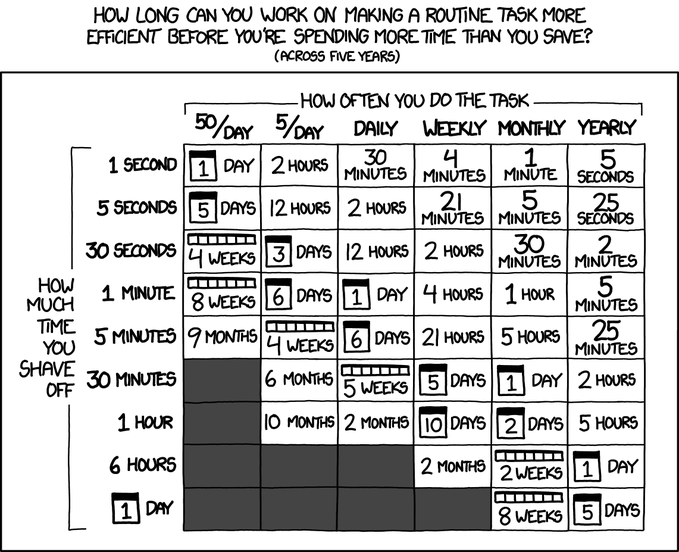
There is always an XKCD: «xkcd: Is It Worth the Time?»

Posted by jpluimers on 2023/06/09

The Bookmarklets posts have mostly reached past the front of the blog queue, so here goes a tweet from last year:

[Archive] Jeroen Wiert Pluimers on Twitter: “The past week, I learned a ton of HTML, JavaScript and (Shadow) DOM oddities while writing browser bookmarklets to speed up my blogging and @waybackmachine / @archiveis archiving. There is always an XKCD: «xkcd: Is It Worth the Time?» …” / Twitter

–jeroen

Posted in Bookmarklet, Fun, LifeHacker, Power User, Web Browsers, xkcd | Leave a Comment »

Side effect-free bookmarklets: wrap them in an IIFE (Immediately Invoked Function Expression)

Posted by jpluimers on 2023/06/08

In Bookmarklets for Archive.is and the WayBack Machine to go to the original page, I wrote about how the Shadow DOM is used to prevent side effects between the code of the WayBack machine and the archived page.

In a similar manner, Bookmarklets can also interfere with code on the page and vice versa, for instance by using global variables.

That is why the [Wayback/Archive] A simple bookmarklet to tweet the current page – DEV Community is wrapped in a special kind of function:

javascript:(function(){
  n=getSelection().anchorNode;
  t=n.nodeType===3?n.data:n.innerText;t=''+t+'\\n\\n';
  window.open(`https://twitter.com/intent/tweet?
  text=${encodeURIComponent(t)}${document.location.href}`)
})()

This is an [Wayback/Archive] IIFE – MDN Web Docs Glossary: Definitions of Web-related terms | MDN or “Immediately Invoked Function Expression”, a mechanism coined by [Archive] Ben Alman (@cowboy) / Twitter at [Wayback/Archive] Ben Alman » Immediately-Invoked Function Expression (IIFE).

Since the variables are inside the function body, they won’t interfere with the page. The body will be immediately executed.

Related:

–jeroen

Posted in Bookmarklet, Development, JavaScript/ECMAScript, Power User, Scripting, Software Development, Web Browsers | Leave a Comment »

Bookmarklets for Archive.is and the WayBack Machine to go to the original page

Posted by jpluimers on 2023/06/07

Quite often, when browsing an archived page on Archive.is or the WayBack Machine, I want to check the current status of the original page.

So I wrote a few Bookmarklets.

Archive.is

Default field

Any Archive.is page has a Saved from field which is an input html element having a name attribute with value q and a value property containing the URL, which is navigated to by assigning the location in the above code.

So my goto Bookmarklet is this one:

javascript:open(document.getElementsByName("q")[0]?.value)

It uses [0]? as there is no getElementsByName, but there is [Wayback/Archive] Document.getElementsByName() – Web APIs | MDN as name values need not to be unique but id values have to be.

Other Archive.is fields

The above works on all types of Archive.is page types:

  1. search pages like https://archive.is/https://example.org
  2. actual archived pages like https://archive.is/LkpeZ and https://archive.ph/2022.01.22-165646/https://example.org/
    • these only have a Saved from field.
  3. redirected archived pages like https://archive.ph/UEQeg and https://archive.ph/2013.01.03-111457/http://www.iana.org/domains/example/
    • these both have Saved from and Redirected from fields.
  4. complex pages like https://archive.ph/5iVVH and https://archive.ph/2015.11.14-044109/http://www.example.org/
    • those have even more fields: in addition to fields Saved from and Redirected from, the fields Via and Original also are added.

To get the additional fields from the other fields, we need to figure out a way to access them.

Read the rest of this entry »

Posted in Bookmarklet, Development, JavaScript/ECMAScript, Power User, Scripting, Software Development, Web Browsers | 1 Comment »

Why I try to keep an online copy of my bookmarklets in html instead of Markdown

Posted by jpluimers on 2023/06/01

As Chrome mangles Bookmarklets to a partially escaped form (I think using Percent encoding), I first tried to document my Bookmarklets in Markdown so I could easier edit them and copy these JavaScript links  to various browsers. That failed, because the html rendered from the Markdown didn’t contain the links any more. So I now use plain html for documenting them which is a pain to edit but works.

[Wayback/Archive] Some bookmarklets hosted as [Wayback/Archive] Some bookmarklets – cached 1 minute – throttled and [Wayback/Archive] Some bookmarklets – cached 1 year – CDN.

This is why:

  1. Technically you can include JavaScript for Bookmarklets in Markdown documents both as Markdown links (either with escapes or by splitting reference and link in two pieces) and html links (as embedding html in Markdown is allowed): [Wayback/Archive] Bookmarklet link in Markdown document – Stack Overflow (thanks [Wayback/Archive] Adam Haile, [Wayback/Archive] Zombo and [Wayback/Archive] stevemegson)
  2. Because of security reasons, many hosters will filter out JavaScript when transforming Markdown in html [Wayback/Archive] Embed JavaScript in GitHub README.md – Stack Overflow (thanks [Wayback/Archive] Matt Smith and [Wayback/Archive] coyotte508)

Searches: [Wayback/Archive] markdown javascript in link – Google Search and [Wayback/Archive] “embed javascript” in markdown – Google Search.

–jeroen

Posted in Bookmarklet, Development, JavaScript/ECMAScript, Power User, Scripting, Software Development, Web Browsers | Leave a Comment »

JavaScript bookmarklet to replace part of the archive.li fixing: not possible 

Posted by jpluimers on 2023/05/31

Quite often while saving a URL in the WayBack Machine, the response often is headed “Sorry” with non-descriptive “Job failed”. In the background however, at least half of th…

Related: JavaScript bookmarklet to replace part of the WayBack machine URL

For instance, a while ago for instance http://archive.fo/search/?q=nu.nl, https://archive.fo/search/?q=nu.nl and similar URLs redirected to https://archive.li/search/?q=nu.nl, which in turn redirected to itself:

This page isn’t working

archive.li redirected you too many times.

ERR_TOO_MANY_REDIRECTS

This isn’t a cookie thing as it happens in an anonymous window on several browsers as well. Most redirect checkers return a 429, as Archive Today has quite strict rate limiting:

I tried these bookmarklets to go to a good archive.is link from the above replacing http://archive.fo/search/?q=nu.nlhttps://archive.fo/search/?q=nu.nl, http://archive.li/search/?q=nu.nl and https://archive.li/search/?q=nu.nl with https://archive.is/search/?q=nu.nl (with the same above bolded parts):

javascript:(function() {window.location=window.location.toString().replace(/^http.?:\/\/archive\.[is|li]\//,'https://archive.is/');})()

It can even be simpler (but maybe not fully conformant to specs):

javascript:location=location.href.replace(/^http.?:\/\/archive\.[is|li]\//,'https://archive.is/')

These both fail!

Even a simple bookmarklet like this fails too:

javascript:alert('hello world!');

It took me a bit of thinking to figure out why, but then figured out that any JavaScript requires a page context to run, and when no page is displayed, there is no context to run on.

And indeed:

–jeroen

Posted in Bookmarklet, Development, JavaScript/ECMAScript, Power User, Scripting, Software Development, Web Browsers | Leave a Comment »

JavaScript bookmarklet to replace part of the WayBack machine URL

Posted by jpluimers on 2023/05/23

Quite often while saving a URL in the WayBack Machine, the response often is headed “Sorry” with non-descriptive “Job failed”.

In the background however, at least half of those times the job actually succeeded.

Some periodes that success rate was way lower as the archival job didn’t start with a GET request. The workaround was to use a POST request, see I want to check out how to do POST requests using bookmarklets in order to save URLs to the WayBack machine and [Archive] Jeroen Wiert Pluimers on Twitter: “Does anyone why the @waybackmachine has a lot of job failed and 404 errors over the last few days? … and … just returned a 404; most of my archivals the last few days failed or had to be retried at least half a dozen times to succeed. …” / Twitter

The error message in both “Job failed” cases is the same, so it makes sense to differ between the first case (job started and complete, but web interface failed to get that) and the latter (job didn’t even start) by doing the below URL replacement with a bookmarklet:

Read the rest of this entry »

Posted in Bookmarklet, Development, JavaScript/ECMAScript, Power User, Scripting, Software Development, Web Browsers | Leave a Comment »