


I like these two metronomes:
- A bestmetronome.com
this one very well reacts on tapping to find the beat you are listening to - Sevenstring metronome
Java applet, easy to setup, nice sound
Anyone that can recommend other online metronomes?
–jeroen
Posted by jpluimers on 2012/07/09
I like these two metronomes:
Anyone that can recommend other online metronomes?
–jeroen

Posted in Power User | Leave a Comment »
Posted by jpluimers on 2012/07/06
Almost 2 years back, I wrote that ESXi 4.1 supports USB pass through:
Recently I needed serial pass through as well, and surprise surprise, serial port pass through too was introduced with ESXi 4.1 as Vlatan Seget posted about a year ago:
in ESXi 4.1 since with this release of VMware Hypervizor now you have the possibility to attach and use the Serial port of the physical host.
Even better: it still works in ESXi 5 (:
–jeroen
via: Serial Port handling in ESXi 4.1 | ESX Virtualization.
Posted in Power User, VMware, VMware ESXi | Leave a Comment »
Posted by jpluimers on 2012/07/05
Recently I was asked to investigate a performance problem with a certain .NET application.
The first error I got when getting the app to build in Visual Studio 2010, and then run it was like this:
System.ComponentModel.InvalidAsynchronousStateException was caught
  Message=An error occurred invoking the method.  The destination thread no longer exists.
  Source=System.Windows.Forms
  StackTrace:
       at System.Windows.Forms.Control.WaitForWaitHandle(WaitHandle waitHandle)
       at System.Windows.Forms.Control.MarshaledInvoke(Control caller, Delegate method, Object[] args, Boolean synchronous)
       at System.Windows.Forms.Control.Invoke(Delegate method, Object[] args)
       at UI.Splash.SetStatus(String status) in C:\...\Splash.cs:line 395
       at UI.Menu.Main() in C:\...\Menu.cs:line 4275
  InnerException:
Someone built their own splash logic with multi-threading.
Funny that today, this got answered on StackOverflow by [WayBack] mgie: [WayBack] multithreading – TMonitor synchronization / Application.ProcessMessages – Stack Overflow.
Though that is a Delphi link (and points to the nice libraries [Archive.is] AsynCalls and [WayBack] OmniThreadLibrary), the most important link it contains is to [WayBack] Borland Newsgroup Archive :: borland.public.delphi.internet.winsock :: Re: Disconnect TIdHttp in thread.
That sounds like a Delphi link too, but the subtitle “‘Ways to get into avoidable trouble with threads, V1.2′” hints the essence: it is a post that describes in an environment-agnostic way how to avoid multi-threading problems.
Recommended reading!
Anyway: Building multi-threaded code is hard. Even harder fleshing out all the corner cases and potential error conditions.
No matter what kind of programming environment: If you have not done lots of multi-threaded programming, then please don’t do it yourself: go ask someone that does know how to do it. Or better, try to avoid it.
I try to let libraries to the handling of multi-threading for me, if I use multi-threading at all, as others are far better at this than I am.
–jeroen
Posted in .NET, C#, C# 1.0, C# 2.0, C# 3.0, C# 4.0, C# 5.0, Conference Topics, Conferences, Delphi, Development, Event, Java, Software Development, VB.NET, VBS, Visual Studio 2010, Visual Studio and tools, WinForms | 6 Comments »
Posted by jpluimers on 2012/07/05
For some version management features, I needed to find the attribute values of loaded assemblies. Googling around, I didn’t find many nice solutions. In fact the solutions I found didn’t work well (AssemblyName is not an Attribute!), and/or contained lots of duplicate code, or uses RegEx and other string comparisons (lesson: if you can do it with either string comparison or proper type checking, use the latter). Below is the code; here some explanation:
Posted in .NET, C#, C# 3.0, C# 4.0, C# 5.0, Development, Software Development | Leave a Comment »
Posted by jpluimers on 2012/07/04
![Apple ][ plus keyboard](https://i0.wp.com/farm9.staticflickr.com/8018/7460975930_9301da62e4_n.jpg "Apple ][ plus keyboard") Some nostalgia (:
Some nostalgia (:
In the mid 80s, when programming in UCSD Pascal and Turbo Pascal, I learned that Pascal has (. and .) digraphs that translate into [ and ], similar to the (* and *) digraphs that translate to { and }.
In fact I thought the English word was bigraph (as bi- is a prefix for twice, just like tri- is a prefix for thirce).
The digraphs are lexical alternatives (Pascal ISO standard 7185:1990 paragraph 6.1.9 or Extended Pascal ISO standard 10260:1990 paragraph 6.1.11). There is even one more: the @ at-sign is a lexical alternative for the ^ caret.
Back then (I was in my teens, there was no internet yet and school library had nothing on programming) I thought these were because keyboards like those of the Apple ][ plus couldn’t emit [ and ], but I was wrong: it was in fact the Hollerith Card Code that could not represent these characters.
That limitation was because of the first Pascal implementation was done on a CDC 6000 series that used punched card readers/writers. You could not punch arbitrary numbers of holes on each row (lace cards lacked structural strength) limiting the character codes you can represent.
They still work in the Delphi compiler for arrays and for comments (I just learned that various Pascal implementations use different rules of mixing digraph and normal comments (some even allow nesting)).
While I taught myself C and C++ just as I taught myself Pascal, somehow I never learned that they use lexical alternatives too. It was only recently that they do, both as trigraphs and as of C99 also as digraphs and that there is even a trigraph tool as part of the C++ personality of RAD Studio 2007.
–jeroen

Posted in Apple, Apple ][, C++, Delphi, Development, History, Keyboards and Keyboard Shortcuts, Power User, Software Development | 1 Comment »
Posted by jpluimers on 2012/07/04
I’m a keyboard fan, so recently I have put up a new Keyboards and Keyboard Shortcuts category and tried to add all old relevant posts to it (staying organized is time consuming, but in the end it pays back by being able to find back stuff faster).
At conferences, presentations, and clients people often wonder “how do you get to such-and-such IDE feature so quickly” and the answer usually is: be sure you know your keyboard shortcuts. Which isn’t easy, as documentation for them is often spread out, and to find the information: you have to know how the underlying actions are called.
A long time ago (I think it was in version 2005) Visual Studio introduced Smart Tags. Most posts talk only about one kind of Smart Tags, but the Visual Studio IDE has two kinds:
Both listen to these keyboard shortcuts (most cheat sheets miss at least one of these, but you can find them at Pre-defined keyboard shortcuts and at the VS2008 C# keyboard cheatsheet):
The pictures below show the Smart Tag in action.
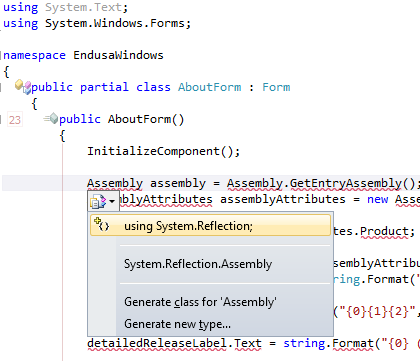
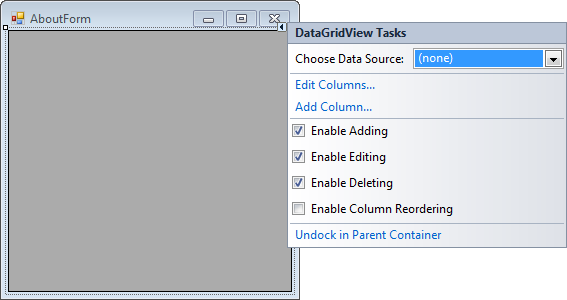
Oh BTW: the red squiggly lines and some of the other adornments in the screenshot are from CodeRush, one of the most keyboard-centric additions to Visual Studio I know.
–jeroen

Posted in Keyboards and Keyboard Shortcuts, Visual Studio 11, Visual Studio 2005, Visual Studio 2008, Visual Studio 2010, Visual Studio and tools | Leave a Comment »
Posted by jpluimers on 2012/07/03
 One of my Visual Studio 2010 VMs gives me an error when recording a temporary macro:
---------------------------

Vsaenv

---------------------------

Cannot find one or more components. Please reinstall the application.

---------------------------

OK

---------------------------
Followed by: Read the rest of this entry »

Posted in .NET, Development, Software Development, Visual Studio 2010, Visual Studio and tools | Leave a Comment »
Posted by jpluimers on 2012/07/02
If you:
Then check if the “VMware DHCP Service” and “VMware NAT Service” are running using this command:
rem "VMware DHCP Service"

sc queryex VMnetDHCP

sc queryex "VMware NAT Service"
If either of them has’t started, use these command – as an Administrator – to start them (they won’t start a service that is already started):
rem "VMware DHCP Service"

net start VMnetDHCP

net start "VMware NAT Service"
Note that VMware will not complain if the VMware DHCP Service or VMware NAT Service have not started (not even in the eventlog) and will just start your VM fine.
If your VMware DHCP service is not running, and you un-suspend a VM that had an address assigned through DHCP, you usually get errors like this:
C:\Users\j.pluimers>tracert -d 194.109.6.66

Tracing route to 194.109.6.66 over a maximum of 30 hops

1 Transmit error: code 1231.

Trace complete.
For my memory:
There are a few more interesting batch files at How to Start & Stop VMware server/Workstation manually | Windows Reference.
–jeroen
via: How to Start & Stop VMware server/Workstation manually | Windows Reference.
Posted in Power User, VMware | Leave a Comment »
Posted by jpluimers on 2012/07/01
Posted in Google, GoogleMaps, LifeHacker, Power User | Leave a Comment »
Posted by jpluimers on 2012/07/01
As of today, France requires all car drivers to have 2 alcohol testers in their car. Either an electronic version that can be used multiple times or a chemical version for single use, as long as it is NF certified.
–jeroen
via: Frankrijk: alcoholtester verplicht | ANWB Motor.
Posted in LifeHacker, Power User | Leave a Comment »
 The Wiert Corner - irregular stream of stuff