


VisionApp: pass Windows key combinations to remote machine
Posted by jpluimers on 2015/12/04
Like MSTSC/RDP, I wanted VisionApp to pass Windows specific key combinations (like Alt-Tab, menu key, PrtSc, and of course Windows key combinations) to pass to the remote.
Though the web-search didn’t turn any good information in the high ranked results, this was remarkably easy:
- Right click on your connection
- Choose “Properties”
- Switch to the “RDP” tab
- Set “Apply Windows key combinations” to “On the remote computer”
- Press “OK”
One catch:
this only work for new sessions. So you will have to re-connect existing sessions to apply this change.
Click on the image for a larger version.
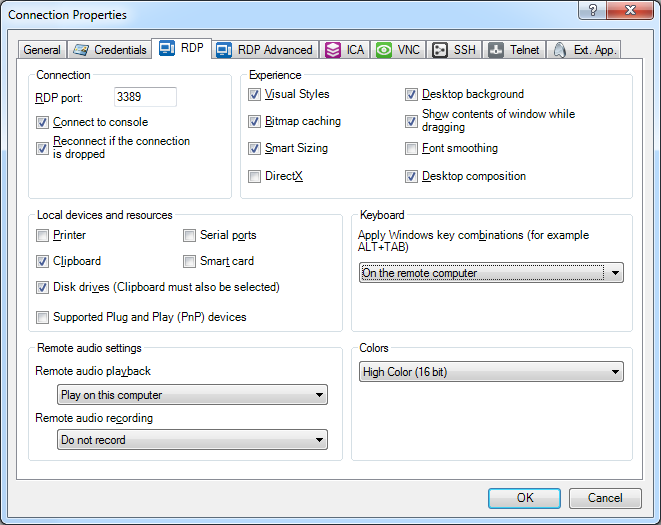
Set “Apply Windows key combinations” to “On the remote computer”
–jeroen

 The Wiert Corner - irregular stream of stuff
Leave a comment