Archive for 2017
Posted by jpluimers on 2017/06/07
When switching my DHCP to a Mikrotik CCR1009, both the AP7920 and AP7921 failed to get IP addresses. The APC7921 would look bounce between waiting and offered states like this:

The cause is the need of DHCP Option 43 (Vendor Class Identifier) specified in RFC2132 – based on [WayBack] RFC 2131 – Dynamic Host Configuration Protocol and [WayBack] RFC 1533 – DHCP Options and BOOTP Vendor Extensions – which I found first via these links:
Read the rest of this entry »
Posted in Development, Internet, MikroTik, Power User, RouterOS, routers, Scripting, Software Development | 3 Comments »
Posted by jpluimers on 2017/06/06
For automated installs that cannot have UI interaction:
The install is “per user” as it is a user-local application; it installs in %LocalAppData%\Programs\Fiddler\Fiddler.exe.
Docs
Note that Fiddler acts as a HTTP proxy. When Fiddler starts, it hooks itself into the default WinINET proxy (which is used by any tool using the WinINET API, including Edge, Internet Explorer, Chrome, but not FireFox).
If you kill your Windows machine before stopping Fiddler, it cannot restore the WinINET proxy, so you have to do that by hand (otherwise you cannot browse web pages any more).
Manual restore:
- Run
"C:\Windows\System32\rundll32.exe" shell32.dll,Control_RunDLL inetcpl.cpl,,4
- Press “LAN settings” (Dutch: “LAN-Instellingen”)
- Uncheck the proxy server checkbox “Use a proxy server for your LAN” (Dutch “Een proxy-server voor uw LAN gebruiken”)
- Confirm
- Close the control panel wizard
–jeroen
Read the rest of this entry »
Posted in Development, Fiddler, Software Development, Web Development | Leave a Comment »
Posted by jpluimers on 2017/06/06
The WAN sides of my Mikrotik CCR1009 are partly behind Fritz!Box routers that do NAT and contain a truckload of port-forwards.
A while ago, I wanted the CCR1009 to do PPTP as Fritz!Box 7360 and 7490: static routes over VPN don’t work (so I could only VPN to the WAN side of the CCR1009). However, it would not pass through the Fritz!Box from the outside.
It appears you need to forward both:
Maybe one day I will ditch the Fritz!Box 7490 and directly hookup the Mikrotik to the NTU: xs4all ftth en Mikrotik router – Google Groups.
But preferably I should follow Don’t use PPTP, and don’t use IPSEC-PSK either (via: CloudCracker blog)
–jeroen
via: VPNs einrichten mit PPTP – administrator.de: Achtung mit PPTP VPN Servern hinter NAT Firewalls !

Forward both PPTP TCP port 1723 and the GRE protocol
Posted in Fritz!, Fritz!Box, Fritz!WLAN, Internet, IPSec, MikroTik, Network-and-equipment, Power User, PPTP, routers, VPN | Leave a Comment »
Posted by jpluimers on 2017/06/05
Interesting:
As I always try to maximize the usage of new hardware I started to explore what is possible with this combination. In this post I will explain how you get access to your FRITZ!Box using ssh.
Source: FRITZ!Box tuning part 1: Enable remote access over ssh [WayBack]
–jeroen
Posted in Fritz!, Fritz!Box, Internet, Power User | Leave a Comment »
Posted by jpluimers on 2017/06/05
Without announcing an actual date, right before the weekend Embarcadero killed their [WayBack] QualityCentral publicly accessible and search engine indexed issue database.
So I wrote this on Google Plus:
Embarcadero just flushed down the drain man-decades of work and useful information. Mainly nilling the work done by their customers to document and inform about known issues, knowing search engines indexed it well and having some hope it would assist into maybe some getting resolved.
The documentation has not been updated and still references qc.embarcadero.com, for instance from [WayBack] docwiki.embarcadero.com/RADStudio/Tokyo/en/Quality_Central
They say the web service is still up, but that likely will die at the snap of a finger as well. Besides, these links mentioned in QualityCentral web services guide are dead too:
These still work though:
So all is left are memories from the past. And dead links from Stack Overflow, blogs and other sites to a defunct repository.
Dead links: q=-site%3Aqc.embarcadero.com+qc.embarcadero.com%2Fwc%2Fqcmain.aspx even from for instance EDN: q=”qc.embarcadero.com”+site%3Aedn.embarcadero.com
Luckily some of the links have been saved in the WayBack machine: https://web.archive.org/web//http://qc.embarcadero.com/
It would have been better if Embarcadero had put some time to archive everything there.
I doubt they will. There was a habit of reclassifying bugs in QC as “feature requests” which continues in Quality Portal (which requires login and is not indexed by search engines so has way less value).
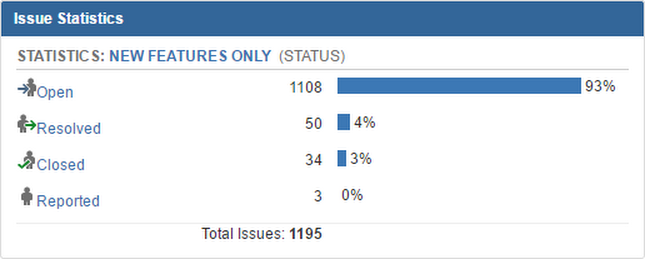 [WayBack] And here is why I think twice before spending time to report feature requests to QP. And even bugs/unexpected behavior are regularly being sweeped under the carpet reclassified as new feature… – Stefan Glienke – Google+
Memories:
Oh well, life goes on and relying on one development tool or vendor is never a good idea.
–jeroen
Posted in Delphi, Development, QC, Software Development | 18 Comments »
Posted by jpluimers on 2017/06/05
 Brilliant:
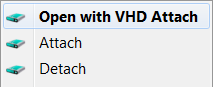
This is small tool that adds Attach and Detach option to contextual (aka right-click) menu of Virtual disk (vhd) files. That enables those operations to be done without trip to Disk Management console. Detach option is available on hard drive contextual menu also (if selected in options).
Source:
–jeroen
Posted in Power User, Windows, Windows 10, Windows 7, Windows 8, Windows 8.1, Windows Server 2012, Windows Server 2012 R2 | Leave a Comment »
Posted by jpluimers on 2017/06/02
Just one example; it applies to virtually all consumer IoT and routers I know: upgrading is hard especially if it’s undocumented on how to keep your configuration.
–jeroen
Posted in Internet, IoT Internet of Things, Power User, routers, TomatoUSB | Leave a Comment »
Posted by jpluimers on 2017/06/02
A while ago I had a “fzsftp could not be started” error using FileZilla on Mac OS X.
From the search results, it wasn’t exactly clear what I did wrong, as the “Show Package Contents” context menu showed “…/Contents/MacOS/fzsftp”
Then I remembered I got a bit confused with all the FileZilla updates coming out and renaming it to contain a version number (I do that with many applications so I can keep old versions allowing me to quickly revert to an older version if there are version compatibilities).
Renaming FileZilla.3.16.x.app back to FileZilla.app solved the issue: apparently FileZilla has a hardcoded dependency on exactly that name. I got there because of the hint about spaces in directories from this thread: fzsftp could not be started – FileZilla Forums
This was before Mac OS X El Capitan; with that version you have to set permissions correctly as well: fzsftp could not be started – Kruyswijk-ICT BV
–jeroen
Posted in Apple, Mac, Mac OS X / OS X / MacOS, MacBook, MacBook Retina, MacBook-Air, MacBook-Pro, OS X 10.10 Yosemite, OS X 10.11 El Capitan, OS X 10.8 Mountain Lion, Power User, Security | Leave a Comment »
Posted by jpluimers on 2017/06/01
It looks like the platform-neutral TIdURI from Indy solves some corner cases that WinInet.InternetCrackUrl doesn’t.
Someday I’ll check it against the .NET Uri class and report back about this.
An addition, you might want to extend it as it lacks some features: Indy, TIdURI.PathEncode, URLEncode and ParamsEncode and more | Marc Durdin’s Blog [WayBack]
–jeroen
Source: delphi – How do I parse a web URL? – Stack Overflow
Posted in Delphi, Development, Software Development | Leave a Comment »


 The Wiert Corner - irregular stream of stuff