The Wiert Corner – irregular stream of stuff

Jeroen W. Pluimers on .NET, C#, Delphi, databases, and personal interests

  • My badges

  • Twitter Updates

  • My Flickr Stream

  • Pages

  • All categories

  • Enter your email address to subscribe to this blog and receive notifications of new posts by email.

    Join 1,860 other subscribers

Archive for May, 2019

Trying to temporarily lower the ESXi acceptance level when installing VIBs

Posted by jpluimers on 2019/05/06

This is an interesting question at [WayBackHow can I lower the ESXI acceptance level when a forced install has been done? – Server Fault.

The default level on ESXi 6.5 is this:

# esxcli software acceptance get
PartnerSupported

Since I had ghettoVCB installed with the -f option, installing any PartnerSupported VIB would result in this error:

 [DependencyError]
 VIB virtuallyGhetto_bootbank_ghettoVCB_1.0.0-0.0.0 violates extensibility rule checks: ['(line 24: col 0) Element vib failed to validate content']
 VIB virtuallyGhetto_bootbank_ghettoVCB_1.0.0-0.0.0's acceptance level is community, which is not compliant with the ImageProfile acceptance level partner
 To change the host acceptance level, use the 'esxcli software acceptance set' command.
 Please refer to the log file for more details.

This fails:

# esxcli software acceptance set --level=CommunitySupported
[AcceptanceConfigError]
Unable to set acceptance level of community due to installed VIBs virtuallyGhetto_bootbank_ghettoVCB_1.0.0-0.0.0 having a lower acceptance level.
Please refer to the log file for more details.

The workaround is to uninstall virtuallyGhetto_bootbank_ghettoVCB_1.0.0-0.0.0, then install thePartnerSupportedVIB, then re-install ghettoVCB with the --force option or with lowered acceptance level:

  1. Remove the ghettoVCB installation: esxcli software vib remove -n ghettoVCB
  2. Perform the steps that ghettoVBC install prevented (install a non-community VIB, upgrade your ESXi system, etc)
  3. Reinstall the ghettoVCB by either:

–jeroen

Posted in ESXi6.5, Power User, Virtualization, VMware, VMware ESXi | Leave a Comment »

Flickr Free is limited to 1000 foto’s and will start deleting old photos in half a year…

Posted by jpluimers on 2019/05/04

A reminder to myself: about half a year ago, [WayBack] Flickr announces changes From http://flickr.com/lookingahead we note the following: Free accounts will soon be limited to 1,000 photos or videos. Flick… – Jeff Diver – Google+

Free members with more than 1,000 photos or videos uploaded to Flickr will no longer be able to upload new content after Tuesday, January 8, 2019 unless they upgrade to Pro. After February 5, 2019, free accounts that contain over 1,000 photos or videos will have content deleted — starting from oldest to newest date uploaded — to meet the new limit. Members may always choose to download content over the limit at any time prior to these dates.

I had been a Flickr Pro subscriber for a long time, but the social interactions where mweh, and I had far less storage than the free tier anyway, so I let the Pro expire.

With about 33k photos, I seem to have no other options than to:

  • download everything, and find a new place, including all meta-information
  • go pro

Time to make a decision in a month or so…

–jeroen

Posted in Flickr, Power User, SocialMedia | Leave a Comment »

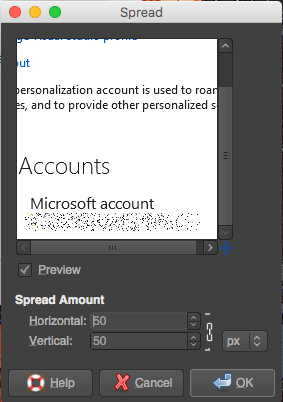
Do not blur, but do randomly add noise or move pixels – Censoring image in GIMP – Graphic Design Stack Exchange

Posted by jpluimers on 2019/05/03

Blurring is like a hash function: it cannot be undone, but with enough plain text to blur examples, you can reconstruct the plain text: [WayBack] Why blurring sensitive information is a bad idea | dheera.net | Dheera Venkatraman’s web site

As an alternative, randomly add noise or move pixels. I used  [WayBack] Censoring image in GIMP – Graphic Design Stack Exchange. For the example on the right, I used “Filters → Noise → Spread” from the Stack Exchange answer.

With enough randomness, it is much harder to construct plain/hash combinations.

–jeroen

Posted in Image Editing, LifeHacker, Power User, Security, The Gimp | Leave a Comment »

Cleaning SILVER WITHOUT losing the Ag!

Posted by jpluimers on 2019/05/03

Interesting trick explained at [WayBackCleaning SILVER WITHOUT losing the Ag! which works very quickly as you can see in the below video.

What happens is that you transform Silver-Sulfide plus Aluminium into Silver plus Aluminium-Sulfide.

After that, the [WayBackAluminium-Sulfide reacts with water and transforms into Aluminium-Hydroxide and Hydrogen-Sulfide. The latter smells like rotten eggs, so better do this in a well ventilated area.

–jeroen

Posted in LifeHacker, Power User | Leave a Comment »

My LSI adapters and ESXi 6.5

Posted by jpluimers on 2019/05/03

So I won’t forget:

Direct download links in September 2017:

[WayBack] How to upgrade LSI MegaRaid SAS controller firmware using FreeDOS – Teksupport.in

Notes:

LSI provider install (SIM-S, SIMS, CIM, WEBM):

  1. Download the latest version (at the time of writing VMW-ESX-5.5.0-lsiprovider-500.04.V0.66-0002-5751577.zip)
  2. Unzip into /tmp
  3. esxcli software vib install -f -v /tmp/vmware-esx-provider-lsiprovider.vib
  4. wait for the VIB install to complete
  5. suspend or shutdown all VMs
  6. reboot the ESXi machine
  7. esxcli system wbem set --enable true
  8. Browse to https://192.168.71.91/ui/#/host/monitor/hardware/storage to see if SIM-S is working

MegaRAID Storage Manager (MSM) operation notes

A few tricky things to get right:

  • waiting: MSM is unbelievably slow (starting on SSD takes 10 seconds; discovery 30; connecting to host 60 – without any indication something is happening; fetching host data another 60;
  • old MSM versions are unstable (especially 14.x and lower), so keep current
  • ensure the hosts file on both the ESXi and Windows side match (otherwise it won’t discover anything, or discover as 0.0.0.0)
  • enable promiscuous mode on your vSwitch
  • if all else fails, disable any firewalls then enable bit by bit to see where it went wrong

Great installation steps:

MegaCLI installs

  1. Download the latest version that has VMware support (at the time of writing 8-07-07_MegaCLI.zip)
  2. Unzip into /tmp
  3. esxcli software vib install -f -v /tmp/VmwareMN/vmware-esx-MegaCli-8.07.07.vib
  4. wait for the VIB install to complete

Now you can the command /opt/lsi/MegaCLI/MegaCli (yes the casing of these two is different!) but you must to it in that directory, or ensure the LD_LIBARY_PATH contains /opt/lsi/MegaCLI.

StorCLI installs

Based on [WayBackStorCLI unter VMware vSphere installieren – Thomas-Krenn-Wiki

  1. Download the latest version that has VMware support (at the time of writing 1.23.02_StorCLI.zip)
  2. Recursively uncompress the ZIP file into /tmp**
  3. esxcli software vib install -f -v /tmp/storcli_All_OS/Vmware-OP/vmware-esx-storcli-1.23.02.vib
  4. wait for the VIB install to complete

Now you can the command /opt/lsi/storcli/storcli but you must to it in that directory, or ensure the LD_LIBARY_PATH contains /opt/lsi/storcli.

Example:

execute-storcli.sh /cALL show all | grep 'Controller = \|Model = \|Serial Number = \|Firmware'a

The vib file in "Vmware-NDS/" folder works with native driver.
The vib file in "Vmware-MN/" folder works with VMKlinux driver.

So I did a bit more searching based on the files in the VMware directories and came up with this list:

  • storcli_All_OS/Vmware/storcli.zip
    • Looks like it targets ESXi 3.x and older
  • storcli_All_OS/Vmware-MN/vmware-esx-storcli-1.23.02.vib wit  storcli_All_OS/Vmware-MN/VMWARE_MN_Readme.txt
    • Targets the vmklinux drivers that are being phased out with ESXi 5.5 and up
  • storcli_All_OS/Vmware-OP/vmware-esx-storcli-1.23.02.vib with storcli_All_OS/Vmware-OP/VMWARE_MN_NDS_Readme.txt
    • Targets the New Driver architecture introduced with ESXi 5.5 and used more and more since then

Background reading:

** unzip doesn’t work:

# unzip -d /tmp/ 1.23.02_StorCLI.zip
Archive: 1.23.02_StorCLI.zip
inflating: 1.23.02_StorCLI.txt
unzip: short read

But a combination of 7za and unzip does work:

# 7za x -o/tmp/ 1.23.02_StorCLI.zip
7-Zip (a) [32] 16.02 : Copyright (c) 1999-2016 Igor Pavlov : 2016-05-21
p7zip Version 16.02 (locale=en_US.UTF-8,Utf16=on,HugeFiles=on,32 bits,20 CPUs Intel(R) Xeon(R) CPU E5-2630L v4 @ 1.80GHz (406F1),ASM,AES-NI)

Scanning the drive for archives:
1 file, 48778476 bytes (47 MiB)

Extracting archive: 1.23.02_StorCLI.zip
--
Path = 1.23.02_StorCLI.zip
Type = zip
Physical Size = 48778476

Everything is Ok

Files: 2
Size: 48928561
Compressed: 48778476

# unzip -d /tmp/ /tmp/storcli_All_OS.zip 
Archive:  /tmp/storcli_All_OS.zip
   creating: storcli_All_OS/
   creating: storcli_All_OS/EFI/
  inflating: storcli_All_OS/EFI/license.txt
   creating: storcli_All_OS/EFI/UDK/
  inflating: storcli_All_OS/EFI/UDK/license.txt
  inflating: storcli_All_OS/EFI/UDK/storcli.efi
   creating: storcli_All_OS/FreeBSD/
  inflating: storcli_All_OS/FreeBSD/FreeBSD_readme.txt
  inflating: storcli_All_OS/FreeBSD/license.txt
  inflating: storcli_All_OS/FreeBSD/storcli.tar
  inflating: storcli_All_OS/FreeBSD/storcli64.tar
   creating: storcli_All_OS/Linux/
  inflating: storcli_All_OS/Linux/license.txt
  inflating: storcli_All_OS/Linux/LINUX_Readme.txt
  inflating: storcli_All_OS/Linux/storcli-1.23.02-1.noarch.rpm
   creating: storcli_All_OS/Linux-OEL-Sparc/
  inflating: storcli_All_OS/Linux-OEL-Sparc/license_OELSparc.txt
  inflating: storcli_All_OS/Linux-OEL-Sparc/storcli64-1.23.02-1.sparc64.rpm
   creating: storcli_All_OS/Linux-ppc/
   creating: storcli_All_OS/Linux-ppc/Big Endian/
  inflating: storcli_All_OS/Linux-ppc/Big Endian/license.txt
  inflating: storcli_All_OS/Linux-ppc/Big Endian/storcli.tar
   creating: storcli_All_OS/Linux-ppc/Little Endian/
  inflating: storcli_All_OS/Linux-ppc/Little Endian/license.txt
  inflating: storcli_All_OS/Linux-ppc/Little Endian/Readme.txt
  inflating: storcli_All_OS/Linux-ppc/Little Endian/storcli64_1.23.02_ppc64el.deb
   creating: storcli_All_OS/Solaris/
  inflating: storcli_All_OS/Solaris/license.txt
  inflating: storcli_All_OS/Solaris/SOLARIS_Readme.txt
  inflating: storcli_All_OS/Solaris/storcli.pkg
   creating: storcli_All_OS/Solaris Sparc/
  inflating: storcli_All_OS/Solaris Sparc/license.txt
  inflating: storcli_All_OS/Solaris Sparc/storcli.pkg
   creating: storcli_All_OS/Ubuntu/
  inflating: storcli_All_OS/Ubuntu/read_me.txt
  inflating: storcli_All_OS/Ubuntu/storcli_1.23.02_all.deb
   creating: storcli_All_OS/Vmware/
  inflating: storcli_All_OS/Vmware/license.txt
   creating: storcli_All_OS/Vmware/Linux/
  inflating: storcli_All_OS/Vmware/Linux/storcliKL-1.23.02-1.noarch.rpm
  inflating: storcli_All_OS/Vmware/Rel_read_me.txt.txt
  inflating: storcli_All_OS/Vmware/storcli.zip
   creating: storcli_All_OS/Vmware/Windows/
  inflating: storcli_All_OS/Vmware/Windows/StorCLIKL.zip
   creating: storcli_All_OS/Vmware-MN/
  inflating: storcli_All_OS/Vmware-MN/license.txt
  inflating: storcli_All_OS/Vmware-MN/vmware-esx-storcli-1.23.02.vib
  inflating: storcli_All_OS/Vmware-MN/VMWARE_MN_Readme.txt
   creating: storcli_All_OS/Vmware-OP/
  inflating: storcli_All_OS/Vmware-OP/license.txt
  inflating: storcli_All_OS/Vmware-OP/vmware-esx-storcli-1.23.02.vib
  inflating: storcli_All_OS/Vmware-OP/VMWARE_MN_NDS_Readme.txt
   creating: storcli_All_OS/Windows/
  inflating: storcli_All_OS/Windows/license.txt
  inflating: storcli_All_OS/Windows/storcli.exe
  inflating: storcli_All_OS/Windows/storcli64.exe
  inflating: storcli_All_OS/Windows/WIN_ReadMe.txt

9260-8i firmware update

  1. Download the latest firmware (at the time of writing 12.15.0-0239_MR_2108_SAS_FW_2.130.403-4660.zip) into /tmp
  2. unzip -d /tmp/ /tmp/12.15.0-0239_MR_2108_SAS_FW_2.130.403-4660.zip
  3. Find out the controller number
  4. Where 0 is the controller number, execute/opt/lsi/storcli/storcli /c0 download file=/tmp/mr2108fw.rom
  5. Wait for the firmware update to complete
  6. Suspend or shutdown all VMs
  7. Reboot

–jeroen

Posted in ESXi6.5, Power User, Virtualization, VMware, VMware ESXi | 2 Comments »

Registering/unregseting Windows file associations with Delphi

Posted by jpluimers on 2019/05/02

As I need this one day: [WayBack] Just in case I need this again… >Free library DSiWin32 … now implements this as DSiRegisterUserFileAssoc and DSiUnregisterUserFileAssoc <… – Thomas Mueller (dummzeuch) – Google+

Note file has moved from WayBack: gpdelphiunits.googlecode.com/svn/trunk/src/DSiWin32.pas to [WayBack] OmniThreadLibrary/DSiWin32.pas at master · gabr42/OmniThreadLibrary · GitHub because Google code has shut down.

There still is [WayBack] Google Code Archive – Long-term storage for Google Code Project Hosting: gpdelphiunits, but maintenance is now part of [WayBack] GitHub – gabr42/OmniThreadLibrary: A simple and powerful multithreading library for Delphi

Related: [WayBack] delphi – How to associate a program with a file type, but only for the current user? – Stack Overflow

–jeroen

Posted in Delphi, Development, Software Development | 1 Comment »

GExperts: searching for case-insensitive “T*List.Create” but not “TStringList.Create”

Posted by jpluimers on 2019/05/02

Just learned that partial exclusion can be done with the case-insensitive GExperts Grep Search like this:

T[^s][^t][^r][^i][^n][^g].*List.*\.Create

This will skip TStringList.Create, but matches TMyList.Create.

I’d rather have done something like this, but the Delphi RegEx does not support negative lookbehind:

^ *[a-zA-Z0-9_]* *: *T(<!string)[a-zA-Z0-9_]*ListO? *;$

So the alternative is to search for this:

^ *[a-zA-Z0-9_]* *: *T[a-zA-Z0-9_]*ListO? *;$

then exclude all the case insensitive TStringList entries from it, however GExperts did not support that at the time of writing.

This is an intermediate that works for some of the times:

^ *[a-zA-Z0-9_]* *: *T[^s][^t][^r][^i][^n][^g][a-zA-Z0-9_]*ListO? *;$

–jeroen

^ *[a-zA-Z0-9_]* *: *T[^s][^t][^r][^i][^n][^g][a-zA-Z0-9_]*ListO? *$;
^ *[a-zA-Z0-9_]*: .T[a-zA-Z0-9_]*ListO? *;$;
^ *[a-zA-Z0-9_]* *: *T(?!string)[a-zA-Z0-9_]*ListO? *;$

Posted in Delphi, Development, GExperts, RegEx, Software Development | Leave a Comment »

Show SCSI / HBA modules in ESXi 6.5 with file and version information

Posted by jpluimers on 2019/05/02

A small script I made: Show SCSI / HBA modules in ESXi 6.5 with file and version information:

MODULES=`esxcfg-scsidevs --hbas | awk 'FNR > 0 {print $2}'`
for MODULE in $MODULES ; do
    # echo "Probing $MODULE"
    vmkload_mod --showinfo $MODULE | grep 'file: \|Version'
done

The script is based on ideas from [WayBackDetermining Network/Storage firmware and driver version in ESXi 4.x and later (1027206) | VMware KB

It works in at least ESXi 6.5 where it shows this on one of my systems:

 input file: /usr/lib/vmware/vmkmod/lsi_msgpt3
 Version: 12.00.02.00-11vmw.650.0.0.4564106
 input file: /usr/lib/vmware/vmkmod/vmw_ahci
 Version: 1.0.0-39vmw.650.1.26.5969303
 input file: /usr/lib/vmware/vmkmod/vmw_ahci
 Version: 1.0.0-39vmw.650.1.26.5969303
 input file: /usr/lib/vmware/vmkmod/vmw_ahci
 Version: 1.0.0-39vmw.650.1.26.5969303
 input file: /usr/lib/vmware/vmkmod/lsi_mr3
 Version: 6.910.18.00-1vmw.650.0.0.4564106
 input file: /usr/lib/vmware/vmkmod/megaraid_sas
 Version: Version 6.603.55.00.2vmw, Build: 4564106, Interface: 9.2 Built on: Oct 26 2016
 input file: /usr/lib/vmware/vmkmod/vmkusb
 Version: 0.1-1vmw.650.1.26.5969303

–jeroen

Read the rest of this entry »

Posted in bash, Development, ESXi6.5, Power User, Scripting, Software Development, Virtualization, VMware, VMware ESXi | Leave a Comment »

Note that the Delphi superobject library has changed to “not maintained” in december 2018, has problems with large address aware

Posted by jpluimers on 2019/05/02

A while ago I found out the [WayBack] not maintained status · hgourvest/superobject@f1c42db · GitHub.

This means you should not use the [WayBack] superobject JSON library in Delphi any more: there won’t be any fixes.

Many people use it, especially because it used to be much more stable than the built-in JSON support of Delphi.

One breaking issue in superobject is the lack of large address space support: due to the pointer calculations in various places, it does not support pointers above the 2 gibibyte boundary as filed in the 2016 [WayBack] Issues with {$SetPEFlags IMAGE_FILE_LARGE_ADDRESS_AWARE} · Issue #22 · hgourvest/superobject · GitHub

This gives problems in at least this case:

  • enabling {$SetPEFlags IMAGE_FILE_LARGE_ADDRESS_AWARE} (in older Delphi 7 through 2006 also versions this was {$SetPEFlags $20})
  • using top-down memory allocation, for instance by:
    • a user setting HKEY_LOCAL_MACHINE\System\CurrentControlSet\Control\Session Manager\Memory Management value AllocationPreference to hex value 00100000
    • using FastMM4 with the (default) {$define AlwaysAllocateTopDown} setting

Example registry file and batch file to enable top-down memory (reboot afterwards):

[HKEY_LOCAL_MACHINE\SYSTEM\CurrentControlSet\Control\Session Manager\Memory Management]
"AllocationPreference"=dword:00100000

Command to view:

reg query "HKEY_LOCAL_MACHINE\SYSTEM\CurrentControlSet\Control\Session Manager\Memory Management" | findstr "AllocationPreference"

Command to enable:

reg add "HKEY_LOCAL_MACHINE\SYSTEM\CurrentControlSet\Control\Session Manager\Memory Management" /v AllocationPreference /t REG_DWORD /d 00100000 /f

Command to disable:

reg delete "HKEY_LOCAL_MACHINE\SYSTEM\CurrentControlSet\Control\Session Manager\Memory Management" /v AllocationPreference /f

Large Address Aware is a nightmare

Be very very very careful with this, and by enabling Large Address Aware to your executables, as many times they can load 3rd party libraries that often are beyond your control.

Even if there is a slight chance that your code is being used with Large Address Aware enabled, then follow guidelines line in [WayBack] windows – Unit Testing for x86 LargeAddressAware compatibility – Stack Overflow

Summary of [WayBack] memory – Drawbacks of using /LARGEADDRESSAWARE for 32 bit Windows executables? – Stack Overflow:

blindly applying the LargeAddressAware flag to your 32bit executable deploys a ticking time bomb!

by setting this flag you are testifying to the OS:

yes, my application (and all DLLs being loaded during runtime) can cope with memory addresses up to 4 GB.
so don’t restrict the VAS for the process to 2 GB but unlock the full range (of 4 GB)”.

but can you really guarantee?
do you take responsibility for all the system DLLs, microsoft redistributables and 3rd-party modules your process may use?

Edit 20240628

Earlier this year, the SuperObject Delphi library got archived on GitHub. Definitely unmaintained: [Wayback/Archive] GitHub – hgourvest/superobject: This repository has been archived by the owner on Feb 27, 2024. It is now read-only.

The XSuperObject library mentioned below in a comment has not been maintained for 4 years either ( [Wayback/Archive] GitHub – onryldz/x-superobject: Delphi Cross Platform Rapid JSON: “vkrapotkin Now ParseFromFile can read UTF8-BOM files (#136) 2d3ec01 · 2020-12-09”), so I wonder what alternatives are still available.

--jeroen

Posted in Conference Topics, Conferences, Delphi, Development, EKON, Event, Software Development | 4 Comments »

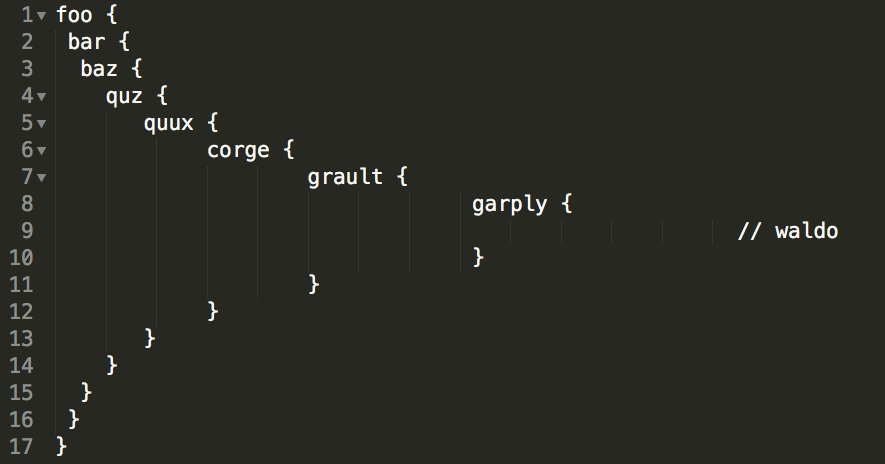
@rw@mastodon.social on Twitter: “Personally, I prefer to increase the spacing for each successive indent according to the Fibbonaci sequence:… “

Posted by jpluimers on 2019/05/01

Awesome! [WayBack@rw@mastodon.social on Twitter: “Personally, I prefer to increase the spacing for each successive indent according to the Fibbonaci sequence:… “

Via [WayBack] The indentation debate just ended – G+ – CodeProject

–jeroen

Posted in Development, Fun, Software Development | Leave a Comment »