The Wiert Corner – irregular stream of stuff

Jeroen W. Pluimers on .NET, C#, Delphi, databases, and personal interests

  • My badges

  • Twitter Updates

  • My Flickr Stream

  • Pages

  • All categories

  • Enter your email address to subscribe to this blog and receive notifications of new posts by email.

    Join 1,860 other subscribers

Archive for March, 2020

The Delphi Geek: Data-driven Multithreading

Posted by jpluimers on 2020/03/18

Still on my reading list because it is relevant to many programming environments: [WayBack] The Delphi Geek: Data-driven Multithreading.

Related:

–jeroen

Posted in Delphi, Development, Software Development | Leave a Comment »

Nick Craver – Stack Overflow: How We Do Deployment – 2016 Edition

Posted by jpluimers on 2020/03/18

It sounds long ago, but this post is still so relevant for anyone not yet bringing operations and development close together. And for those who did:

  • automate the heck out of everything
  • make lots of mistakes as early as possible so you can fix them before the hit any of your production sites

[WayBackNick Craver – Stack Overflow: How We Do Deployment – 2016 Edition

The relevance is why Nick repeated it in 2018 in a response to a @ThePracticalDev discussion right after the first Falcon Heavy deployment, and why I repeat it now.

–jeroen

Posted in Development, DevOps, Infrastructure, Software Development | Leave a Comment »

Fast-Forward »: My Lazarus External Tools (and Delphi External tools)

Posted by jpluimers on 2020/03/17

For my link archive if I want to make Explorer (for Linux caja) or console shortcuts to source or target directories: [WayBack] Fast-Forward »: My Lazarus External Tools with these XML files from [WayBack] Lazarus External Tools · GitHub:

And the Delphi equivalent from 2004: [WayBack] Fast-Forward »: My Delphi Tools, which addes “Open Source in Notepad2” and “Start Resource Explorer”.

via: [WayBack] Ondrej Kelle – Google+

–jeroen

Read the rest of this entry »

Posted in Delphi, Development, Lazarus, Software Development | Leave a Comment »

Working around [Fatal error] F2084 Internal errors like AV101E53EB-R0000000C-0

Posted by jpluimers on 2020/03/17

A few notes from my response to [WayBack] [Fatal error] F2084 Internal error : AV101E53EB-R0000000C-0 I’m getting this when trying to do some code completion. Any idea ? – Stéphane Wierzbicki – Google+:

This compiler related error usually made it go away for me either when it occurs during project compilation or when using code completion: Close the IDE. Delete your DCU files. Then restart the IDE.

Starting fresh gives a high chance if fixing this unless it is indeed a compiler related error in which case it returns. For that you need to trim down your code to see under which circumstances.

Reasoning (please shoot at it when things are wrong/missing):

Both the IDE code completion and the project compilation use the compiler. The DCU cache is shared between these compiler instances. The DCU cache depends on internal memory structures. Various pointer related errors (both from the IDE, compiler and 3rd party extensions) can damage this cache.

Especially weak IDE uses of the compiler are the find symbol and rename symbol functionalities. I’ve stopped using those about a decade ago.

Sometimes the F2084 (which I often mistype as F2048) is indeed an error in the compiler. Over the years, some of them have been fixed too. See my earlier articles on F2084.

–jeroen

Posted in Conference Topics, Conferences, Delphi, Development, Event, F2084, Software Development | Leave a Comment »

bash – How to add a progress bar to a shell script? – Stack Overflow

Posted by jpluimers on 2020/03/17

From [WayBackbash – How to add a progress bar to a shell script? – Stack Overflow (thanks Mitch Haile!):

You can implement this by overwriting a line. Use \r to go back to the beginning of the line without writing \n to the terminal.

Write \n when you’re done to advance the line.

Use echo -ne to:

  1. not print \n and
  2. to recognize escape sequences like \r.

Here’s a demo:

echo -ne '#####                     (33%)\r'
sleep 1
echo -ne '#############             (66%)\r'
sleep 1
echo -ne '#######################   (100%)\r'
echo -ne '\n'

–jeroen

Posted in *nix, *nix-tools, bash, bash, Development, Power User, Scripting, Software Development | Leave a Comment »

Mounting a Time Machine backup under Linux so you can send it to Backblaze using Restic…

Posted by jpluimers on 2020/03/16

[WayBack1/WayBack2] Memo to self: Ich will ein Time Machine Backup unter Linux mounten, um das “Latest” Verzeichnis mit Restic an Backblaze senden zu können. Schritt 1: Sp… – Kristian Köhntopp – Google+:

Memo to self: Ich will ein Time Machine Backup unter Linux mounten, um das “Latest” Verzeichnis mit Restic an Backblaze senden zu können.

Schritt 1: Sparsebundle mounten

# ls -l /export/tm_kk/
total 8
drwx—— 3 kris users 4096 Oct 21 16:24 KK.sparsebundle

Geht mit

# git clone git://github.com/torarnv/sparsebundlefs.git
# cd sparsebundlefs; make
# mkdir -p /bundles/tm_kk
# sparsebundlefs /export/tm_kk/KK.sparsebundle /bundles/tm_kk
# ls -lh /bundles/tm_kk
total 0
-r——– 1 root nogroup 1.5T Oct 21 16:24 sparsebundle.dmg

Schritt 2: DMG loopmounten

# fdisk -l /bundles/tm_kk/sparsebundle.dmg
Disk /bundles/tm_kk/sparsebundle.dmg: 1.5 TiB, 1648462135296 bytes, 3219652608 sectors
Units: sectors of 1 * 512 = 512 bytes
Sector size (logical/physical): 512 bytes / 512 bytes
I/O size (minimum/optimal): 512 bytes / 512 bytes
Disklabel type: gpt
Disk identifier: 15FCCBBD-49E4-42BB-B359-EF662F9916CF

Device Start End Sectors Size Type
/bundles/tm_kk/sparsebundle.dmg1 40 409639 409600 200M EFI System
/bundles/tm_kk/sparsebundle.dmg2 409640 3219390423 3218980784 1.5T Apple HFS/HFS+

# kpartx -a -v /bundles/tm_kk/sparsebundle.dmg
add map loop8p1 (253:1): 0 409600 linear 7:8 40
add map loop8p2 (253:19): 0 3218980784 linear 7:8 409640

# mkdir -p /hfs/tm_kk
# mount -o ro -t hfsplus /dev/mapper/loop8p2 /hfs/tm_kk
# b=$(readlink /hfs/tm_kk/Backups.backupdb/KK/Latest)
# ls -l /hfs/tm_kk/Backups.backupdb/KK/$b
total 0
drwxr-xr-x 1 root root 30 Oct 21 14:26 ‘Macintosh HD’

Schritt 3: tmfs mount

Ein Time Machine Backup enthält doofe Hardlinks auf Verzeichnisse. Das kann Linux so nicht, und man muß das noch einmal mit tmfs fusemounten. Seufz.

# apt-get install tmfs
# mkdir -p /tmfs/tm_kk
# tmfs /hfs/tm_kk /tmfs/tm_kk
# ls -l /tmfs/tm_kk/KK/Latest/
total 0
drwxr-xr-x 1 root root 30 Oct 21 14:26 ‘Macintosh HD’

Das durchzulesen ist nicht mal langsam.

Schritt 4: Abbauen

# umount /tmfs/tm_kk
# umount /hfs/tm_kk/
# kpartx -d -v /bundles/tm_kk/sparsebundle.dmg
del devmap : loop8p1
del devmap : loop8p2
loop deleted : /dev/loop8
# umount /bundles/tm_kk

Schritt 5: Den Mist scripten

A few important comments from the WayBack2 link:

Jeroen Wiert Pluimers:

So your time machine data is on a Linux disk that you export from Linux to MacOS? (as otherwise, I don’t understand what /export/tm_kk/KK.sparsebundle is for)

Kristian Köhntopp:

Yes, I am running netatalk, SMB and NFS on an Ubuntu 18.04.

Jeroen Wiert Pluimers:

+Kristian Köhntopp Thanks. What do you envision as steps to restore a complete time machine?

Kristian Köhntopp:

We will see. I do not see that as normally necessary. Mostly I do not want to lose the work on my laptop, and am just to lazy to restrict the backup to that. In general, it should be possible to create this as a writeable setup so that I get the data back. I will probably never recreate a full runnable mac setup from this emergency offsite backup.

Tools used:

–jeroen

Posted in *nix, *nix-tools, Apple, Backup, Mac, Mac OS X / OS X / MacOS, MacBook, Power User | Leave a Comment »

Management 3.0 Practice: STAR Behavioral Interview Questions – Management 3.0

Posted by jpluimers on 2020/03/16

This works both ways: people find out about your company and your company finds out about the people.

It works for any field of work.

[WayBack] Management 3.0 Practice: STAR Behavioral Interview Questions – Management 3.0

Using the STAR behavioral interview questions can help you hire great people, for maximum employee engagement and cultural fit as well as role competence

  • Situation
  • Task
  • Action
  • Results

Via:

[WayBack] Management 3.0 Practice: STAR Behavioral Interview Questions – Management 3.0 – Marjan Venema – Google+.

–jeroen


Posted in Development | Leave a Comment »

Linux – How to Securely Copy Files Using SCP examples

Posted by jpluimers on 2020/03/16

I love short and to the point examples. The list of permutations for scp is at [WayBack] Linux – How to Securely Copy Files Using SCP examples.

–jeroen

Read the rest of this entry »

Posted in *nix, *nix-tools, Development, Internet protocol suite, Power User, SSH, TCP | Leave a Comment »

worksheet function – How to add or subtract to, or increment, column letters in Excel? – Super User

Posted by jpluimers on 2020/03/13

[WayBack] worksheet function – How to add or subtract to, or increment, column letters in Excel? – Super User:

Here’s the best I’ve found so far: =SUBSTITUTE(ADDRESS(1,( COLUMN() + 1 ),4),1,"")The part in the middle marked in bold is the only part that changes. In this example, it’s taking the current column and adding 1, so returning B if it’s in column A and AA if it’s in column Z.

It is related to the question and answer [WayBack] Formula to return just the Column Letter in excel – Super User:

FYI on your original formula you don’t actually need to call the CELL formula to get row and column you can use:

=ADDRESS(ROW(),COLUMN())

Then as an extension of that you can use MID & SEARCH to find the $ and trim down the output so you are just left with the letter:

=MID(ADDRESS(ROW(),COLUMN()),SEARCH("$",ADDRESS(ROW(),COLUMN()))+1,SEARCH("$",ADDRESS(ROW(),COLUMN()),SEARCH("$",ADDRESS(ROW(),COLUMN()))+1)-2)

edit You can even simplify this further:

=MID(ADDRESS(ROW(),COLUMN()),2,SEARCH("$",ADDRESS(ROW(),COLUMN()),2)-2)

And it is part of a much more elaborate answer

Read the rest of this entry »

Posted in Development, Excel, Office, Power User, Software Development | Leave a Comment »

MacOS: Checking a disk for bad blocks

Posted by jpluimers on 2020/03/13

Hardware fails, but most disk tools on MacOS only check logical disk structures, not bad blocks.

Luckily, fsck_hfs can, though Apple is a bit secretive on it: [WayBack] Page Not Found – Apple Developer: ManPages/man8/fsck_hfs.8.html is empty, but there is [WayBack] man page fsck_hfs section 8 and the gist below.

Disk volumes on MacOS use a successor of HFS called HFS Plus – Wikipedia, but the tooling never changed names.

I got at the below parameters through [

This is the disk check command:

# sudo fsck_hfs -dylS /dev/disk3s1
** /dev/rdisk3s1 (NO WRITE)
    Using cacheBlockSize=32K cacheTotalBlock=65536 cacheSize=2097152K.
Scanning entire disk for bad blocks
   Executing fsck_hfs (version hfs-407.50.6).
** Performing live verification.
** Checking Journaled HFS Plus volume.
   The volume name is SanDisk400GB
** Checking extents overflow file.
** Checking catalog file.
** Checking extended attributes file.
** Checking volume bitmap.
** Checking volume information.
** The volume SanDisk400GB appears to be OK.
    CheckHFS returned 0, fsmodified = 0

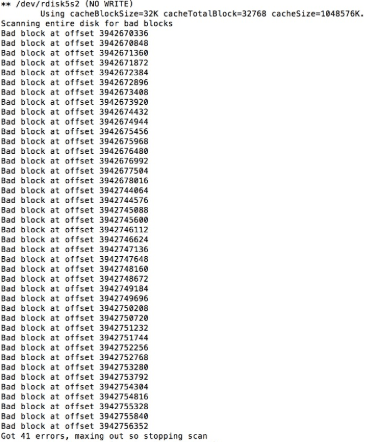
The italic part is the bad block scanning. The normal part the hfs scanning, which will continue even after finding bad blocks.

If bad blocks are found, output looks more like on the right. If it looks like that, basically you know a disk is toast.

It can be slow, as I did not specify a cache, so it defaults to 32 Kibibyte. You can increase that by adding for instance -c 512m  for 512 Mebibyte cache, just read the short help or man page below.

This tremendously helps checking volumes containing many files, for instance [WayBack] Checking Very Large Time Machine Volumes – Mac OS X Hints

Read the rest of this entry »

Posted in Apple, Mac, Mac OS X / OS X / MacOS, Power User | 1 Comment »