The Wiert Corner – irregular stream of stuff

Jeroen W. Pluimers on .NET, C#, Delphi, databases, and personal interests

  • My badges

  • Twitter Updates

  • My Flickr Stream

  • Pages

  • All categories

  • Enter your email address to subscribe to this blog and receive notifications of new posts by email.

    Join 1,862 other subscribers

Archive for March, 2020

ssh – Why OpenSSH deprecated DSA keys – Information Security Stack Exchange

Posted by jpluimers on 2020/03/10

In a lot of ssh-keygen related posts, you still see DSA being mentioned, though that has been deprecated and later removed from OpenSSH.

I wondered why, so I did some digging.

TL;DR: it’s complicated:

  • different standards mandating eventually conflicting parameters,
  • extending the parameters would require protocol extension,
  • a logjam vulnerability for certain combinations of parameters and finally
  • better algorithms having become available.

Some of the related topics cannot be archived in the WayBack machine or refuse being archived at Archive.is, so here is a list of partially archived relevant links:

–jeroen

Posted in Communications Development, Development, Internet protocol suite, Power User, Security, SSH, TCP | Leave a Comment »

Start Together. Finish Together – Hacker Noon

Posted by jpluimers on 2020/03/10

I need to read more Hacker Noon stuff:

It may seem counterintuitive, but… Start Together. Finish Together – Hacker Noon [WayBack]

Via a mention of the “non developers” point of view, who are the key persons to do this whole “start/finish together” mantra wit: [WayBack] “Their mental model is that developers/designers are this tiny little pipe, and you have to play this intricate game of Tetris to get the most amount of… – Marjan Venema – Google+ (who does great coaching, so be sure to check out her postings)

–jeroen


Posted in Agile, Development, Software Development | Leave a Comment »

MacOS: converting a man page to markdown

Posted by jpluimers on 2020/03/09

Converting a man page to markdown is a three step process:

  1. installing a tool that can convert the source of a man page to markdown
  2. finding the location of the man page source
  3. doing the actual conversion

Tool to convert man to markdown

The source format of man pages is troff, which is usually converted by man using groff, or a set of macros.

My initial thought for the first problem was to use pandoc, but as I found earlier in pandoc oneliner from reStructuredText to html, on MacOS, the pandoc can write groff format, but not read it.

Luckily doing a pandoc from groff to markdown – Google Search, I bumped into [WayBack] Convert groff to markdown · Issue #8 · neomutt/neomutt-docs · GitHub which lead to mandoc – Wikipedia.

Since I already had homebrew installed, getting mandoc was simple: brew install mandoc.

Finding the man page source

Earlier in the process when searching for pandoc based conversions, I found the solution for the second problem too: [WayBack] Man page with preserved text decorations, proportional text and fixed-width code – Unix & Linux Stack Exchange taught me about the -w option, but there is actually a -W option that works better if you have multiple pages for a keyword:

-w or --path
Don’t actually display the man pages, but do print the location(s) of the files that would be formatted or displayed. If no argument is given: display (on stdout) the list of directories that is searched by man for man pages. If manpath is a link to man, then “manpath” is equivalent to “man --path“.

-W Like -w, but print file names one per line, without additional information. This is useful in shell commands like man -aW man | xargs ls -l

Actual conversion for fsck_hfs

It all came down to a one-liner:

mandoc -T markdown `man -w fsck_hfs` > /tmp/fsck_hfs.8.md

Note the order here is important this will fail with an error:

mandoc `man -w fsck_hfs` -T markdown > /tmp/fsck_hfs.8.md

mandoc: -T: ERROR: No such file or directory
mandoc: markdown: ERROR: No such file or directory

–jeroen

Read the rest of this entry »

Posted in Apple, Mac, Mac OS X / OS X / MacOS, Power User | 1 Comment »

command line – Recursive tar compression? – Ask Ubuntu

Posted by jpluimers on 2020/03/09

Since I always forget one-letter command-line options: [WayBack]command line – Recursive tar compression? – Ask Ubuntu (thanks andrew.46 for this very nice answer!):

Try:

tar -czvf directorios.tar.gz folder

A few notes:

  1. Recursion is the default, from the tar man pages:
    -c, --create
        Create a new archive.  Arguments supply the names of the files to be archived.
        Directories  are  archived  recursively,  unless  the --no-recursion option is
        given.
    

    Although this can be turned off by using the --no-recursion option…

  2. You need the archive name immediately after the -f option, the correct sequence being:
    tar -c [-f ARCHIVE] [OPTIONS] [FILE...]
             ^^^^^^^^^^
    
  3. For a more flexible command line (particularly if you wanted to use other compression utilities apart from gzip with tar) you could omit the -z option and use -a option to allow tar to automatically decide which compressor to use based on the archive suffix:
    -a, --auto-compress
        Use archive suffix to determine the compression program.
    

    Recognised suffixes are:

    • .gz : gzip
    • .tgz : gzip
    • .taz : gzip
    • .Z : compress
    • .taZ : compress
    • .bz2 : bzip2
    • .tz2 : bzip2
    • .tbz2 : bzip2
    • .tbz : bzip2
    • .lz : lzip
    • .lzma : lzma
    • .tlz : lzma
    • .lzo : lzop
    • .xz : xz

tar is pretty cool :)

–jeroen

Posted in *nix, *nix-tools, Power User | Leave a Comment »

GitHub – facebook/osquery: SQL powered operating system instrumentation, monitoring, and analytics.

Posted by jpluimers on 2020/03/09

Boy, I wish I had found this years ago: [WayBack] GitHub – facebook/osquery: SQL powered operating system instrumentation, monitoring, and analytics.

No more remembering all those nifty configuration and log file details by heart, just install and query using SQL.

Now you need to learn a “database” schema, however that’s the same for all supported operating systems.

Example installation steps:

Run interactively through osqueryi, then perform .help or .schema to get an impression of what is possible.

There is lots of documentation at [WayBack] osquery.

–jeroen

Posted in *nix, *nix-tools, Apple, Mac, Mac OS X / OS X / MacOS, Power User | Leave a Comment »

🔎Julia Evans🔍 on Twitter: “the ip command… “

Posted by jpluimers on 2020/03/06

[Archive.is] 🔎Julia Evans🔍 on Twitter: “the ip command… “

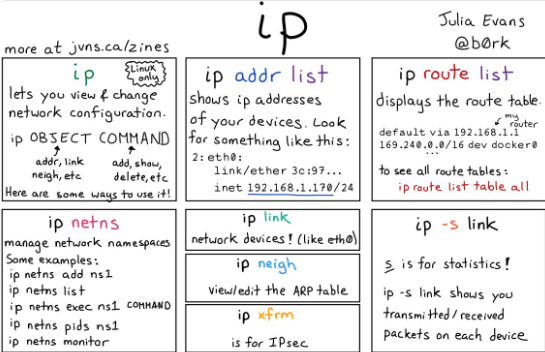
Larger image below the fold; thanks Julia!

Shortened transcript:

  • ip
    • lets you view and change network configuration
    • ip OBJECT COMMAND
    • object: addr, link, neigh, etc
    • command: add, show, delete, etc
  • ip addr list
    • shows IP addresses
  • ip route list
    • displays the route table
    • ip route list table all
  • ip netsh
    • manage network namespaces
  • ip link
    • network devices (like eth0)
  • ip neigh
    • view/edit the ARP table
  • ip xfrm
  • ip -s link
    • s is for statistics
    • shows transmitted/received packets for each device

Lots of additions in the Twitter Thread too, including (and some of them I still need to figure out):

Read the rest of this entry »

Posted in *nix, *nix-tools, Power User | Leave a Comment »

In Unix, what are some common dot files?

Posted by jpluimers on 2020/03/06

I came across some 20 year old Unix stuff a while ago, so I needed an historic reference of filenames starting with a dot (like .newsrc).

This is a pretty good one: [WayBackIn Unix, what are some common dot files?

–jeroen

Posted in *nix, *nix-tools, History, Power User | Leave a Comment »

Mac OS X / macOS / …: quit screen or window when using it for a serial port

Posted by jpluimers on 2020/03/06

I wrote a bit on using screen from my Mac in The woods and trees of OpenSuSE on single-board computers – image abbreviations – and getting it installed using OS X.

The coverage was way too brief and also buried in large post.

Today, I want to focus on some things related to properly terminating a a screen window, session or screen by itself from a Mac which somehow is one of the harder things for me to do.

I’m talking about sessions and windows, because screen is a terminal multiplexer, which can also put a serial link in a window on a session. So screen is not “just” a serial console terminal application by itself.

Part of being hard is probably that even on for instance 10.12 Sierra, Apple ships a fairly old version: screen --version returns Screen version 4.00.03 (FAU) 23-Oct-06 whereas after 2014 (before that, screen development was pretty stalled) many new versions appeared: [WayBack] screen.git.

It makes it less hard that it hardly reproduces, and seems to reproduce less with the screen version I installed through homebrew: Screen version 4.06.02 (GNU) 23-Oct-17.

Time to make some notes so I can hopefully amend them later with solutions.

The screen magic key

When screen gives you a session to a terminal, all but one key are being routed through on a 1-on-1 base except for a “magic” key combination: Ctrla (which the documentation abbreviates as C-a).

Following the Ctrla combination, you can type a character (sometimes that needs Ctrl too) for a lot screen functionality (for a start, see the “Getting help” below).

Listing existing screen sessions and windows

Each screen process has one session

You list screen sessions from the command-line. I usually combine the latter with getting a process list as well using this command because the process list will show you parameters passed to screen:

ps -ax | grep screen && screen -list

which gets you output like this:

31992 ttys019    0:00.01 screen
29040 ttys020    0:00.04 screen /dev/cu.usbserial 115200
31898 ttys021    0:00.01 screen
32503 ttys025    0:00.00 grep screen
There are screens on:
    29041.ttys020.RMBPro1TBJWP  (Attached)
    31899.ttys021.RMBPro1TBJWP  (Attached)
    31993.ttys019.RMBPro1TBJWP  (Attached)
3 Sockets in /var/folders/zr/dsp77fhs6zq179n72lykjrjw0000gq/T/.screen.

Many people abbreviate screen -list as screen -ls, but I like descriptive commands over cryptic ones.

What you see is that:

  • there are three screen sessions of which one is using a USB serial device.
  • there is one session per screen session

Windows are within sessions

From within each session, you can use the Ctrl* combination to list the Windows. For the both non-serial sessions – looked like this on my machine:

term-type   size         user interface           window
---------- ------- ---------- ----------------- ----------
xterm-256c  84x28     jeroenp@/dev/ttys019        0(bash)       rwx

and

term-type   size         user interface           window
---------- ------- ---------- ----------------- ----------
xterm-256c  84x28     jeroenp@/dev/ttys021        1(bash)       rwx

The first was for session 31899.ttys021.RMBPro1TBJWP, the second for 31993.ttys019.RMBPro1TBJWP.

Attaching (or re-attaching) to an existing session

The -x parameter can attach to both an Attached or a Detached screen session. This allows for:

  • multiple Mac terminal tabs to see the same content
  • getting access to a detached session (because you – maybe by accident – closed terminal,  or detached the session)

Detached sessions keep their windows and the commands running in those windows. This allows you to have long-running scripts starting from the terminal but not terminated when the terminal closes.

So in my case, this command attaches to the second session not matter if it is attached or detached.

screen -x 31993.ttys019.RMBPro1TBJWP

Killing an existing window

When killing a window, all the processes in that window will be killed too.

Typing Ctrla followed by k or Ctrlk will kill the current window.

Killing a session with all windows

When killing a session, it will kill all the windows with all the processes in those windows.

Typing Ctrla followed by Ctrl\ will kill the current session with all the windows in it. On some Linux systems, you can replace Ctrl\ with just \.

I’ve not run into dead sessions yet, but if I do, I should try the -wipe command line option as shown in [WayBack] How to kill a dead screen session? – Stack Overflow (which also shows this can fail if you run out of disk space, but then you have bigger issues).

TODO: Killing a session that seems attached but isn’t

I still need to research this further, as every now and then I run into this:

# ps -ax | grep -w screen && screen -list
29040 ?? 0:00.04 screen /dev/cu.usbserial 115200
35724 ttys025 0:00.00 grep -w screen
There is a screen on:
 29041.ttys020.RMBPro1TBJWP (Attached)
1 Socket in /var/folders/zr/dsp77fhs6zq179n72lykjrjw0000gq/T/.screen.

Wiping it fails:

# screen -wipe 29041.ttys020.RMBPro1TBJWP
There is a screen on:
 29041.ttys020.RMBPro1TBJWP (Attached)
1 Socket in /var/folders/zr/dsp77fhs6zq179n72lykjrjw0000gq/T/.screen.

Attaching however times out:

# screen -x 29041.ttys020.RMBPro1TBJWP

For now, the only option is to reboot my system.

I’ve seen this happening mostly with cables that present themselves as prolific PL2303HX chipset.

So I will get some TTL debug cables based on other chipsets.

These posts will help finding about the available serial cables:

Getting help

It is daunting, but the man screen page [WayBack] has a truckload of information, for instance on the command-line options, key bindings and much more.

If you like on-line lists of tips more, then follow these:

The man page will get you most of that information:

Start screen

Screen version 4.00.03 (FAU) 23-Oct-06

Copyright (c) 1993-2002 Juergen Weigert, Michael Schroeder
Copyright (c) 1987 Oliver Laumann

This program is free software; you can redistribute it and/or modify it under the
terms of the GNU General Public License as published by the Free Software
Foundation; either version 2, or (at your option) any later version.

This program is distributed in the hope that it will be useful, but WITHOUT ANY
WARRANTY; without even the implied warranty of MERCHANTABILITY or FITNESS FOR A
PARTICULAR PURPOSE. See the GNU General Public License for more details.

You should have received a copy of the GNU General Public License along with this
program (see the file COPYING); if not, write to the Free Software Foundation,
Inc., 59 Temple Place - Suite 330, Boston, MA  02111-1307, USA.

Send bugreports, fixes, enhancements, t-shirts, money, beer & pizza to
screen@uni-erlangen.de


                          [Press Space or Return to end.]

Here you can press Ctrl-A followed by : to get a prompt where you can type help:

[Press Space or Return to end.]
:help

There you get one or two (depending on your terminal size) pages of help:

                         Screen key bindings, page 1 of 2.

                         Command key:  ^A   Literal ^A:  a

   break       ^B b          license     ,             reset       Z         
   clear       C             lockscreen  ^X x          screen      ^C c      
   colon       :             log         H             select      '         
   copy        ^[ [          meta        a             silence     _         
   detach      ^D d          monitor     M             split       S         
   digraph     ^V            next        ^@ ^N sp n    suspend     ^Z z      
   displays    *             number      N             time        ^T t      
   dumptermcap .             only        Q             title       A         
   fit         F             other       ^A            vbell       ^G        
   flow        ^F f          pow_break   B             version     v         
   focus       ^I            pow_detach  D             width       W         
   hardcopy    h             prev        ^H ^P p ^?    windows     ^W w      
   help        ?             quit        ^\            wrap        ^R r      
   history     { }           readbuf     < writebuf >         
   info        i             redisplay   ^L l          xoff        ^S s      
   kill        ^K k          remove      X             xon         ^Q q      
   lastmsg     ^M m          removebuf   =         

                    [Press Space for next page; Return to end.]

followed by:

                         Screen key bindings, page 2 of 2.

^]  paste .
"   windowlist -b
-   select -
0   select 0
1   select 1
2   select 2
3   select 3
4   select 4
5   select 5
6   select 6
7   select 7
8   select 8
9   select 9
]   paste .


                          [Press Space or Return to end.]

–jeroen

Partially based on: [WayBack] terminate screen monitoring serial port – Unix & Linux Stack Exchange.

Posted in *nix, *nix-tools, Apple, Mac, Mac OS X / OS X / MacOS, MacBook, MacBook Retina, MacBook-Air, MacBook-Pro, MacMini, macOS 10.12 Sierra, macOS 10.13 High Sierra, OS X 10.10 Yosemite, OS X 10.11 El Capitan, Power User, screen | Leave a Comment »

Some tools useful for analysing PDF documents

Posted by jpluimers on 2020/03/05

A while ago, I wanted to analyse the difference of some PDF documents: why they had suddenly grown to twice their size.

[WayBack] Jeroen Pluimers en Twitter: “dat genereren kun je overigens zien als je dezelfde downloads doet, maar dan een fikse periode uit elkaar.…”

There are quite a few tools on [WayBack] Browse Internal PDF Structure – Super User and [WayBack] Best tool for inspecting PDF files? – Stack Overflow, including:

They also made me discover [WayBack] GitHub – pipwerks/PDFObject: A lightweight JavaScript utility for dynamically embedding PDFs in HTML documents documented at [WayBack] PDFObject: A JavaScript utility for embedding PDFs 

This particular case

The quickest way to analyse these for me was [WayBack] PDF Object Browser based on [WayBack] GitHub – brendandahl/pdf.js.utils: PDF.js Utility Files which is also the foundation of [WayBack] Test PDF Creator.

It runs in your web browser as local JavaScript, so it is pretty OK to load a PDF file into it: it does no “phone home”.

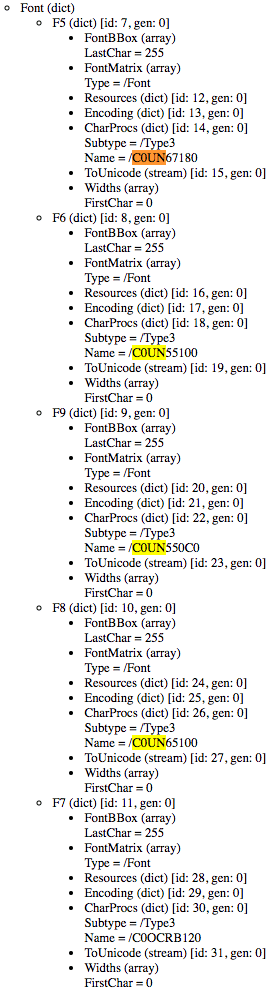
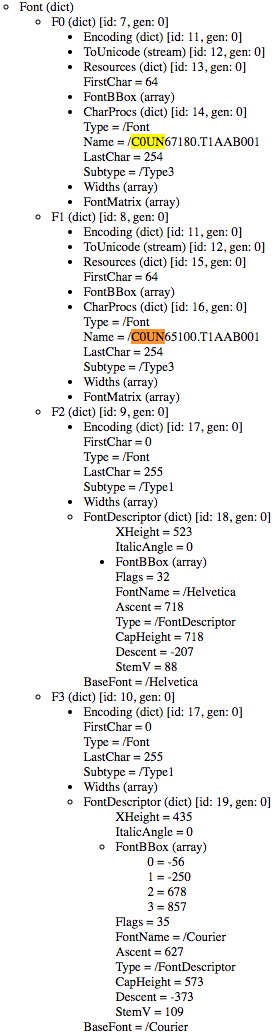
In this case, for generating PDF files with the same content, ABN AMRO added five Type 3 fonts of which one font was not used at all, and two others used to be Type 1 fonts.

Type 1 fonts (wikipedia)

Type 1 (also known as PostScriptPostScript Type 1PS1T1or Adobe Type 1) is the font format for single-byte digital fonts for use with Adobe Type Manager software and with PostScript printers. It can support font hinting.

It was originally a proprietary specification, but Adobe released the specification to third-party font manufacturers provided that all Type 1 fonts adhere to it.

Type 1 fonts are natively supported in Mac OS X, and in Windows 2000 and later via the GDI API.[2] (They are not supported in the Windows GDI+, WPF or DirectWrite APIs.)

Type 3 fonts (wikipedia)

Type 3 font (also known as PostScript Type 3 or PS3T3 or Adobe Type 3) consists of glyphs defined using the full PostScript language, rather than just a subset. Because of this, a Type 3 font can do some things that Type 1 fonts cannot do, such as specify shading, color, and fill patterns. However, it does not support hinting. Adobe Type Manager did not support Type 3 fonts, and they are not supported as native WYSIWYG fonts on any version of Mac OS or Windows.

So far for optimised PDF rendering…

Being in software development for this long, I am constantly reminded that The inmates are running the asylum – Wikipedia. I can definitely recommend reading “The Inmates Are Running the Asylum: Why High Tech Products Drive Us Crazy and How to Restore the Sanity”, by Alan Cooper:

–jeroen

Posted in Development, EPS/PostScript, PDF, Power User, Software Development | Leave a Comment »

Multi-parameter FreeAndNil plus InitialiseNil methods – interesting code ceremony reduction by David Heffernan

Posted by jpluimers on 2020/03/05

I’m probably getting a truckload of anti-FreeAndNil folks over me, but there are cases this comes in useful, so having an overloaded version cutting down code ceremony makes sense: [WayBack] interface – Avoiding nested try…finally blocks in Delphi – Stack Overflow

Which means I need to update my type safe FreeAndNil one day.

This should be relatively straightforward, given that David published a python generator for his Delphi code [WayBack].

–jeroen

Via: [WayBack] Interesting approach by David Heffernan (*1) to the nested try..finally blocks because of multiple object creations: Overloaded InitializeNil and FreeA… – Thomas Mueller (dummzeuch) – Google+

Read the rest of this entry »

Posted in Delphi, Development, Software Development | Leave a Comment »