


According to [WayBack] Hightlight active row/column in Excel without using VBA? – Stack Overflow: no, but you do not need much code.
On my list of things to try is to combine both answers there into one.
–jeroen
Posted by jpluimers on 2020/04/02
According to [WayBack] Hightlight active row/column in Excel without using VBA? – Stack Overflow: no, but you do not need much code.
On my list of things to try is to combine both answers there into one.
–jeroen

Posted in Development, Excel, Office, Power User, Software Development | Leave a Comment »
Posted by jpluimers on 2020/04/02
The article is dense but goes way deeper than straightforward sys.argv[1:] handling: [WayBack] 10.6. Handling command-line arguments.
–jeroen
Posted in Development, Python, Scripting, Software Development | Leave a Comment »
Posted by jpluimers on 2020/04/02
The IDE already owns and modifies your .dproj and .dpr files (of which many users complain, but I think it is a good thing), so this is a great suggestion: [WayBack] Possibly slightly obvious but nonetheless a minor little tip to bear in mind when moving a project (.dproj/.dpr) by saving it to a new location (which I… – Walter Prins – Google+
Possibly slightly obvious but nonetheless a minor little tip to bear in mind when moving a project (.dproj/.dpr) by saving it to a new location (which I encountered this morning):
While the IDE will automatically adjust form/pas file paths for files included in the project in the .dpr for you, what it will not however do is also adjust the project “Search path” in a similar fashion, even though moving the project is guaranteed to break the project if it has project relative search paths and hence they would require adjusting.
That is to say, if you have project relative search folders specified in the “Search path” (and indeed the output folders), you will need to manually go and edit these paths in the project by hand when you change the project’s location.
(I’d argue that the IDE ought to update relative paths in the project options automatically given that it does so already for the .dpr; it would be the intuitive and graceful thing to do.)
–jeroen
Posted in Delphi, Development, Software Development | Leave a Comment »
Posted by jpluimers on 2020/04/01
[WayBack] Ladies and gentlemen, Tim Berners-Lee and Vint Cerf. – Steven Vaughan-Nichols – Google+

Related:
–jeroen

Posted in Fun, History | Leave a Comment »
Posted by jpluimers on 2020/04/01
It is important to look beyond your own comfort zone to see what other languages can support: [WayBack] Forde’s Tenth Rule, or, “How I Learned to Stop Worrying and ❤ the State Machine”.
The article is about implementing finite state machines in JavaScript with as little usage of string literals as possible.
Via: [WayBack] How I Learned to Stop Worrying and Love the State Machine – Adrian Marius Popa – Google+
–jeroen
Posted in Development, JavaScript/ECMAScript, Scripting, Software Development | Leave a Comment »
Posted by jpluimers on 2020/04/01
Great thread with many nice WiFi passwords, network names and device names: [WayBack] Ian Sausage on Twitter: “Me: What’s the wifi password? Barman: You need to buy a drink first. Me: Okay, I’ll have a coke…”.
Other nice network names or passwords from the same thread:
–jeroen
Posted in Fun, LifeHacker, Power User, Quotes | Leave a Comment »
Posted by jpluimers on 2020/03/31
Since the Git output by default is not shown, here is how to enable it:
[WayBack] Version Control in Visual Studio Code: Git output window
You can always peek under the hood to see the Git commands we are using. This is helpful if something strange is happening or if you are just curious. :)
To open the Git output window, run View > Output and select Git from the dropdown.
Or shorter on MacOS:
Cmd–Shift–Pshow git output–jeroen
Posted in .NET, Development, DVCS - Distributed Version Control, git, Software Development, Source Code Management, Visual Studio and tools, vscode Visual Studio Code | Leave a Comment »
Posted by jpluimers on 2020/03/31
Veel doelgroepen hebben meer begrijpelijke taal nodig.
Deze sites helpen je verder:
–jeroen
Posted in About, Personal | Leave a Comment »
Posted by jpluimers on 2020/03/31
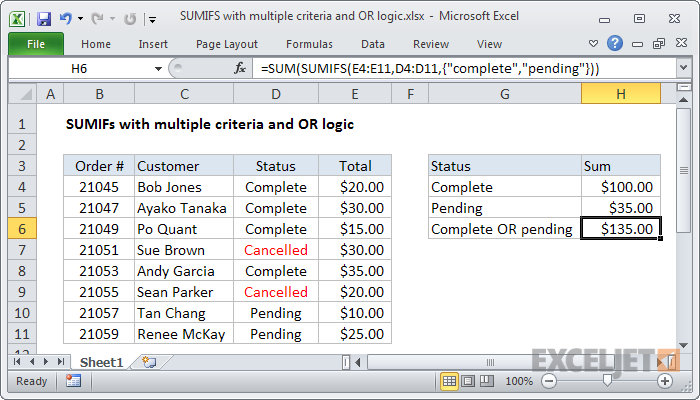
As I need this one day:
To sum based on multiple criteria using OR logic, you can use the SUMIFS function with an array constant. In the example shown, the formula in H6 is:
Source: [WayBack] Excel formula: SUMIFS with multiple criteria and OR logic | Exceljet
–jeroen

Posted in Development, Excel, Office, Office 2011 for Mac, Office 2013, Office 2016, Power User, Software Development | Leave a Comment »
Posted by jpluimers on 2020/03/31
Cool example, which requires dnspython and might need an update of the DNS record type list (maybe dnspython has that list built in?):
[WayBack] Printing all DNS records using DNSPython in Python 3 · GitHub
–jeroen
Posted in Development, Python, Scripting, Software Development | Leave a Comment »

 The Wiert Corner - irregular stream of stuff